pub struct Surface { /* private fields */ }Expand description
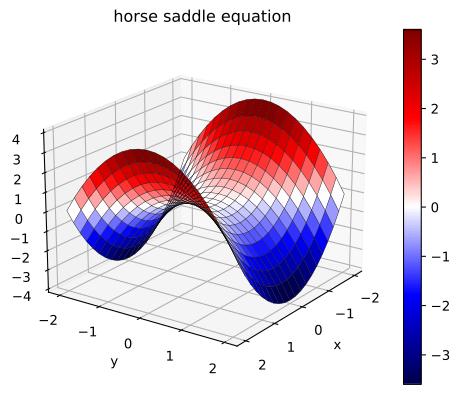
Generates a 3D a surface (or wireframe, or both)
Example
use plotpy::{Plot, StrError, Surface};
use russell_lab::generate3d;

fn main() -> Result<(), StrError> {
    // generate (x,y,z) matrices
    let n = 21;
    let (x, y, z) = generate3d(-2.0, 2.0, -2.0, 2.0, n, n, |x, y| x * x - y * y);

    // configure and draw surface + wireframe
    let mut surface = Surface::new();
    surface.set_colormap_name("seismic")
        .set_with_colorbar(true)
        .set_with_wireframe(true)
        .set_line_width(0.3);

    // draw surface + wireframe
    surface.draw(&x, &y, &z);

    // add surface to plot
    let mut plot = Plot::new();
    plot.add(&surface)
        .set_title("horse saddle equation") // must be after add surface
        .set_camera(20.0, 35.0); // must be after add surface

    // save figure
    plot.save("/tmp/plotpy/doc_tests/doc_surface.svg")?;
    Ok(())
}
See also integration tests in the tests directory
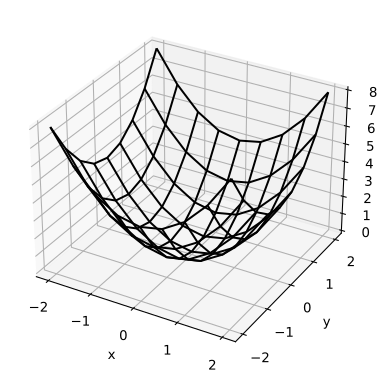
Output from some integration tests:
Implementations
sourceimpl Surface
impl Surface
sourcepub fn draw<'a, T, U>(&mut self, x: &'a T, y: &'a T, z: &'a T) where
T: AsMatrix<'a, U>,
U: 'a + Display,
pub fn draw<'a, T, U>(&mut self, x: &'a T, y: &'a T, z: &'a T) where
T: AsMatrix<'a, U>,
U: 'a + Display,
sourcepub fn set_row_stride(&mut self, value: usize) -> &mut Self
pub fn set_row_stride(&mut self, value: usize) -> &mut Self
Sets the row stride
sourcepub fn set_col_stride(&mut self, value: usize) -> &mut Self
pub fn set_col_stride(&mut self, value: usize) -> &mut Self
Sets the column stride
sourcepub fn set_with_surface(&mut self, flag: bool) -> &mut Self
pub fn set_with_surface(&mut self, flag: bool) -> &mut Self
Sets option to generate surface
sourcepub fn set_with_wireframe(&mut self, flag: bool) -> &mut Self
pub fn set_with_wireframe(&mut self, flag: bool) -> &mut Self
Sets option to generate wireframe
sourcepub fn set_colormap_index(&mut self, index: usize) -> &mut Self
pub fn set_colormap_index(&mut self, index: usize) -> &mut Self
Sets the colormap index
Options:
- 0 – bwr
- 1 – RdBu
- 2 – hsv
- 3 – jet
- 4 – terrain
- 5 – pink
- 6 – Greys
>6 – starts over from 0
sourcepub fn set_colormap_name(&mut self, name: &str) -> &mut Self
pub fn set_colormap_name(&mut self, name: &str) -> &mut Self
Sets the colormap name
Options:
bwrRdBuhsvjetterrainpinkGreys- see more here https://matplotlib.org/stable/tutorials/colors/colormaps.html
sourcepub fn set_with_colormap(&mut self, flag: bool) -> &mut Self
pub fn set_with_colormap(&mut self, flag: bool) -> &mut Self
Sets option to use a colormap
sourcepub fn set_with_colorbar(&mut self, flag: bool) -> &mut Self
pub fn set_with_colorbar(&mut self, flag: bool) -> &mut Self
Sets option to draw a colorbar
sourcepub fn set_colorbar_label(&mut self, label: &str) -> &mut Self
pub fn set_colorbar_label(&mut self, label: &str) -> &mut Self
Sets the colorbar label
sourcepub fn set_number_format_cb(&mut self, format: &str) -> &mut Self
pub fn set_number_format_cb(&mut self, format: &str) -> &mut Self
Sets the number format for the labels in the colorbar (cb)
sourcepub fn set_solid_color(&mut self, color: &str) -> &mut Self
pub fn set_solid_color(&mut self, color: &str) -> &mut Self
Sets a solid color for the surface (disables colormap)
sourcepub fn set_line_color(&mut self, color: &str) -> &mut Self
pub fn set_line_color(&mut self, color: &str) -> &mut Self
Sets the color of wireframe lines
sourcepub fn set_line_style(&mut self, style: &str) -> &mut Self
pub fn set_line_style(&mut self, style: &str) -> &mut Self
Sets the style of wireframe line
Options:
- “
-”, “:”, “--”, “-.”
sourcepub fn set_line_width(&mut self, width: f64) -> &mut Self
pub fn set_line_width(&mut self, width: f64) -> &mut Self
Sets the width of wireframe line
sourceimpl Surface
impl Surface
sourcepub fn draw_cylinder(
&mut self,
a: &[f64],
b: &[f64],
radius: f64,
ndiv_axis: usize,
ndiv_perimeter: usize
) -> Result<(), StrError>
pub fn draw_cylinder(
&mut self,
a: &[f64],
b: &[f64],
radius: f64,
ndiv_axis: usize,
ndiv_perimeter: usize
) -> Result<(), StrError>
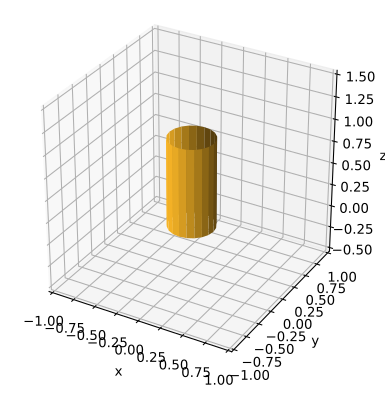
Draws a cylinder
Input
a– first point on the cylinder (centered) axisb– second point on the cylinder (centered) axisradius– the cylinder’s radiusndiv_axis– number of divisions along the axis (≥ 1)ndiv_perimeter– number of divisions along the cross-sectional circle perimeter (≥ 3)
Example
use plotpy::{Plot, StrError, Surface};
use std::path::Path;

fn main() -> Result<(), StrError> {
    // configure and draw surface
    let mut surface = Surface::new();
    let a = &[0.0, 0.0, 0.0];
    let b = &[0.0, 0.0, 1.0];
    surface.set_solid_color("#fcb827")
           .draw_cylinder(a, b, 0.25, 1, 20)?;

    // add surface to plot
    let mut plot = Plot::new();
    plot.add(&surface);

    // save figure
    plot.set_range_3d(-1.0, 1.0, -1.0, 1.0, 0.0, 1.0)
        .set_equal_axes(true)
        .save("/tmp/plotpy/doc_tests/doc_cylinder.svg")?;
    Ok(())
}
See also integration tests in the tests directory
sourcepub fn draw_plane_nzz(
&mut self,
p: &[f64],
n: &[f64],
xmin: f64,
xmax: f64,
ymin: f64,
ymax: f64,
nx: usize,
ny: usize
) -> Result<(Matrix, Matrix, Matrix), StrError>
pub fn draw_plane_nzz(
&mut self,
p: &[f64],
n: &[f64],
xmin: f64,
xmax: f64,
ymin: f64,
ymax: f64,
nx: usize,
ny: usize
) -> Result<(Matrix, Matrix, Matrix), StrError>
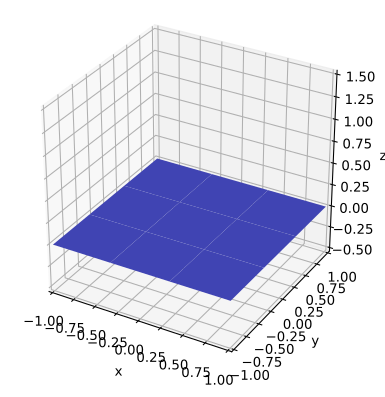
Draws a plane that has a normal vector with a non-zero z (nzz) component
The plane may be perpendicular to z if n = (0,0,1)
Input
p– (len=3) point on planen– (len=3) normal vectorxminandxmax– limits along xyminandymax– limits along ynx– number of divisions along x (must be ≥ 2)ny– number of divisions along y (must be ≥ 2)
Output
x,y,z– the coordinates of all points as in a meshgrid
Example
use plotpy::{Plot, StrError, Surface};
use std::path::Path;

fn main() -> Result<(), StrError> {
    // configure and draw surface
    let mut surface = Surface::new();
    let p = &[0.0, 0.0, 0.0];
    let n = &[0.0, 0.0, 1.0];
    surface.set_solid_color("#5359e9")
           .draw_plane_nzz(p, n, -1.0, 1.0, -1.0, 1.0, 3, 3)?;

    // add surface to plot
    let mut plot = Plot::new();
    plot.add(&surface);

    // save figure
    plot.set_range_3d(-1.0, 1.0, -1.0, 1.0, 0.0, 1.0)
        .set_equal_axes(true)
        .save("/tmp/plotpy/doc_tests/doc_plane_nzz.svg")?;
    Ok(())
}
See also integration test in the tests directory.
sourcepub fn draw_hemisphere(
&mut self,
c: &[f64],
r: f64,
alpha_min: f64,
alpha_max: f64,
n_alpha: usize,
n_theta: usize,
cup: bool
) -> Result<(Matrix, Matrix, Matrix), StrError>
pub fn draw_hemisphere(
&mut self,
c: &[f64],
r: f64,
alpha_min: f64,
alpha_max: f64,
n_alpha: usize,
n_theta: usize,
cup: bool
) -> Result<(Matrix, Matrix, Matrix), StrError>
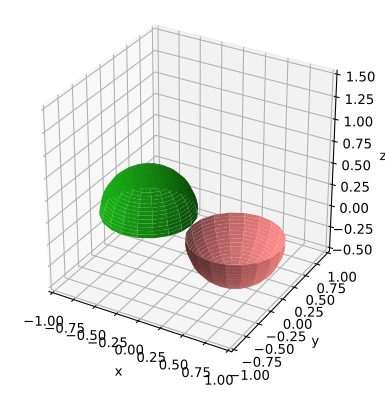
Draws a hemisphere
Input
c– (len=3) center coordinatesr– radiusalpha_min– min α angle in [-180, 180) degreesalpha_max– max α angle in (-180, 180] degreesn_alpha– number of divisions along α (must be ≥ 2)n_theta– number of divisions along θ (must be ≥ 2)cup– upside-down; like a cup
Output
x,y,z– the coordinates of all points as in a meshgrid
Example
use plotpy::{Plot, StrError, Surface};
use std::path::Path;

fn main() -> Result<(), StrError> {
    // draw hat
    let mut hat = Surface::new();
    let c = &[-0.5, 0.0, 0.0];
    hat.set_solid_color("#17af14")
       .draw_hemisphere(c, 0.5, -180.0, 180.0, 20, 20, false)?;

    // draw cup
    let mut cup = Surface::new();
    let c = &[0.5, 0.0, 0.0];
    cup.set_solid_color("#ff8787")
       .draw_hemisphere(c, 0.5, -180.0, 180.0, 20, 20, true)?;

    // add surfaces to plot
    let mut plot = Plot::new();
    plot.add(&hat).add(&cup);

    // save figure
    plot.set_range_3d(-1.0, 1.0, -1.0, 1.0, 0.0, 1.0)
        .set_equal_axes(true)
        .save("/tmp/plotpy/doc_tests/doc_hemisphere.svg")?;
    Ok(())
}
See also integration test in the tests directory.
sourcepub fn draw_superquadric(
&mut self,
c: &[f64],
r: &[f64],
k: &[f64],
alpha_min: f64,
alpha_max: f64,
theta_min: f64,
theta_max: f64,
n_alpha: usize,
n_theta: usize
) -> Result<(Matrix, Matrix, Matrix), StrError>
pub fn draw_superquadric(
&mut self,
c: &[f64],
r: &[f64],
k: &[f64],
alpha_min: f64,
alpha_max: f64,
theta_min: f64,
theta_max: f64,
n_alpha: usize,
n_theta: usize
) -> Result<(Matrix, Matrix, Matrix), StrError>
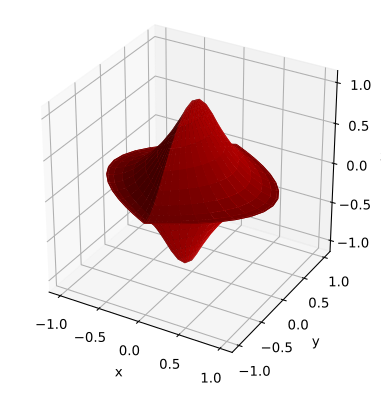
Draws a superquadric (includes sphere, super-ellipsoid, and super-hyperboloid)
Input
c– (len=3) center coordinatesr– (len=3) radiik– (len=3) exponents (must all be ≥ 0)alpha_min– min α angle in [-180, 180) degreesalpha_max– max α angle in (-180, 180] degreestheta_min– min θ angle in [-90, 90) degreestheta_max– max θ angle in (-90, 90] degreesn_alpha– number of divisions along α (must be ≥ 2)n_theta– number of divisions along θ (must be ≥ 2)
Output
x,y,z– the coordinates of all points as in a meshgrid
Reference: https://en.wikipedia.org/wiki/Superquadrics
Example
use plotpy::{Plot, StrError, Surface};
use std::path::Path;

fn main() -> Result<(), StrError> {
    // configure and draw surface
    let c = &[0.0, 0.0, 0.0];
    let r = &[1.0, 1.0, 1.0];
    let k = &[1.0, 2.0, 0.5];
    let mut surface = Surface::new();
    surface.set_solid_color("#cd0000")
        .draw_superquadric(c, r, k, -180.0, 180.0, -90.0, 90.0, 40, 20)?;

    // add surface to plot
    let mut plot = Plot::new();
    plot.add(&surface);

    // save figure
    plot.set_equal_axes(true)
        .save("/tmp/plotpy/doc_tests/doc_superquadric.svg")?;
    Ok(())
}
See also integration test in the tests directory.
sourcepub fn draw_sphere(
&mut self,
c: &[f64],
r: f64,
n_alpha: usize,
n_theta: usize
) -> Result<(Matrix, Matrix, Matrix), StrError>
pub fn draw_sphere(
&mut self,
c: &[f64],
r: f64,
n_alpha: usize,
n_theta: usize
) -> Result<(Matrix, Matrix, Matrix), StrError>
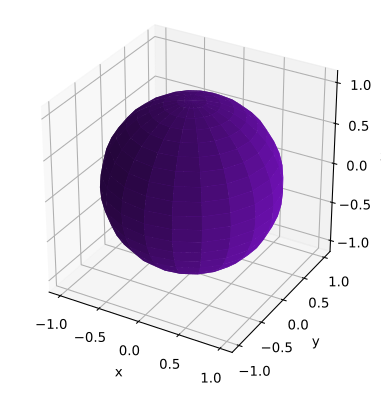
Draws a sphere
Input
c– (len=3) center coordinatesr– radiusn_alpha– number of divisions along α (must be ≥ 2)n_theta– number of divisions along θ (must be ≥ 2)
Output:
x,y,z– the coordinates of all points as in a meshgrid
Example
use plotpy::{Plot, StrError, Surface};
use std::path::Path;

fn main() -> Result<(), StrError> {
    // configure and draw surface
    let mut surface = Surface::new();
    let c = &[0.0, 0.0, 0.0];
    surface.set_solid_color("#7812c3")
           .draw_sphere(c, 1.0, 20, 20)?;

    // add surface to plot
    let mut plot = Plot::new();
    plot.add(&surface);

    // save figure
    plot.set_equal_axes(true)
        .save("/tmp/plotpy/doc_tests/doc_sphere.svg")?;
    Ok(())
}
See also integration test in the tests directory.
Trait Implementations
sourceimpl GraphMaker for Surface
impl GraphMaker for Surface
fn get_buffer<'a>(&'a self) -> &'a String
Auto Trait Implementations
impl RefUnwindSafe for Surface
impl Send for Surface
impl Sync for Surface
impl Unpin for Surface
impl UnwindSafe for Surface
Blanket Implementations
sourceimpl<T> BorrowMut<T> for T where
T: ?Sized,
impl<T> BorrowMut<T> for T where
T: ?Sized,
const: unstable · sourcefn borrow_mut(&mut self) -> &mut T
fn borrow_mut(&mut self) -> &mut T
Mutably borrows from an owned value. Read more