pub struct Plot { /* private fields */ }Expand description
Driver structure that calls Python
Example
use plotpy::{Curve, Plot, StrError};
use russell_lab::Vector;

fn main() -> Result<(), StrError> {
    // generate (x,y) points
    let n = 11;
    let x = Vector::linspace(-1.0, 1.0, n)?;
    let y1 = x.clone();
    let y2 = x.get_mapped(|v| f64::abs(v));
    let y3 = x.get_mapped(|v| f64::exp(1.0 + v) - 1.0);
    let y4 = x.get_mapped(|v| f64::sqrt(1.0 + v));

    // configure and draw curves
    let mut curve1 = Curve::new();
    let mut curve2 = Curve::new();
    let mut curve3 = Curve::new();
    let mut curve4 = Curve::new();
    curve1.set_label("y = x");
    curve2.set_label("y = |x|").set_line_color("#cd0000");
    curve3.set_label("y = exp(1+x)-1").set_line_color("#e79955");
    curve4.set_label("y = sqrt(1+x)").set_line_color("#b566ab");
    curve1.draw(&x, &y1);
    curve2.draw(&x, &y2);
    curve3.draw(&x, &y3);
    curve4.draw(&x, &y4);

    // configure plot
    let mut plot = Plot::new();
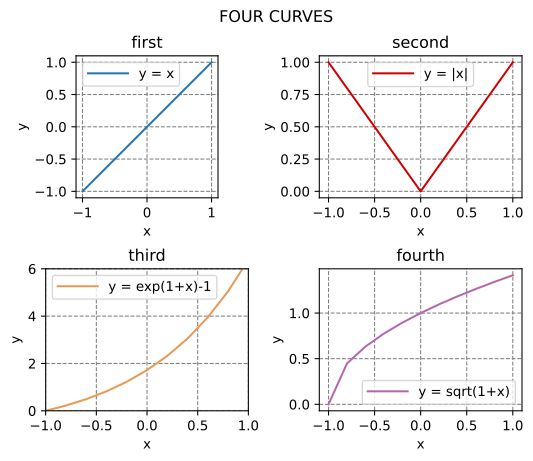
    plot.set_super_title("FOUR CURVES").set_gaps(0.35, 0.5);

    // add curve to subplot
    plot.set_subplot(2, 2, 1)
        .set_title("first")
        .add(&curve1)
        .grid_labels_legend("x", "y")
        .set_equal_axes(true);

    // add curve to subplot
    plot.set_subplot(2, 2, 2)
        .set_title("second")
        .add(&curve2)
        .grid_labels_legend("x", "y");

    // add curve to subplot
    plot.set_subplot(2, 2, 3)
        .set_title("third")
        .add(&curve3)
        .set_range(-1.0, 1.0, 0.0, 6.0)
        .grid_labels_legend("x", "y");

    // add curve to subplot
    plot.set_subplot(2, 2, 4)
        .set_title("fourth")
        .add(&curve4)
        .grid_labels_legend("x", "y");

    // save figure
    plot.save("/tmp/plotpy/doc_tests/doc_plot.svg")?;
    Ok(())
}
See also integration tests in the tests directory
Implementations
sourceimpl Plot
impl Plot
sourcepub fn add(&mut self, graph: &dyn GraphMaker) -> &mut Self
pub fn add(&mut self, graph: &dyn GraphMaker) -> &mut Self
Adds new graph entity
sourcepub fn save<S>(&self, figure_path: &S) -> Result<(), StrError> where
S: AsRef<OsStr> + ?Sized,
pub fn save<S>(&self, figure_path: &S) -> Result<(), StrError> where
S: AsRef<OsStr> + ?Sized,
sourcepub fn save_and_show<S>(&self, figure_path: &S) -> Result<(), StrError> where
S: AsRef<OsStr> + ?Sized,
pub fn save_and_show<S>(&self, figure_path: &S) -> Result<(), StrError> where
S: AsRef<OsStr> + ?Sized,
sourcepub fn clear_current_figure(&mut self) -> &mut Self
pub fn clear_current_figure(&mut self) -> &mut Self
Clears current figure
sourcepub fn grid_and_labels(&mut self, xlabel: &str, ylabel: &str) -> &mut Self
pub fn grid_and_labels(&mut self, xlabel: &str, ylabel: &str) -> &mut Self
Adds grid and labels
sourcepub fn grid_labels_legend(&mut self, xlabel: &str, ylabel: &str) -> &mut Self
pub fn grid_labels_legend(&mut self, xlabel: &str, ylabel: &str) -> &mut Self
Adds grid, labels, and legend
sourcepub fn set_show_errors(&mut self, option: bool) -> &mut Self
pub fn set_show_errors(&mut self, option: bool) -> &mut Self
Sets flag to print python errors (if any) when calling save
sourcepub fn set_subplot(&mut self, row: usize, col: usize, index: usize) -> &mut Self
pub fn set_subplot(&mut self, row: usize, col: usize, index: usize) -> &mut Self
Configures subplots
Arguments
row- number of rows in the subplot gridcol- number of columns in the subplot gridindex- activate current subplot; indices start at one (1-based)
sourcepub fn set_super_title(&mut self, title: &str) -> &mut Self
pub fn set_super_title(&mut self, title: &str) -> &mut Self
Adds a title to all sub-plots
sourcepub fn set_horizontal_gap(&mut self, value: f64) -> &mut Self
pub fn set_horizontal_gap(&mut self, value: f64) -> &mut Self
Sets the horizontal gap between subplots
sourcepub fn set_vertical_gap(&mut self, value: f64) -> &mut Self
pub fn set_vertical_gap(&mut self, value: f64) -> &mut Self
Sets the vertical gap between subplots
sourcepub fn set_gaps(&mut self, horizontal: f64, vertical: f64) -> &mut Self
pub fn set_gaps(&mut self, horizontal: f64, vertical: f64) -> &mut Self
Sets the horizontal and vertical gap between subplots
sourcepub fn set_equal_axes(&mut self, equal: bool) -> &mut Self
pub fn set_equal_axes(&mut self, equal: bool) -> &mut Self
Sets same scale for both axes
sourcepub fn set_figure_size_inches(&mut self, width: f64, height: f64) -> &mut Self
pub fn set_figure_size_inches(&mut self, width: f64, height: f64) -> &mut Self
Sets the figure size in inches
sourcepub fn set_figure_size_points(&mut self, width: f64, height: f64) -> &mut Self
pub fn set_figure_size_points(&mut self, width: f64, height: f64) -> &mut Self
Sets the figure size in points
sourcepub fn set_hide_axes(&mut self, hide: bool) -> &mut Self
pub fn set_hide_axes(&mut self, hide: bool) -> &mut Self
Set option to hide axes
sourcepub fn set_range_3d(
&mut self,
xmin: f64,
xmax: f64,
ymin: f64,
ymax: f64,
zmin: f64,
zmax: f64
) -> &mut Self
pub fn set_range_3d(
&mut self,
xmin: f64,
xmax: f64,
ymin: f64,
ymax: f64,
zmin: f64,
zmax: f64
) -> &mut Self
Sets axes limits
sourcepub fn set_range(
&mut self,
xmin: f64,
xmax: f64,
ymin: f64,
ymax: f64
) -> &mut Self
pub fn set_range(
&mut self,
xmin: f64,
xmax: f64,
ymin: f64,
ymax: f64
) -> &mut Self
Sets axes limits
sourcepub fn set_range_from_vec(&mut self, limits: &[f64]) -> &mut Self
pub fn set_range_from_vec(&mut self, limits: &[f64]) -> &mut Self
Sets axes limits from vector
sourcepub fn set_xrange(&mut self, xmin: f64, xmax: f64) -> &mut Self
pub fn set_xrange(&mut self, xmin: f64, xmax: f64) -> &mut Self
Sets x-range (i.e. limits)
sourcepub fn set_yrange(&mut self, ymin: f64, ymax: f64) -> &mut Self
pub fn set_yrange(&mut self, ymin: f64, ymax: f64) -> &mut Self
Sets y-range (i.e. limits)
sourcepub fn set_num_ticks_x(&mut self, num: usize) -> &mut Self
pub fn set_num_ticks_x(&mut self, num: usize) -> &mut Self
Sets number of ticks along x
sourcepub fn set_num_ticks_y(&mut self, num: usize) -> &mut Self
pub fn set_num_ticks_y(&mut self, num: usize) -> &mut Self
Sets number of ticks along y
sourcepub fn set_ticks_x(
&mut self,
major_every: f64,
minor_every: f64,
major_number_format: &str
) -> &mut Self
pub fn set_ticks_x(
&mut self,
major_every: f64,
minor_every: f64,
major_number_format: &str
) -> &mut Self
Sets the number and format of x-ticks
Input
major_every– step for major ticks (ignored if ≤ 0.0)minor_every– step for major ticks (ignored if ≤ 0.0)major_number_format– C-style number format for major ticks; e.g. “%.2f” (ignored if empty “”) See matplotlib FormatStrFormatter
sourcepub fn set_ticks_y(
&mut self,
major_every: f64,
minor_every: f64,
major_number_format: &str
) -> &mut Self
pub fn set_ticks_y(
&mut self,
major_every: f64,
minor_every: f64,
major_number_format: &str
) -> &mut Self
Sets the number and format of y-ticks
Input
major_every– step for major ticks (ignored if ≤ 0.0)minor_every– step for major ticks (ignored if ≤ 0.0)major_number_format– C-style number format for major ticks; e.g. “%.2f” (ignored if empty “”) See matplotlib FormatStrFormatter
sourcepub fn set_ticks_x_multiple_of_pi(&mut self, minor_every: f64) -> &mut Self
pub fn set_ticks_x_multiple_of_pi(&mut self, minor_every: f64) -> &mut Self
Sets the x-ticks to multiples of pi
Input
minor_every– step for major ticks (ignored if ≤ 0.0). ExamplePI / 12.0
Note: This function sets the major ticks as PI / 2.0.
sourcepub fn set_ticks_y_multiple_of_pi(&mut self, minor_every: f64) -> &mut Self
pub fn set_ticks_y_multiple_of_pi(&mut self, minor_every: f64) -> &mut Self
Sets the y-ticks to multiples of pi
Input
minor_every– step for major ticks (ignored if ≤ 0.0). ExamplePI / 12.0
Note: This function sets the major ticks as PI / 2.0.
sourcepub fn set_label_x(&mut self, label: &str) -> &mut Self
pub fn set_label_x(&mut self, label: &str) -> &mut Self
Sets the label for the x-axis
sourcepub fn set_label_y(&mut self, label: &str) -> &mut Self
pub fn set_label_y(&mut self, label: &str) -> &mut Self
Sets the label for the y-axis
sourcepub fn set_labels(&mut self, xlabel: &str, ylabel: &str) -> &mut Self
pub fn set_labels(&mut self, xlabel: &str, ylabel: &str) -> &mut Self
Sets the labels of x and y axis
sourcepub fn set_camera(&mut self, elev: f64, azimuth: f64) -> &mut Self
pub fn set_camera(&mut self, elev: f64, azimuth: f64) -> &mut Self
Sets camera in 3d graph. Sets the elevation and azimuth of the axes.
Input
elev– is the elevation angle in the z planeazimuth– is the azimuth angle in the x,y plane
sourcepub fn set_frame_border(
&mut self,
left: bool,
right: bool,
bottom: bool,
top: bool
) -> &mut Self
pub fn set_frame_border(
&mut self,
left: bool,
right: bool,
bottom: bool,
top: bool
) -> &mut Self
Sets option to hide (or show) frame borders
sourcepub fn set_frame_borders(&mut self, show_all: bool) -> &mut Self
pub fn set_frame_borders(&mut self, show_all: bool) -> &mut Self
Sets visibility of all frame borders
Auto Trait Implementations
impl RefUnwindSafe for Plot
impl Send for Plot
impl Sync for Plot
impl Unpin for Plot
impl UnwindSafe for Plot
Blanket Implementations
sourceimpl<T> BorrowMut<T> for T where
T: ?Sized,
impl<T> BorrowMut<T> for T where
T: ?Sized,
const: unstable · sourcefn borrow_mut(&mut self) -> &mut T
fn borrow_mut(&mut self) -> &mut T
Mutably borrows from an owned value. Read more