pub struct Curve { /* private fields */ }Expand description
Generates a curve (aka line-plot) given two arrays (x,y)
Notes
- This struct corresponds to the plot function of Matplotlib.
- You may plot a Scatter plot by setting line_style = “None”
Examples
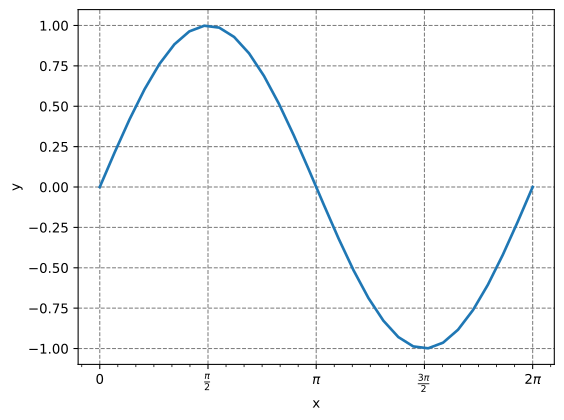
Using methods to set the points
use plotpy::{Curve, Plot, StrError};
use std::f64::consts::PI;

fn main() -> Result<(), StrError> {
    // configure curve
    let mut curve = Curve::new();
    curve.set_line_width(2.0);

    // add points
    const N: usize = 30;
    curve.points_begin();
    for i in 0..N {
        let x = (i as f64) * 2.0 * PI / ((N - 1) as f64);
        let y = f64::sin(x);
        curve.points_add(x, y);
    }
    curve.points_end();

    // add curve to plot
    let mut plot = Plot::new();
    plot.add(&curve).grid_and_labels("x", "y");

    // configure multiple-of-pi formatter
    let minor_every = PI / 12.0;
    plot.set_ticks_x_multiple_of_pi(minor_every);

    // save figure
    plot.save("/tmp/plotpy/doc_tests/doc_curve_methods.svg")?;
    Ok(())
}
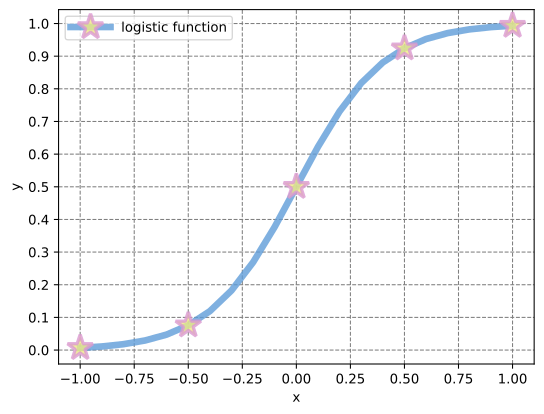
Using Vector with point data
use plotpy::{Curve, Plot, StrError};
use russell_lab::Vector;

fn main() -> Result<(), StrError> {
    // generate (x,y) points
    let x = Vector::linspace(-1.0, 1.0, 21)?;
    let y = x.get_mapped(|v| 1.0 / (1.0 + f64::exp(-5.0 * v)));

    // configure curve
    let mut curve = Curve::new();
    curve
        .set_label("logistic function")
        .set_line_alpha(0.8)
        .set_line_color("#5f9cd8")
        .set_line_style("-")
        .set_line_width(5.0)
        .set_marker_color("#eeea83")
        .set_marker_every(5)
        .set_marker_line_color("#da98d1")
        .set_marker_line_width(2.5)
        .set_marker_size(20.0)
        .set_marker_style("*");

    // draw curve
    curve.draw(&x, &y);

    // add curve to plot
    let mut plot = Plot::new();
    plot.add(&curve).set_num_ticks_y(11).grid_labels_legend("x", "y");

    // save figure
    plot.save("/tmp/plotpy/doc_tests/doc_curve.svg")?;
    Ok(())
}
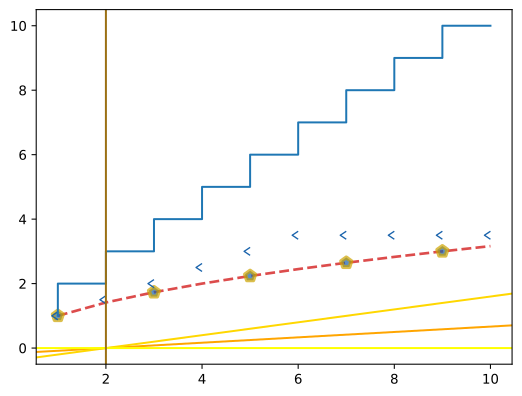
See also integration tests in the tests directory
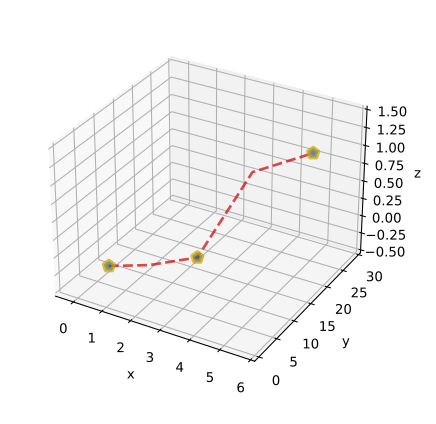
Output from some integration tests:
Implementations
sourceimpl Curve
impl Curve
sourcepub fn points_begin(&mut self) -> &mut Self
pub fn points_begin(&mut self) -> &mut Self
Begins adding points to the curve (2D only)
Warning
This function must be followed by Curve::points_add and Curve::points_end, otherwise Python/Matplotlib will fail.
sourcepub fn points_add<T>(&mut self, x: T, y: T) -> &mut Self where
T: Display,
pub fn points_add<T>(&mut self, x: T, y: T) -> &mut Self where
T: Display,
Adds point to the curve (2D only)
Warning
This function must be called after Curve::points_begin and must be followed by Curve::points_end, otherwise Python/Matplotlib will fail.
sourcepub fn points_end(&mut self) -> &mut Self
pub fn points_end(&mut self) -> &mut Self
Ends adding points to the curve (2D only)
Warning
This function must be called after Curve::points_begin and Curve::points_add, otherwise Python/Matplotlib will fail.
sourcepub fn points_3d_begin(&mut self) -> &mut Self
pub fn points_3d_begin(&mut self) -> &mut Self
Begins adding 3D points to the curve
Warning
This function must be followed by Curve::points_3d_add and Curve::points_3d_end, otherwise Python/Matplotlib will fail
sourcepub fn points_3d_add<T>(&mut self, x: T, y: T, z: T) -> &mut Self where
T: Display,
pub fn points_3d_add<T>(&mut self, x: T, y: T, z: T) -> &mut Self where
T: Display,
Adds 3D point to the curve
Warning
This function must be called after Curve::points_3d_begin and must be followed by Curve::points_3d_end, otherwise Python/Matplotlib will fail.
sourcepub fn points_3d_end(&mut self) -> &mut Self
pub fn points_3d_end(&mut self) -> &mut Self
Ends adding 3D points to the curve
Warning
This function must be called after Curve::points_3d_begin and Curve::points_3d_add, otherwise Python/Matplotlib will fail.
sourcepub fn draw<'a, T, U>(&mut self, x: &'a T, y: &'a T) where
T: AsVector<'a, U>,
U: 'a + Display,
pub fn draw<'a, T, U>(&mut self, x: &'a T, y: &'a T) where
T: AsVector<'a, U>,
U: 'a + Display,
sourcepub fn draw_3d<'a, T, U>(&mut self, x: &'a T, y: &'a T, z: &'a T) where
T: AsVector<'a, U>,
U: 'a + Display,
pub fn draw_3d<'a, T, U>(&mut self, x: &'a T, y: &'a T, z: &'a T) where
T: AsVector<'a, U>,
U: 'a + Display,
sourcepub fn set_label(&mut self, label: &str) -> &mut Self
pub fn set_label(&mut self, label: &str) -> &mut Self
Sets the name of this curve in the legend
sourcepub fn set_line_alpha(&mut self, alpha: f64) -> &mut Self
pub fn set_line_alpha(&mut self, alpha: f64) -> &mut Self
Sets the opacity of lines (0, 1]. A<1e-14 => A=1.0
sourcepub fn set_line_color(&mut self, color: &str) -> &mut Self
pub fn set_line_color(&mut self, color: &str) -> &mut Self
Sets the color of lines
sourcepub fn draw_ray(&mut self, xa: f64, ya: f64, endpoint: RayEndpoint)
pub fn draw_ray(&mut self, xa: f64, ya: f64, endpoint: RayEndpoint)
Draws a ray (an infinite line)
- For horizontal rays, only
yais used - For vertical rays, only
xais used
sourcepub fn set_line_style(&mut self, style: &str) -> &mut Self
pub fn set_line_style(&mut self, style: &str) -> &mut Self
Sets the style of lines
Options:
- “
-”,:“, “--”, “-.”, or “None” - As defined in https://matplotlib.org/stable/gallery/lines_bars_and_markers/linestyles.html
sourcepub fn set_line_width(&mut self, width: f64) -> &mut Self
pub fn set_line_width(&mut self, width: f64) -> &mut Self
Sets the width of lines
sourcepub fn set_marker_color(&mut self, color: &str) -> &mut Self
pub fn set_marker_color(&mut self, color: &str) -> &mut Self
Sets the color of markers
sourcepub fn set_marker_every(&mut self, every: usize) -> &mut Self
pub fn set_marker_every(&mut self, every: usize) -> &mut Self
Sets the increment of data points to use when drawing markers
sourcepub fn set_marker_void(&mut self, flag: bool) -> &mut Self
pub fn set_marker_void(&mut self, flag: bool) -> &mut Self
Sets the option to draw a void marker (draw edge only)
sourcepub fn set_marker_line_color(&mut self, color: &str) -> &mut Self
pub fn set_marker_line_color(&mut self, color: &str) -> &mut Self
Sets the edge color of markers
sourcepub fn set_marker_line_width(&mut self, width: f64) -> &mut Self
pub fn set_marker_line_width(&mut self, width: f64) -> &mut Self
Sets the edge width of markers
sourcepub fn set_marker_size(&mut self, size: f64) -> &mut Self
pub fn set_marker_size(&mut self, size: f64) -> &mut Self
Sets the size of markers
sourcepub fn set_marker_style(&mut self, style: &str) -> &mut Self
pub fn set_marker_style(&mut self, style: &str) -> &mut Self
Sets the style of markers
Examples:
- “
o”, “+” - As defined in https://matplotlib.org/stable/api/markers_api.html
sourcepub fn set_stop_clip(&mut self, flag: bool) -> &mut Self
pub fn set_stop_clip(&mut self, flag: bool) -> &mut Self
Sets the flag to stop clipping features within margins
Trait Implementations
sourceimpl GraphMaker for Curve
impl GraphMaker for Curve
fn get_buffer<'a>(&'a self) -> &'a String
Auto Trait Implementations
impl RefUnwindSafe for Curve
impl Send for Curve
impl Sync for Curve
impl Unpin for Curve
impl UnwindSafe for Curve
Blanket Implementations
sourceimpl<T> BorrowMut<T> for T where
T: ?Sized,
impl<T> BorrowMut<T> for T where
T: ?Sized,
const: unstable · sourcefn borrow_mut(&mut self) -> &mut T
fn borrow_mut(&mut self) -> &mut T
Mutably borrows from an owned value. Read more