Expand description
§Bob - A Package Builder


Bob’s goal is to become a simple but powerful, complete, and user-friendly utility for building pkgsrc packages.
§Screencasts
-
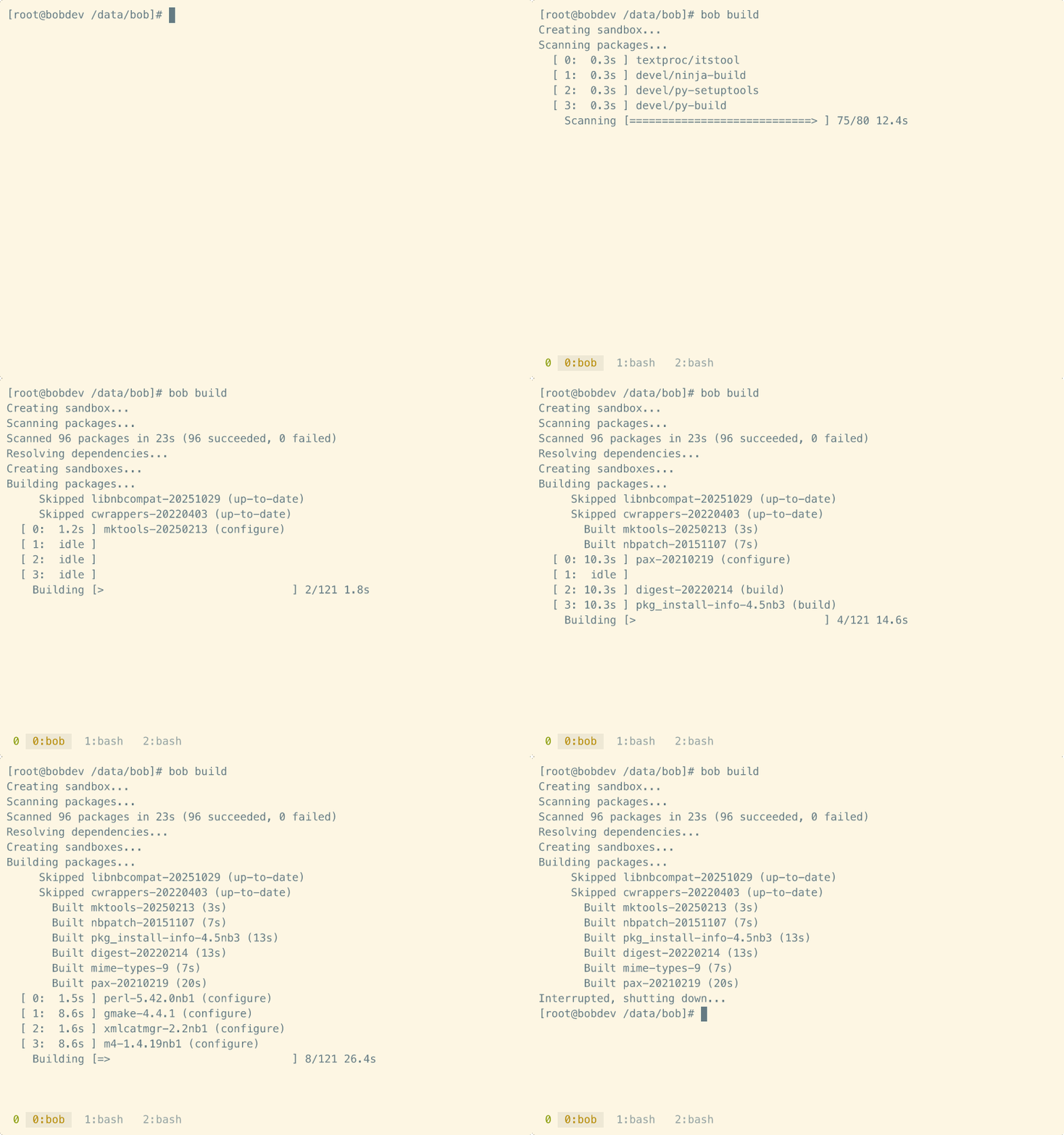
Example build session
-
Live build log viewer

§Features
- Powerful and fast, but easy to use.
- Native sandbox implementation for common operating systems.
- Threaded scan and build processes inside concurrent sandboxes.
- Ratatui-based user interface.
- Simple, flexible, powerful Lua-based configuration.
- Easily support multiple build configurations.
Bob should work pretty much out-of-the-box on NetBSD, Linux, and illumos.
Bob works on macOS, but due to Apple, there is a lot of additional sandbox work to do before things work correctly (e.g. name resolution inside chroot). This will be implemented in due course.
§Getting Started
Install bob, or upgrade an existing install to the latest release.
$ cargo install pkgbobGenerate directory containing the configuration file and build scripts. This
is also where by default all data will be generated. /bob here is used as
an example, but this can be any location. You may wish to put this directory
under version control to track changes.
You may wish to build multiple package sets (e.g. netbsd-x86_64 and
netbsd-i386) in which case you can simply create a configuration directory
for each set.
$ bob init /bobCustomise the config. The defaults are designed to work mostly out of the box, but you are likely to want to change some things, for example which packages to build, or any additional mount points required.
$ cd /bob
$ vi config.lua
On non-NetBSD systems you will also need a pkgsrc bootstrap kit. By default
bob will look for bootstrap.tar.gz inside the init directory.
When you are happy with the configuration:
$ bob buildwill proceed to build all of the packages you have requested.
During the build phase you can press ‘v’ to toggle between the default inline progress bars and a full-screen paned layout that shows live build logs to track progress.
Bob should handle interruptions gracefully, and automatically clean up sandboxes, etc. If the build is interrupted, you can resume with `bob build, and bob should continue from where it left off.
After a build has completed, and some time later you wish to update pkgsrc to build updated packages, you will first need to run:
$ bob cleanto clear the previous database state, before running a new bob build.
§Design Goals
There are two main methods currently used to update a pkgsrc installation.
Update-in-place using tools such as pkg_chk or pkg_rolling-replace.
These tools operate directly on the target host, upgrading packages in
turn. These are the simplest to set up and use, and so are reasonable
popular amongst users, but have some major drawbacks:
-
Upgrading in place means that if a build error is encountered, the system may be left in a degraded state until the issue is fixed.
-
Building directly on the system may end up finding tools and libraries on the host system that wouldn’t be found otherwise, which may mask issues that would be exposed when building in a clean environment.
-
Only one build can happen at a time, and dependency issues aren’t discovered until build time.
Bulk builds using pbulk allow packages to be built inside clean sandboxes,
and with the appropriate patches mean that builds can be performed in parallel.
These solve a number of the problems with update-in-place builds, but do have
their own drawbacks:
-
Historically pbulk has been notoriously difficult to set up and configure, and any runtime problems can be very hard to diagnose.
-
A separate pkgsrc prefix (e.g.
/usr/pbulk) is required to hold pbulk and associated tools. -
Support for concurrent builds and sandbox configuration is left to external patches and the user to configure manually, and it can be very easy to accidentally trash your system.
Bob aims to combine these methods into a best-of-both approach:
-
Automatically set up build sandboxes, hiding away all of the complexity involved trying to support multiple operating systems.
-
Perform a pbulk-style scan of the requested packages to ensure all of the dependencies are correct.
-
Build packages inside sandboxes, using a directed acyclic graph to perform builds in the correct order, and take advantage of parallel builds where possible.
-
Provide a very flexible configuration interface for local customisation.
all with a user-friendly and easy to configure interface.
Re-exports§
pub use action::Action;pub use action::ActionType;pub use action::FSType;pub use build::Build;pub use build::BuildCounts;pub use build::BuildOptions;pub use build::BuildOutcome;pub use build::BuildResult;pub use build::BuildSummary;pub use config::Config;pub use config::Options;pub use config::Pkgsrc;pub use config::PkgsrcEnv;pub use config::Sandboxes;pub use db::Database;pub use report::write_html_report;pub use sandbox::Sandbox;pub use scan::ResolvedPackage;pub use scan::Scan;pub use scan::ScanResult;pub use scan::ScanSummary;pub use scan::SkipReason;pub use scan::SkippedCounts;pub use summary::generate_pkg_summary;
Modules§
- action
- Sandbox action configuration.
- build
- Parallel package builds.
- config
- Configuration file parsing (Lua format).
- db
- SQLite database for caching scan and build results.
- logging
- report
- HTML build report generation.
- sandbox
- Sandbox creation and management.
- scan
- Package dependency scanning and resolution.
- summary
- Generate pkg_summary.gz for binary packages.
Structs§
- Init
- Interrupted
- Error indicating the operation was interrupted (e.g., by Ctrl+C).
- RunContext
- Shared context for a build or scan run.