Expand description
§hx
Futuristic take on hexdump.
hx accepts a file path or stdin as input and outputs a hexadecimal colorized view to stdout.
hx with file path as input, outputting colorized hexadecimal:
$ hx tests/files/alphanumeric.txt
0x000000: 0x61 0x62 0x63 0x64 0x65 0x66 0x67 0x68 0x69 0x6a abcdefghij
0x00000a: 0x6b 0x69 0x6c 0x6d 0x6e 0x6f 0x70 0x71 0x72 0x73 kilmnopqrs
0x000014: 0x74 0x75 0x76 0x77 0x78 0x79 0x7a 0x30 0x31 0x32 tuvwxyz012
0x00001e: 0x33 0x34 0x35 0x36 0x37 0x38 0x39 0x0a 0x30 0x31 3456789.01
0x000028: 0x32 0x33 0x34 0x35 0x36 0x37 0x38 0x39 0x30 0x31 2345678901
0x000032: 0x32 0x33 0x34 0x35 0x36 0x37 0x38 0x39 0x30 0x31 2345678901
0x00003c: 0x32 0x33 0x34 0x35 0x36 0x37 0x38 0x39           23456789
   bytes: 68
hx with stdin as input, outputting colorized hexadecimal:
cat tests/files/alphanumeric.txt | hx
0x000000: 0x61 0x62 0x63 0x64 0x65 0x66 0x67 0x68 0x69 0x6a abcdefghij
0x00000a: 0x6b 0x69 0x6c 0x6d 0x6e 0x6f 0x70 0x71 0x72 0x73 kilmnopqrs
0x000014: 0x74 0x75 0x76 0x77 0x78 0x79 0x7a 0x30 0x31 0x32 tuvwxyz012
0x00001e: 0x33 0x34 0x35 0x36 0x37 0x38 0x39 0x0a 0x30 0x31 3456789.01
0x000028: 0x32 0x33 0x34 0x35 0x36 0x37 0x38 0x39 0x30 0x31 2345678901
0x000032: 0x32 0x33 0x34 0x35 0x36 0x37 0x38 0x39 0x30 0x31 2345678901
0x00003c: 0x32 0x33 0x34 0x35 0x36 0x37 0x38 0x39           23456789
   bytes: 68


§quick links
§examples
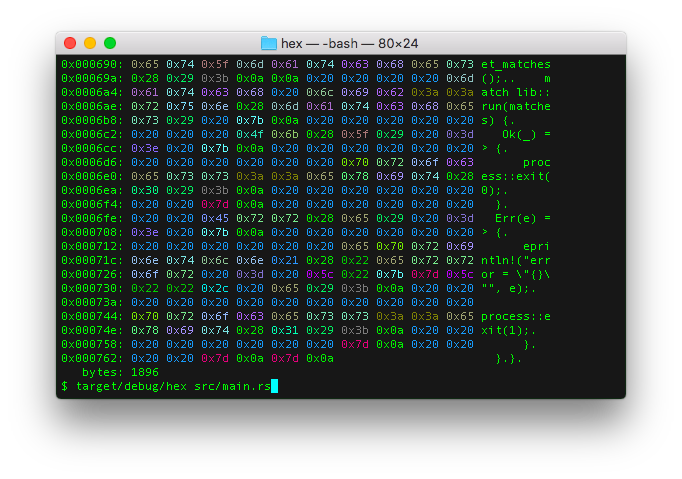
§lower hex format -fx
$ hx src/main.rs
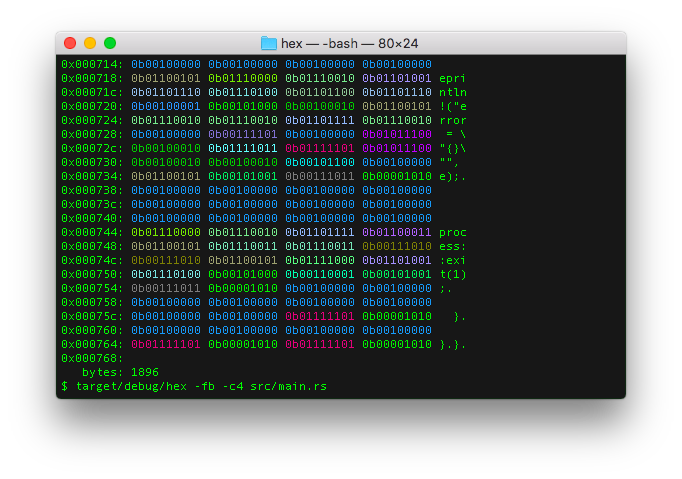
§binary hex format -fb
$ hx -fb -c4 src/main.rs
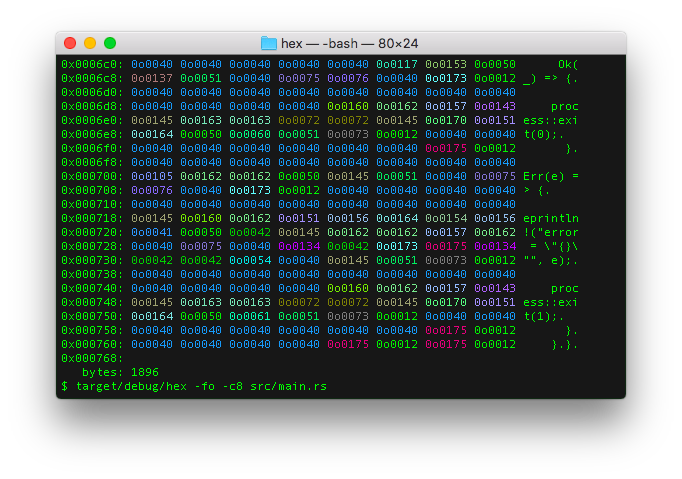
§octal hex format -fo
$ hx -fo -c8 src/main.rs
§installation
§packaging availability
hx is packaged and available for install on the following platforms:

§crates.io install
If cargo is already installed, simply:
cargo install hx§source install
From within the hx source code directory, simply execute:
make installThis will run the following cargo commands:
cargo build --release
cargo test --verbose --all -- --nocapture
cargo install --path .
Which will compile the release version, run tests and install release binary to <USERDIR>/.cargo/bin/hx.
If <USERDIR>/.cargo/bin is part of the PATH environment variable, hx should be able
executable anywhere in the shell.
§arch linux install
pacman -S hex§debian install
Browse the latest releases to choose VERSION
for use with this debian installation example:
VERSION=0.7.0 && curl -sLO "https://github.com/sitkevij/hex/releases/download/v$VERSION/hx_$VERSION-1_amd64.deb" && dpkg -i "hx_$VERSION-1_amd64.deb"§guix install
guix install hexIn an isolated environment:
guix shell --container hex§docker run
# stdin
cat README.md | docker run -ti sitkevij/hx:latest

# file input with parameters and NO_COLOR environment variable
echo "NO_COLOR=1" >docker_env_vars.ignore.txt &&
docker run -ti --env-file docker_env_vars.ignore.txt -v $(pwd)/README.md:/README.md sitkevij/hx:latest -fo -c8 /README.md§features
§output arrays in rust, c, golang, python, fsharp, kotlin, java, or swift
hx has a feature which can output the input file bytes as source code arrays.
For example:
§rust array: -ar
$ hx -ar -c8 tests/files/tiny.txt
let ARRAY: [u8; 3] = [
    0x69, 0x6c, 0x0a
];§c array: -ac
$ hx -ac -c8 tests/files/tiny.txt
unsigned char ARRAY[3] = {
    0x69, 0x6c, 0x0a
};§golang array: -ag
$ hx -ag -c8 tests/files/tiny.txt
a := [3]byte{
    0x69, 0x6c, 0x0a,
}§python array: -ap
$ hx -ap -c8 tests/files/tiny.txt
a = [
    0x69, 0x6c, 0x0a
]§kotlin array: -ak
$ hx -ak -c8 tests/files/tiny.txt
val a = byteArrayOf(
    0x69, 0x6c, 0x0a
)§java array: -aj
$ hx -aj -c8 tests/files/tiny.txt
byte[] a = new byte[]{
    0x69, 0x6c, 0x0a
};§swift array: -as
$ hx -as -c8 tests/files/tiny.txt
let a: [UInt8] = [
    0x69, 0x6c, 0x0a
]§fsharp array: -af
$ hx -af -c8 tests/files/tiny.txt
let a = [|
    0x69uy; 0x6cuy; 0x0auy
|]§NO_COLOR support
hx will honor the NO_COLOR environment variable. If set, no color will be output to the terminal.
Rust no_color crate:
§help
hx
Futuristic take on hexdump, made in Rust.

USAGE:
    hx [OPTIONS] [INPUTFILE]
    <stdout> | hx [OPTIONS]

FLAGS:
    -h, --help       Prints help information
    -V, --version    Prints version information

OPTIONS:
    -a, --array <array_format>    Set source code format output: rust (r), C (c), golang (g), python (p), kotlin (k),
                                  java (j), swift (s), fsharp (f) [possible values: r, c, g, p, k, j, s, f]
    -t, --color <color>           Set color tint terminal output. 0 to disable, 1 to enable [possible values: 0, 1]
    -c, --cols <columns>          Set column length
    -f, --format <format>         Set format of octet: Octal (o), LowerHex (x), UpperHex (X), Binary (b) [possible
                                  values: o, x, X, b]
    -u, --func <func_length>      Set function wave length
    -l, --len <len>               Set <len> bytes to read
    -p, --places <func_places>    Set function wave output decimal places

ARGS:
<INPUTFILE> Pass file path as an argument, or input data may be passed via stdin§license
MIT
§hx - Overview
A modern hex viewer library that displays file contents in hexadecimal format
with ASCII representation. This library provides the core functionality for
the hx command-line tool.
§Features
- Multiple input sources: Read from files or stdin
- Flexible output formats: Support for octal, hexadecimal (lower/upper), binary, pointer, and exponential formats
- Array output modes: Generate code arrays in various programming languages (Rust, C, Go, Python, etc.)
- Colorization: ANSI color codes for better readability (automatically disabled for non-terminal outputs)
- Configurable display: Customizable column width, byte truncation, and formatting options
§Core Concepts
The library processes binary data and displays it in a traditional hex editor format:
- Offset: Memory address or byte position (displayed in hexadecimal)
- Hex values: Bytes represented as hexadecimal values (grouped by column width)
- ASCII representation: Printable characters corresponding to each byte
§Usage
The main entry point is the run function, which processes command-line
arguments and executes the hex viewing operation.
§Modules
The library is organized into several internal modules:
- args: Command-line argument parsing and validation
- array_output: Generate programming language array formats
- buffer: Buffer reading and conversion utilities
- format: Output format definitions and handling
- function_output: Mathematical function wave generation
- models: Data structures for hex display (Line, Page)
- output: Low-level output formatting and printing functions
Structs§
Enums§
- Format
- Format variants for hexadecimal display output
- Format
Error - Custom error type for format operations
Constants§
- ARG_ARR
- Command-line argument name for array format (
--array) - ARG_CLR
- Command-line argument name for colorization (
--color) - ARG_COL
- Command-line argument name for column width (
--cols) - ARG_FMT
- Command-line argument name for output format (
--format) - ARG_FNC
- Command-line argument name for function wave length (
--func) - ARG_INP
- Command-line argument name for input file (
INPUTFILE) - ARG_LEN
- Command-line argument name for truncation length (
--len) - ARG_PFX
- Command-line argument name for numeric prefix (
--prefix) - ARG_PLC
- Command-line argument name for decimal places (
--places)
Functions§
- append_
ascii - Appends the ASCII representation of a byte to a buffer
- buf_
to_ array - Converts a readable buffer into a structured
Pagewith formatted lines - byte_
to_ color - Maps a byte value to an ANSI terminal color code
- is_
stdin - Detects whether input should be read from stdin or from a file
- offset
- Formats a memory offset as a hexadecimal string
- output_
array - Converts binary data to source code array format for various programming languages
- output_
function - Generates and outputs a mathematical function wave to stdout
- print_
byte - Formats and writes a byte to a writer
- print_
offset - Writes a formatted offset to a writer
- run
- Main entry point for processing hex viewer operations.