pub struct ChatService { /* private fields */ }Expand description
Implements a client for the Google Chat API.
§Example
use google_cloud_gax::paginator::ItemPaginator as _;
async fn sample(
   space_id: &str,
) -> anyhow::Result<()> {
    let client = ChatService::builder().build().await?;
    let mut list = client.list_messages()
        .set_parent(format!("spaces/{space_id}"))
        .by_item();
    while let Some(item) = list.next().await.transpose()? {
        println!("{:?}", item);
    }
    Ok(())
}§Service Description
Enables developers to build Chat apps and integrations on Google Chat Platform.
§Configuration
To configure ChatService use the with_* methods in the type returned
by builder(). The default configuration should
work for most applications. Common configuration changes include
- with_endpoint(): by default this client uses the global default endpoint
(
https://chat.googleapis.com). Applications using regional endpoints or running in restricted networks (e.g. a network configured with Private Google Access with VPC Service Controls) may want to override this default. - with_credentials(): by default this client uses Application Default Credentials. Applications using custom authentication may need to override this default.
§Pooling and Cloning
ChatService holds a connection pool internally, it is advised to
create one and reuse it. You do not need to wrap ChatService in
an Rc or Arc to reuse it, because it
already uses an Arc internally.
Implementations§
Source§impl ChatService
impl ChatService
Sourcepub fn builder() -> ClientBuilder
pub fn builder() -> ClientBuilder
Returns a builder for ChatService.
let client = ChatService::builder().build().await?;Sourcepub fn from_stub<T>(stub: impl Into<Arc<T>>) -> Selfwhere
T: ChatService + 'static,
pub fn from_stub<T>(stub: impl Into<Arc<T>>) -> Selfwhere
T: ChatService + 'static,
Creates a new client from the provided stub.
The most common case for calling this function is in tests mocking the client’s behavior.
Sourcepub fn create_message(&self) -> CreateMessage
pub fn create_message(&self) -> CreateMessage
Creates a message in a Google Chat space. For an example, see Send a message.
Supports the following types of authentication:
- App
authentication
with the authorization scope:
<https://www.googleapis.com/auth/chat.bot>
- User
authentication
with one of the following authorization scopes:
<https://www.googleapis.com/auth/chat.messages.create><https://www.googleapis.com/auth/chat.messages><https://www.googleapis.com/auth/chat.import>(import mode spaces only)
Chat attributes the message sender differently depending on the type of authentication that you use in your request.
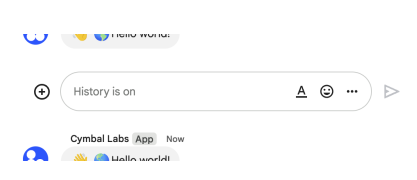
The following image shows how Chat attributes a message when you use app
authentication. Chat displays the Chat app as the message
sender. The content of the message can contain text (text), cards
(cardsV2), and accessory widgets (accessoryWidgets).
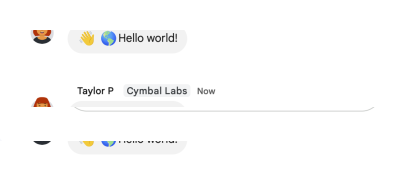
The following image shows how Chat attributes a message when you use user
authentication. Chat displays the user as the message sender and attributes
the Chat app to the message by displaying its name. The content of message
can only contain text (text).
The maximum message size, including the message contents, is 32,000 bytes.
For
webhook
requests, the response doesn’t contain the full message. The response only
populates the name and thread.name fields in addition to the
information that was in the request.
§Example
use google_chat_v1::model::Message;
use google_chat_v1::Result;
async fn sample(
   client: &ChatService, space_id: &str
) -> Result<()> {
    let response = client.create_message()
        .set_parent(format!("spaces/{space_id}"))
        .set_message_id("message_id_value")
        .set_message(
            Message::new()/* set fields */
        )
        .send().await?;
    println!("response {:?}", response);
    Ok(())
}Sourcepub fn list_messages(&self) -> ListMessages
pub fn list_messages(&self) -> ListMessages
Lists messages in a space that the caller is a member of, including
messages from blocked members and spaces. System messages, like those
announcing new space members, aren’t included. If you list messages from a
space with no messages, the response is an empty object. When using a
REST/HTTP interface, the response contains an empty JSON object, {}.
For an example, see
List
messages.
Supports the following types of authentication:
-
App authentication with administrator approval with the authorization scope:
<https://www.googleapis.com/auth/chat.app.messages.readonly>. When using this authentication scope, this method only returns public messages in a space. It doesn’t include private messages.
-
User authentication with one of the following authorization scopes:
<https://www.googleapis.com/auth/chat.messages.readonly><https://www.googleapis.com/auth/chat.messages><https://www.googleapis.com/auth/chat.import>(import mode spaces only)
§Example
use google_cloud_gax::paginator::ItemPaginator as _;
use google_chat_v1::Result;
async fn sample(
   client: &ChatService, space_id: &str
) -> Result<()> {
    let mut list = client.list_messages()
        .set_parent(format!("spaces/{space_id}"))
        .by_item();
    while let Some(item) = list.next().await.transpose()? {
        println!("{:?}", item);
    }
    Ok(())
}Sourcepub fn list_memberships(&self) -> ListMemberships
pub fn list_memberships(&self) -> ListMemberships
Lists memberships in a space. For an example, see List users and Google Chat apps in a space. Listing memberships with app authentication lists memberships in spaces that the Chat app has access to, but excludes Chat app memberships, including its own. Listing memberships with User authentication lists memberships in spaces that the authenticated user has access to.
Supports the following types of authentication:
-
App authentication with one of the following authorization scopes:
<https://www.googleapis.com/auth/chat.bot><https://www.googleapis.com/auth/chat.app.memberships>(requires administrator approval)
-
User authentication with one of the following authorization scopes:
<https://www.googleapis.com/auth/chat.memberships.readonly><https://www.googleapis.com/auth/chat.memberships><https://www.googleapis.com/auth/chat.import>(import mode spaces only)- User authentication grants administrator privileges when an
administrator account authenticates,
use_admin_accessistrue, and one of the following authorization scopes is used:<https://www.googleapis.com/auth/chat.admin.memberships.readonly><https://www.googleapis.com/auth/chat.admin.memberships>
§Example
use google_cloud_gax::paginator::ItemPaginator as _;
use google_chat_v1::Result;
async fn sample(
   client: &ChatService, space_id: &str
) -> Result<()> {
    let mut list = client.list_memberships()
        .set_parent(format!("spaces/{space_id}"))
        .by_item();
    while let Some(item) = list.next().await.transpose()? {
        println!("{:?}", item);
    }
    Ok(())
}Sourcepub fn get_membership(&self) -> GetMembership
pub fn get_membership(&self) -> GetMembership
Returns details about a membership. For an example, see Get details about a user’s or Google Chat app’s membership.
Supports the following types of authentication:
-
App authentication with one of the following authorization scopes:
<https://www.googleapis.com/auth/chat.bot><https://www.googleapis.com/auth/chat.app.memberships>(requires administrator approval)
-
User authentication with one of the following authorization scopes:
<https://www.googleapis.com/auth/chat.memberships.readonly><https://www.googleapis.com/auth/chat.memberships>- User authentication grants administrator privileges when an
administrator account authenticates,
use_admin_accessistrue, and one of the following authorization scopes is used:<https://www.googleapis.com/auth/chat.admin.memberships.readonly><https://www.googleapis.com/auth/chat.admin.memberships>
§Example
use google_chat_v1::Result;
async fn sample(
   client: &ChatService, space_id: &str, member_id: &str
) -> Result<()> {
    let response = client.get_membership()
        .set_name(format!("spaces/{space_id}/members/{member_id}"))
        .send().await?;
    println!("response {:?}", response);
    Ok(())
}Sourcepub fn get_message(&self) -> GetMessage
pub fn get_message(&self) -> GetMessage
Returns details about a message. For an example, see Get details about a message.
Supports the following types of authentication:
-
App authentication with one of the following authorization scopes:
<https://www.googleapis.com/auth/chat.bot>: When using this authorization scope, this method returns details about a message the Chat app has access to, like direct messages and slash commands that invoke the Chat app.<https://www.googleapis.com/auth/chat.app.messages.readonly>with administrator approval. When using this authentication scope, this method returns details about a public message in a space.
-
User authentication with one of the following authorization scopes:
<https://www.googleapis.com/auth/chat.messages.readonly><https://www.googleapis.com/auth/chat.messages>
Note: Might return a message from a blocked member or space.
§Example
use google_chat_v1::Result;
async fn sample(
   client: &ChatService, space_id: &str, message_id: &str
) -> Result<()> {
    let response = client.get_message()
        .set_name(format!("spaces/{space_id}/messages/{message_id}"))
        .send().await?;
    println!("response {:?}", response);
    Ok(())
}Sourcepub fn update_message(&self) -> UpdateMessage
pub fn update_message(&self) -> UpdateMessage
Updates a message. There’s a difference between the patch and update
methods. The patch
method uses a patch request while the update method uses a put
request. We recommend using the patch method. For an example, see
Update a
message.
Supports the following types of authentication:
-
App authentication with the authorization scope:
<https://www.googleapis.com/auth/chat.bot>
-
User authentication with one of the following authorization scopes:
<https://www.googleapis.com/auth/chat.messages><https://www.googleapis.com/auth/chat.import>(import mode spaces only)
When using app authentication, requests can only update messages created by the calling Chat app.
§Example
use google_cloud_wkt::FieldMask;
use google_chat_v1::model::Message;
use google_chat_v1::Result;
async fn sample(
   client: &ChatService, space_id: &str, message_id: &str
) -> Result<()> {
    let response = client.update_message()
        .set_message(
            Message::new().set_name(format!("spaces/{space_id}/messages/{message_id}"))/* set fields */
        )
        .set_update_mask(FieldMask::default().set_paths(["updated.field.path1", "updated.field.path2"]))
        .send().await?;
    println!("response {:?}", response);
    Ok(())
}Sourcepub fn delete_message(&self) -> DeleteMessage
pub fn delete_message(&self) -> DeleteMessage
Deletes a message. For an example, see Delete a message.
Supports the following types of authentication:
-
App authentication with the authorization scope:
<https://www.googleapis.com/auth/chat.bot>
-
User authentication with one of the following authorization scopes:
<https://www.googleapis.com/auth/chat.messages><https://www.googleapis.com/auth/chat.import>(import mode spaces only)
When using app authentication, requests can only delete messages created by the calling Chat app.
§Example
use google_chat_v1::Result;
async fn sample(
   client: &ChatService, space_id: &str, message_id: &str
) -> Result<()> {
    client.delete_message()
        .set_name(format!("spaces/{space_id}/messages/{message_id}"))
        .send().await?;
    Ok(())
}Sourcepub fn search_messages(&self) -> SearchMessages
pub fn search_messages(&self) -> SearchMessages
Searches for messages in Google Chat that the calling user has access to. Returns a list of messages matching the search criteria.
To search across all spaces the user has access to, set parent to
spaces/-. Using any other value for parent results in an
INVALID_ARGUMENT error. The returned messages have their name field
populated with the full resource name, which includes the specific space
in which the message resides.
This API doesn’t return all message types. The types of messages listed below aren’t included in the response. Use ListMessages to list all messages.
- Private Messages that are visible to the authenticated user.
- Messages posted by Chat apps in spaces or group chats.
- Messages in a Chat app DM.
- Messages from blocked users.
- Messages in spaces that the caller has muted.
Requires user authentication with one of the following authorization scopes:
<https://www.googleapis.com/auth/chat.messages.readonly><https://www.googleapis.com/auth/chat.messages>
§Example
use google_cloud_gax::paginator::ItemPaginator as _;
use google_chat_v1::Result;
async fn sample(
   client: &ChatService
) -> Result<()> {
    let mut list = client.search_messages()
        /* set fields */
        .by_item();
    while let Some(item) = list.next().await.transpose()? {
        println!("{:?}", item);
    }
    Ok(())
}Sourcepub fn get_attachment(&self) -> GetAttachment
pub fn get_attachment(&self) -> GetAttachment
Gets the metadata of a message attachment. The attachment data is fetched using the media API. For an example, see Get metadata about a message attachment.
Requires app authentication with the authorization scope:
<https://www.googleapis.com/auth/chat.bot>
§Example
use google_chat_v1::Result;
async fn sample(
   client: &ChatService, space_id: &str, message_id: &str, attachment_id: &str
) -> Result<()> {
    let response = client.get_attachment()
        .set_name(format!("spaces/{space_id}/messages/{message_id}/attachments/{attachment_id}"))
        .send().await?;
    println!("response {:?}", response);
    Ok(())
}Sourcepub fn upload_attachment(&self) -> UploadAttachment
pub fn upload_attachment(&self) -> UploadAttachment
Uploads an attachment. For an example, see Upload media as a file attachment.
Requires user authentication with one of the following authorization scopes:
<https://www.googleapis.com/auth/chat.messages.create><https://www.googleapis.com/auth/chat.messages><https://www.googleapis.com/auth/chat.import>(import mode spaces only)
You can upload attachments up to 200 MB. Certain file types aren’t supported. For details, see File types blocked by Google Chat.
§Example
use google_chat_v1::Result;
async fn sample(
   client: &ChatService
) -> Result<()> {
    let response = client.upload_attachment()
        /* set fields */
        .send().await?;
    println!("response {:?}", response);
    Ok(())
}Sourcepub fn list_spaces(&self) -> ListSpaces
pub fn list_spaces(&self) -> ListSpaces
Lists spaces the caller is a member of. Group chats and DMs aren’t listed until the first message is sent. For an example, see List spaces.
Supports the following types of authentication:
-
App authentication with the authorization scope:
<https://www.googleapis.com/auth/chat.bot>
-
User authentication with one of the following authorization scopes:
<https://www.googleapis.com/auth/chat.spaces.readonly><https://www.googleapis.com/auth/chat.spaces>
To list all named spaces by Google Workspace organization, use the
spaces.search()
method using Workspace administrator privileges instead.
§Example
use google_cloud_gax::paginator::ItemPaginator as _;
use google_chat_v1::Result;
async fn sample(
   client: &ChatService
) -> Result<()> {
    let mut list = client.list_spaces()
        /* set fields */
        .by_item();
    while let Some(item) = list.next().await.transpose()? {
        println!("{:?}", item);
    }
    Ok(())
}Sourcepub fn search_spaces(&self) -> SearchSpaces
pub fn search_spaces(&self) -> SearchSpaces
Returns a list of spaces in a Google Workspace organization. For an example, see Search for and manage spaces.
When use_admin_access is set to false, the results are limited to
spaces where the calling user is a joined member. To search with
administrator privileges, set use_admin_access to true.
Supports the following types of authentication:
-
User authentication with one of the following authorization scopes:
<https://www.googleapis.com/auth/chat.spaces.readonly><https://www.googleapis.com/auth/chat.spaces>
-
User authentication with administrator privileges and one of the following authorization scopes:
<https://www.googleapis.com/auth/chat.admin.spaces.readonly><https://www.googleapis.com/auth/chat.admin.spaces>
§Example
use google_cloud_gax::paginator::ItemPaginator as _;
use google_chat_v1::Result;
async fn sample(
   client: &ChatService
) -> Result<()> {
    let mut list = client.search_spaces()
        /* set fields */
        .by_item();
    while let Some(item) = list.next().await.transpose()? {
        println!("{:?}", item);
    }
    Ok(())
}Sourcepub fn get_space(&self) -> GetSpace
pub fn get_space(&self) -> GetSpace
Returns details about a space. For an example, see Get details about a space.
Supports the following types of authentication:
-
App authentication with one of the following authorization scopes:
<https://www.googleapis.com/auth/chat.bot><https://www.googleapis.com/auth/chat.app.spaces>with administrator approval
-
User authentication with one of the following authorization scopes:
<https://www.googleapis.com/auth/chat.spaces.readonly><https://www.googleapis.com/auth/chat.spaces>- User authentication grants administrator privileges when an
administrator account authenticates,
use_admin_accessistrue, and one of the following authorization scopes is used:<https://www.googleapis.com/auth/chat.admin.spaces.readonly><https://www.googleapis.com/auth/chat.admin.spaces>
App authentication has the following limitations:
space.access_settingsis only populated when using thechat.app.spacesscope.space.predefind_permission_settingsandspace.permission_settingsare only populated when using thechat.app.spacesscope, and only for spaces the app created.
§Example
use google_chat_v1::Result;
async fn sample(
   client: &ChatService, space_id: &str
) -> Result<()> {
    let response = client.get_space()
        .set_name(format!("spaces/{space_id}"))
        .send().await?;
    println!("response {:?}", response);
    Ok(())
}Sourcepub fn create_space(&self) -> CreateSpace
pub fn create_space(&self) -> CreateSpace
Creates a space. Can be used to create a named space, or a
group chat in Import mode. For an example, see Create a
space.
Supports the following types of authentication:
-
App authentication with administrator approval and one of the following authorization scopes:
<https://www.googleapis.com/auth/chat.app.spaces.create><https://www.googleapis.com/auth/chat.app.spaces>
-
User authentication with one of the following authorization scopes:
<https://www.googleapis.com/auth/chat.spaces.create><https://www.googleapis.com/auth/chat.spaces><https://www.googleapis.com/auth/chat.import>(import mode spaces only)
When authenticating as an app, the space.customer field must be set in
the request.
When authenticating as an app, the Chat app is added as a member of the
space. However, unlike human authentication, the Chat app is not added as a
space manager. By default, the Chat app can be removed from the space by
all space members. To allow only space managers to remove the app from a
space, set space.permission_settings.manage_apps to managers_allowed.
Space membership upon creation depends on whether the space is created in
Import mode:
- Import mode: No members are created.
- All other modes: The calling user is added as a member. This is:
- The app itself when using app authentication.
- The human user when using user authentication.
If you receive the error message ALREADY_EXISTS when creating
a space, try a different displayName. An existing space within
the Google Workspace organization might already use this display name.
§Example
use google_chat_v1::Result;
async fn sample(
   client: &ChatService
) -> Result<()> {
    let response = client.create_space()
        /* set fields */
        .send().await?;
    println!("response {:?}", response);
    Ok(())
}Sourcepub fn set_up_space(&self) -> SetUpSpace
pub fn set_up_space(&self) -> SetUpSpace
Creates a space and adds specified users to it. The calling user is automatically added to the space, and shouldn’t be specified as a membership in the request. For an example, see Set up a space with initial members.
To specify the human members to add, add memberships with the appropriate
membership.member.name. To add a human user, use users/{user}, where
{user} can be the email address for the user. For users in the same
Workspace organization {user} can also be the id for the person from
the People API, or the id for the user in the Directory API. For example,
if the People API Person profile ID for user@example.com is 123456789,
you can add the user to the space by setting the membership.member.name
to users/user@example.com or users/123456789.
To specify the Google groups to add, add memberships with the
appropriate membership.group_member.name. To add or invite a Google
group, use groups/{group}, where {group} is the id for the group from
the Cloud Identity Groups API. For example, you can use Cloud Identity
Groups lookup
API
to retrieve the ID 123456789 for group email group@example.com, then
you can add the group to the space by setting the
membership.group_member.name to groups/123456789. Group email is not
supported, and Google groups can only be added as members in named spaces.
For a named space or group chat, if the caller blocks, or is blocked by some members, or doesn’t have permission to add some members, then those members aren’t added to the created space.
To create a direct message (DM) between the calling user and another human user, specify exactly one membership to represent the human user. If one user blocks the other, the request fails and the DM isn’t created.
To create a DM between the calling user and the calling app, set
Space.singleUserBotDm to true and don’t specify any memberships. You
can only use this method to set up a DM with the calling app. To add the
calling app as a member of a space or an existing DM between two human
users, see
Invite or add a user or app to a
space.
If a DM already exists between two users, even when one user blocks the other at the time a request is made, then the existing DM is returned.
Spaces with threaded replies aren’t supported. If you receive the error
message ALREADY_EXISTS when setting up a space, try a different
displayName. An existing space within the Google Workspace organization
might already use this display name.
Requires user authentication with one of the following authorization scopes:
<https://www.googleapis.com/auth/chat.spaces.create><https://www.googleapis.com/auth/chat.spaces>
§Example
use google_chat_v1::Result;
async fn sample(
   client: &ChatService
) -> Result<()> {
    let response = client.set_up_space()
        /* set fields */
        .send().await?;
    println!("response {:?}", response);
    Ok(())
}Sourcepub fn update_space(&self) -> UpdateSpace
pub fn update_space(&self) -> UpdateSpace
Updates a space. For an example, see Update a space.
If you’re updating the displayName field and receive the error message
ALREADY_EXISTS, try a different display name.. An existing space within
the Google Workspace organization might already use this display name.
Supports the following types of authentication:
-
App authentication with administrator approval and one of the following authorization scopes:
<https://www.googleapis.com/auth/chat.app.spaces>
-
User authentication with one of the following authorization scopes:
<https://www.googleapis.com/auth/chat.spaces><https://www.googleapis.com/auth/chat.import>(import mode spaces only)- User authentication grants administrator privileges when an
administrator account authenticates,
use_admin_accessistrue, and the following authorization scopes is used:<https://www.googleapis.com/auth/chat.admin.spaces>
App authentication has the following limitations:
- To update either
space.predefined_permission_settingsorspace.permission_settings, the app must be the space creator. - Updating the
space.access_settings.audienceis not supported for app authentication.
§Example
use google_cloud_wkt::FieldMask;
use google_chat_v1::model::Space;
use google_chat_v1::Result;
async fn sample(
   client: &ChatService, space_id: &str
) -> Result<()> {
    let response = client.update_space()
        .set_space(
            Space::new().set_name(format!("spaces/{space_id}"))/* set fields */
        )
        .set_update_mask(FieldMask::default().set_paths(["updated.field.path1", "updated.field.path2"]))
        .send().await?;
    println!("response {:?}", response);
    Ok(())
}Sourcepub fn delete_space(&self) -> DeleteSpace
pub fn delete_space(&self) -> DeleteSpace
Deletes a named space. Always performs a cascading delete, which means that the space’s child resources—like messages posted in the space and memberships in the space—are also deleted. For an example, see Delete a space.
Supports the following types of authentication:
-
App authentication with administrator approval and the authorization scope:
<https://www.googleapis.com/auth/chat.app.delete>(only in spaces the app created)
-
User authentication with one of the following authorization scopes:
<https://www.googleapis.com/auth/chat.delete><https://www.googleapis.com/auth/chat.import>(import mode spaces only)- User authentication grants administrator privileges when an
administrator account authenticates,
use_admin_accessistrue, and the following authorization scope is used:<https://www.googleapis.com/auth/chat.admin.delete>
§Example
use google_chat_v1::Result;
async fn sample(
   client: &ChatService, space_id: &str
) -> Result<()> {
    client.delete_space()
        .set_name(format!("spaces/{space_id}"))
        .send().await?;
    Ok(())
}Sourcepub fn complete_import_space(&self) -> CompleteImportSpace
pub fn complete_import_space(&self) -> CompleteImportSpace
Completes the import process for the specified space and makes it visible to users.
Requires user authentication and domain-wide delegation with the authorization scope:
<https://www.googleapis.com/auth/chat.import>
For more information, see Authorize Google Chat apps to import data.
§Example
use google_chat_v1::Result;
async fn sample(
   client: &ChatService
) -> Result<()> {
    let response = client.complete_import_space()
        /* set fields */
        .send().await?;
    println!("response {:?}", response);
    Ok(())
}Sourcepub fn find_direct_message(&self) -> FindDirectMessage
pub fn find_direct_message(&self) -> FindDirectMessage
Returns the existing direct message with the specified user. If no direct
message space is found, returns a 404 NOT_FOUND error. For an example,
see
Find a direct message.
With app authentication, returns the direct message space between the specified user and the calling Chat app.
With user authentication, returns the direct message space between the specified user and the authenticated user.
Supports the following types of authentication:
-
App authentication with the authorization scope:
<https://www.googleapis.com/auth/chat.bot>
-
User authentication with one of the following authorization scopes:
<https://www.googleapis.com/auth/chat.spaces.readonly><https://www.googleapis.com/auth/chat.spaces>
§Example
use google_chat_v1::Result;
async fn sample(
   client: &ChatService
) -> Result<()> {
    let response = client.find_direct_message()
        /* set fields */
        .send().await?;
    println!("response {:?}", response);
    Ok(())
}Sourcepub fn find_group_chats(&self) -> FindGroupChats
pub fn find_group_chats(&self) -> FindGroupChats
Returns all spaces with spaceType == GROUP_CHAT, whose
human memberships contain exactly the calling user, and the users specified
in FindGroupChatsRequest.users. Only members that have joined the
conversation are supported. For an example, see Find group
chats.
If the calling user blocks, or is blocked by, some users, and no spaces with the entire specified set of users are found, this method returns spaces that don’t include the blocked or blocking users.
The specified set of users must contain only human (non-app) memberships. A request that contains non-human users doesn’t return any spaces.
Requires user authentication with one of the following authorization scopes:
<https://www.googleapis.com/auth/chat.memberships.readonly><https://www.googleapis.com/auth/chat.memberships>
§Example
use google_cloud_gax::paginator::ItemPaginator as _;
use google_chat_v1::Result;
async fn sample(
   client: &ChatService
) -> Result<()> {
    let mut list = client.find_group_chats()
        /* set fields */
        .by_item();
    while let Some(item) = list.next().await.transpose()? {
        println!("{:?}", item);
    }
    Ok(())
}Sourcepub fn create_membership(&self) -> CreateMembership
pub fn create_membership(&self) -> CreateMembership
Creates a membership for the calling Chat app, a user, or a Google Group. Creating memberships for other Chat apps isn’t supported. When creating a membership, if the specified member has their auto-accept policy turned off, then they’re invited, and must accept the space invitation before joining. Otherwise, creating a membership adds the member directly to the specified space.
Supports the following types of authentication:
-
App authentication with administrator approval and the authorization scope:
<https://www.googleapis.com/auth/chat.app.memberships>
-
User authentication with one of the following authorization scopes:
<https://www.googleapis.com/auth/chat.memberships><https://www.googleapis.com/auth/chat.memberships.app>(to add the calling app to the space)<https://www.googleapis.com/auth/chat.import>(import mode spaces only)- User authentication grants administrator privileges when an
administrator account authenticates,
use_admin_accessistrue, and the following authorization scope is used:<https://www.googleapis.com/auth/chat.admin.memberships>
App authentication is not supported for the following use cases:
- Inviting users external to the Workspace organization that owns the space.
- Adding a Google Group to a space.
- Adding a Chat app to a space.
For example usage, see:
- Invite or add a user to a space.
- Invite or add a Google Group to a space.
- Add the Chat app to a space.
§Example
use google_chat_v1::model::Membership;
use google_chat_v1::Result;
async fn sample(
   client: &ChatService, space_id: &str
) -> Result<()> {
    let response = client.create_membership()
        .set_parent(format!("spaces/{space_id}"))
        .set_membership(
            Membership::new()/* set fields */
        )
        .send().await?;
    println!("response {:?}", response);
    Ok(())
}Sourcepub fn update_membership(&self) -> UpdateMembership
pub fn update_membership(&self) -> UpdateMembership
Updates a membership. For an example, see Update a user’s membership in a space.
Supports the following types of authentication:
-
App authentication with administrator approval and the authorization scope:
<https://www.googleapis.com/auth/chat.app.memberships>(only in spaces the app created)
-
User authentication with one of the following authorization scopes:
<https://www.googleapis.com/auth/chat.memberships><https://www.googleapis.com/auth/chat.import>(import mode spaces only)- User authentication grants administrator privileges when an
administrator account authenticates,
use_admin_accessistrue, and the following authorization scope is used:<https://www.googleapis.com/auth/chat.admin.memberships>
§Example
use google_cloud_wkt::FieldMask;
use google_chat_v1::model::Membership;
use google_chat_v1::Result;
async fn sample(
   client: &ChatService, space_id: &str, member_id: &str
) -> Result<()> {
    let response = client.update_membership()
        .set_membership(
            Membership::new().set_name(format!("spaces/{space_id}/members/{member_id}"))/* set fields */
        )
        .set_update_mask(FieldMask::default().set_paths(["updated.field.path1", "updated.field.path2"]))
        .send().await?;
    println!("response {:?}", response);
    Ok(())
}Sourcepub fn delete_membership(&self) -> DeleteMembership
pub fn delete_membership(&self) -> DeleteMembership
Deletes a membership. For an example, see Remove a user or a Google Chat app from a space.
Supports the following types of authentication:
-
App authentication with administrator approval and the authorization scope:
<https://www.googleapis.com/auth/chat.app.memberships>
-
User authentication with one of the following authorization scopes:
<https://www.googleapis.com/auth/chat.memberships><https://www.googleapis.com/auth/chat.memberships.app>(to remove the calling app from the space)<https://www.googleapis.com/auth/chat.import>(import mode spaces only)- User authentication grants administrator privileges when an
administrator account authenticates,
use_admin_accessistrue, and the following authorization scope is used:<https://www.googleapis.com/auth/chat.admin.memberships>
App authentication is not supported for the following use cases:
- Removing a Google Group from a space.
- Removing a Chat app from a space.
To delete memberships for space managers, the requester must be a space manager. If you’re using app authentication the Chat app must be the space creator.
§Example
use google_chat_v1::Result;
async fn sample(
   client: &ChatService, space_id: &str, member_id: &str
) -> Result<()> {
    let response = client.delete_membership()
        .set_name(format!("spaces/{space_id}/members/{member_id}"))
        .send().await?;
    println!("response {:?}", response);
    Ok(())
}Sourcepub fn create_reaction(&self) -> CreateReaction
pub fn create_reaction(&self) -> CreateReaction
Creates a reaction and adds it to a message. For an example, see Add a reaction to a message.
Requires user authentication with one of the following authorization scopes:
<https://www.googleapis.com/auth/chat.messages.reactions.create><https://www.googleapis.com/auth/chat.messages.reactions><https://www.googleapis.com/auth/chat.messages><https://www.googleapis.com/auth/chat.import>(import mode spaces only)
§Example
use google_chat_v1::model::Reaction;
use google_chat_v1::Result;
async fn sample(
   client: &ChatService, space_id: &str, message_id: &str
) -> Result<()> {
    let response = client.create_reaction()
        .set_parent(format!("spaces/{space_id}/messages/{message_id}"))
        .set_reaction(
            Reaction::new()/* set fields */
        )
        .send().await?;
    println!("response {:?}", response);
    Ok(())
}Sourcepub fn list_reactions(&self) -> ListReactions
pub fn list_reactions(&self) -> ListReactions
Lists reactions to a message. For an example, see List reactions for a message.
Requires user authentication with one of the following authorization scopes:
<https://www.googleapis.com/auth/chat.messages.reactions.readonly><https://www.googleapis.com/auth/chat.messages.reactions><https://www.googleapis.com/auth/chat.messages.readonly><https://www.googleapis.com/auth/chat.messages>
§Example
use google_cloud_gax::paginator::ItemPaginator as _;
use google_chat_v1::Result;
async fn sample(
   client: &ChatService, space_id: &str, message_id: &str
) -> Result<()> {
    let mut list = client.list_reactions()
        .set_parent(format!("spaces/{space_id}/messages/{message_id}"))
        .by_item();
    while let Some(item) = list.next().await.transpose()? {
        println!("{:?}", item);
    }
    Ok(())
}Sourcepub fn delete_reaction(&self) -> DeleteReaction
pub fn delete_reaction(&self) -> DeleteReaction
Deletes a reaction to a message. For an example, see Delete a reaction.
Requires user authentication with one of the following authorization scopes:
<https://www.googleapis.com/auth/chat.messages.reactions><https://www.googleapis.com/auth/chat.messages><https://www.googleapis.com/auth/chat.import>(import mode spaces only)
§Example
use google_chat_v1::Result;
async fn sample(
   client: &ChatService, space_id: &str, message_id: &str, reaction_id: &str
) -> Result<()> {
    client.delete_reaction()
        .set_name(format!("spaces/{space_id}/messages/{message_id}/reactions/{reaction_id}"))
        .send().await?;
    Ok(())
}Sourcepub fn create_custom_emoji(&self) -> CreateCustomEmoji
pub fn create_custom_emoji(&self) -> CreateCustomEmoji
Creates a custom emoji.
Custom emojis are only available for Google Workspace accounts, and the administrator must turn custom emojis on for the organization. For more information, see Learn about custom emojis in Google Chat and Manage custom emoji permissions.
Requires user authentication with the authorization scope:
<https://www.googleapis.com/auth/chat.customemojis>
§Example
use google_chat_v1::Result;
async fn sample(
   client: &ChatService
) -> Result<()> {
    let response = client.create_custom_emoji()
        /* set fields */
        .send().await?;
    println!("response {:?}", response);
    Ok(())
}Sourcepub fn get_custom_emoji(&self) -> GetCustomEmoji
pub fn get_custom_emoji(&self) -> GetCustomEmoji
Returns details about a custom emoji.
Custom emojis are only available for Google Workspace accounts, and the administrator must turn custom emojis on for the organization. For more information, see Learn about custom emojis in Google Chat and Manage custom emoji permissions.
Requires user authentication with one of the following authorization scopes:
<https://www.googleapis.com/auth/chat.customemojis.readonly><https://www.googleapis.com/auth/chat.customemojis>
§Example
use google_chat_v1::Result;
async fn sample(
   client: &ChatService, custom_emoji_id: &str
) -> Result<()> {
    let response = client.get_custom_emoji()
        .set_name(format!("customEmojis/{custom_emoji_id}"))
        .send().await?;
    println!("response {:?}", response);
    Ok(())
}Sourcepub fn list_custom_emojis(&self) -> ListCustomEmojis
pub fn list_custom_emojis(&self) -> ListCustomEmojis
Lists custom emojis visible to the authenticated user.
Custom emojis are only available for Google Workspace accounts, and the administrator must turn custom emojis on for the organization. For more information, see Learn about custom emojis in Google Chat and Manage custom emoji permissions.
Requires user authentication with one of the following authorization scopes:
<https://www.googleapis.com/auth/chat.customemojis.readonly><https://www.googleapis.com/auth/chat.customemojis>
§Example
use google_cloud_gax::paginator::ItemPaginator as _;
use google_chat_v1::Result;
async fn sample(
   client: &ChatService
) -> Result<()> {
    let mut list = client.list_custom_emojis()
        /* set fields */
        .by_item();
    while let Some(item) = list.next().await.transpose()? {
        println!("{:?}", item);
    }
    Ok(())
}Sourcepub fn delete_custom_emoji(&self) -> DeleteCustomEmoji
pub fn delete_custom_emoji(&self) -> DeleteCustomEmoji
Deletes a custom emoji. By default, users can only delete custom emoji they created. Emoji managers assigned by the administrator can delete any custom emoji in the organization. See Learn about custom emojis in Google Chat.
Custom emojis are only available for Google Workspace accounts, and the administrator must turn custom emojis on for the organization. For more information, see Learn about custom emojis in Google Chat and Manage custom emoji permissions.
Requires user authentication with the authorization scope:
<https://www.googleapis.com/auth/chat.customemojis>
§Example
use google_chat_v1::Result;
async fn sample(
   client: &ChatService, custom_emoji_id: &str
) -> Result<()> {
    client.delete_custom_emoji()
        .set_name(format!("customEmojis/{custom_emoji_id}"))
        .send().await?;
    Ok(())
}Sourcepub fn get_space_read_state(&self) -> GetSpaceReadState
pub fn get_space_read_state(&self) -> GetSpaceReadState
Returns details about a user’s read state within a space, used to identify read and unread messages. For an example, see Get details about a user’s space read state.
Requires user authentication with one of the following authorization scopes:
<https://www.googleapis.com/auth/chat.users.readstate.readonly><https://www.googleapis.com/auth/chat.users.readstate>
§Example
use google_chat_v1::Result;
async fn sample(
   client: &ChatService, user_id: &str, space_id: &str
) -> Result<()> {
    let response = client.get_space_read_state()
        .set_name(format!("users/{user_id}/spaces/{space_id}/spaceReadState"))
        .send().await?;
    println!("response {:?}", response);
    Ok(())
}Sourcepub fn update_space_read_state(&self) -> UpdateSpaceReadState
pub fn update_space_read_state(&self) -> UpdateSpaceReadState
Updates a user’s read state within a space, used to identify read and unread messages. For an example, see Update a user’s space read state.
Requires user authentication with the authorization scope:
<https://www.googleapis.com/auth/chat.users.readstate>
§Example
use google_cloud_wkt::FieldMask;
use google_chat_v1::model::SpaceReadState;
use google_chat_v1::Result;
async fn sample(
   client: &ChatService, user_id: &str, space_id: &str
) -> Result<()> {
    let response = client.update_space_read_state()
        .set_space_read_state(
            SpaceReadState::new().set_name(format!("users/{user_id}/spaces/{space_id}/spaceReadState"))/* set fields */
        )
        .set_update_mask(FieldMask::default().set_paths(["updated.field.path1", "updated.field.path2"]))
        .send().await?;
    println!("response {:?}", response);
    Ok(())
}Sourcepub fn get_thread_read_state(&self) -> GetThreadReadState
pub fn get_thread_read_state(&self) -> GetThreadReadState
Returns details about a user’s read state within a thread, used to identify read and unread messages. For an example, see Get details about a user’s thread read state.
Requires user authentication with one of the following authorization scopes:
<https://www.googleapis.com/auth/chat.users.readstate.readonly><https://www.googleapis.com/auth/chat.users.readstate>
§Example
use google_chat_v1::Result;
async fn sample(
   client: &ChatService, user_id: &str, space_id: &str, thread_id: &str
) -> Result<()> {
    let response = client.get_thread_read_state()
        .set_name(format!("users/{user_id}/spaces/{space_id}/threads/{thread_id}/threadReadState"))
        .send().await?;
    println!("response {:?}", response);
    Ok(())
}Sourcepub fn get_availability(&self) -> GetAvailability
pub fn get_availability(&self) -> GetAvailability
Returns availability information for a human user in Google Chat. For example, this can be used to check if a user is online or away, or to retrieve their custom status message.
This method only retrieves the authenticated user’s availability.
Requires user authentication with one of the following authorization scopes:
<https://www.googleapis.com/auth/chat.users.availability.readonly><https://www.googleapis.com/auth/chat.users.availability>
§Example
use google_chat_v1::Result;
async fn sample(
   client: &ChatService, user_id: &str
) -> Result<()> {
    let response = client.get_availability()
        .set_name(format!("users/{user_id}/availability"))
        .send().await?;
    println!("response {:?}", response);
    Ok(())
}Sourcepub fn mark_as_active(&self) -> MarkAsActive
pub fn mark_as_active(&self) -> MarkAsActive
Marks user as ACTIVE in Google Chat.
Sets the user’s availability state to ACTIVE. The ACTIVE state
lasts until the specified expiration, at which point the user’s state
becomes AWAY. Note that if the user is actively using Chat, the ACTIVE
state duration may extend beyond the provided expiration.
This method only updates the authenticated user’s availability.
Requires user authentication with authorization scope:
<https://www.googleapis.com/auth/chat.users.availability>
§Example
use google_chat_v1::Result;
async fn sample(
   client: &ChatService
) -> Result<()> {
    let response = client.mark_as_active()
        /* set fields */
        .send().await?;
    println!("response {:?}", response);
    Ok(())
}Sourcepub fn mark_as_away(&self) -> MarkAsAway
pub fn mark_as_away(&self) -> MarkAsAway
Marks user as AWAY in Google Chat.
Sets the user’s state to away and is not affected by the user’s activity.
This method only updates the authenticated user’s availability.
Requires user authentication with authorization scope:
<https://www.googleapis.com/auth/chat.users.availability>
§Example
use google_chat_v1::Result;
async fn sample(
   client: &ChatService
) -> Result<()> {
    let response = client.mark_as_away()
        /* set fields */
        .send().await?;
    println!("response {:?}", response);
    Ok(())
}Sourcepub fn mark_as_do_not_disturb(&self) -> MarkAsDoNotDisturb
pub fn mark_as_do_not_disturb(&self) -> MarkAsDoNotDisturb
Marks user as DO_NOT_DISTURB in Google Chat.
Sets a user’s availability state to DO_NOT_DISTURB until a specified
expiration time.
When in DO_NOT_DISTURB, users typically won’t receive notifications.
This method only updates the authenticated user’s availability.
Requires user authentication with authorization scope:
<https://www.googleapis.com/auth/chat.users.availability>
§Example
use google_chat_v1::Result;
async fn sample(
   client: &ChatService
) -> Result<()> {
    let response = client.mark_as_do_not_disturb()
        /* set fields */
        .send().await?;
    println!("response {:?}", response);
    Ok(())
}Sourcepub fn update_availability(&self) -> UpdateAvailability
pub fn update_availability(&self) -> UpdateAvailability
Updates availability information for a human user. Only the custom_status
field can be updated through this method.
This method only updates the authenticated user’s availability.
Requires user authentication with one of the following authorization scopes:
<https://www.googleapis.com/auth/chat.users.availability>
§Example
use google_cloud_wkt::FieldMask;
use google_chat_v1::model::Availability;
use google_chat_v1::Result;
async fn sample(
   client: &ChatService, user_id: &str
) -> Result<()> {
    let response = client.update_availability()
        .set_availability(
            Availability::new().set_name(format!("users/{user_id}/availability"))/* set fields */
        )
        .set_update_mask(FieldMask::default().set_paths(["updated.field.path1", "updated.field.path2"]))
        .send().await?;
    println!("response {:?}", response);
    Ok(())
}Sourcepub fn get_space_event(&self) -> GetSpaceEvent
pub fn get_space_event(&self) -> GetSpaceEvent
Returns an event from a Google Chat space. The event
payload
contains the most recent version of the resource that changed. For example,
if you request an event about a new message but the message was later
updated, the server returns the updated Message resource in the event
payload.
Note: The permissionSettings field is not returned in the Space
object of the Space event data for this request.
Supports the following types of authentication with an authorization scope appropriate for reading the requested data:
-
App authentication with administrator approval with one of the following authorization scopes:
<https://www.googleapis.com/auth/chat.app.spaces><https://www.googleapis.com/auth/chat.app.spaces.readonly><https://www.googleapis.com/auth/chat.app.messages.readonly><https://www.googleapis.com/auth/chat.app.memberships><https://www.googleapis.com/auth/chat.app.memberships.readonly>
-
User authentication with one of the following authorization scopes:
<https://www.googleapis.com/auth/chat.spaces.readonly><https://www.googleapis.com/auth/chat.spaces><https://www.googleapis.com/auth/chat.messages.readonly><https://www.googleapis.com/auth/chat.messages><https://www.googleapis.com/auth/chat.messages.reactions.readonly><https://www.googleapis.com/auth/chat.messages.reactions><https://www.googleapis.com/auth/chat.memberships.readonly><https://www.googleapis.com/auth/chat.memberships>
To get an event, the authenticated caller must be a member of the space.
For an example, see Get details about an event from a Google Chat space.
§Example
use google_chat_v1::Result;
async fn sample(
   client: &ChatService, space_id: &str, space_event_id: &str
) -> Result<()> {
    let response = client.get_space_event()
        .set_name(format!("spaces/{space_id}/spaceEvents/{space_event_id}"))
        .send().await?;
    println!("response {:?}", response);
    Ok(())
}Sourcepub fn list_space_events(&self) -> ListSpaceEvents
pub fn list_space_events(&self) -> ListSpaceEvents
Lists events from a Google Chat space. For each event, the
payload
contains the most recent version of the Chat resource. For example, if you
list events about new space members, the server returns Membership
resources that contain the latest membership details. If new members were
removed during the requested period, the event payload contains an empty
Membership resource.
Supports the following types of authentication with an authorization scope appropriate for reading the requested data:
-
App authentication with administrator approval with one of the following authorization scopes:
<https://www.googleapis.com/auth/chat.app.spaces><https://www.googleapis.com/auth/chat.app.spaces.readonly><https://www.googleapis.com/auth/chat.app.messages.readonly><https://www.googleapis.com/auth/chat.app.memberships><https://www.googleapis.com/auth/chat.app.memberships.readonly>
-
User authentication with one of the following authorization scopes:
<https://www.googleapis.com/auth/chat.spaces.readonly><https://www.googleapis.com/auth/chat.spaces><https://www.googleapis.com/auth/chat.messages.readonly><https://www.googleapis.com/auth/chat.messages><https://www.googleapis.com/auth/chat.messages.reactions.readonly><https://www.googleapis.com/auth/chat.messages.reactions><https://www.googleapis.com/auth/chat.memberships.readonly><https://www.googleapis.com/auth/chat.memberships>
To list events, the authenticated caller must be a member of the space.
For an example, see List events from a Google Chat space.
§Example
use google_cloud_gax::paginator::ItemPaginator as _;
use google_chat_v1::Result;
async fn sample(
   client: &ChatService, space_id: &str
) -> Result<()> {
    let mut list = client.list_space_events()
        .set_parent(format!("spaces/{space_id}"))
        .by_item();
    while let Some(item) = list.next().await.transpose()? {
        println!("{:?}", item);
    }
    Ok(())
}Sourcepub fn get_space_notification_setting(&self) -> GetSpaceNotificationSetting
pub fn get_space_notification_setting(&self) -> GetSpaceNotificationSetting
Gets the space notification setting. For an example, see Get the caller’s space notification setting.
Requires user authentication with the authorization scope:
<https://www.googleapis.com/auth/chat.users.spacesettings>
§Example
use google_chat_v1::Result;
async fn sample(
   client: &ChatService, user_id: &str, space_id: &str
) -> Result<()> {
    let response = client.get_space_notification_setting()
        .set_name(format!("users/{user_id}/spaces/{space_id}/spaceNotificationSetting"))
        .send().await?;
    println!("response {:?}", response);
    Ok(())
}Sourcepub fn update_space_notification_setting(
&self,
) -> UpdateSpaceNotificationSetting
pub fn update_space_notification_setting( &self, ) -> UpdateSpaceNotificationSetting
Updates the space notification setting. For an example, see Update the caller’s space notification setting.
Requires user authentication with the authorization scope:
<https://www.googleapis.com/auth/chat.users.spacesettings>
§Example
use google_cloud_wkt::FieldMask;
use google_chat_v1::model::SpaceNotificationSetting;
use google_chat_v1::Result;
async fn sample(
   client: &ChatService, user_id: &str, space_id: &str
) -> Result<()> {
    let response = client.update_space_notification_setting()
        .set_space_notification_setting(
            SpaceNotificationSetting::new().set_name(format!("users/{user_id}/spaces/{space_id}/spaceNotificationSetting"))/* set fields */
        )
        .set_update_mask(FieldMask::default().set_paths(["updated.field.path1", "updated.field.path2"]))
        .send().await?;
    println!("response {:?}", response);
    Ok(())
}Sourcepub fn create_section(&self) -> CreateSection
pub fn create_section(&self) -> CreateSection
Creates a section in Google Chat. Sections help users group conversations
and customize the list of spaces displayed in Chat navigation panel. Only
sections of type CUSTOM_SECTION can be created. For details, see Create
and organize sections in Google
Chat.
Requires user authentication with the authorization scope:
<https://www.googleapis.com/auth/chat.users.sections>
§Example
use google_chat_v1::model::Section;
use google_chat_v1::Result;
async fn sample(
   client: &ChatService, parent: &str
) -> Result<()> {
    let response = client.create_section()
        .set_parent(parent)
        .set_section(
            Section::new()/* set fields */
        )
        .send().await?;
    println!("response {:?}", response);
    Ok(())
}Sourcepub fn delete_section(&self) -> DeleteSection
pub fn delete_section(&self) -> DeleteSection
Deletes a section of type CUSTOM_SECTION.
If the section contains items, such as spaces, the items are moved to Google Chat’s default sections and are not deleted.
For details, see Create and organize sections in Google Chat.
Requires user authentication with the authorization scope:
<https://www.googleapis.com/auth/chat.users.sections>
§Example
use google_chat_v1::Result;
async fn sample(
   client: &ChatService, user_id: &str, section_id: &str
) -> Result<()> {
    client.delete_section()
        .set_name(format!("users/{user_id}/sections/{section_id}"))
        .send().await?;
    Ok(())
}Sourcepub fn update_section(&self) -> UpdateSection
pub fn update_section(&self) -> UpdateSection
Updates a section. Only sections of type CUSTOM_SECTION can be updated.
For details, see Create and organize sections in Google
Chat.
Requires user authentication with the authorization scope:
<https://www.googleapis.com/auth/chat.users.sections>
§Example
use google_cloud_wkt::FieldMask;
use google_chat_v1::model::Section;
use google_chat_v1::Result;
async fn sample(
   client: &ChatService, user_id: &str, section_id: &str
) -> Result<()> {
    let response = client.update_section()
        .set_section(
            Section::new().set_name(format!("users/{user_id}/sections/{section_id}"))/* set fields */
        )
        .set_update_mask(FieldMask::default().set_paths(["updated.field.path1", "updated.field.path2"]))
        .send().await?;
    println!("response {:?}", response);
    Ok(())
}Sourcepub fn list_sections(&self) -> ListSections
pub fn list_sections(&self) -> ListSections
Lists sections available to the Chat user. Sections help users group their conversations and customize the list of spaces displayed in Chat navigation panel. For details, see Create and organize sections in Google Chat.
Requires user authentication with the authorization scope:
<https://www.googleapis.com/auth/chat.users.sections><https://www.googleapis.com/auth/chat.users.sections.readonly>
§Example
use google_cloud_gax::paginator::ItemPaginator as _;
use google_chat_v1::Result;
async fn sample(
   client: &ChatService, parent: &str
) -> Result<()> {
    let mut list = client.list_sections()
        .set_parent(parent)
        .by_item();
    while let Some(item) = list.next().await.transpose()? {
        println!("{:?}", item);
    }
    Ok(())
}Sourcepub fn position_section(&self) -> PositionSection
pub fn position_section(&self) -> PositionSection
Changes the sort order of a section. For details, see Create and organize sections in Google Chat.
Requires user authentication with the authorization scope:
<https://www.googleapis.com/auth/chat.users.sections>
§Example
use google_chat_v1::Result;
async fn sample(
   client: &ChatService
) -> Result<()> {
    let response = client.position_section()
        /* set fields */
        .send().await?;
    println!("response {:?}", response);
    Ok(())
}Sourcepub fn list_section_items(&self) -> ListSectionItems
pub fn list_section_items(&self) -> ListSectionItems
Lists items in a section.
Only spaces can be section items. For details, see Create and organize sections in Google Chat.
Requires user authentication with the authorization scope:
<https://www.googleapis.com/auth/chat.users.sections><https://www.googleapis.com/auth/chat.users.sections.readonly>
§Example
use google_cloud_gax::paginator::ItemPaginator as _;
use google_chat_v1::Result;
async fn sample(
   client: &ChatService, user_id: &str, section_id: &str
) -> Result<()> {
    let mut list = client.list_section_items()
        .set_parent(format!("users/{user_id}/sections/{section_id}"))
        .by_item();
    while let Some(item) = list.next().await.transpose()? {
        println!("{:?}", item);
    }
    Ok(())
}Sourcepub fn move_section_item(&self) -> MoveSectionItem
pub fn move_section_item(&self) -> MoveSectionItem
Moves an item from one section to another. For example, if a section contains spaces, this method can be used to move a space to a different section. For details, see Create and organize sections in Google Chat.
Requires user authentication with the authorization scope:
<https://www.googleapis.com/auth/chat.users.sections>
§Example
use google_chat_v1::Result;
async fn sample(
   client: &ChatService
) -> Result<()> {
    let response = client.move_section_item()
        /* set fields */
        .send().await?;
    println!("response {:?}", response);
    Ok(())
}
Trait Implementations§
Source§impl Clone for ChatService
impl Clone for ChatService
Source§fn clone(&self) -> ChatService
fn clone(&self) -> ChatService
1.0.0 (const: unstable) · Source§fn clone_from(&mut self, source: &Self)
fn clone_from(&mut self, source: &Self)
source. Read more