Struct fltk::window::GlutWindow
source · pub struct GlutWindow { /* private fields */ }Expand description
Creates a OpenGL Glut window widget
Implementations§
source§impl GlutWindow
impl GlutWindow
sourcepub fn default() -> GlutWindow
pub fn default() -> GlutWindow
Creates a default initialized glut window
sourcepub fn get_proc_address(&self, s: &str) -> *const c_void
pub fn get_proc_address(&self, s: &str) -> *const c_void
Gets an opengl function address
sourcepub fn flush(&mut self)
pub fn flush(&mut self)
Forces the window to be drawn, this window is also made current and calls draw()
sourcepub fn context_valid(&self) -> bool
pub fn context_valid(&self) -> bool
Returns whether the context is valid upon creation
sourcepub fn set_context_valid(&mut self, v: bool)
pub fn set_context_valid(&mut self, v: bool)
Mark the context as valid upon creation
sourcepub fn set_context(&mut self, ctx: GlContext, destroy_flag: bool)
pub fn set_context(&mut self, ctx: GlContext, destroy_flag: bool)
Sets the GlContext
sourcepub fn swap_buffers(&mut self)
pub fn swap_buffers(&mut self)
Swaps the back and front buffers
sourcepub fn ortho(&mut self)
pub fn ortho(&mut self)
Sets the projection so 0,0 is in the lower left of the window and each pixel is 1 unit wide/tall.
sourcepub fn can_do_overlay(&self) -> bool
pub fn can_do_overlay(&self) -> bool
Returns whether the GlutWindow can do overlay
sourcepub fn redraw_overlay(&mut self)
pub fn redraw_overlay(&mut self)
Redraws the overlay
sourcepub fn hide_overlay(&mut self)
pub fn hide_overlay(&mut self)
Hides the overlay
sourcepub fn make_overlay_current(&mut self)
pub fn make_overlay_current(&mut self)
Makes the overlay current
sourcepub fn pixels_per_unit(&self) -> f32
pub fn pixels_per_unit(&self) -> f32
Returns the pixels per unit/point
Trait Implementations§
source§impl Clone for GlutWindow
impl Clone for GlutWindow
source§fn clone(&self) -> GlutWindow
fn clone(&self) -> GlutWindow
Returns a copy of the value. Read more
1.0.0 · source§fn clone_from(&mut self, source: &Self)
fn clone_from(&mut self, source: &Self)
Performs copy-assignment from
source. Read moresource§impl Debug for GlutWindow
impl Debug for GlutWindow
source§impl Default for GlutWindow
impl Default for GlutWindow
source§impl GroupExt for GlutWindow
impl GroupExt for GlutWindow
source§fn find<W: WidgetExt>(&self, widget: &W) -> i32
fn find<W: WidgetExt>(&self, widget: &W) -> i32
Find a widget within a group and return its index
source§fn insert<W: WidgetExt>(&mut self, widget: &W, index: i32)
fn insert<W: WidgetExt>(&mut self, widget: &W, index: i32)
Insert a widget to a group at a certain index
source§fn remove<W: WidgetExt>(&mut self, widget: &W)
fn remove<W: WidgetExt>(&mut self, widget: &W)
Remove a widget from a group, but does not delete it
source§fn remove_by_index(&mut self, idx: i32)
fn remove_by_index(&mut self, idx: i32)
Remove a child widget by its index
source§fn resizable<W: WidgetExt>(&self, widget: &W)
fn resizable<W: WidgetExt>(&self, widget: &W)
The resizable widget defines both the resizing frame and the resizing behavior of the group and its children.
source§fn make_resizable(&mut self, val: bool)
fn make_resizable(&mut self, val: bool)
Make the group itself resizable, should be called before the widget is shown
source§fn add_resizable<W: WidgetExt>(&mut self, widget: &W)
fn add_resizable<W: WidgetExt>(&mut self, widget: &W)
Adds a widget to the group and makes it the resizable widget
source§fn set_clip_children(&mut self, flag: bool)
fn set_clip_children(&mut self, flag: bool)
Clips children outside the group boundaries
source§fn clip_children(&self) -> bool
fn clip_children(&self) -> bool
Get whether
clip_children is setsource§fn draw_child<W: WidgetExt>(&self, w: &mut W)
fn draw_child<W: WidgetExt>(&self, w: &mut W)
Draw a child widget, the call should be in a
WidgetBase::draw methodsource§fn update_child<W: WidgetExt>(&self, w: &mut W)
fn update_child<W: WidgetExt>(&self, w: &mut W)
Update a child widget, the call should be in a
WidgetBase::draw methodsource§fn draw_outside_label<W: WidgetExt>(&self, w: &mut W)
fn draw_outside_label<W: WidgetExt>(&self, w: &mut W)
Draw the outside label, the call should be in a
WidgetBase::draw methodsource§fn draw_children(&mut self)
fn draw_children(&mut self)
Draw children, the call should be in a
WidgetBase::draw methodsource§fn init_sizes(&mut self)
fn init_sizes(&mut self)
Resets the internal array of widget sizes and positions
source§fn bounds(&self) -> Vec<(i32, i32, i32, i32)>
fn bounds(&self) -> Vec<(i32, i32, i32, i32)>
Get the bounds of all children widgets (left, upper, right, bottom)
source§unsafe fn into_group(&self) -> Group
unsafe fn into_group(&self) -> Group
Converts a widget implementing GroupExt into a Group widget Read more
source§impl IntoIterator for GlutWindow
impl IntoIterator for GlutWindow
source§impl PartialEq<GlutWindow> for GlutWindow
impl PartialEq<GlutWindow> for GlutWindow
source§impl WidgetBase for GlutWindow
impl WidgetBase for GlutWindow
source§fn new<T: Into<Option<&'static str>>>(
x: i32,
y: i32,
width: i32,
height: i32,
title: T
) -> GlutWindow
fn new<T: Into<Option<&'static str>>>(
x: i32,
y: i32,
width: i32,
height: i32,
title: T
) -> GlutWindow
Creates a new widget, takes an x, y coordinates, as well as a width and height, plus a title Read more
source§fn default_fill() -> Self
fn default_fill() -> Self
Constructs a widget with the size of its parent
source§unsafe fn from_widget_ptr(ptr: *mut Fl_Widget) -> Self
unsafe fn from_widget_ptr(ptr: *mut Fl_Widget) -> Self
transforms a widget pointer to a Widget, for internal use Read more
source§unsafe fn from_widget<W: WidgetExt>(w: W) -> Self
unsafe fn from_widget<W: WidgetExt>(w: W) -> Self
Get a widget from base widget Read more
source§fn handle<F: FnMut(&mut Self, Event) -> bool + 'static>(&mut self, cb: F)
fn handle<F: FnMut(&mut Self, Event) -> bool + 'static>(&mut self, cb: F)
Set a custom handler, where events are managed manually, akin to
Fl_Widget::handle(int).
Handled or ignored events should return true, unhandled events should return false.
takes the widget as a closure argument Read moresource§fn draw<F: FnMut(&mut Self) + 'static>(&mut self, cb: F)
fn draw<F: FnMut(&mut Self) + 'static>(&mut self, cb: F)
Set a custom draw method.
takes the widget as a closure argument.
macOS requires that
WidgetBase::draw actually calls drawing functions Read moresource§fn resize_callback<F: FnMut(&mut Self, i32, i32, i32, i32) + 'static>(
&mut self,
cb: F
)
fn resize_callback<F: FnMut(&mut Self, i32, i32, i32, i32) + 'static>(
&mut self,
cb: F
)
Perform a callback on resize.
Avoid resizing the parent or the same widget to avoid infinite recursion Read more
source§unsafe fn assume_derived(&mut self)
unsafe fn assume_derived(&mut self)
Makes the widget derived Read more
source§impl WidgetExt for GlutWindow
impl WidgetExt for GlutWindow
source§fn with_label(self, title: &str) -> Self
fn with_label(self, title: &str) -> Self
Initialize with a label
source§fn with_align(self, align: Align) -> Self
fn with_align(self, align: Align) -> Self
Initialize with alignment
source§fn with_type<T: WidgetType>(self, typ: T) -> Self
fn with_type<T: WidgetType>(self, typ: T) -> Self
Initialize with type
source§fn below_of<W: WidgetExt>(self, wid: &W, padding: i32) -> Self
fn below_of<W: WidgetExt>(self, wid: &W, padding: i32) -> Self
Initialize at bottom of another widget
source§fn above_of<W: WidgetExt>(self, wid: &W, padding: i32) -> Self
fn above_of<W: WidgetExt>(self, wid: &W, padding: i32) -> Self
Initialize above of another widget
source§fn right_of<W: WidgetExt>(self, wid: &W, padding: i32) -> Self
fn right_of<W: WidgetExt>(self, wid: &W, padding: i32) -> Self
Initialize right of another widget
source§fn left_of<W: WidgetExt>(self, wid: &W, padding: i32) -> Self
fn left_of<W: WidgetExt>(self, wid: &W, padding: i32) -> Self
Initialize left of another widget
source§fn center_of_parent(self) -> Self
fn center_of_parent(self) -> Self
Initialize center of parent
source§fn size_of_parent(self) -> Self
fn size_of_parent(self) -> Self
Initialize to the size of the parent
source§fn set_label(&mut self, title: &str)
fn set_label(&mut self, title: &str)
Sets the widget’s label.
labels support special symbols preceded by an
@ sign.
and for the associated formatting. Read more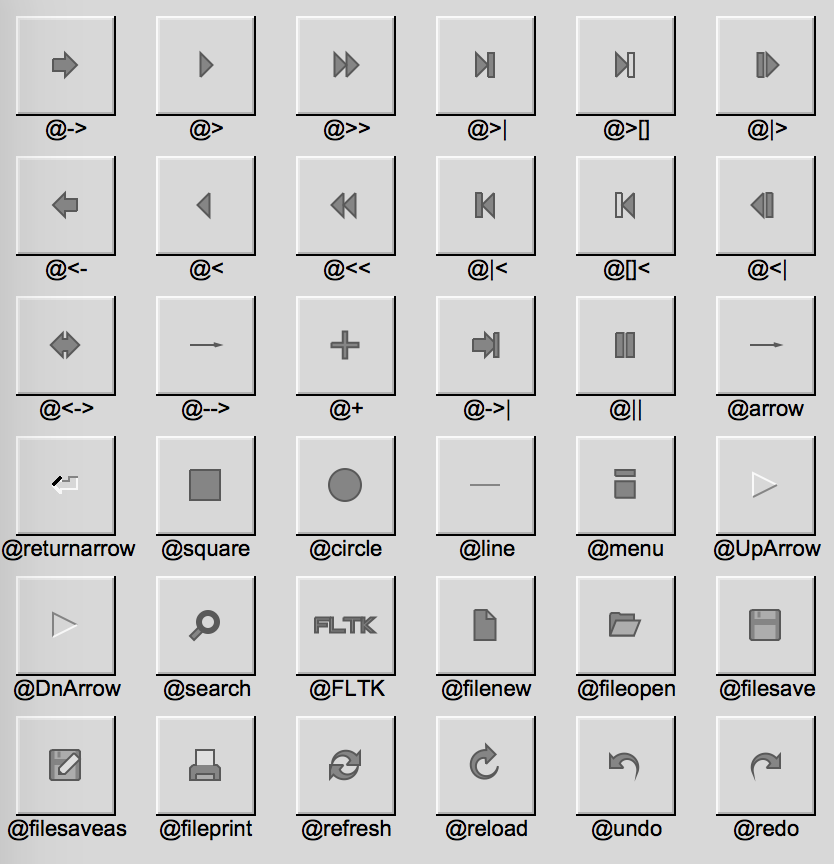
source§fn measure_label(&self) -> (i32, i32)
fn measure_label(&self) -> (i32, i32)
Measures the label’s width and height
source§unsafe fn as_widget_ptr(&self) -> *mut Fl_Widget
unsafe fn as_widget_ptr(&self) -> *mut Fl_Widget
transforms a widget to a base
Fl_Widget, for internal use Read moresource§fn deactivate(&mut self)
fn deactivate(&mut self)
Deactivates the widget
source§fn redraw_label(&mut self)
fn redraw_label(&mut self)
Redraws the label of the widget
source§fn resize(&mut self, x: i32, y: i32, width: i32, height: i32)
fn resize(&mut self, x: i32, y: i32, width: i32, height: i32)
Resizes and/or moves the widget, takes x, y, width and height
source§fn widget_resize(&mut self, x: i32, y: i32, width: i32, height: i32)
fn widget_resize(&mut self, x: i32, y: i32, width: i32, height: i32)
Does a simple resize ignoring class-specific resize functionality
source§fn set_tooltip(&mut self, txt: &str)
fn set_tooltip(&mut self, txt: &str)
Sets the tooltip text
source§fn label_color(&self) -> Color
fn label_color(&self) -> Color
Returns the widget label’s color
source§fn set_label_color(&mut self, color: Color)
fn set_label_color(&mut self, color: Color)
Sets the widget label’s color
source§fn label_font(&self) -> Font
fn label_font(&self) -> Font
Returns the widget label’s font
source§fn set_label_font(&mut self, font: Font)
fn set_label_font(&mut self, font: Font)
Sets the widget label’s font
source§fn label_size(&self) -> i32
fn label_size(&self) -> i32
Returns the widget label’s size
source§fn set_label_size(&mut self, sz: i32)
fn set_label_size(&mut self, sz: i32)
Sets the widget label’s size
source§fn label_type(&self) -> LabelType
fn label_type(&self) -> LabelType
Returns the widget label’s type
source§fn set_label_type(&mut self, typ: LabelType)
fn set_label_type(&mut self, typ: LabelType)
Sets the widget label’s type
source§fn set_changed(&mut self)
fn set_changed(&mut self)
Mark the widget as changed
source§fn clear_changed(&mut self)
fn clear_changed(&mut self)
Clears the changed status of the widget
source§fn set_trigger(&mut self, trigger: CallbackTrigger)
fn set_trigger(&mut self, trigger: CallbackTrigger)
Sets the default callback trigger for a widget, equivalent to
when()source§fn trigger(&self) -> CallbackTrigger
fn trigger(&self) -> CallbackTrigger
Return the callback trigger, equivalent to
when()source§fn selection_color(&self) -> Color
fn selection_color(&self) -> Color
Gets the selection color of the widget
source§fn set_selection_color(&mut self, color: Color)
fn set_selection_color(&mut self, color: Color)
Sets the selection color of the widget
source§fn do_callback(&mut self)
fn do_callback(&mut self)
Runs the already registered callback
source§fn top_window(&self) -> Option<Box<dyn WindowExt>>
fn top_window(&self) -> Option<Box<dyn WindowExt>>
Returns the topmost window holding the widget
source§fn takes_events(&self) -> bool
fn takes_events(&self) -> bool
Checks whether a widget is capable of taking events
source§fn set_visible_focus(&mut self)
fn set_visible_focus(&mut self)
Set the widget to have visible focus
source§fn clear_visible_focus(&mut self)
fn clear_visible_focus(&mut self)
Clear visible focus
source§fn visible_focus(&mut self, v: bool)
fn visible_focus(&mut self, v: bool)
Set the visible focus using a flag
source§fn has_visible_focus(&self) -> bool
fn has_visible_focus(&self) -> bool
Return whether the widget has visible focus
source§fn was_deleted(&self) -> bool
fn was_deleted(&self) -> bool
Check if a widget was deleted
source§fn set_damage(&mut self, flag: bool)
fn set_damage(&mut self, flag: bool)
Signal the widget as damaged and it should be redrawn in the next event loop cycle
source§fn damage_type(&self) -> Damage
fn damage_type(&self) -> Damage
Return the damage mask
source§fn set_damage_type(&mut self, mask: Damage)
fn set_damage_type(&mut self, mask: Damage)
Signal the type of damage a widget received
source§fn clear_damage(&mut self)
fn clear_damage(&mut self)
Clear the damaged flag
source§fn as_window(&self) -> Option<Box<dyn WindowExt>>
fn as_window(&self) -> Option<Box<dyn WindowExt>>
Return the widget as a window if it’s a window
source§fn as_group(&self) -> Option<Group>
fn as_group(&self) -> Option<Group>
Return the widget as a group widget if it’s a group widget
source§fn inside<W: WidgetExt>(&self, wid: &W) -> bool
fn inside<W: WidgetExt>(&self, wid: &W) -> bool
Checks whether the self widget is inside another widget
source§fn get_type<T: WidgetType>(&self) -> T
fn get_type<T: WidgetType>(&self) -> T
Returns the widget type when applicable
source§fn set_type<T: WidgetType>(&mut self, typ: T)
fn set_type<T: WidgetType>(&mut self, typ: T)
Sets the widget type
source§fn set_image_scaled<I: ImageExt>(&mut self, image: Option<I>)
fn set_image_scaled<I: ImageExt>(&mut self, image: Option<I>)
Sets the image of the widget scaled to the widget’s size
source§fn set_deimage<I: ImageExt>(&mut self, image: Option<I>)
fn set_deimage<I: ImageExt>(&mut self, image: Option<I>)
Sets the deactivated image of the widget
source§fn set_deimage_scaled<I: ImageExt>(&mut self, image: Option<I>)
fn set_deimage_scaled<I: ImageExt>(&mut self, image: Option<I>)
Sets the deactivated image of the widget scaled to the widget’s size
source§fn deimage(&self) -> Option<Box<dyn ImageExt>>
fn deimage(&self) -> Option<Box<dyn ImageExt>>
Gets the deactivated image associated with the widget
source§fn set_callback<F: FnMut(&mut Self) + 'static>(&mut self, cb: F)
fn set_callback<F: FnMut(&mut Self) + 'static>(&mut self, cb: F)
Sets the callback when the widget is triggered (clicks for example)
takes the widget as a closure argument Read more
source§fn emit<T: 'static + Clone + Send + Sync>(&mut self, sender: Sender<T>, msg: T)
fn emit<T: 'static + Clone + Send + Sync>(&mut self, sender: Sender<T>, msg: T)
Emits a message on callback using a sender
source§unsafe fn into_widget<W: WidgetBase>(&self) -> W
unsafe fn into_widget<W: WidgetBase>(&self) -> W
Upcast a
WidgetExt to some widget type Read moresource§fn visible_r(&self) -> bool
fn visible_r(&self) -> bool
Returns whether a widget or any of its parents are visible (recursively)
source§fn is_same<W: WidgetExt>(&self, other: &W) -> bool
fn is_same<W: WidgetExt>(&self, other: &W) -> bool
Return whether two widgets object point to the same widget
source§fn active_r(&self) -> bool
fn active_r(&self) -> bool
Returns whether a widget or any of its parents are active (recursively)
source§fn handle_event(&mut self, event: Event)
fn handle_event(&mut self, event: Event)
Handle a specific event
source§fn is_derived(&self) -> bool
fn is_derived(&self) -> bool
Check whether a widget is derived
source§fn as_base_widget(&self) -> Widgetwhere
Self: Sized,
fn as_base_widget(&self) -> Widgetwhere
Self: Sized,
Upcast a
WidgetExt to a Widgetsource§impl WindowExt for GlutWindow
impl WindowExt for GlutWindow
source§fn center_screen(self) -> Self
fn center_screen(self) -> Self
Positions the window to the center of the screen
source§fn make_modal(&mut self, val: bool)
fn make_modal(&mut self, val: bool)
Makes a window modal, should be called before
showsource§fn fullscreen(&mut self, val: bool)
fn fullscreen(&mut self, val: bool)
Makes a window fullscreen
source§fn make_current(&mut self)
fn make_current(&mut self)
Makes the window current
source§fn set_icon<T: ImageExt>(&mut self, image: Option<T>)
fn set_icon<T: ImageExt>(&mut self, image: Option<T>)
Sets the windows icon.
Supported formats are bmp, jpeg, png and rgb. Read more
source§fn set_cursor(&mut self, cursor: Cursor)
fn set_cursor(&mut self, cursor: Cursor)
Sets the cursor style within the window.
Needs to be called after the window is shown Read more
source§fn set_border(&mut self, flag: bool)
fn set_border(&mut self, flag: bool)
Sets whether the window has a border
source§fn free_position(&mut self)
fn free_position(&mut self)
Frees the position of the window
source§fn raw_handle(&self) -> RawHandle
fn raw_handle(&self) -> RawHandle
Get the raw system handle of the window
source§unsafe fn set_region(&mut self, region: Region)
unsafe fn set_region(&mut self, region: Region)
Set the graphical draw region of the window Read more
source§fn iconize(&mut self)
fn iconize(&mut self)
Iconifies the window.
You can tell that the window is iconized by checking that it’s shown and not visible Read more
source§fn fullscreen_active(&self) -> bool
fn fullscreen_active(&self) -> bool
Returns whether the window is fullscreen or not
source§fn decorated_w(&self) -> i32
fn decorated_w(&self) -> i32
Returns the decorated width
source§fn decorated_h(&self) -> i32
fn decorated_h(&self) -> i32
Returns the decorated height
source§fn size_range(&mut self, min_w: i32, min_h: i32, max_w: i32, max_h: i32)
fn size_range(&mut self, min_w: i32, min_h: i32, max_w: i32, max_h: i32)
Set the window’s minimum width, minimum height, max width and max height.
You can pass 0 as max_w and max_h to allow unlimited upward resize of the window. Read more
source§fn set_shape<I: ImageExt>(&mut self, image: Option<I>)
fn set_shape<I: ImageExt>(&mut self, image: Option<I>)
Set the shape of the window.
Supported image formats are BMP, RGB and Pixmap.
The window covers non-transparent/non-black shape of the image.
The image must not be scaled(resized) beforehand.
The size will be adapted to the window’s size Read more
source§fn default_cursor(&mut self, cursor: Cursor)
fn default_cursor(&mut self, cursor: Cursor)
Set the window’s default cursor
source§fn screen_num(&self) -> i32
fn screen_num(&self) -> i32
Get the screen number
source§fn set_screen_num(&mut self, n: i32)
fn set_screen_num(&mut self, n: i32)
Set the screen number
source§fn wait_for_expose(&self)
fn wait_for_expose(&self)
source§fn set_opacity(&mut self, val: f64)
fn set_opacity(&mut self, val: f64)
Set the window’s opacity,
Ranges from 0.0 to 1.0, where 1.0 is fully opaque and 0.0 is fully transparent.
This should be called on a shown window.
On X11, opacity support depends on the window manager and can be queried: Read more
source§fn set_xclass(&mut self, s: &str)
fn set_xclass(&mut self, s: &str)
Set the window’s XA_WM_CLASS property.
This should be called before showing the window Read more
source§fn clear_modal_states(&mut self)
fn clear_modal_states(&mut self)
Clear the modal state of the window
source§fn force_position(&mut self, flag: bool)
fn force_position(&mut self, flag: bool)
Forces the position of the window
source§fn set_override(&mut self)
fn set_override(&mut self)
removes the window border and sets the window on top, by settings the NOBORDER and OVERRIDE flags
source§fn is_override(&self) -> bool
fn is_override(&self) -> bool
Checks whether the OVERRIDE flag was set
source§fn set_icon_label(&mut self, label: &str)
fn set_icon_label(&mut self, label: &str)
Set the icon label
source§fn icon_label(&self) -> Option<String>
fn icon_label(&self) -> Option<String>
Get the icon label