Expand description
§Delta Arrow Reader
Delta Lake in. Arrow batches out. No Spark required.
Delta Arrow Reader is a read-only Rust library that streams Delta Lake data as Arrow batches, with optional SQL through DataFusion.


For guided examples and design details, see the Delta Arrow Reader documentation.
§When to use it
Delta Arrow Reader fits Rust services, command-line tools, and data pipelines that read Delta Lake tables. It is especially useful when:
- You need to read a large table without holding all of it in memory.
- You want to process each batch as soon as it arrives.
- Your application already works with Arrow data.
- You want to run SQL through DataFusion.
§Why not…
Most alternatives solve a much bigger problem than reading a Delta table. Their Delta path pays for that extra weight.
§Spark or Trino
Spark is Delta Lake’s home ground, and Trino is a proven distributed engine. They fit naturally when a cluster is already part of the system. A small, single-node read service would still carry their JVM, full query runtime, and operational machinery. Running either one just to stream Arrow batches is bringing a distributed system to do a library’s job.
§The “read everything” engines
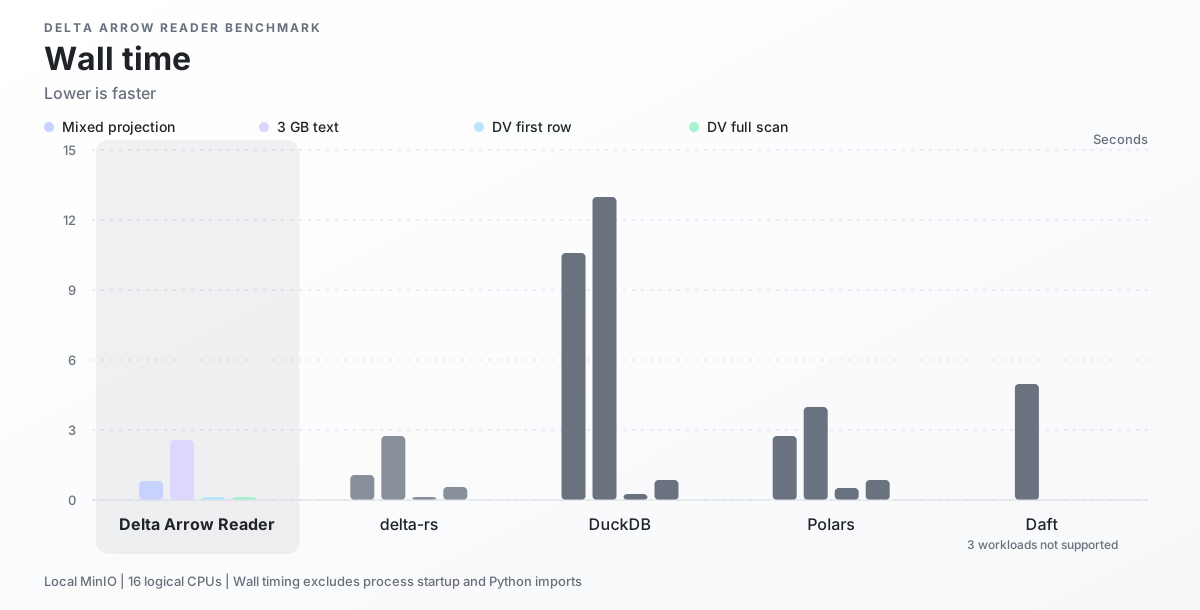
DuckDB, Polars, and Daft promise one engine for many formats. Delta Lake becomes another compatibility box to check, and the jack-of-all-trades tradeoff showed clearly in our benchmarks. DuckDB took 5.8-14.6 times as long as Delta Arrow Reader, and Polars took 1.7-20 times as long. Of our four workloads, Daft could run only the text projection; it took 2.1 times as long and rejected the deletion-vector tables. All three also used more memory in every comparable run. See the benchmark setup and complete results.
§delta-rs
delta-rs is the closest alternative and covers the full Delta lifecycle, including writes. Delta Arrow Reader concentrates on asynchronous reads, bounded memory, Arrow streaming, and efficient deletion vectors. Across the two projection workloads, it ranged from roughly even with delta-rs to finishing 24% sooner. On deletion-vector tables, delta-rs took three times as long to return one live row and seven times as long to scan the full table.
Databricks now recommends deletion vectors for most tables and is rolling out automatic enablement for new tables.
§Install
Add the reader, Tokio, and the futures utilities used by the example:
cargo add delta-arrow-reader futures-util
cargo add tokio --features macros,rt-multi-thread
For DataFusion, follow the DataFusion installation instructions to add the matching dependencies.
§Read a table
Load a table and consume its batches from asynchronous code:
use delta_arrow_reader::DeltaTableBuilder;
use futures_util::TryStreamExt;

let table = DeltaTableBuilder::new("/tmp/example-delta-table")
    .load_table()
    .await?;
let mut batches = table.scan().build().await?.into_stream();

while let Some(batch) = batches.try_next().await? {
    println!("rows={}", batch.num_rows());
}
Once this works, the streaming reader quickstart shows how to select columns, filter rows, limit results, and inspect metrics.
§Query with DataFusion
Enable the datafusion feature when you want to register a Delta table with a
DataFusion SessionContext. Registration loads the Delta metadata; Parquet data
is read when DataFusion executes the query.
The DataFusion quickstart walks through registration and a first SQL query.
§Scope
The reader can load the latest or a selected table snapshot. It supports column selection, row filters, result limits, deletion vectors, bounded read scheduling, and optional DataFusion integration.
It does not write Delta tables, manage transactions, create a Tokio runtime, or provide Delta Funnel orchestration, reporting, or Python APIs.
§Documentation
- Streaming reader quickstart
- DataFusion quickstart
- Architecture
- Execution options
- Scan metrics
- Reader benchmarks
- Rust API reference
§Development
For local checks and documentation setup, see the development guide.
Modules§
- datafusion
- Optional DataFusion table-provider and registration surface.
- guides
- Guides for getting started and understanding how the reader works.
Structs§
- Delta
Batch Stream - Pull-driven stream of finalized logical Arrow batches from one Delta scan.
- Delta
Protocol - Protocol metadata captured from one immutable Delta snapshot.
- Delta
Scan - One immutable, single-use streaming Delta scan plan.
- Delta
Scan Builder - Configures one single-use streaming Delta scan.
- Delta
Scan Execution Options - Bounded execution settings for one Delta scan.
- Delta
Scan Metrics - Shared live metrics for one Delta scan.
- Delta
Scan Metrics Snapshot - Immutable point-in-time metrics for one Delta scan.
- Delta
Table - One immutable loaded Delta table snapshot.
- Delta
Table Builder - Configures and loads one immutable Delta table snapshot.
- Delta
Table Snapshot - Loaded Delta snapshot metadata awaiting logical Arrow schema conversion.
Enums§
- Delta
Comparison - Comparison operation in a Delta predicate.
- Delta
Predicate - Query-engine-neutral Delta predicate.
- Delta
Reader Error - Redacted failure returned by reader APIs.
- Delta
Reader Phase - Reader operation phase associated with an error.
- Delta
Scalar - Non-null scalar value in a Delta predicate.
- Delta
Snapshot Selection - Delta snapshot selected for a table load.
- Parquet
Reader Backend - Backend used to read Parquet data files.
Constants§
- VERSION
- The crate version.
Type Aliases§
- Delta
Storage Options - Storage options forwarded to Delta object-store construction.