# Yororen UI
<p align="center">
<a href="README_zh_CN.md">中文版</a> | <strong>English</strong>
</p>
<p align="center">
<img src="https://img.shields.io/badge/license-Apache%202.0-blue.svg" alt="License">
<img src="https://img.shields.io/badge/rust-edition%202024-yellow.svg" alt="Rust Edition">
<img src="https://img.shields.io/badge/gpui-based-2a2a2a.svg" alt="Powered by gpui">
</p>
<p align="center">
<strong>Yororen UI</strong> is a reusable UI Components + Widgets library built on top of <a href="https://github.com/zed-industries/zed"><code>gpui</code></a> (Zed).
</p>
<p align="center">
It is designed to be consumed by a <code>gpui</code> application crate, while keeping the UI layer self-contained (theme, components, widgets, and embedded icon assets).
</p>
---
## Features
<table>
<tr>
<td><strong>60+ Components</strong></td>
<td>Buttons, inputs, badges, tooltips, icons, headings, cards, modals, tree controls, and more</td>
</tr>
<tr>
<td><strong>Widgets</strong></td>
<td>TitleBar, VirtualList and other advanced widgets</td>
</tr>
<tr>
<td><strong>Theme System</strong></td>
<td><code>GlobalTheme</code> + <code>ActiveTheme</code> helper, supporting light/dark mode</td>
</tr>
<tr>
<td><strong>Animation System</strong></td>
<td>Configurable animations with presets, easing functions, and orchestrator</td>
</tr>
<tr>
<td><strong>Internationalization</strong></td>
<td>Multi-language support (English, Chinese), text direction support (LTR/RTL)</td>
</tr>
<tr>
<td><strong>Accessibility</strong></td>
<td>ARIA support, focus management, keyboard navigation, focus trap</td>
</tr>
<tr>
<td><strong>Embedded Assets</strong></td>
<td>29+ SVG icons embedded via <code>rust-embed</code> (<code>assets/icons/**</code>)</td>
</tr>
<tr>
<td><strong>Notification System</strong></td>
<td>Toast notifications with various styles, queue management, and interactive actions</td>
</tr>
</table>
---
## Quick Start
### 1) Register Components
Some components require one-time registration/initialization. Call `component::init` during app startup:
```rust
use gpui::App;
use yororen_ui::component;
fn init_ui(cx: &mut App) {
component::init(cx);
}
```
### 2) Install the Global Theme
Yororen UI provides a `GlobalTheme` that selects light/dark palettes based on `WindowAppearance`.
```rust
use gpui::App;
use yororen_ui::theme::GlobalTheme;
fn init_theme(cx: &mut App) {
cx.set_global(GlobalTheme::new(cx.window_appearance()));
}
```
Inside render functions you can access theme colors via `ActiveTheme`:
```rust
use gpui::{Render, div};
use yororen_ui::theme::ActiveTheme;
// in render(..., cx: &mut gpui::Context<Self>)
let theme = cx.theme();
let _ = div().bg(theme.surface.base).text_color(theme.content.primary);
```
### 2.5) Install i18n (Locale + RTL)
Yororen UI ships with an embedded JSON translation loader under `locales/*.json`.
Initialize `I18n` during app startup:
```rust
use gpui::App;
use yororen_ui::i18n::{I18n, Locale};
fn init_i18n(cx: &mut App) {
// Load all embedded locales and pick a default.
cx.set_global(I18n::with_embedded(Locale::new("en").unwrap()));
}
```
To preview RTL, switch the locale:
```rust
cx.set_global(I18n::with_embedded(Locale::new("ar").unwrap()));
```
### 3) Provide Assets (Icons)
This crate embeds its icons under `assets/icons/**` and exposes them as a `gpui::AssetSource` (`yororen_ui::assets::UiAsset`).
If your app only needs Yororen UI's icons, you can install them directly:
```rust
use gpui::Application;
use yororen_ui::assets::UiAsset;
let app = Application::new().with_assets(UiAsset);
```
If your app has its own assets too, compose asset sources so both sets are available. Yororen UI includes a small helper `CompositeAssetSource`:
```rust
use gpui::Application;
use yororen_ui::assets::{CompositeAssetSource, UiAsset};
// `MyAsset` is your own AssetSource implementation
let app = Application::new().with_assets(CompositeAssetSource::new(MyAsset, UiAsset));
```
**Important:** Your primary `AssetSource` should return `Ok(None)` when a path doesn't exist. If it returns an error on missing paths, it can prevent fallback to `UiAsset`.
---
## Demo Applications
We provide four official demo applications to help you get started:
| <a href="#counter">Counter</a> | Minimal counter app - perfect for learning basics | <code>cd demo/counter && cargo run</code> |
| <a href="#todolist">TodoList</a> | Todo app template - ideal for building full apps | <code>cd demo/todolist && cargo run</code> |
| <a href="#file-browser">File Browser</a> | File browser with tree structure | <code>cd demo/file_browser && cargo run</code> |
| <a href="#toast-notification">Toast Notification</a> | Toast notification showcase | <code>cd demo/toast_notification && cargo run</code> |
### Counter
<img src="demo/screenshots/counter.png" alt="Counter Demo" width="600">
A minimal counter application demonstrating the most fundamental Yororen UI concepts.
**Key Features:**
- Simple global state management (`Arc<Mutex<T>>`)
- Button click event handling (`on_click`)
- Reactive UI updates (`cx.notify()`)
**Best For:** Developers new to Yororen UI as their first learning example.
### TodoList
<img src="demo/screenshots/todolist.png" alt="TodoList Demo" width="600">
A todo list application template demonstrating standard patterns and best practices for building complete Yororen UI applications.
**Key Features:**
- Application bootstrap pattern
- Modular architecture (state, components, models)
- Global state management
- CRUD operations (create, read, update, delete todo items)
**Best For:** Developers building production applications, serving as a starter template.
### File Browser
<img src="demo/screenshots/file-browser.png" alt="File Browser Demo" width="600">
A fully functional file browser demo showing how to render and interact with complex hierarchical data structures.
**Key Features:**
- **Directory tree** (`Tree` + `TreeItem`): Display file system hierarchy
- **Icons**: File and folder icon display
- **Empty state**: Friendly message when no content
- **Context menu**: Right-click menu for copy/paste operations
**Best For:** Scenarios requiring tree structures, file managers, or any hierarchical data display.
### Toast Notification
<img src="demo/screenshots/toast-notification.png" alt="Toast Notification Demo" width="600">
Demonstrates the Toast notification component with various styles and usage patterns.
**Key Features:**
- Multiple Toast types: Success, Warning, Error, Info, Neutral
- Notification queue management (`NotificationCenter`)
- Interactive notifications (with action buttons)
- Custom notification content
- Different dismissal strategies (auto-dismiss/manual)
**Best For:** Applications that need to provide immediate feedback to users.
---
## Built with Yororen UI
Projects and applications built using Yororen UI.
### Yororen Accelerator
<img src="demo/screenshots/accelerator-1.png" alt="Yororen Accelerator" width="380">
<img src="demo/screenshots/accelerator-2.png" alt="Yororen Accelerator" width="380">
<img src="demo/screenshots/accelerator-3.png" alt="Yororen Accelerator" width="380">
<img src="demo/screenshots/accelerator-4.png" alt="Yororen Accelerator" width="380">
A network acceleration tool with native-transparent TCP forwarding + relay passthrough, built with Yororen UI.
**Key Highlights:**
- Complex dashboard with real-time statistics
- Custom window chrome with native-like experience
- Rich data tables and virtualized lists
- Server management and configuration UI
---
## What's Inside
### Modules
<table>
<tr>
<td><code>yororen_ui::theme</code></td>
<td>
<ul>
<li><code>Theme</code> (palettes)</li>
<li><code>GlobalTheme</code> (<code>gpui::Global</code>)</li>
<li><code>ActiveTheme</code> trait (gives <code>theme()</code> on <code>App</code> and render contexts)</li>
</ul>
</td>
</tr>
<tr>
<td><code>yororen_ui::assets</code></td>
<td>
<ul>
<li><code>UiAsset</code> (<code>gpui::AssetSource</code> for embedded icons)</li>
<li><code>CompositeAssetSource</code> (compose two asset sources with fallback)</li>
</ul>
</td>
</tr>
<tr>
<td><code>yororen_ui::component</code></td>
<td>
<ul>
<li>Common building blocks: <code>button</code>, <code>icon_button</code>, <code>text_input</code>, <code>password_input</code>, <code>tooltip</code>, <code>badge</code>, <code>divider</code>, etc.</li>
<li><code>component::init(cx)</code> for any registrations</li>
</ul>
</td>
</tr>
<tr>
<td><code>yororen_ui::widget</code></td>
<td>Higher-level widgets composed from components. Currently: <code>TitleBar</code> and <code>VirtualList</code>.</td>
</tr>
<tr>
<td><code>yororen_ui::animation</code></td>
<td>
<ul>
<li>Easing functions (linear, quad, cubic, back, elastic, bounce)</li>
<li>Preset animations (fade, slide, scale, bounce)</li>
<li>Animation orchestration (sequence, parallel, stagger)</li>
</ul>
</td>
</tr>
<tr>
<td><code>yororen_ui::a11y</code></td>
<td>
<ul>
<li>ARIA role and attribute definitions</li>
<li>Focus management (FocusTrap)</li>
<li>Accessibility helpers</li>
</ul>
</td>
</tr>
<tr>
<td><code>yororen_ui::i18n</code></td>
<td>
<ul>
<li>Multi-language support</li>
<li>Locale management and runtime switching</li>
<li>Number and date formatting</li>
</ul>
</td>
</tr>
<tr>
<td><code>yororen_ui::notification</code></td>
<td>
<ul>
<li><code>Toast</code> component</li>
<li><code>NotificationCenter</code> for queue management</li>
</ul>
</td>
</tr>
</table>
### Component Overview
<table>
<tr>
<td><strong>Foundation</strong></td>
<td>Button, IconButton, Icon, Label, Text, Heading, Spacer, Divider, Card, FocusRing</td>
</tr>
<tr>
<td><strong>Inputs</strong></td>
<td>TextInput, PasswordInput, NumberInput, TextArea, SearchInput, FilePathInput, KeybindingInput</td>
</tr>
<tr>
<td><strong>Selection</strong></td>
<td>Checkbox, Radio, RadioGroup, Switch, Slider, Select, ComboBox</td>
</tr>
<tr>
<td><strong>Display</strong></td>
<td>Badge, Avatar, Image, Progress, Skeleton, Tag, Spinner</td>
</tr>
<tr>
<td><strong>Overlays</strong></td>
<td>Tooltip, Popover, Modal, Toast, DropdownMenu</td>
</tr>
<tr>
<td><strong>Layout</strong></td>
<td>Card, ListItem, EmptyState, Disclosure, ClickableSurface</td>
</tr>
<tr>
<td><strong>Interaction</strong></td>
<td>ToggleButton, SplitButton, DragHandle, ButtonGroup, ShortcutHint, KeybindingDisplay</td>
</tr>
<tr>
<td><strong>Tree/Hierarchical</strong></td>
<td>Tree, TreeNode, TreeItem, TreeData, TreeDrag</td>
</tr>
<tr>
<td><strong>Forms</strong></td>
<td>Form, ContextMenuTrigger</td>
</tr>
<tr>
<td><strong>Navigation</strong></td>
<td>TitleBar widget, VirtualList, VirtualRow</td>
</tr>
</table>
### Icons
The component icon API uses strongly-typed names:
```rust
use yororen_ui::component::{icon, IconName};
let _ = icon(IconName::Minecraft);
```
Icon paths map to embedded SVG assets like `icons/minecraft.svg`.
---
## Requirements
<ul>
<li><strong>Rust edition:</strong> 2024 (works with the toolchain used by your <code>gpui</code> app)</li>
<li><code>gpui</code> is provided via <a href="https://crates.io/crates/gpui-ce"><code>gpui-ce</code></a> crate on crates.io</li>
</ul>
---
## Installation
### From crates.io (recommended)
```toml
[dependencies]
yororen_ui = "0.2"
```
### From GitHub (latest development)
```toml
[dependencies]
yororen_ui = { git = "https://github.com/MeowLynxSea/yororen-ui.git", tag = "v0.2.0" }
```
### From a local path (development)
```toml
[dependencies]
yororen_ui = { path = "../yororen-ui" }
```
---
## Dependencies
<code>gpui-ce</code> is distributed via crates.io with semantic versioning. Make sure your application uses a compatible version:
```toml
[dependencies]
gpui = { package = "gpui-ce", version = "0.3" }
```
In this repository, <code>gpui-ce</code> is specified in <code>Cargo.toml</code>.
---
## License
<ul>
<li>Yororen UI is licensed under the <strong>Apache License, Version 2.0</strong>. See <code>LICENSE</code>.</li>
<li>This project is built on top of <code>gpui</code> (Zed Industries), also Apache-2.0.</li>
</ul>
See <code>NOTICE</code> for attribution details.
---
## Contributing
Issues and PRs are welcome.
When changing visuals:
<ul>
<li>Include screenshots or a short recording</li>
<li>Keep changes <code>rustfmt</code> clean</li>
</ul>
---
## Wiki
See <a href="https://github.com/MeowLynxSea/yororen-ui/wiki" target="_blank">Yororen UI Wiki</a> for detailed documentation, guides, and component references.
---
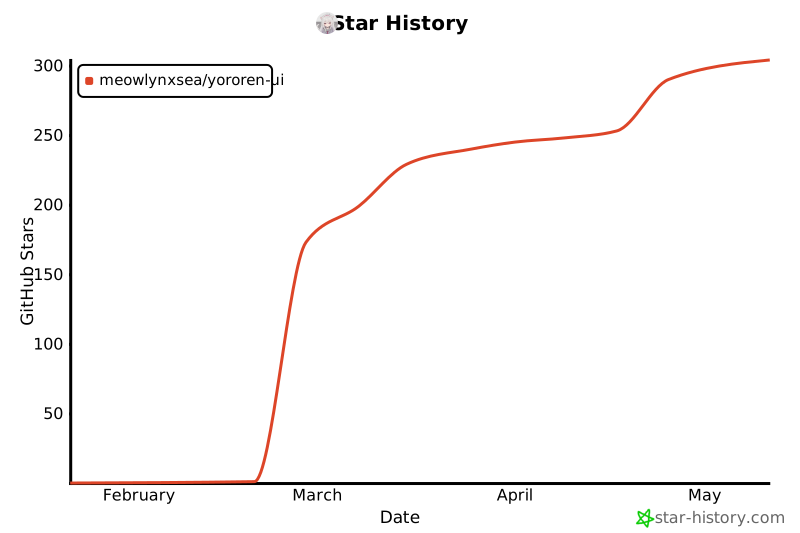
## Star History
[](https://www.star-history.com/#MeowLynxSea/yororen-ui&type=date&legend=top-left)