
xct2cli
Library and CLI for transforming Xcode Instruments .trace bundles
into output that's useful to humans and LLMs. Apple Silicon only.
The crate is library-forward: xct2cli (the binary) is a thin clap
shell over xct2cli (the lib). Other tools can depend on the lib with
default-features = false to skip the CLI deps.
NOTE: This is kind of some LLM bullshit. I kept having Claude Code use Instruments to profile code and it would always create a Python script to interpret the results. This project is my attempt to kill the Python script it would always generate, and get richer info at the same time.
Requirements
- macOS with Xcode (
/usr/bin/xctraceships with it). - Apple Silicon for the disassembler (we use
capstonein arm64 mode). - Optional:
cargo-instrumentsfor recording from Cargo projects.
Commands
xct2cli toc       <trace>                          # what's in the bundle
xct2cli hotspots  <trace> [--binary BIN] [--dsym DSYM] [--filter SUBSTR]
xct2cli slide     <trace> [--binary BIN] [--dsym DSYM]
xct2cli annotate  <trace> --function NAME [--mode interleaved] [--event NAME | --metric N]
xct2cli callgraph <trace> [--function NAME] [--top 10]
xct2cli counters  <trace> [--sort-by N]
xct2cli events    <trace>                          # list metric / pmi-event names
xct2cli record    -t TEMPLATE -o OUT.trace [-f] -- ./bin args
Global flags: --color {auto,always,never} (auto-detect TTY + honor
NO_COLOR), --verbose, --json on every command for
machine-readable output. ASLR slide is recovered automatically from
the trace's kdebug image-load events whenever --binary is provided;
xct2cli slide is the escape hatch when that fails. <binary>.dSYM
next to the binary is picked up automatically - pass --dsym only for
non-standard layouts.
Time profile (Time Profiler trace)
Record and inspect the bundle
-f/--force removes an existing bundle at --output first; xctrace
itself errors if the bundle already exists.
run #1
  template: Time Profiler
  duration: 1.354983s
  device:   caladan (MacBook Pro, 26.4 (25E246))
  process:  profile_compress (pid 85408)
  processes:
    pid     0  kernel  /System/Library/Kernels/kernel.release.t8142
    pid 85408  profile_compress  /Users/lander/dev/acceleration/target/release/examples/profile_compress
  tables (40):
    tick
    time-sample
    time-profile
    kdebug
    ...
Hotspots: per-CPU summary + top PCs
samples: 500
per CPU:
  CPU 0 CPU 0 (E Core)              1 samples
  CPU 6 CPU 6 (S Core)            152 samples
  CPU 7 CPU 7 (S Core)            118 samples
  CPU 8 CPU 8 (S Core)            111 samples
  CPU 9 CPU 9 (S Core)            118 samples

timeline (10ms buckets, 51 buckets):
  ms_off cpu0 cpu6 cpu7 cpu8 cpu9
       0     0     2     1     3     2
      40     0     6     0     4     0
      70     0     9     0     0     1
     130     0     8     2     0     0
     ...

top 25 PCs:
      94  0x0000000100ac249c  lzxc::match_finder::MatchFinder::process  match_finder.rs:202
      68  0x0000000100ac237c  lzxc::match_finder::MatchFinder::process  match_finder.rs:182
      38  0x0000000100ac2460  lzxc::match_finder::MatchFinder::process  match_finder.rs
      31  0x0000000100ac236c  lzxc::match_finder::MatchFinder::process  match_finder.rs:182
       ...
Filter out stdlib / system noise
--filter SUBSTR keeps only PCs whose resolved function name contains
SUBSTR (case-insensitive), applied after symbolication and before
--top truncation:
Callgraph: flamegraph-style top-down view
Inclusive samples (function appears anywhere in the stack - bar width in a flamegraph):
top functions (inclusive)  (499 samples)

      497   99.6%  _main
      497   99.6%  std::rt::lang_start::{{closure}}
      497   99.6%  std::sys::backtrace::__rust_begin_short_backtrace
      497   99.6%  profile_compress::main
      495   99.2%  lzxc::Encoder::encode_chunk
      359   71.9%  lzxc::match_finder::MatchFinder::process
      128   25.7%  lzxc::verbatim::emit_verbatim_block
        9    1.8%  lzxc::huffman::build_path_lengths
Drill into a hot function's callees
Shows what encode_chunk was calling at sample time (its stack-frame
children):
callees of encode_chunk  (495 samples)

      359   72.5%  lzxc::match_finder::MatchFinder::process
      128   25.9%  lzxc::verbatim::emit_verbatim_block
        3    0.6%  0x182ea9418
Annotate: per-instruction view with source
callgraph works on stack-walked frames, so functions that were
inlined into their caller are invisible - kperf only saw one stack
frame for the whole inline chain. To see source-level inlined callees
of a function, use annotate instead:
--mode interleaved groups consecutive instructions by their innermost
inlined source location, prints stats + function + source per group,
then the asm:
[931 samples / 3 insns]  lzxc::match_finder::MatchFinder::find_best_match  match_finder.rs:278    inlined into MatchFinder::process at match_finder.rs:182
    let next_candidate_abs = prev[c_rel] as u64;
          931  ##########  0x10250e378  ldr w15, [x22, x11, lsl #2]
The default --mode instructions is asm-first: every sampled
instruction with its sample count + heat bar + source-line comment,
followed by an annotate-snippets block per source file showing the
hot lines in context (hot-line clusters more than 2 * --context lines
apart split into separate snippets):
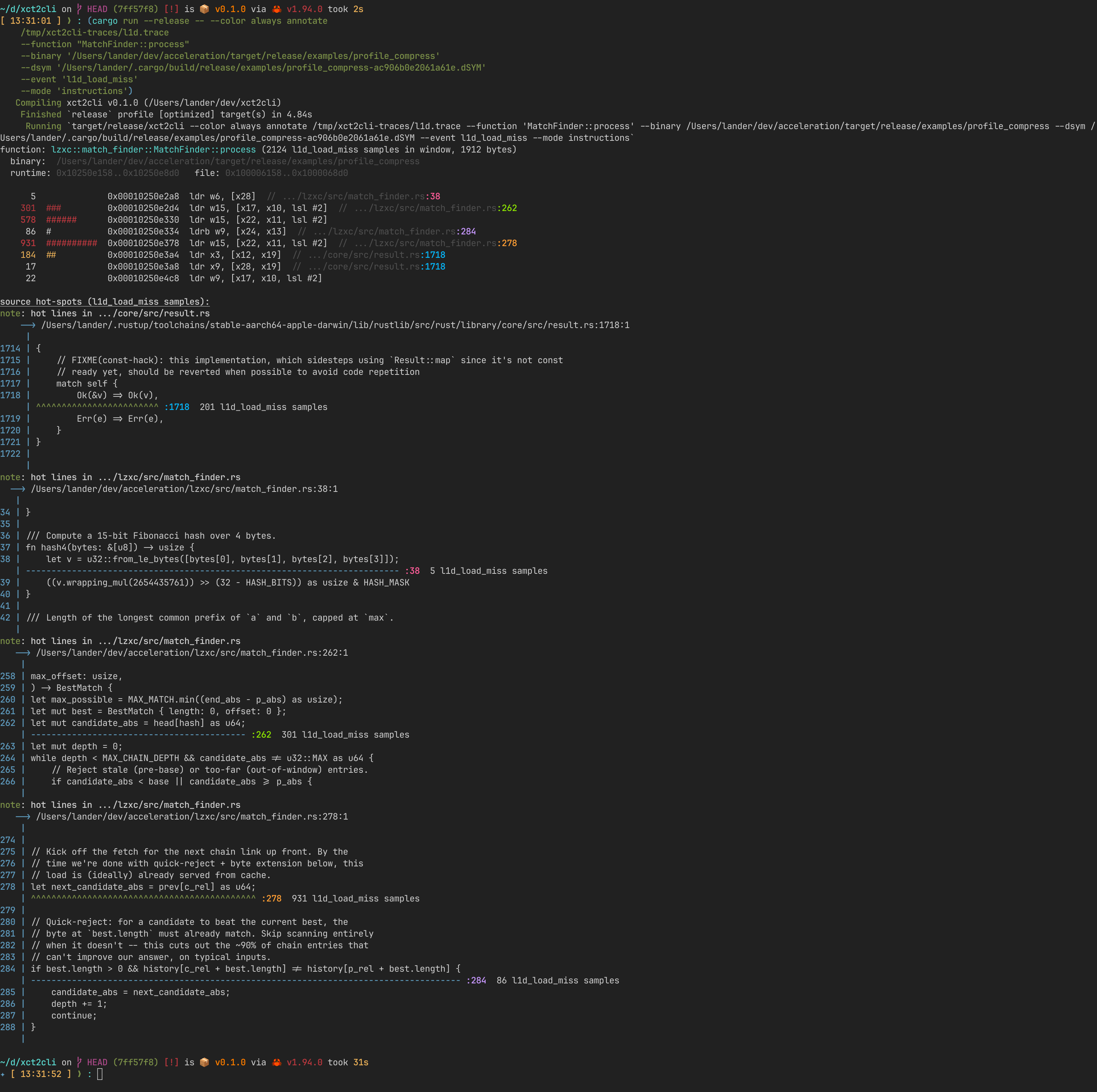
--mode source collapses to just the annotate-snippets source-line
callouts.
Per-instruction cache miss attribution (CPU Counters trace)
Picking a template
For literal cache miss attribution you need a .tracetemplate
configured for PMI-overflow sampling on a memory event. Two are
checked in under templates/:
templates/L1D_Miss.tracetemplate- Apple's Guided "L1D Miss Sampling" mode. Capturesl1d_load_miss,l1d_store_miss,l1d_tlb_missevents with full callstacks at the PMI overflow.templates/l2_miss.tracetemplate- Manual mode samplingPL2_CACHE_MISS_LD(Apple Silicon's per-cluster L2). Manual mode doesn't capture per-PMI callstacks, so PCs are recovered by joining each PMI sample to the nearesttime-samplerow from the co-recorded Time Profiler.
Record and list available events
metrics (use with `annotate --metric N` or `counters --sort-by N`):
  [0]  Cycles
  [1]  L1D Cache Load Misses
  [2]  L1D Cache Store Misses
  [3]  L1D TLB Misses

pmi events (use with `annotate --event NAME`):
  l1d_load_miss              2473   61.2%
  l1d_store_miss             1546   38.3%
  l1d_tlb_miss                 20    0.5%
Attribute misses to specific source lines
function: lzxc::match_finder::MatchFinder::process (2124 l1d_load_miss samples in window, 1912 bytes)

[301 l1d_load_miss samples / 3 insns]  lzxc::match_finder::MatchFinder::find_best_match  match_finder.rs:262    inlined into MatchFinder::process at match_finder.rs:182
    let mut candidate_abs = head[hash] as u64;
          301  ###         0x10250e2d4  ldr w15, [x17, x10, lsl #2]

[578 l1d_load_miss samples / 1 insns]  (no source mapping)    inlined into MatchFinder::process at match_finder.rs:182
          578  ######      0x10250e330  ldr w15, [x22, x11, lsl #2]

[931 l1d_load_miss samples / 3 insns]  lzxc::match_finder::MatchFinder::find_best_match  match_finder.rs:278    inlined into MatchFinder::process at match_finder.rs:182
    let next_candidate_abs = prev[c_rel] as u64;
          931  ##########  0x10250e378  ldr w15, [x22, x11, lsl #2]
In color:
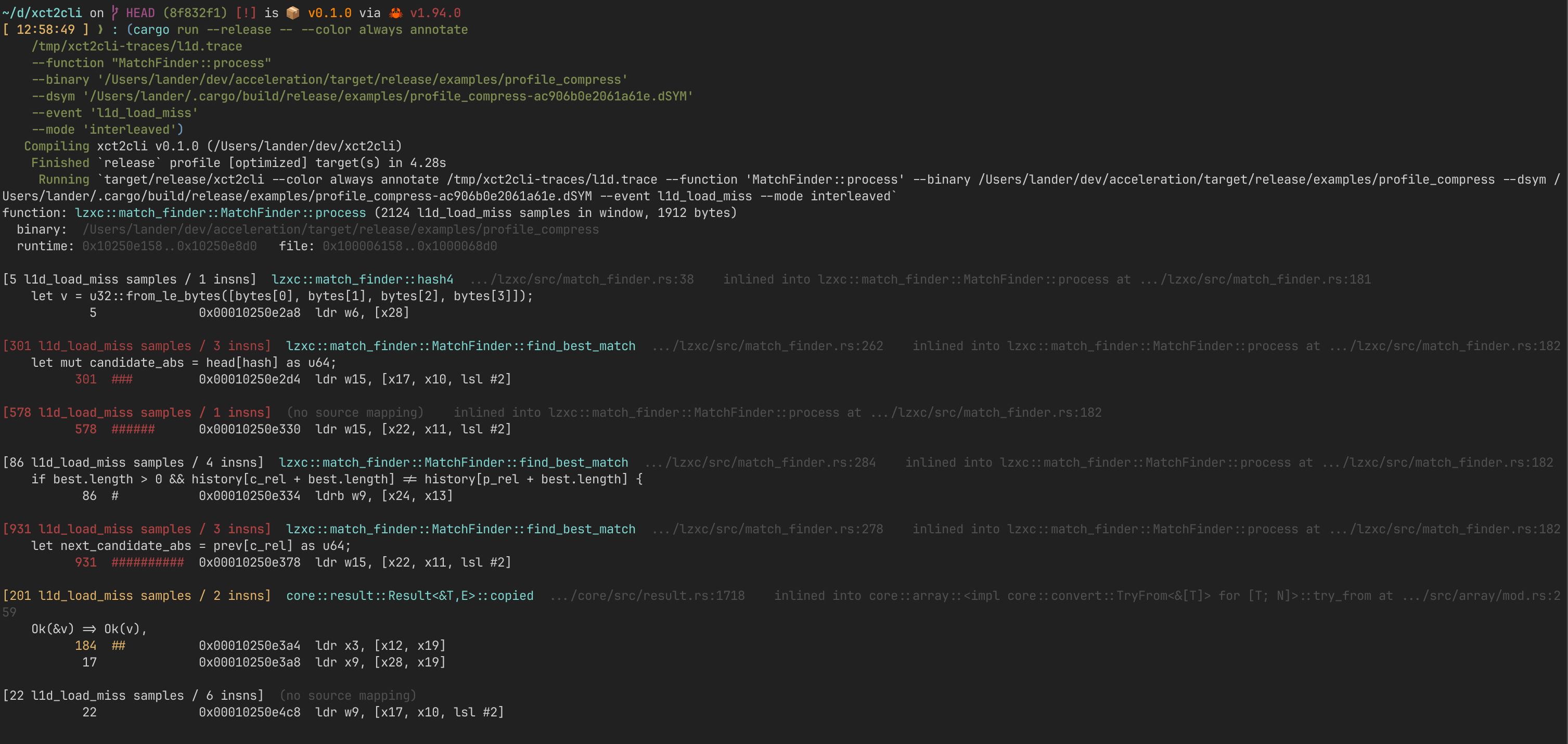
In this trace, 931 of 2124 L1D load misses (44%) come from a single
prev[c_rel] read in find_best_match at match_finder.rs:278 - the
hash-chain walk that the compiler inlined into MatchFinder::process.
Adding new templates
xctrace's CLI doesn't expose CPU Counters' Mode dropdown, so any new
sampling mode (e.g. branch-mispredict, store-buffer-stall) needs a
.tracetemplate built once in Instruments.app:
- New Document -> Blank -> add CPU Counters instrument.
- Configuration Manual, Sample By Events, pick the Sampling Event, set Sample Every (start at 1M; lower if samples are sparse).
- Add a Time Profiler instrument with High Frequency Sampling on so PMI samples can be joined to a PC.
- File -> Save as Template -> put it in
templates/.
xct2cli events <trace> will show whatever event name Apple wrote
into the trace; --event NAME works the same as for the bundled
templates.
Library use
use TraceBundle;
use HotspotsBuilder;
use Palette;
let bundle = open?;
let report = new
.top
.binary
.run?;
println!;
Most data-extraction helpers are inherent methods on TraceBundle:
pc_samples, pmi_samples, pmi_event_names, metric_labels,
per_pc_pmi_count, per_pc_metric_deltas, image_loads,
counters_profile_event. BinaryInfo::open(path) parses Mach-O and
exposes slide_from(&loads) for ASLR-slide detection.