1
2
3
4
5
6
7
8
9
10
11
12
13
14
15
16
17
18
19
20
21
22
23
24
25
26
27
28
29
30
31
32
33
34
35
36
37
38
39
40
41
42
43
44
45
46
47
48
49
50
51
52
53
54
55
56
57
58
59
60
61
62
63
64
65
66
67
68
69
70
71
72
73
74
75
76
77
78
79
80
81
82
83
84
85
86
87
88
89
90
91
92
93
94
95
96
97
98
99
100
101
102
103
104
105
106
107
108
109
110
111
112
113
114
115
116
117
118
119
120
121
122
123
124
125
126
127
128
129
130
131
132
133
134
135
136
137
138
139
140
141
142
143
144
145
146
147
148
149
150
151
152
153
154
155
156
157
158
159
160
//! # Markdown
//!
//! `rustdoc` uses markdown as a format to add markup (pun intended) to text.
//! Markup are simple things like *emphasis*:
//! ```markdown
//! *emphasis*
//! ```
//! or even **strong emphasis**:
//! ```markdown
//! **strong emphasis**
//! ```
//!
//! But we also have seen code examples in triple backticks:
//!
//! ~~~text
//! ```
//! Rust code goes here
//! ```
//! ~~~
//!
//! Markdown is actually a superset of HTML (Hypertext Markup Language).
//! But with markdown you can write things much more succintly:
//!
//! ```markdown
//! * one
//! * two
//! * three
//! ```
//!
//! compared to
//!
//! ```html
//! <ul>
//! <li>one</li>
//! <li>two</li>
//! <li>three</li>
//! </ul>
//! ```
//!
//! Which are both rendered as
//!
//! <ul>
//! <li>one</li>
//! <li>two</li>
//! <li>three</li>
//! </ul>
//!
//! # The different dialects of Markdown
//!
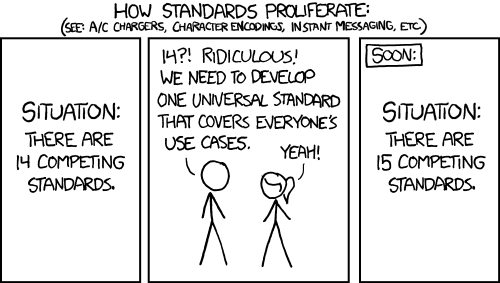
//! There are different markdown implementations.
//! To unite them all, a new standard has been created: Commonmark
//!
//! 
//!
//! Commonmark is great for writing regular text-based documentation,
//! but for software-oriented texts, there is [GitHub-flavored markdown](https://github.github.com/gfm/),
//! which is also what rustup uses.
//! GitHub-flavored markdown is an extension of CommonMark.
//! For example, it provides Tables:
//!
//! |Programming language|execution model|
//! |--------------------|---------------|
//! |Rust|Compiled to native code|
//! |C|Compiled to native code|
//! |Python|Compiled to bytecode|
//!
//! <script>
//! function check_javascript() {
//! alert("JavaScript is enabled");
//! }
//! </script>
//!
//! GitHub-flavored markdown disallows some HTML tags for security reasons.
//! But it seems that rustdoc doesn't mind those tags:
//! <a href="javascript:check_javascript()">Check if JavaScript is enabled</a>
//!
//! # Paragraph
//!
//! A very useful element in markdown are paragraphs.
//! Any text that is surrounded by at least one empty line is a rendered as a paragraph.
//!
//! # Links
//!
//! Code documentation is typically not meant as linear reading material.
//! You start somewhere, and depending on what you need to know more about,
//! you follow some links.
//!
//! The syntax to define a link in Markdown is
//!
//! ```markdown
//! [link text](link target)
//! ```
//! For example, to link to the [Rust homepage](https://www.rust-lang.org/) we use
//! ```markdown
//! [Rust homepage](https://www.rust-lang.org/)
//! ```
//!
//! Alternatively, if the link text and the link target are the same,
//! you can use `<url>`:
//! ```markdown
//! <https://rust-lang.org>.
//! ```
//!
//! `rustdoc` also allows special links to Rust documentation!
//! For example, to link to the [greet](super::greetings::greet) function
//! from earlier, use the code
//!
//! ```markdown
//! [greet](super::greetings::greet)
//! ```
//! As you can see, the link target is a Rust module specification
//! that is relative to the current module.
//! You can also use an [absolute module path](crate::greetings::greet):
//!
//! ```markdown
//! [absolute module path](crate::greetings::greet)
//! ```
//!
//! Which points to [the same target](crate::greetings::greet).
//!
//! ## Headlines
//!
//! Markdown supports to syntaxes for headlines:
//!
//! * Headlines starting with 1-6 # signs
//! * Headlines that are followed by a line containing only `=` or `-`
//!
//! ```markdown
//! ordinary text.
//!
//! ## This is a level 1 headline
//!
//! This is another level 1 headline
//! ================================
//!
//! ### This is a level 2 headline
//!
//! This is also a level two headline
//! ---------------------------------
//! ```
//! Which looks like this:
//!
//! ordinary text.
//!
//! # This is a level 1 headline
//!
//! This is another level 1 headline
//! ================================
//!
//! ## This is a level 2 headline
//!
//! This is also a level two headline
//! ---------------------------------
//!
//! **But when you actually look at the HTML source code, you see that the priority of these headlines is reduced,
//! because `rustdoc` prioritises the general structure of the API documentation higher than free-text markdown text.**
//!
//! If you want to learn more about markdown, I suggest you check out the [GitHub flavored markdown specification](https://github.github.com/gfm/).
//!
//! Now that you know how to write documentation for your code, we need to [make it accessible to other people](super::hosting).