# WinSafe
[](https://crates.io/crates/winsafe)
[](https://crates.io/crates/winsafe)
[](https://opensource.org/licenses/MIT)
[](https://github.com/rodrigocfd/winsafe)
Windows API and GUI in safe, idiomatic Rust.
WinSafe has:
* low-level Win32 API constants, functions and structs;
* high-level structs to build native Win32 GUI applications.
WinSafe documentation:
| Stable | [docs.rs/winsafe](https://docs.rs/winsafe) |
| Nightly (master) | [rodrigocfd.github.io/winsafe/winsafe](https://rodrigocfd.github.io/winsafe/winsafe/) |
## Current status
### Native FFI items implemented
| Functions | 913 |
| Structs | 264 |
| Constants | 12,283 |
| Window messages | 684 |
| Handles | 54 |
| COM interfaces | 98 |
| COM methods | 643 |
Although WinSafe already has a lot of Win32 APIs, it doesn't have *everything*, simply because Win32 API is gigantic. So if you're looking for a comprehensive Win32 coverage, take a look at [winapi](https://crates.io/crates/winapi) or [windows](https://crates.io/crates/windows) crates, which are *unsafe*, but have everything.
### High-level GUI controls implemented
* User custom window/dialog – main, modal, modeless, control, message-only.
* Native controls – button, check box, combo box, date and time picker, edit, header, label, list box, list view, month calendar, progress bar, radio button, status bar, tab, track bar, tree view, up down.
## Usage
Add the dependency in your `Cargo.toml`:
```toml
[dependencies]
winsafe = { version = "0.0.28", features = [] }
```
Then you must enable the [Cargo features](https://doc.rust-lang.org/cargo/reference/features.html#the-features-section) you want to be included – these modules are named after native Windows DLL and library names, mostly.
### Cargo features
The APIs in WinSafe are split into Cargo features to speed up compilation time. Only the features you include will be compiled.
The following Cargo features are available so far:
| `advapi` | Advapi32.dll and Ktmw32.dll, advanced kernel functions |
| `comctl` | ComCtl32.dll, the [Common Controls](https://learn.microsoft.com/en-us/windows/win32/api/_controls/) |
| `dshow` | [DirectShow](https://learn.microsoft.com/en-us/windows/win32/directshow/directshow) |
| `dwm` | [Desktop Window Manager](https://learn.microsoft.com/en-us/windows/win32/dwm/dwm-overview) |
| `dxgi` | [DirectX Graphics Infrastructure](https://learn.microsoft.com/en-us/windows/win32/direct3ddxgi/dx-graphics-dxgi) |
| `gdi` | Gdi32.dll, the [Windows GDI](https://learn.microsoft.com/en-us/windows/win32/gdi/windows-gdi) |
| **`gui`** | **The WinSafe high-level GUI abstractions** |
| `htmlhelp` | [HTML Help](https://learn.microsoft.com/en-us/previous-versions/windows/desktop/htmlhelp/microsoft-html-help-1-4-sdk) |
| `kernel` | Kernel32.dll, basic kernel functions |
| `mf` | [Media Foundation](https://learn.microsoft.com/en-us/windows/win32/medfound/microsoft-media-foundation-sdk) |
| `ole` | Basic OLE/COM support |
| `oleaut` | [OLE Automation](https://learn.microsoft.com/en-us/windows/win32/api/_automat/) |
| `psapi` | [Process Status API](https://learn.microsoft.com/en-us/windows/win32/api/_psapi/) |
| **`raw-dylib`** | **Enables [raw-dylib](https://doc.rust-lang.org/reference/items/external-blocks.html#the-link-attribute) linking** |
| `shell` | Shell32.dll, Shlwapi.dll, and Userenv.dll, the COM-based [Windows Shell](https://learn.microsoft.com/en-us/windows/win32/shell/shell-entry) |
| `taskschd` | [Task Scheduler](https://learn.microsoft.com/en-us/windows/win32/taskschd/task-scheduler-start-page) |
| `user` | User32.dll and ComDlg32.dll, the basic Windows GUI support |
| `uxtheme` | UxTheme.dll, extended window theming |
| `version` | Version.dll, to manipulate *.exe version info |
| `wininet` | [Windows Internet](https://learn.microsoft.com/en-us/windows/win32/wininet/portal) |
| `winspool` | [Print Spooler API](https://learn.microsoft.com/en-us/windows/win32/printdocs/print-spooler-api) |
Don't worry about including dependency features. Once you use a feature, Cargo will add and resolve all dependencies automatically.
You can visualize the complete dependency graph [here](https://github.com/rodrigocfd/winsafe/blob/master/features-chart.md).
## Example
**Note:** You can find several examples in the dedicated repo: [github.com/rodrigocfd/winsafe-examples](https://github.com/rodrigocfd/winsafe-examples)
WinSafe allows you to create windows in two ways:
* programmatically defining parameters; or
* [loading dialogs](https://github.com/rodrigocfd/winsafe-examples/tree/master/03_dialog_resources) from a `.res` file created with a WYSIWYG resource editor.
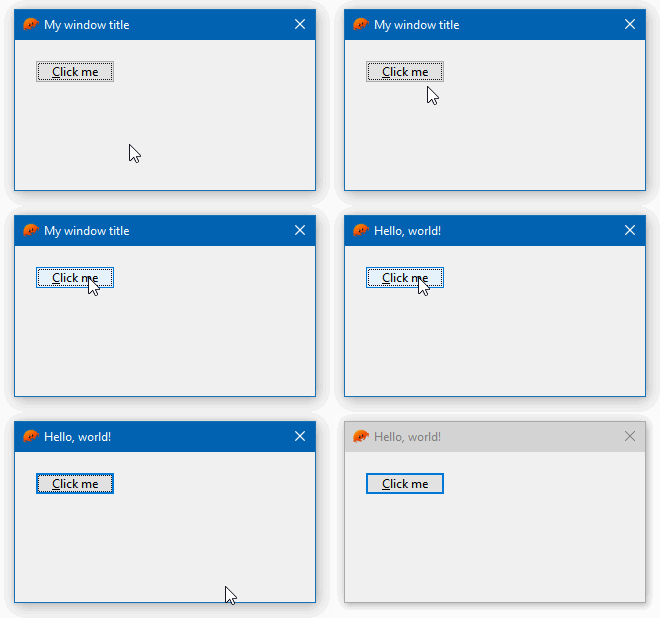
The [example below](https://github.com/rodrigocfd/winsafe-examples/tree/master/01_button_click/) creates a window with a button programmatically. Note how the click event is handled with a closure:
```toml
[dependencies]
winsafe = { version = "0.0.28", features = ["gui"] }
```
```rust
#![windows_subsystem = "windows"]
use winsafe::{self as w, gui, prelude::*};
fn main() {
if let Err(e) = MyWindow::create_and_run() {
eprintln!("{}", e);
}
}
#[derive(Clone)]
pub struct MyWindow {
wnd: gui::WindowMain, // responsible for managing the window
btn_hello: gui::Button, // a button
}
impl MyWindow {
pub fn create_and_run() -> w::AnyResult<i32> {
let wnd = gui::WindowMain::new(
// instantiate the window manager
gui::WindowMainOpts {
title: "My window title",
size: gui::dpi(300, 150),
..Default::default() // leave all other options as default
},
);
let btn_hello = gui::Button::new(
&wnd, // the window manager is the parent of our button
gui::ButtonOpts {
text: "&Click me",
position: gui::dpi(20, 20),
..Default::default()
},
);
let new_self = Self { wnd, btn_hello };
new_self.events(); // attach our events
new_self.wnd.run_main(None) // show the main window; will block until closed
}
fn events(&self) {
let wnd = self.wnd.clone(); // clone so it can be passed into the closure
self.btn_hello.on().bn_clicked(move || {
wnd.hwnd().SetWindowText("Hello, world!")?; // call native Windows API
Ok(())
});
}
}
```
## License
Licensed under [MIT license](https://opensource.org/licenses/MIT), see [LICENSE.md](LICENSE.md) for details.