//! [<img alt="github" src="https://img.shields.io/badge/github-udoprog/winctx-8da0cb?style=for-the-badge&logo=github" height="20">](https://github.com/udoprog/winctx)
//! [<img alt="crates.io" src="https://img.shields.io/crates/v/winctx.svg?style=for-the-badge&color=fc8d62&logo=rust" height="20">](https://crates.io/crates/winctx)
//! [<img alt="docs.rs" src="https://img.shields.io/badge/docs.rs-winctx-66c2a5?style=for-the-badge&logoColor=white&logo=data:image/svg+xml;base64,PHN2ZyByb2xlPSJpbWciIHhtbG5zPSJodHRwOi8vd3d3LnczLm9yZy8yMDAwL3N2ZyIgdmlld0JveD0iMCAwIDUxMiA1MTIiPjxwYXRoIGZpbGw9IiNmNWY1ZjUiIGQ9Ik00ODguNiAyNTAuMkwzOTIgMjE0VjEwNS41YzAtMTUtOS4zLTI4LjQtMjMuNC0zMy43bC0xMDAtMzcuNWMtOC4xLTMuMS0xNy4xLTMuMS0yNS4zIDBsLTEwMCAzNy41Yy0xNC4xIDUuMy0yMy40IDE4LjctMjMuNCAzMy43VjIxNGwtOTYuNiAzNi4yQzkuMyAyNTUuNSAwIDI2OC45IDAgMjgzLjlWMzk0YzAgMTMuNiA3LjcgMjYuMSAxOS45IDMyLjJsMTAwIDUwYzEwLjEgNS4xIDIyLjEgNS4xIDMyLjIgMGwxMDMuOS01MiAxMDMuOSA1MmMxMC4xIDUuMSAyMi4xIDUuMSAzMi4yIDBsMTAwLTUwYzEyLjItNi4xIDE5LjktMTguNiAxOS45LTMyLjJWMjgzLjljMC0xNS05LjMtMjguNC0yMy40LTMzLjd6TTM1OCAyMTQuOGwtODUgMzEuOXYtNjguMmw4NS0zN3Y3My4zek0xNTQgMTA0LjFsMTAyLTM4LjIgMTAyIDM4LjJ2LjZsLTEwMiA0MS40LTEwMi00MS40di0uNnptODQgMjkxLjFsLTg1IDQyLjV2LTc5LjFsODUtMzguOHY3NS40em0wLTExMmwtMTAyIDQxLjQtMTAyLTQxLjR2LS42bDEwMi0zOC4yIDEwMiAzOC4ydi42em0yNDAgMTEybC04NSA0Mi41di03OS4xbDg1LTM4Ljh2NzUuNHptMC0xMTJsLTEwMiA0MS40LTEwMi00MS40di0uNmwxMDItMzguMiAxMDIgMzguMnYuNnoiPjwvcGF0aD48L3N2Zz4K" height="20">](https://docs.rs/winctx)
//!
//! A minimal window context for Rust on Windows.
//!
//! *I read msdn so you don't have to*.
//!
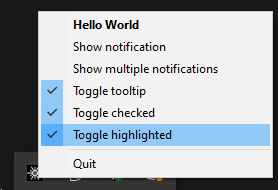
//! 
//!
//! This crate provides a minimalistic method for setting up and running a
//! [*window*][window]. A window on windows is more like a generic application
//! framework and doesn't actually need to have any visible elements, but is
//! necessary to do many of the productive things you might want to do on
//! Windows.
//!
//! Some example of this are:
//!
//! * [Register and use a tray icon with a popup menu][showcase], or the
//! "clickable icons" you see in the bottom right for running applications.
//! * [Send desktop notifcations][showcase], or "balloons" as they are sometimes
//! called.
//! * Interact with the clipboard and [monitor it for changes][clipboard].
//! * [Copy data to a remote process][copy-data], allowing for very simple
//! unidirection IPC.
//!
//! There are a few additional APIs provided by this crate because they are also
//! useful:
//!
//! * [Basic safe registry access][registry] allowing for example of the
//! registration of an application that should be [started automatically] when
//! the user logs in.
//!
//! This crate is an amalgamation and cleanup of code I've copied back and forth
//! between my projects, so it is fairly opinionated to things I personally find
//! useful. Not everything will be possible, but if there is something you're
//! missing and ~~hate being happy~~ enjoy Windows programming feel free to open
//! an issue or a pull request.
//!
//! <br>
//!
//! ## Example
//!
//! The primary purpose of this crate is to:
//! * Define a window and its capabilities. I.e. if it should have a context
//! menu or receive clipboard events.
//! * Handle incoming [Events][Event] from the window.
//!
//! The basic loop looks like this:
//!
//! ```no_run
//! use std::pin::pin;
//!
//! use tokio::signal::ctrl_c;
//! use winctx::{Event, CreateWindow};
//!
//! # macro_rules! include_bytes { ($path:literal) => { &[] } }
//! const ICON: &[u8] = include_bytes!("tokio.ico");
//!
//! # #[tokio::main] async fn main() -> winctx::Result<()> {
//! let mut window = CreateWindow::new("se.tedro.Example")
//! .window_name("Example Application");
//!
//! let icon = window.icons().insert_buffer(ICON, 22, 22);
//!
//! let area = window.new_area().icon(icon);
//!
//! let menu = area.popup_menu();
//!
//! let first = menu.push_entry("Example Application").id();
//! menu.push_separator();
//! let quit = menu.push_entry("Quit").id();
//! menu.set_default(first);
//!
//! let (sender, mut event_loop) = window
//! .build()
//! .await?;
//!
//! let mut ctrl_c = pin!(ctrl_c());
//! let mut shutdown = false;
//!
//! loop {
//! let event = tokio::select! {
//! _ = ctrl_c.as_mut(), if !shutdown => {
//! sender.shutdown();
//! shutdown = true;
//! continue;
//! }
//! event = event_loop.tick() => {
//! event?
//! }
//! };
//!
//! match event {
//! Event::MenuItemClicked { item_id, .. } => {
//! println!("Menu entry clicked: {item_id:?}");
//!
//! if item_id == quit {
//! sender.shutdown();
//! }
//! }
//! Event::Shutdown { .. } => {
//! println!("Window shut down");
//! break;
//! }
//! _ => {}
//! }
//! }
//! # Ok(()) }
//! ```
//!
//! [window]: https://learn.microsoft.com/en-us/windows/win32/learnwin32/creating-a-window
//! [Event]: https://docs.rs/winctx/latest/winctx/enum.Event.html
//! [clipboard]: https://github.com/udoprog/winctx/blob/main/examples/clipboard.rs
//! [copy-data]: https://github.com/udoprog/winctx/blob/main/examples/copy_data.rs
//! [registry]: https://github.com/udoprog/winctx/blob/main/examples/registry.rs
//! [showcase]: https://github.com/udoprog/winctx/blob/main/examples/showcase.rs
//! [started automatically]: https://docs.rs/winctx/latest/winctx/struct.AutoStart.html
#![allow(clippy::module_inception)]
#![deny(missing_docs)]
/// Convenient result alias for this crate.
pub type Result<T, E = Error> = core::result::Result<T, E>;
mod clipboard;
mod convert;
#[doc(inline)]
pub use self::registry::{OpenRegistryKey, RegistryKey};
mod registry;
#[doc(inline)]
pub use self::window::Window;
pub mod window;
mod window_loop;
#[doc(inline)]
use self::notification::Notification;
mod notification;
#[doc(inline)]
pub use self::error::Error;
mod error;
#[doc(inline)]
pub use self::item_id::ItemId;
mod item_id;
#[doc(inline)]
pub use self::notification_id::NotificationId;
mod notification_id;
#[doc(inline)]
pub use self::area_id::AreaId;
mod area_id;
#[doc(inline)]
pub use self::event_loop::EventLoop;
mod event_loop;
#[doc(inline)]
pub use self::event::Event;
pub mod event;
#[doc(inline)]
pub use self::create_window::CreateWindow;
mod create_window;
pub mod area;
pub mod icons;
#[doc(inline)]
pub use self::popup_menu::PopupMenu;
mod popup_menu;
#[doc(inline)]
use self::icon_buffer::IconBuffer;
mod icon_buffer;
#[doc(inline)]
pub use self::autostart::AutoStart;
mod autostart;
pub mod tools;
#[doc(inline)]
pub use self::named_mutex::NamedMutex;
mod named_mutex;
#[doc(inline)]
use self::menu_item::MenuItem;
pub(crate) mod menu_item;
#[doc(inline)]
pub use self::icon::IconId;
pub mod icon;
#[doc(inline)]
use self::modify_area::ModifyArea;
mod modify_area;
#[doc(inline)]
use self::modify_menu_item::ModifyMenuItem;
mod modify_menu_item;
use self::sender::InputEvent;
#[doc(inline)]
pub use self::sender::Sender;
pub mod sender;
#[cfg_attr(windows, path = "windows/real.rs")]
#[cfg_attr(not(windows), path = "windows/fake.rs")]
mod windows;