
winctx
A minimal window context for Rust.
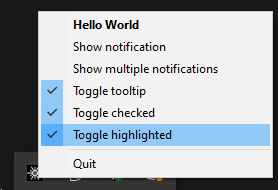
In order to do most productive things in a Windows desktop environment, you need to construct and interact with a window. Constructing this window allows for processing messages which fill a wide range of functions.
Doing this allows applications to:
- Register and use a context menu, the icons you see in the bottom right for running applications.
- Send notifcations, or balloons as Windows call them.
- Monitor the clipboard for changes.
- Copy data to a remote process, allowing for very simple unidirection IPC.
There are a few additional APIs provided by this crate because they are so common:
- Basic access the registry allowing the registration of an application that should be started automatically.
Note that crate is fairly opinionated, not everything that is possible through the underlying APIs will be exposed.
Example
The primary purpose of this crate is to:
- Define a window and its capabilities. I.e. if it should have a context menu or receive clipboard events.
- Handle incoming Events from the window.
The basic loop looks like this:
use pin;
use ctrl_c;
use ;
const ICON: & = include_bytes!;
let mut icons = new;
let icon = icons.push_buffer;
let mut window = new
.window_name
.icons;
let area = window.new_area.icon;
let menu = area.popup_menu;
let first = menu.push_entry.id;
menu.push_separator;
let quit = menu.push_entry.id;
menu.set_default;
let = window
.build
.await?;
let mut ctrl_c = pin!;
let mut shutdown = false;
loop