# Diagrams

## Class diagram

- `Parser`
> This component takes in raw strings of text and converts them into `ParsedCommand` objects. These objects contain all of the information needed to represent a command, but they haven't been validated or processed in any way yet.

- `Grammar`
> Contains available commands configured by the user.
>
> Once the `ParsedCommand` objects have been generated, the `Grammar` component steps in. This component takes in the `ParsedCommand`-s and converts them into `VerifiedCommand` objects, which contain subject and property values that have been validated against a set of pre-defined grammar. This ensures that the user's input is structured correctly and can be understood by the system.

- `Executor`
> Contains available routines configured by the user.
>
> Once the `VerifiedCommand` objects have been generated, the `Executor` component takes over. This component converts the `GrammarCommands` into `ExecutableCommand_` objects, which contain the actual routines that will be executed at runtime. This is where the system takes action based on the user's input.

- `CommandsAggregator`
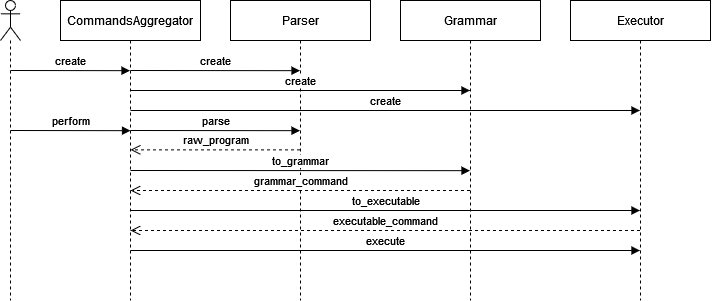
> Finally, the `CommandsAggregator` component brings everything together. This component is responsible for configuring the `Parser`, `Grammar`, and `Executor` components based on the user's needs. It also manages the entire pipeline of processing, from parsing the raw text input to executing the final command(parse -> validate -> execute).


<div style="background-color: #FFFFFF; padding: 10px; border-radius: 8px;">
    <img src="https://i.imgur.com/uW70tQg.png" title="Class diagram" />
</div>

## Sequence diagram

<div style="background-color: #FFFFFF; padding: 10px; border-radius: 8px;">
    <img src="https://i.imgur.com/LmUP7QK.png" title="Sequence diagram" />
</div>