# wallust - Generate colors from an image
[](https://crates.io/crates/wallust)
[](https://crates.io/crates/wallust)
[](https://codeberg.org/explosion-mental/wallust/src/branch/main/LICENSE)
[](https://deps.rs/repo/codeberg/explosion-mental/wallust)
[](https://codeberg.org/explosion-mental/wallust)
[](https://matrix.to/#/#wal-lust:matrix.org)
<br>
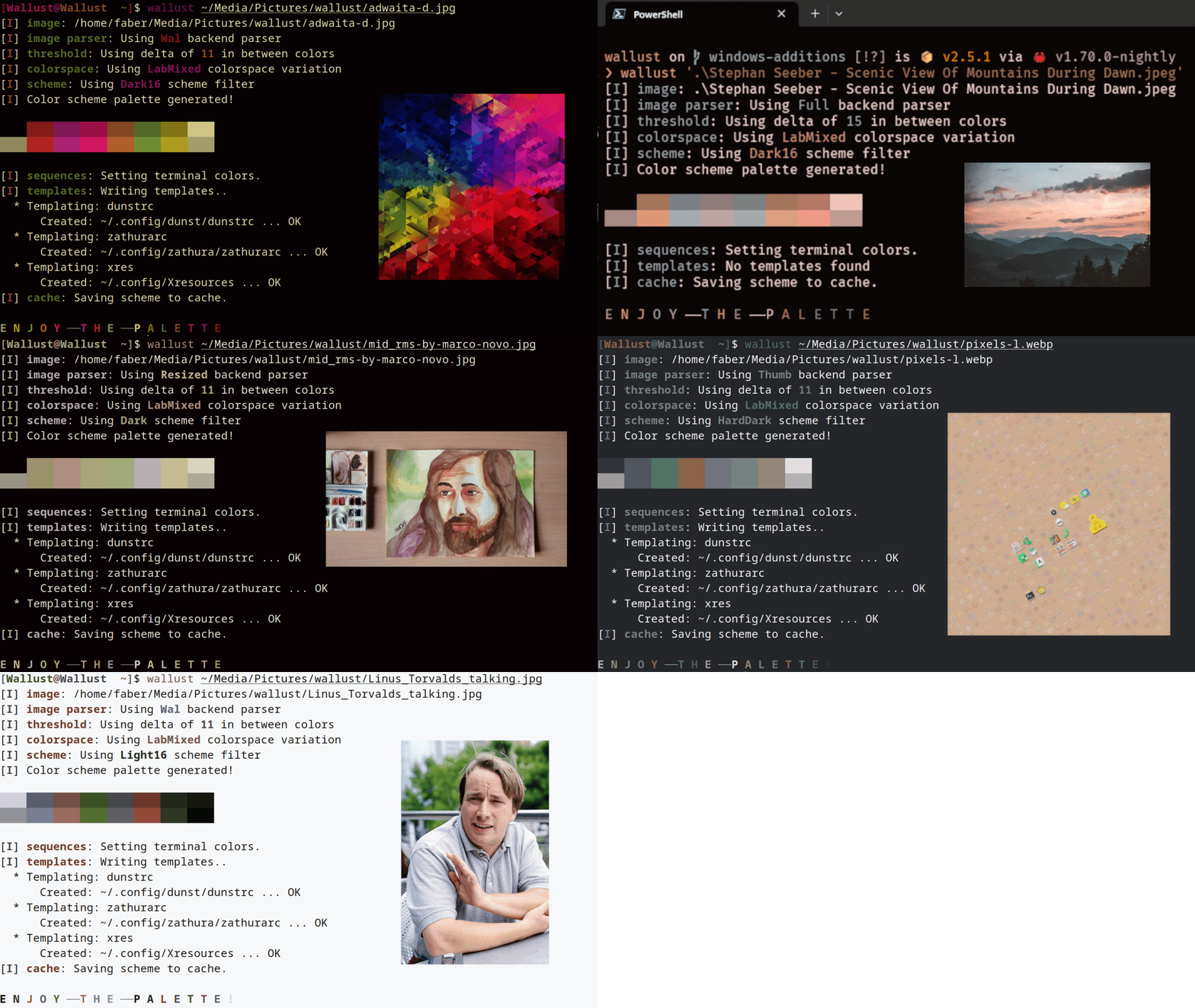
> sources: [adwaita](https://gitlab.gnome.org/GNOME/gnome-backgrounds/-/blob/main/backgrounds/adwaita-d.jpg) - [scenic view of mountains](https://www.pexels.com/photo/scenic-view-of-mountains-during-dawn-1261728) - [rms by marco novo](https://stallman.org/photos/rms/pages/2.html) - [pixels](https://gitlab.gnome.org/GNOME/gnome-backgrounds/-/blob/main/backgrounds/pixels-l.webp) - [linus talking](https://en.wikipedia.org/wiki/File:Linus_Torvalds_talking.jpeg)
## Usage
```
wallust my_wallpaper.png
```
_use `wallust -h` for an overview and `wallust --help` for a more detailed explanation_
## Features
- Sets [terminal colors](#Terminal-color) on all active terminals
* *NIX: ASCII escape sequences
* MacOS: iTerm2 sequences
* Windows: Adds a [color scheme for the windows terminal](https://learn.microsoft.com/en-us/windows/terminal/customize-settings/color-schemes#creating-your-own-color-scheme)
- Cache scheme palettes
* Linux: `$XDG_CACHE_HOME` or `$HOME/.cache`
* MacOs: `$HOME/Library/Caches`
* Windows: `{FOLDERID_LocalAppData}`
- Read pywal/terminal-sexy colorschemes with `cs` subcommand
- Built-in [pywal themes](https://github.com/dylanaraps/pywal/tree/master/pywal/colorschemes) with the `theme` subcommand (can be disabled with compile-time features) `wallust theme --help` to list possible themes
- Configuration file, documented at `wallust.toml` of this repo:
* When no config file, the [default config file](https://codeberg.org/explosion-mental/wallust/src/branch/master/wallust.toml) will be generated
* **Optional** [templating](#templating) integrated in a config file
* backends, colorspaces and filters
* configurable [threshold](#threshold)
* Linux: `$XDG_CONFIG_HOME` or `$HOME/.config`
* MacOs: `$HOME/Library/Application Support`
* Windows: `{FOLDERID_RoamingAppData}`
| Backends | How to extract the colors from the image. (e.g [pywal uses convert](https://github.com/dylanaraps/pywal/blob/236aa48e741ff8d65c4c3826db2813bf2ee6f352/pywal/backends/wal.py#L14)) |
| ColorSpace | Get the most prominent color, and sort them according to the `Filter`, configurable with a [threshold](#threshold) |
| Filter | Makes a scheme palette with the gathered colors, (e.g makes the colors constrast nicely with the background) |
_To see what's avaliable under each method, check the_ [_config file_](https://codeberg.org/explosion-mental/wallust/src/branch/master/wallust.toml)
### Threshold
Default is `20` with a more colorful approach, `19` is also suggested.
| 1 | Not perceptible by human eyes. |
| 1 - 2 | Perceptible through close observation. |
| 2 - 10 | Perceptible at a glance. |
| 11 - 49 | Colors are more similar than opposite |
| 100 | Colors are exact opposite |
### Terminal colors
By default, `wallust` will send these sequences to all open terminals:
- `/dev/pts/` on Linux
- `/dev/ttys00` on MacOS
- [`ps` to search active terminals](https://github.com/dylanaraps/pywal/pull/510) on OpenBSD
- Updates `settings.json` on Windows Terminal, to enable this scheme for
the first time you will have to selected it manually
You can skip this with the `-s` or `--skip-sequences` flag.
When opening new terminals you will notice that the color sequences are not
applied. To solve this you can send the sequences yourself when your shell
opens. `wallust` will store the sequences in the cache directory as a file
called `sequences`, the usual way is to `cat ~/.cache/wallust/sequences` in
your `.zshrc`, `.bashrc`, etc.
### Templating
_OPTIONAL_
**NOTE**: You can enable a new method by using `new_engine = true` inside an `[[entry]]`.
This "new engine" difers by using double brackets like `{{variable}}` instead of one like
`{variable}` (_as in the example below_), which helps with file formats that use brackets
like json. With the `new_engine` enabled you can escape and produce a literal `{{` by `{{{{}}`, and for `}}` you escape it with `{{}}}}`.
You can use `wallust` generated colors in a program by _templating_ the colors
in it's config file, like the following example:
```
# zathurarc config file
#keybindings
...
# colors
set default-bg "{color2}"
set default-fg "{foreground}"
set statusbar-bg "{color4}"
set statusbar-fg "{color6}"
set inputbar-bg "{color1}"
```
Then add this file to `~/.config/wallust/` e.g. _~/.config/wallust/zathurarc_
(config directory defined by the platform) and add a new entry to `wallust.toml`
```toml
[[entry]]
template = "zathurarc"
target = "~/.config/zathura/zathurarc"
```
You can find examples at
[pywal templates](https://github.com/dylanaraps/pywal/tree/master/pywal/templates)
or
[wpgtk templates](https://github.com/deviantfero/wpgtk-templates)
#### Variables and Methods
- `wallpaper`: The full path to the current wallpaper.
- `backend`: Current **backend** being used.
- `colorspace`: Current **colorspace** being used.
- `filter`: Current **filter** being used.
- `alpha`: Default to 100, can be modified in the config file or with `--alpha`/`-a`.
- `alpha_dec`: instead of [0..=100], displays it from 0.00 to 1.00.
- `var`: Output the color in `hex`.
- `var.rgb`: Output the color in `rgb`.
- `var.rgba`: Output the color in `rgba`.
- `var.xrgba`: Output the color in `xrgb`.
- `var.strip`: Output the color in `hex` (without a `#`).
- `var.red`: Output the red value.
- `var.green`: Output the green value.
- `var.blue`: Output the blue value.
Where `var` can be colors from `color0` to `color15`, `background`, `foreground` and `cursor`.
## Installation
<a href="https://repology.org/project/wallust/versions">
<img align="right" width="192" src="https://repology.org/badge/vertical-allrepos/wallust.svg">
</a>
### Distros Packages
#### NetBSD
If you are using NetBSD, a native package is available from the official repositories. To install it, simply run:
```
pkgin install wallust
```
#### Nix
If you are using Nix, a native package is available for the [unstable channel][nix-search].
Install it for your profile:
```
nix-env -iA nixos.wallust # change `nixos` for `nixpkgs`, if on a non-NixOS system
```
Try it with `nix-shell`
```
nix-shell -p wallust
```
[nix-search]: <https://search.nixos.org/packages?channel=unstable&from=0&size=1&sort=relevance&type=packages&query=wallust>
### Binary
Go to the [releases](https://codeberg.org/explosion-mental/wallust/releases)
and download the `tar.gz` file, which contains a binary for musl, so it should
work for most *nix platforms.
```
tar -xf wallust-TARGET.tar.gz
```
### Build from source
_The master branch **is** stable_
#### From this repo
Go to the [releases](https://codeberg.org/explosion-mental/wallust/releases)
page and download the `.zip` or `.tar.gz` repository. After extracting the contents,
go to the directory (`cd MAYOR.MINOR.PATCH`).
Then you can do the following, which moves the binary into your `$CARGO_HOME/bin`
```
cargo install --path .
```
or build it and copy the binary to one folder present in your `$PATH` like
`/usr/local/bin`
```
cargo build --release
cp -f ./target/release/wallust /usr/local/bin
```
#### From crates.io
```
cargo install wallust
```
This will use the lastest version
## Packaging
Binary-based distros can grab the latest pre-compiled binary from the [releases
page](https://codeberg.org/explosion-mental/wallust/releases).
Source-based distros, if they wish to build `wallust` from source, must ensure
that the following dependencies are available:
- Build Dependencies:
1. Rust (`cargo`, `rustc`)
## Contribute!
**Use the [dev](https://codeberg.org/explosion-mental/wallust/src/branch/dev) branch**
Show some of your taste by adding a
[backends](https://codeberg.org/explosion-mental/wallust/src/branch/master/src/backends),
[colorspaces](https://codeberg.org/explosion-mental/wallust/src/branch/master/src/colorspaces),
[filters](https://codeberg.org/explosion-mental/wallust/src/branch/master/src/filters),
and/or
[colorscheme](https://codeberg.org/explosion-mental/wallust/src/branch/master/src/themes/colorschemes.rs).
Having thoughts or suggestios is also very welcome.
## TODOs
for more, grep the src for TODO `rg TODO`
- automate binary releases with a CI, figure out woodkeeper codeberg CI
- Think about using [k means algo](https://en.wikipedia.org/wiki/K-means_clustering)
similar to [pigmnts](https://github.com/blenderskool/pigmnts) (just without seg faulting :p)
- use `thiserror` for errors in the modules (there aren't that many)
## Related
- [pywal - 🎨Generate and change color-schemes on the fly](https://github.com/dylanaraps/pywal)
- [pywal16 - 16 colors fork of pywal](https://github.com/eylles/pywal16)
- [wpgtk - 🎴a colorscheme, wallpaper and template manager for *nix](https://github.com/deviantfero/wpgtk)
- [wal-theme-picker - pick the best theme for the image (_rather than generating one_)](https://github.com/drybalka/wal-theme-picker)
- [pigmnts - 🎨Color palette generator from an image using WebAssesmbly and Rust](https://github.com/blenderskool/pigmnts)
- [Chameleon - 🦎Theme your linux system to match any image](https://github.com/GideonWolfe/Chameleon)
- [lule_bash - Genretare all 255 colors from wallpapers](https://github.com/warpwm/lule_bash)
- [lule - `lule_bash` rewriten for efficiency](https://github.com/warpwm/lule)
- using [vscode-wal-theme with `wallust`](https://github.com/dlasagno/vscode-wal-theme/issues/23)
- [base16 - Framework for Tomorrow styled themes](https://github.com/chriskempson/base16)
- [flavours - 🎨💧An easy to use base16 scheme manager that integrates with any workflow](https://github.com/Misterio77/flavours)
- [oxidec - Eye-candy manager written in Rust](https://github.com/mrtnvgr/oxidec)
- [raventhemer - A theme manager and switcher for desktop linux](https://git.sr.ht/~nicohman/raven)
- [rose-pine _Issue #2_ - Ideas with using the whole 15 color palette](https://github.com/rose-pine/xresources/issues/2)