<div align="center">
<img src="./resources/logo/vt_code_adaptive.svg" alt="VT Code" width="520" style="border-radius: 10px" />
<p><strong>A Rust terminal coding agent with safe workspace tools, multi-provider LLM support, and open protocol integrations.</strong></p>
<p>
<a href="https://crates.io/crates/vtcode"><img src="https://img.shields.io/crates/v/vtcode?style=flat-square&color=171C26&label=crates.io" alt="Crates.io Version" /></a>
<a href="https://github.com/vinhnx/vtcode/releases"><img src="https://img.shields.io/github/v/release/vinhnx/vtcode?style=flat-square&color=171C26&label=Release" alt="GitHub Release" /></a>
<a href="./docs/skills/SKILLS_GUIDE.md"><img src="https://img.shields.io/badge/Agent%20Skills-BFB38F?style=flat-square" alt="Skills" /></a>
<a href="./docs/guides/zed-acp.md"><img src="https://img.shields.io/badge/ACP-Zed-383B73?style=flat-square&logo=zedindustries" alt="Zed ACP" /></a>
<a href="./docs/guides/mcp-integration.md"><img src="https://img.shields.io/badge/MCP-A63333?style=flat-square&logo=modelcontextprotocol" alt="MCP" /></a>
<a href="https://deepwiki.com/vinhnx/VTCode"><img src="https://deepwiki.com/badge.svg" alt="Ask DeepWiki" /></a>
</p>
<img src="./resources/gif/vtcode.gif" alt="VT Code demo" style="border-radius: 10px" />
</div>
## Quick start
Launch VT Code in any project directory to start an interactive session:
```bash
vtcode
```
### Common commands
```bash
# Ask a quick question (no tools, prints reply to stdout)
vtcode ask "explain the difference between Rc and Arc in Rust"
# Run a headless task with full tool access (file edits, search, terminal)
vtcode exec "refactor src/main.rs to use clap for CLI parsing"
# Review uncommitted changes before committing
vtcode review
# Review a specific commit range
vtcode review --target HEAD~3..HEAD
# Continue the most recent session
vtcode --resume
# List available models and their status
vtcode models list
# Switch the default provider and model
vtcode models set-provider openai
vtcode models set-model gpt-5
# Update vtcode to the latest release
vtcode update
```
### Real-world workflows
```bash
# Generate and save a code snippet
vtcode ask "write a Rust function that reads a file and counts word frequencies" > word_count.rs
# Summarize what changed on the current branch
vtcode exec "summarize all changes between main and HEAD, grouped by file"
# Security-focused review of staged changes
vtcode review --style security
# Run a task from stdin (useful in pipelines)
# Explore workspace structure
vtcode analyze
# Manage agent skills
vtcode skills list
```
## Interactive TUI
Launch `vtcode` with no arguments to enter the interactive terminal UI. Type `/` inside a session to see all available slash commands.
### Session modes
```text
/mode edit # agent can read and write files (default)
/mode auto # autonomous mode, minimal confirmations
/mode plan # read-only research mode, no file changes
/mode # cycle through modes
```
### Working with models
```text
/model # open interactive model picker
/effort high # set reasoning effort (low, medium, high)
```
### Session management
```text
/resume # pick a previous session to continue
/fork # branch the current conversation
/history # browse past sessions
/clear # clear the screen
/clear new # start a fresh conversation
/compact # compress context to free tokens
/compact --reasoning-effort high --verbosity concise
/rewind # undo recent turns
/copy # copy the last assistant reply to clipboard
/share # export session as JSON, Markdown, or HTML
```
### Code review and analysis inside TUI
```text
/review # review uncommitted changes
/review --last-diff # review the last commit
/review --style security # security-focused review
/analyze # full workspace analysis
/analyze security # security scan only
```
### Workspace setup
```text
/init # guided setup: vtcode.toml, AGENTS.md, indexing
/config # browse current settings
/config memory # inspect memory and loaded rules
/config model # view or change model config
```
### MCP and integrations
```text
/mcp # show MCP connection status
/mcp list # list configured MCP providers
/mcp tools # show tools exposed by active providers
/mcp refresh # reindex MCP tools without restarting
/mcp repair # restart MCP connections
```
### Skills and agents
```text
/skills list # list available agent skills
/skills load <name> # load a skill into the session
/agents list # list configured subagents
/agents create # create a new agent definition
```
### Automation
```text
/loop 5m check the deployment # repeat a prompt every 5 minutes
/schedule # open the task scheduler UI
/schedule list # browse scheduled tasks
```
### Theming and terminal
```text
/theme # open the theme picker
/theme ciapre # switch to a specific theme
/doctor # run diagnostics
/help # list all slash commands
/help review # show help for a specific command
```
## Autonomous agent
VT Code can run as an autonomous agent that plans, executes, and verifies work without waiting for human approval on each step.
### Interactive auto mode
Inside the TUI, switch to auto mode to let the agent proceed through tool calls with minimal interruptions:
```text
/mode auto # autonomous mode, minimal confirmations
/mode edit # switch back to interactive edit mode
```
### Full-auto CLI mode
For headless or CI workflows, `--full-auto` skips all permission prompts and executes against a configurable tool allow-list:
```bash
vtcode exec --full-auto "migrate the test suite from jest to vitest"
```
Full-auto requires explicit opt-in via `vtcode.toml`:
```toml
[automation.full_auto]
enabled = true
require_profile_ack = true
profile_path = "automation/full_auto_profile.toml"
allowed_tools = [
"read_file",
"list_files",
"grep_file",
"run_pty_cmd",
]
```
Tools not in the allow-list are rejected automatically. Setting `allowed_tools = ["*"]` permits every tool, but is only safe in isolated workspaces.
### Orchestrated harness
For longer autonomous builds, enable the plan-build-evaluate harness. The agent writes working artifacts under `.vtcode/tasks/` (spec, contract, tracker, evaluation) so that multi-round revision is explicit and resumable:
```toml
[agent.harness]
orchestration_mode = "plan_build_evaluate"
max_revision_rounds = 2
```
```bash
vtcode exec --full-auto "implement the payment service with tests and docs"
```
### Subagents and background workers
VT Code delegates bounded work to child agent threads with isolated context and tool restrictions. Built-in agents include `explorer` (read-only search), `plan` (read-only planning), and `worker` (bounded implementation). Background subagents can run as managed child processes for long-running or parallel tasks.
### Scheduled automation
Durable scheduled tasks run on cron or interval schedules without an active session:
```bash
vtcode schedule # manage tasks interactively
vtcode schedule create --cron "0 9 * * 1" --prompt "review open PRs"
```
Inside the TUI, `/loop` repeats a prompt on an interval within the current session, and `/schedule` opens the task manager.
> Read the full guide: [Full-Auto Mode](./docs/guides/full_auto_mode.md)
## Features
| Agent runtime | Interactive TUI, slash commands, streaming responses, non-interactive `ask` and `exec`, resume and continue, dynamic context curation |
| Coding tools | Safe file operations, patching, ripgrep search, fuzzy file discovery, syntax-aware code intelligence, project indexing, terminal execution |
| Model providers | GitHub Copilot, OpenAI, Anthropic, Gemini, DeepSeek, OpenRouter, Z.AI, Moonshot AI, MiniMax, Xiaomi MiMo, HuggingFace, Ollama, LM Studio, llama.cpp, custom OpenAI-compatible APIs |
| Extensibility | Agent Skills, MCP clients and server mode, lifecycle hooks, subagents, background subprocess agents, custom providers, editor integrations |
| Interoperability | Open Responses, Agent2Agent, Anthropic Messages API compatibility, ATIF trajectory export |
| Terminal UX | Rich TUI, mouse support, text selection, live command output, Ghostty VT snapshots with `legacy_vt100` fallback |
## Installation
### macOS and Linux
```bash
Skip optional search tools:
```bash
### Windows PowerShell
```powershell
> [!NOTE]
> Windows release artifacts are best-effort and may lag behind macOS/Linux builds.
### Package managers
```bash
cargo install vtcode
brew install vtcode
# Development tap
brew tap vinhnx/tap
brew install vinhnx/tap/vtcode
```
> [!TIP]
> Official macOS/Linux release archives include `ghostty-vt/` runtime libraries for richer PTY snapshots. Custom installs continue to work with the built-in `legacy_vt100` backend.
More details: [Installation Guide](./docs/installation/README.md), [Native Installer Guide](./docs/installation/NATIVE_INSTALLERS.md), [Ghostty VT Packaging](./docs/development/GHOSTTY_VT_PACKAGING.md).
## Providers
VT Code supports 21 LLM providers out of the box — from cloud APIs to local inference servers — plus any OpenAI-compatible API through `[[custom_providers]]`.
For detailed setup guides, see [Provider Guides](./docs/providers/PROVIDER_GUIDES.md).
### Provider spotlight: Xiaomi MiMo V2.5 Series
> VT Code is happy to be part of the [Xiaomi MiMo Orbit Program](https://platform.xiaomimimo.com/)
<div align="center">
<a href="https://platform.xiaomimimo.com"><img src="./resources/screenshots/xiaomi_mi_promo.png" alt="Xiaomi MiMo V2.5 - Invite builders" width="300" style="border-radius: 10px" /></a>
</div>
Xiaomi's MiMo V2.5 Pro is the default model in VT Code — available as the native MiMo provider and through OpenRouter. It delivers strong performance in agentic capabilities, complex software engineering, and long-horizon tasks with a 1M context window and deep reasoning.
<div align="center">
<a href="https://openrouter.ai/xiaomi/mimo-v2.5-pro">
<img src="./resources/screenshots/xiaomi-mimo.png" alt="Xiaomi MiMo V2.5 Pro on OpenRouter" width="300" style="border-radius: 10px" />
</a>
</div>
| [OpenRouter](https://openrouter.ai/xiaomi/mimo-v2.5-pro) | `xiaomi/mimo-v2.5-pro` | 1M tokens |
| OpenRouter | `xiaomi/mimo-v2.5` | 1M tokens |
| [Xiaomi MiMo](https://platform.xiaomimimo.com/docs/en-US/welcome) | `mimo-v2.5-pro` | 1M tokens |
| Xiaomi MiMo | `mimo-v2.5` | 1M tokens |
Pricing: [Pay-as-you-go](https://platform.xiaomimimo.com/docs/en-US/price/pay-as-you-go) · [Subscription](https://platform.xiaomimimo.com/docs/en-US/price/tokenplan/subscription) · [Quick Access](https://platform.xiaomimimo.com/docs/en-US/price/tokenplan/quick-access)
### Atlas Cloud
[Atlas Cloud](https://atlascloud.ai) is an LLM provider accessible through VT Code's `[[custom_providers]]` support — no dedicated runtime provider needed.
```toml
[agent]
provider = "atlascloud"
default_model = "deepseek-ai/DeepSeek-V3-0324"
[[custom_providers]]
name = "atlascloud"
display_name = "Atlas Cloud"
base_url = "https://api.atlascloud.ai/v1"
api_key_env = "ATLASCLOUD_API_KEY"
model = "deepseek-ai/DeepSeek-V3-0324"
```
<div align="center">
<img src="./resources/screenshots/atlascloud-provider.png" alt="Atlas Cloud provider configuration" width="300" style="border-radius: 10px" />
</div>
Other custom OpenAI-compatible providers use the same `[[custom_providers]]` pattern.
## Configuration
VT Code reads configuration from `vtcode.toml` in your project root. The default agent uses the MiMo provider with `mimo-v2.5-pro` as the default model.
```toml
[agent]
provider = "openai"
default_model = "gpt5.5"
```
Useful configuration docs:
- [Configuration Precedence](./docs/config/CONFIGURATION_PRECEDENCE.md)
- [Config Field Reference](./docs/config/CONFIG_FIELD_REFERENCE.md)
- [Tool Configuration](./docs/config/TOOLS_CONFIG.md)
- [Lifecycle Hooks](./docs/guides/lifecycle-hooks.md)
## Extension points
### Skills
VT Code discovers repository, user, admin, and bundled system skills using the open Agent Skills `SKILL.md` format.
```bash
vtcode skills list
vtcode skills info my-skill
vtcode skills create my-skill
vtcode skills validate ./.agents/skills/my-skill
```
Read: [Agent Skills Guide](./docs/skills/SKILLS_GUIDE.md).
### MCP
VT Code ships as both an MCP client and server:
- **Client**: connect to any MCP server for tools like Figma, Playwright, Sentry, and more.
- **Server**: expose VT Code tools to external agents and editors.
Read: [MCP Integration](./docs/guides/mcp-integration.md).
### Agents and editors
- **Zed**: native ACP support with project-wide indexing.
- **VS Code / Copilot**: use the `vtcode ask` CLI or background agent mode.
- **Claude Code**: VT Code can operate as a subagent under `claude`.
Read: [Zed ACP Guide](./docs/guides/zed-acp.md), [VS Code Guide](./docs/guides/vscode.md), [Claude Code Guide](./docs/guides/claude-code.md).
## Safety model
VT Code runs a read-restricted shell. Every command passes through a sandbox that can block dangerous operations, log activity, and enforce policy.
| Shell sandbox | Restricts commands to a safe subset; dangerous patterns are blocked |
| Tool guardrails | File operations are scoped to the project directory |
| Subprocess isolation | Background agents run in bounded, supervised subprocesses |
| Audit logging | All tool calls are logged for review |
Read: [Safety Architecture](./docs/safety/SAFETY_ARCHITECTURE.md), [Security Hardening](./docs/safety/SECURITY_HARDENING.md), [Threat Model](./docs/safety/THREAT_MODEL.md).
## Protocols and exports
| Open Responses | OpenAI-compatible response format | [Open Responses](./docs/protocols/OPEN_RESPONSES.md) |
| ATIF | Standardized session trajectory export | [ATIF Trajectory Format](./docs/protocols/ATIF_TRAJECTORY_FORMAT.md) |
| A2A | Agent discovery, task lifecycle, streaming, JSON-RPC | [A2A Protocol](./docs/a2a/a2a-protocol.md) |
| Anthropic Messages API | Compatibility server for Anthropic-style clients | [Provider Guides](./docs/providers/PROVIDER_GUIDES.md#anthropic-api-compatibility-server) |
## Development
```bash
git clone https://github.com/vinhnx/vtcode.git
cd vtcode
./scripts/run-debug.sh
```
VT Code uses Rust stable, edition 2024, and MSRV 1.88. The dev profile disables incremental compilation (sccache). Set `CARGO_INCREMENTAL=1` to override.
**Local checks:**
```bash
./scripts/check-dev.sh # fast gate (clippy, fmt, check)
./scripts/check-dev.sh --test # + unit and integration tests
./scripts/check-dev.sh --workspace # + all workspace crates
./scripts/check-dev.sh --lints # + additional lints
```
**Running tests:**
```bash
cargo nextest run # parallel runner (preferred)
cargo nextest run -p vtcode-core # single crate
cargo nextest run test_name # single test by name
```
**Launching VT Code:**
```bash
./scripts/run-debug.sh # debug build + launch
./scripts/run.sh # release build + launch
```
Both auto-bootstrap the Ghostty VT runtime. Without it, PTY snapshots fall back to `legacy_vt100`.
Read: [Development Setup](./docs/development/DEVELOPMENT_SETUP.md), [Testing](./docs/development/testing.md), [CI/CD](./docs/development/ci-cd.md).
## Contributing
Contributions are welcome -- typos, docs, bugs, code, ideas. Start with [open issues](https://github.com/vinhnx/vtcode/issues) or [good first issues](https://github.com/vinhnx/vtcode/issues?q=is%3Aopen+is%3Aissue+label%3A%22good+first+issue%22). For AI agents, read [AGENTS.md](./AGENTS.md) first. Humans should also read [CONTRIBUTING.md](./docs/CONTRIBUTING.md).
## Support
VT Code is built in my spare time and shared freely with the community. If it helps you ship code, learn, experiment with agents, or save a few hours, a small donation helps me keep improving it.
### Sponsor
<a href="https://github.com/sponsors/vinhnx"><img src="https://img.shields.io/badge/GitHub%20Sponsors-EA4AAA?style=flat-square&logo=githubsponsors&logoColor=white" alt="GitHub Sponsors" /></a>
<a href="https://buymeacoffee.com/vinhnx"><img src="https://img.shields.io/badge/Buy%20Me%20a%20Coffee-FFDD00?style=flat-square&logo=buymeacoffee&logoColor=black" alt="Buy Me a Coffee" /></a>
<a href="https://www.patreon.com/vinhnx"><img src="https://img.shields.io/badge/Patreon-FF424D?style=flat-square&logo=patreon&logoColor=white" alt="Patreon" /></a>
<a href="https://opencollective.com/vinhnx"><img src="https://img.shields.io/badge/Open%20Collective-3385FF?style=flat-square&logo=opencollective&logoColor=white" alt="Open Collective" /></a>
<div align="center">
<img src="./resources/screenshots/qr_donate.png" alt="Buy Me a Coffee QR code" style="border-radius: 10px" />
</div>
### Current sponsors
Thank you to the sponsors who support ongoing development:
<a href="https://github.com/dnhn"><img src="https://avatars.githubusercontent.com/u/2561973?s=60" width="40" height="40" alt="@dnhn" title="@dnhn" style="border-radius: 10px" /></a>
<a href="https://github.com/codemod"><img src="https://avatars.githubusercontent.com/u/78830094?s=60" width="40" height="40" alt="@codemod" title="@codemod" style="border-radius: 10px" /></a>
<a href="https://github.com/coderabbitai"><img src="https://avatars.githubusercontent.com/u/132028505?s=60" width="40" height="40" alt="@coderabbitai" title="@coderabbitai" style="border-radius: 10px" /></a>
<a href="https://github.com/KhaiRyth"><img src="https://avatars.githubusercontent.com/u/273723951?s=60" width="40" height="40" alt="@KhaiRyth" title="@KhaiRyth" style="border-radius: 10px" /></a>
## Star History
If you find VT Code useful, please consider starring the repository. It helps more developers discover the project and gives the community a visible signal that the work is valuable.
[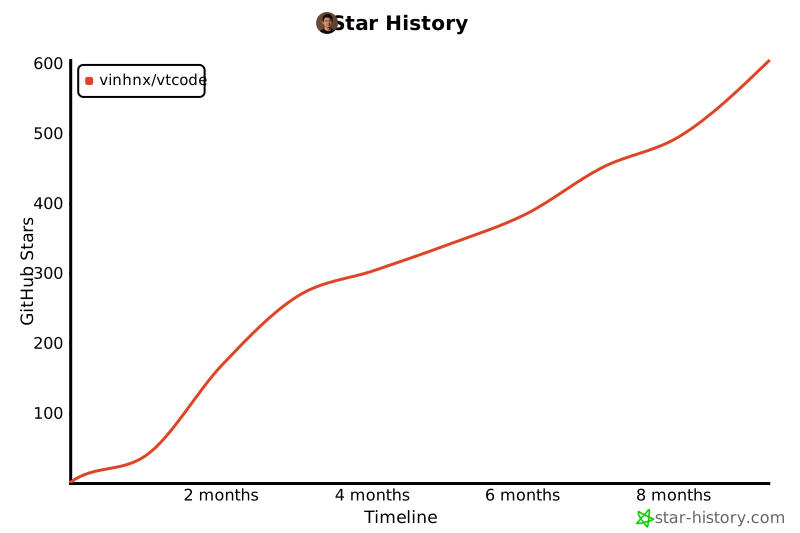](https://www.star-history.com/#vinhnx/vtcode&type=timeline&legend=top-left)
## License
This repository is licensed under the [MIT License](LICENSE).