<div align="center">
<img src="./resources/logo/vt_code_adaptive.svg" alt="VT Code" width="520" />
<p><strong>A Rust terminal coding agent with safe workspace tools, multi-provider LLM support, and open protocol integrations.</strong></p>
<p>
<a href="https://crates.io/crates/vtcode"><img src="https://img.shields.io/crates/v/vtcode?style=flat-square&color=171C26&label=crates.io" alt="Crates.io Version" /></a>
<a href="https://github.com/vinhnx/vtcode/releases"><img src="https://img.shields.io/github/v/release/vinhnx/vtcode?style=flat-square&color=171C26&label=Release" alt="GitHub Release" /></a>
<a href="./docs/skills/SKILLS_GUIDE.md"><img src="https://img.shields.io/badge/Agent%20Skills-BFB38F?style=flat-square" alt="Skills" /></a>
<a href="./docs/guides/zed-acp.md"><img src="https://img.shields.io/badge/ACP-Zed-383B73?style=flat-square&logo=zedindustries" alt="Zed ACP" /></a>
<a href="./docs/guides/mcp-integration.md"><img src="https://img.shields.io/badge/MCP-A63333?style=flat-square&logo=modelcontextprotocol" alt="MCP" /></a>
<a href="https://deepwiki.com/vinhnx/VTCode"><img src="https://deepwiki.com/badge.svg" alt="Ask DeepWiki" /></a>
</p>
<img src="./resources/gif/vtcode.gif" alt="VT Code demo" />
</div>
## Table of contents
- [Table of contents](#table-of-contents)
- [What is VT Code?](#what-is-vt-code)
- [Core capabilities](#core-capabilities)
- [Install](#install)
- [macOS and Linux](#macos-and-linux)
- [Windows PowerShell](#windows-powershell)
- [Package managers](#package-managers)
- [Quick start](#quick-start)
- [Model promotions](#model-promotions)
- [Xiaomi MiMo V2.5 Series](#xiaomi-mimo-v25-series)
- [Configuration](#configuration)
- [Atlas Cloud](#atlas-cloud)
- [Extension points](#extension-points)
- [Skills](#skills)
- [MCP](#mcp)
- [Agents and editors](#agents-and-editors)
- [Safety model](#safety-model)
- [Protocols and exports](#protocols-and-exports)
- [Benchmarks](#benchmarks)
- [Documentation](#documentation)
- [Contributing guide](#contributing-guide)
- [For AI agents](#for-ai-agents)
- [For human contributors](#for-human-contributors)
- [Development](#development)
- [Contributing](#contributing)
- [Support](#support)
- [Star History](#star-history)
- [License](#license)
## What is VT Code?
VT Code is an open-source coding agent for the terminal. It combines a model-driven reasoning loop with a local harness that can read files, search code, edit safely, run commands, preserve context, resume sessions, and connect to external tools.
The default workflow is intentionally simple: one reliable agent loop, explicit delegation for bounded side work, and a workspace-first security model.
## Core capabilities
| Agent runtime | Interactive TUI, slash commands, streaming responses, non-interactive `ask` and `exec`, resume and continue, dynamic context curation |
| Coding tools | Safe file operations, patching, ripgrep search, fuzzy file discovery, syntax-aware code intelligence, project indexing, terminal execution |
| Model providers | GitHub Copilot, OpenAI, Anthropic, Gemini, DeepSeek, OpenRouter, Z.AI, Moonshot AI, MiniMax, HuggingFace, Ollama, LM Studio, llama.cpp, custom OpenAI-compatible APIs |
| Extensibility | Agent Skills, MCP clients and server mode, lifecycle hooks, subagents, background subprocess agents, custom providers, editor integrations |
| Interoperability | Open Responses, Agent2Agent, Anthropic Messages API compatibility, ATIF trajectory export |
| Terminal UX | Rich TUI, mouse support, text selection, live command output, Ghostty VT snapshots with `legacy_vt100` fallback |
## Install
### macOS and Linux
```bash
Skip optional search tools:
```bash
### Windows PowerShell
```powershell
> [!NOTE]
> Windows release artifacts are best-effort and may lag behind macOS/Linux builds.
### Package managers
```bash
cargo install vtcode
brew install vtcode
# Development tap
brew tap vinhnx/tap
brew install vinhnx/tap/vtcode
```
> [!TIP]
> Official macOS/Linux release archives include `ghostty-vt/` runtime libraries for richer PTY snapshots. Custom installs continue to work with the built-in `legacy_vt100` backend.
More details: [Installation Guide](./docs/installation/README.md), [Native Installer Guide](./docs/installation/NATIVE_INSTALLERS.md), [Ghostty VT Packaging](./docs/development/GHOSTTY_VT_PACKAGING.md).
## Quick start
Set a provider key and launch VT Code in a project:
```bash
export OPENAI_API_KEY="sk-..."
vtcode
```
Common commands:
```bash
vtcode ask "write a Rust factorial function" > factorial.rs
vtcode exec "summarize the current git diff"
vtcode --resume
vtcode --continue
```
VT Code keeps primary output on stdout and sends logs, metadata, reasoning traces, and prompts to stderr. This keeps `ask` and `exec` useful in shell pipelines.
## Model promotions
### Xiaomi MiMo V2.5 Series
Try Xiaomi's MiMo V2.5 Pro with invite code `K5BCAP`. Enter the code in the console sidebar after signup to unlock the promotion.
<p align="center">
<a href="https://platform.xiaomimimo.com/docs/en-US/welcome">
<img src="./resources/screenshots/xiaomi_mi_promo.png" alt="Xiaomi MiMo V2.5 Pro promotion invite code K5BCAP" width="386" />
</a>
</p>
Read: [Xiaomi MiMo documentation](https://platform.xiaomimimo.com/docs/en-US/welcome).
## Configuration
Most settings live in `vtcode.toml`. Runtime overrides use `--config key=value`.
```toml
[agent]
provider = "openai"
default_model = "gpt-5.4"
```
### Atlas Cloud
[Atlas Cloud](https://atlascloud.ai) is a new LLM provider in VT Code. It works through VT Code's `[[custom_providers]]` support, so you can point VT Code at `https://api.atlascloud.ai/v1` without adding a dedicated runtime provider.
```toml
[agent]
provider = "atlascloud"
default_model = "deepseek-ai/DeepSeek-V3-0324"
[[custom_providers]]
name = "atlascloud"
display_name = "Atlas Cloud"
base_url = "https://api.atlascloud.ai/v1"
api_key_env = "ATLASCLOUD_API_KEY"
model = "deepseek-ai/DeepSeek-V3-0324"
```
<p align="center">
<img src="./resources/screenshots/atlascloud-provider.png" alt="Atlas Cloud provider configuration" width="400" />
</p>
Other custom OpenAI-compatible providers use the same `[[custom_providers]]` pattern.
Recommended validated Atlas chat model pool examples for `default_model` or
`vtcode ask --model <model-id>` include:
- `deepseek-ai/DeepSeek-V3-0324`
- `deepseek-ai/deepseek-r1-0528`
- `moonshotai/Kimi-K2-Instruct`
- `Qwen/Qwen3-Coder`
- `google/gemini-2.5-flash`
- `openai/gpt-5.2-chat`
- `anthropic/claude-opus-4.5-20251101`
- `zai-org/glm-4.7`
- `minimaxai/minimax-m2.1`
- `xai/grok-4-0709`
Useful configuration docs:
- [Provider Guides](./docs/providers/PROVIDER_GUIDES.md)
- [Configuration Precedence](./docs/config/CONFIGURATION_PRECEDENCE.md)
- [Config Field Reference](./docs/config/CONFIG_FIELD_REFERENCE.md)
- [Tool Configuration](./docs/config/TOOLS_CONFIG.md)
- [Lifecycle Hooks](./docs/guides/lifecycle-hooks.md)
## Extension points
### Skills
VT Code discovers repository, user, admin, and bundled system skills using the open Agent Skills `SKILL.md` format.
```bash
vtcode skills list
vtcode skills info my-skill
vtcode skills create my-skill
vtcode skills validate ./.agents/skills/my-skill
```
Read: [Agent Skills Guide](./docs/skills/SKILLS_GUIDE.md).
### MCP
VT Code can connect to external MCP servers over stdio or HTTP transports. It can also expose curated tools through its embedded MCP server. The MCP config covers providers, concurrency, timeouts, allowlists, UI rendering, auth, rate limits, and validation.
Read: [MCP Integration Guide](./docs/guides/mcp-integration.md).
### Agents and editors
- [Subagents](./docs/user-guide/subagents.md)
- [Agent Client Protocol and Zed](./docs/guides/zed-acp.md)
- [IDE Downloads](./docs/ide/downloads.md)
- [IDE Troubleshooting](./docs/ide/troubleshooting.md)
## Safety model
VT Code uses layered controls for shell and filesystem access:
- [x] Command allowlist
- [x] Per-command argument validation
- [x] Workspace path normalization and symlink checks
- [x] Dangerous command blocking
- [x] Optional sandbox integration
- [x] Human approval gates
- [x] Auditable execution logs
The model is designed to reduce prompt injection, argument injection, workspace escape, and privilege escalation risk while keeping developer workflows practical.
<details>
<summary>Security documentation</summary>
- [Security Model](./docs/security/SECURITY_MODEL.md)
- [Command Security Model](./docs/development/COMMAND_SECURITY_MODEL.md)
- [Execution Policy](./docs/development/EXECUTION_POLICY.md)
- [Sandbox Deep Dive](./docs/sandbox/SANDBOX_DEEP_DIVE.md)
- [Tool Policies](./docs/modules/vtcode_tools_policy.md)
</details>
## Protocols and exports
| Open Responses | Vendor-neutral response and item lifecycle model | [Open Responses](./docs/protocols/OPEN_RESPONSES.md) |
| ATIF | Standardized session trajectory export | [ATIF Trajectory Format](./docs/protocols/ATIF_TRAJECTORY_FORMAT.md) |
| A2A | Agent discovery, task lifecycle, streaming, JSON-RPC | [A2A Protocol](./docs/a2a/a2a-protocol.md) |
| Anthropic Messages API | Compatibility server for Anthropic-style clients | [Provider Guides](./docs/providers/PROVIDER_GUIDES.md#anthropic-api-compatibility-server) |
## Benchmarks
VT Code has a pending submission to [vercel/next-evals-oss](https://github.com/vercel/next-evals-oss/pull/83), the benchmark behind the [Next.js AI Agent Evaluations leaderboard](https://nextjs.org/evals).
| **VT Code** | `moonshotai/Kimi-K2.6:novita` | **Pending** | **33%** | 8/24 | 90.5s |
Read: [benchmark notes](./docs/benchmarks/README.md#nextjs-ai-agent-evaluations), [eval framework](./evals/README.md).
## Documentation
Start here:
- [Documentation Hub](./docs/README.md)
- [Documentation Map](./docs/modules/vtcode_docs_map.md)
- [Getting Started](./docs/user-guide/getting-started.md)
- [Interactive Mode](./docs/user-guide/interactive-mode.md)
- [Commands](./docs/user-guide/commands.md)
- [Exec Mode](./docs/user-guide/exec-mode.md)
- [Context Engineering](./docs/context/context_engineering.md)
- [Architecture](./docs/ARCHITECTURE.md)
- [Development](./docs/development/README.md)
- [FAQ](./docs/FAQ.md)
Ask docs assistants: [Google Gemini CodeWiki](https://codewiki.google/github.com/vinhnx/vtcode) or [Devin DeepWiki](https://deepwiki.com/vinhnx/vtcode).
## Contributing guide
Whether you are an AI agent or a human contributor, read this section before opening a PR.
### For AI agents
If you are an AI coding agent (Claude Code, Cursor, Copilot, Codex, or similar), read [AGENTS.md](./AGENTS.md) before making changes. It is the authoritative source for workspace conventions.
**Rules (non-negotiable):**
- **Conventions**: Conventional Commits (`type(scope): subject`), 4-space indentation, `snake_case` functions, `PascalCase` types, `anyhow::Result<T>` with `.with_context()`.
- **API contract**: `vtcode-exec-events::ThreadEvent` is the authoritative runtime event type. Do not invent parallel types. Harness config lives in `agent.harness`, `automation.full_auto`, `context.dynamic` -- do not add new top-level harness subsystems.
- **Keep changes surgical**. Preserve existing APIs unless the task requires a change. Do not reformat files you are not editing.
**Verification workflow:**
| `./scripts/check-dev.sh` | Fast gate: `cargo check --locked` + clippy | 10-30 s |
| `./scripts/check-dev.sh --test` | Fast gate + `cargo test` | 30-90 s |
| `./scripts/check-dev.sh --workspace` | Full workspace check + all tests | 1-3 min |
CI sets `RUSTFLAGS="-D warnings"` and uses `--locked`. Match locally.
**Workspace layout:**
~20 crates. Key crates: `vtcode` (binary/CLI), `vtcode-core` (agent loop, tools, LLM orchestration), `vtcode-tui` (TUI surface), `vtcode-llm` (provider abstraction), `vtcode-config` (config schema). Each crate has its own `AGENTS.md` with crate-specific guidance.
**Session memory:** `.vtcode/memory/` (gitignored) stores cross-session learnings. Read `gotchas.md` and `decisions.md` at session start when context is needed.
**Output discipline:** Cap large command output: `COMMAND 2>&1 | head -c 4000`.
### For human contributors
**Getting started:**
1. Fork the repo and clone your fork.
2. Install Rust (stable). The project uses `rust-toolchain.toml` to pin the channel.
3. Run `./scripts/check-dev.sh` to confirm your environment builds cleanly.
4. Pick an [open issue](https://github.com/vinhnx/vtcode/issues) or a [good first issue](https://github.com/vinhnx/vtcode/issues?q=is%3Aopen+is%3Aissue+label%3A%22good+first+issue%22).
**Before you commit:**
- Run `./scripts/check-dev.sh` (fast) or `./scripts/check-dev.sh --test` (thorough).
- Use Conventional Commits: `type(scope): subject`. Example: `fix(tools): handle empty glob result`.
- Keep PRs focused. One logical change per PR is easier to review.
**Where to put things:**
| New tool or tool behavior | `vtcode-tools` or `vtcode-bash-runner` |
| Agent loop, prompt, or orchestration | `vtcode-core` |
| LLM provider support | `vtcode-llm` |
| Config schema or loading | `vtcode-config` |
| TUI rendering | `vtcode-tui` |
| Release packaging | `xtask` |
If you are unsure, open an issue first and describe what you want to change.
**Further reading:**
- [AGENTS.md](./AGENTS.md) -- workspace conventions and rules
- [CONTRIBUTING.md](./docs/CONTRIBUTING.md) -- detailed contribution process
- [Architecture](./docs/ARCHITECTURE.md) -- system design overview
## Development
```bash
git clone https://github.com/vinhnx/vtcode.git
cd vtcode
./scripts/run-debug.sh
```
VT Code uses Rust stable, edition 2024, and MSRV 1.88. The dev profile disables incremental compilation (sccache). Set `CARGO_INCREMENTAL=1` to override.
**Local checks:**
```bash
./scripts/check-dev.sh # fast gate (clippy, fmt, check)
./scripts/check-dev.sh --test # + unit and integration tests
./scripts/check-dev.sh --workspace # + all workspace crates
./scripts/check-dev.sh --lints # + additional lints
```
**Running tests:**
```bash
cargo nextest run # parallel runner (preferred)
cargo nextest run -p vtcode-core # single crate
cargo nextest run test_name # single test by name
```
**Launching VT Code:**
```bash
./scripts/run-debug.sh # debug build + launch
./scripts/run.sh # release build + launch
```
Both auto-bootstrap the Ghostty VT runtime. Without it, PTY snapshots fall back to `legacy_vt100`.
Read: [Development Setup](./docs/development/DEVELOPMENT_SETUP.md), [Testing](./docs/development/testing.md), [CI/CD](./docs/development/ci-cd.md).
## Contributing
VT Code is an open-source project, and I would love for more people to help shape it. Whether you are fixing a typo, improving docs, reporting a bug, testing a model provider, sharing an idea, or sending code, your contribution is welcome.
If you are new here, start with [open issues](https://github.com/vinhnx/vtcode/issues) or [good first issues](https://github.com/vinhnx/vtcode/issues?q=is%3Aopen+is%3Aissue+label%3A%22good+first+issue%22). For larger changes, please read [CONTRIBUTING.md](./docs/CONTRIBUTING.md) and [AGENTS.md](./AGENTS.md) first so we can keep the project easy to review and maintain together.
## Support
VT Code is built in my spare time and shared freely with the community. If it helps you ship code, learn, experiment with agents, or save a few hours, a small donation helps me keep improving it.
You can support ongoing development at [buymeacoffee.com/vinhnx](https://buymeacoffee.com/vinhnx). Stars, issues, feedback, and word of mouth also mean a lot.
<p align="center">
<img src="./resources/screenshots/qr_donate.png" alt="Buy Me a Coffee QR code" />
</p>
## Star History
If you find VT Code useful, please consider starring the repository. It helps more developers discover the project and gives the community a visible signal that the work is valuable.
[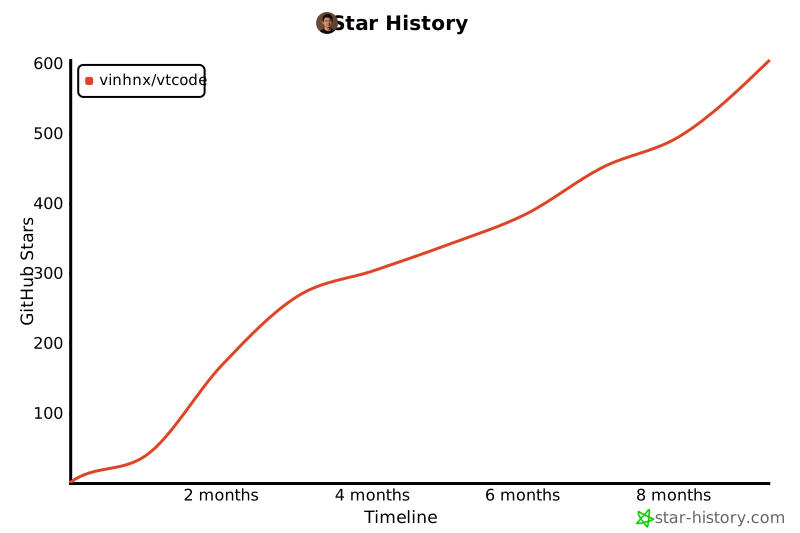](https://www.star-history.com/#vinhnx/vtcode&type=timeline&legend=top-left)
## License
This repository is licensed under the [MIT License](LICENSE).