# *vsvg*: core library for pen-plotter graphics
[<img alt="github" src="https://img.shields.io/badge/github-abey79/vsvg-8da0cb?logo=github" height="20">](https://github.com/abey79/vsvg)
[](https://crates.io/crates/vsvg)
[](https://docs.rs/vsvg)
[](https://github.com/abey79/vsvg/blob/master/LICENSE)
*vsvg* is the core crate of the project. It implements data structures, I/O, and algorithms to import, create, manipulate,
and export vector graphics for pen-plotter generative art. It is similar in purpose to the core library that is part
of [*vpype*](https://github.com/abey79/vpype), but with *many* improvements (see bellow).
This crate, to ether with its companion [*vsvg-viewer*](https://crates.io/crates/vsvg-viewer), is part of the [*vsvg* project](https://github.com/abey79/vsvg) and powers the [*whiskers*](https://crates.io/crates/whiskers)
interactive sketch environment.
## Example
```rust
use vsvg::{DocumentTrait, LayerTrait, PathTrait};
fn main() {
/* == Document == */
let mut doc = vsvg::Document::default();
// push a path to layer 1
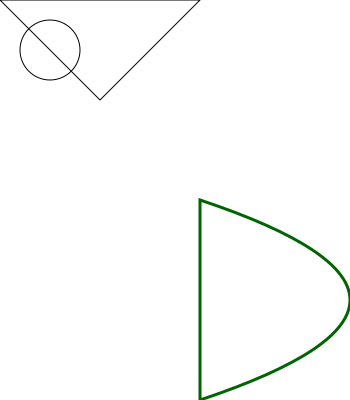
doc.push_path(1, vec![(0., 0.), (100., 100.), (200., 0.), (0., 0.)]);
/* == Layers == */
let mut layer = vsvg::Layer::default();
layer.metadata_mut().name = "Layer 2".to_string();
// vsvg uses kurbo internally, and its API is compatible with it
layer.push_path(kurbo::Circle::new((50., 50.), 30.));
doc.layers_mut().insert(2, layer);
/* == Path == */
// Amongst various ways to create a path, the SVG <path> syntax is supported.
let mut path = vsvg::Path::from_svg("M 200 200 L 200 400 Q 500 300 200 200 Z").unwrap();
path.metadata_mut().color = vsvg::Color::DARK_GREEN;
path.metadata_mut().stroke_width = 3.0;
doc.push_path(3, path);
// save to SVG
doc.to_svg_file("basic.svg").unwrap();
}
```
This generates the following SVG:
## Compared to *vpype*
This crate offers similar functionalities as the core [*vpype*](https://github.com/abey79/vpype) package and its `Document`/`LineCollection` structures. It brings however a host of improvements listed below. In the future, a Python wrapper over *vsvg* will replace *vpype*'s core package, leading to *vpype 2.0*.
## Installation
```
cargo add vsvg
```
### Fast
By "fast", I mean "much faster than *vpype*". Consider the following command:
```
vpype read 300_beziers.svg show
```
On my computer (a 2021 MacBook Pro M1 Max), *vpype* takes about 570ms *just to start*. Then it needs another 140ms to load this benchmark file containing 300 Bézier curves. Then it kicks off the viewer (this part is actually rather quick).
As of today `vsvg` takes ~3.6ms to start and load the same SVG file. It feels instantaneous.
In another test with a rather pathological 90MB SVG, `vsvg` takes 1.4s to load the file, where it takes upward of 30s for *vpype*.
### Support for Béziers
The core path data structure used by *vsvg* is [`kurbo::BezPath`](https://docs.rs/kurbo/latest/kurbo/struct.BezPath.html). It is similar to SVG's `<path>` element in that it consists of a series of draw commands such as "move to", "line to", "quad bézier to", "cubic bézier to", and "close". This is a major departure from *vpype*'s approach where everything was linearised to polylines. The major advantages of this path representation is a much greater accuracy while remaining more compact that polyline for all curved elements.
The [`bezpath`](../whiskers/examples/bezpath.rs) example from *whiskers* provides insights on how `kurbo::BezPath` are used in *vsvg*.
Note that `kurbo::BezPath` does *not* include arc/circle/ellipses commands. When drawing such primitive (or loading SVGs containing them), they are converted into cubic Béziers. Although this approximation is not 100% accurate, it's _vastly_ superior to polylines. For example, a circle is typically approximated by 4 cubic Béziers (16 coordinates), where hundreds of line segment would be needed for a lesser accuracy.
### Compound paths
A subtle (but decisive) advantage of the `kurbo::BezPath` data structure is that it can contain multiple sub-paths, a.k.a. Inkscape's "Combine" path operation. This happens by using multiple "move to" commands. This means that shapes such as polygons with hole can be modelled in a semantically correct way. Previously, such a shape was represented by distinct, unrelated paths.
Amongst other thing, this will enable hatching algorithm that correctly handle polygons with hole, e.g. where the holes aren't actually hatched. This is currently impossible to do with *vpype*. *vsketch*'s `Shape` currently enables this, but at the cost of a lot of internal/external complexity.
### Improved linearisation
*vsvg* retains the ability to convert curved elements into polylines (a.k.a. linearisation), as this step is still required by some operations. For example, exporting to G-code (a feature not yet implemented) typically requires fully linearised path data. Likewise, the *vsvg-viewer* crate requires linearised paths for rendering.
The linearisation process is better than *vpype*, with an improved tolerance handling. The segment size adapts based on the curvature instead of respecting an absolute maximum segment length, which minimises the number of points needed when curves are nearly straight.
To conveniently support linearisation, *vsvg* provides a hierarchy of data structures (`FlattenedDocument`/`FlattenedLayer`/`FlattenedPath`) which generally behaves identically to the `kurbo::BezPath`-based main hierarchy.
### Path-level metadata
*vsvg* maintains per-path metadata such a color and stroke width. This is an improvement over *vpype*, which only offers per-layer metadata.
### WebAssembly-ready
Although I have yet to sort out the details, the entire stack of the *vsvg* project is compatible with WebAssembly targets. This means that most of what *vsvg* is capable natively could be made available on the web, including display and interactivity. This opens up lots of very nice opportunities to build web-based tooling, generators, etc.
## Is that the future of *vpype*?
Maybe. At least I'd very much like to.
*vpype* is currently made of two packages: `vpype` and `vpype-cli`. The former implements the "engine" and the API, that's then used by `vpype-cli` and plug-ins to offer a CLI interface. What this project explores is basically to opportunity to entirely re-implement the `vpype` package in Rust, which would aptly be renamed `vpype-core` in the process. This would dramatically improve the performance of *vpype*, thanks the Rust being compiled to native code and having much better concurrency.