# Vortix
[](https://github.com/Harry-kp/vortix/actions/workflows/ci.yml)
[](LICENSE)
[](CONTRIBUTING.md)
[](https://crates.io/crates/vortix)
[](https://crates.io/crates/vortix)
[](https://www.npmjs.com/package/@harry-kp/vortix)
[](https://www.npmjs.com/package/@harry-kp/vortix)
[](https://github.com/Harry-kp/homebrew-tap)
[](https://github.com/Harry-kp/vortix#installation)
[](https://github.com/Harry-kp/vortix)
[](https://github.com/Harry-kp/vortix)
[](https://www.rust-lang.org/)
[](https://github.com/Harry-kp/vortix)
[](https://github.com/sponsors/Harry-kp)
Terminal UI for WireGuard and OpenVPN with real-time telemetry and leak guarding.

## Why Vortix?
I wanted a single interface to:
- See connection status, throughput, and latency at a glance
- Detect IPv6/DNS leaks without running separate tools
- Switch between VPN profiles without remembering CLI flags
Existing options (`wg show`, NetworkManager, Tunnelblick) either lack real-time telemetry or require a GUI.
| Memory usage | ~15MB | 200-500MB | ~5MB |
| Startup time | <100ms | 2-5s | Instant |
| Real-time telemetry | ✅ | ✅ | ❌ |
| Leak detection | ✅ | Some | ❌ |
| Kill switch | ✅ | ✅ | Manual |
| Keyboard-driven | ✅ | ❌ | ✅ |
| Works over SSH | ✅ | ❌ | ✅ |
## Features
- **WireGuard & OpenVPN** — Auto-detects `.conf` and `.ovpn` files
- **Advanced Telemetry** — Real-time throughput, latency, **jitter**, and **packet loss**
- **Geo-Location** — Instant detection of your exit IP's city and country
- **Leak detection** — Monitors for IPv6 leaks and DNS leaks in real-time
- **Kill Switch** — Built-in firewall management for maximum security
- **Interactive Import** — Easily add new profiles directly within the TUI
- **Config Viewer** — Inspect profile configurations directly within the TUI
- **Keyboard-driven** — No mouse required
## Platform Support
Vortix is actively developed and used primarily on macOS.
Linux support is a current focus and is improving quickly, with CI coverage for Ubuntu and Fedora. Linux environments still vary a lot across distributions, firewall backends, DNS tooling, and privilege models, so distro-specific issues may still exist.
If you use Vortix on Linux and hit a problem, please open an issue and include `vortix report` output when possible. Ubuntu, Fedora, and Arch users are especially helpful when testing release candidates and validating fixes before release. If you want to help test Linux support, join the [Linux tester discussion](https://github.com/Harry-kp/vortix/discussions/184).
## Requirements
### Runtime dependencies
| `curl` | Pre-installed | `apt install curl` | Telemetry and IP detection |
| `openvpn` | `brew install openvpn` | `apt install openvpn` | OpenVPN sessions |
| `wireguard-tools` | `brew install wireguard-tools` | `apt install wireguard-tools` | WireGuard sessions |
| `resolvconf` / `systemd-resolved` | N/A (uses native DNS) | `systemd-resolvconf` or `openresolv` | WireGuard DNS management (optional, needed if DNS in config) |
| `iptables` or `nftables` | N/A (uses `pfctl`) | Pre-installed | Kill switch |
| `iproute2` | N/A (uses `ifconfig`) | Pre-installed | Interface detection |
> Vortix checks for missing tools at startup and shows a warning toast with install instructions.
**DNS tools note:** If your WireGuard profile includes a `DNS =` directive, Vortix will automatically detect and warn about missing DNS tools. Install accordingly:
- **Arch/Fedora (systemd-based):** `sudo pacman -S systemd-resolvconf` or `sudo dnf install systemd-resolved`
- **Debian/Ubuntu:** `sudo apt install systemd-resolved` (usually pre-installed)
- **Alpine/Void (OpenRC):** Vortix falls back to `/etc/resolv.conf` editing automatically
### Build dependencies (source installs only)
- Rust 1.75+
- macOS 12+ or Linux kernel 3.10+ (5.6+ recommended for native WireGuard)
### Quick install commands
**Ubuntu/Debian:**
```bash
sudo apt install curl wireguard-tools openvpn iptables iproute2 systemd-resolved
```
**Fedora/RHEL:**
```bash
sudo dnf install curl wireguard-tools openvpn iptables iproute systemd-resolved
```
**Arch Linux** (only needed for source builds — `pacman -S vortix` handles deps automatically):
```bash
sudo pacman -S curl wireguard-tools openvpn iptables iproute2 systemd-resolvconf
```
> **DNS management:** Vortix uses `resolvconf` (via `systemd-resolvconf` or `openresolv`) to manage DNS when your WireGuard profile contains `DNS =`. On systemd distros (most modern Linux), this is automatic via systemd-resolved. Non-systemd distros (Alpine, Void, Gentoo OpenRC) will use `/etc/resolv.conf` editing as a fallback.
## Installation
**Homebrew (macOS/Linux):**
```bash
brew install Harry-kp/tap/vortix
```
**npm/npx:**
```bash
npm install -g @harry-kp/vortix
# or run directly without installing:
npx @harry-kp/vortix
```
**From crates.io:**
```bash
cargo install vortix
```
**Arch Linux ([extra repo](https://archlinux.org/packages/extra/x86_64/vortix/)):**
```bash
pacman -S vortix
```
**Quick install (Binary):**
```bash
**Static binary (Linux):**
Download the `x86_64-unknown-linux-musl` release from the [releases page](https://github.com/Harry-kp/vortix/releases). This is a statically linked binary (no glibc needed), but you still need the runtime dependencies above (curl, openvpn/wireguard-tools, etc.).
**Nix (flakes):**
```bash
nix run github:Harry-kp/vortix # Run without installing
nix profile install github:Harry-kp/vortix # Install to profile
```
**From source:**
```bash
git clone https://github.com/Harry-kp/vortix.git
cd vortix
cargo install --path .
```
### Linux: setting up sudo access
Vortix needs root to manage VPN connections and firewall rules. On Linux, `sudo` uses a restricted PATH (`secure_path` in `/etc/sudoers`) that **does not include** `~/.cargo/bin/` — so `sudo vortix` will fail with `command not found`.
**Fix (one-time):**
```bash
sudo ln -s ~/.cargo/bin/vortix /usr/local/bin/vortix
```
After this, `sudo vortix` works as expected.
**Who is affected:**
- `cargo install vortix` — yes
- Shell installer (`curl | sh`) — yes
- From source (`cargo install --path .`) — yes
- `pacman -S vortix` (Arch) — **no**, installs to `/usr/bin/`
- `brew install` (Homebrew) — **no**, installs to Homebrew prefix
- `npm install -g` (npm) — **no**, installs to npm global bin
- Nix (`nix profile install`) — **no**, installs to Nix profile bin
- macOS — **no**, sudo preserves user PATH
### Linux support note
Most day-to-day development happens on macOS. Linux support is continuously tested in CI, but real-world distro coverage is still growing. If something behaves differently on your Linux setup, please treat that as useful signal and report it rather than assuming it is expected.
## Usage
Vortix has two modes: an interactive TUI dashboard (default) and a headless CLI for scripting, automation, and AI agents.
```bash
sudo vortix # Launch TUI dashboard (default)
```
### CLI Commands
Every subcommand supports `--json` for machine-readable output and `--quiet` for silent operation (exit code only).
**Connection:**
```bash
sudo vortix up work-vpn # Connect to a profile
sudo vortix down # Disconnect (graceful)
sudo vortix down --force # Force-disconnect (SIGKILL)
sudo vortix reconnect # Reconnect to last used profile
vortix status # Show connection state + telemetry
vortix status --brief # One-line: "● Connected to work-vpn"
vortix status --watch # Live updates every 2s
vortix status --watch --json # NDJSON stream for monitoring
```
**Profile Management:**
```bash
vortix list # List all imported profiles
vortix list --names-only # Profile names for scripting
vortix list --sort last-used # Most recently used first
vortix import ./work.conf # Import a WireGuard profile
vortix import ./configs/ # Bulk import from directory
vortix show work-vpn # Display profile configuration
vortix show work-vpn --raw # Raw config file contents
vortix delete old-vpn --yes # Delete without confirmation
vortix rename old-vpn new-vpn # Rename a profile
```
**Security:**
```bash
sudo vortix killswitch auto # Set kill switch to auto mode
sudo vortix killswitch always # Always-on kill switch
vortix killswitch # Show current mode
sudo vortix release-killswitch # Emergency firewall release
```
**System:**
```bash
vortix info # Config paths, versions, profile count
vortix update # Self-update from crates.io
vortix report # Generate bug report
vortix completions bash >> ~/.bashrc # Shell completions
vortix completions zsh > ~/.zfunc/_vortix
```
**JSON output for AI agents / scripts:**
```bash
# Structured JSON envelope on every command
vortix status --json
# {"ok":true,"command":"status","data":{...},"next_actions":[...]}
# NDJSON stream for monitoring
vortix status --watch --json
```
**Exit codes** are semantic and scriptable:
| 0 | Success |
| 1 | General error |
| 2 | Permission denied (needs sudo) |
| 3 | Not found (profile doesn't exist) |
| 4 | State conflict (already connected) |
| 5 | Missing dependency |
| 6 | Timeout |
### Keybindings
| `Tab` | Cycle Focus (All Panels) |
| `1-9` | Connect to Quick-Slot 1-9 |
| `Enter` | Connect / Toggle Profile |
| `d` | Disconnect Active Session |
| `r` | Reconnect Active Session |
| `i` | Import Profile (Direct) |
| `v` | View Profile Configuration |
| `y` | Copy Public IP to Clipboard |
| `K` | Toggle Kill Switch (Shift+K) |
| `z` | Toggle Zoom View (Panel) |
| `x` | Open Action Menu (Contextual) |
| `b` | Open Bulk Menu |
| `Del` | Delete Profile (Sidebar) |
| `q` | Quit Application |
## Configuration
### Config directory
By default, vortix stores profiles, auth credentials, and logs in `~/.config/vortix/`.
Override via CLI flag or environment variable:
```bash
sudo vortix --config-dir /path/to/custom/dir
# or
export VORTIX_CONFIG_DIR=/path/to/custom/dir
sudo vortix
```
Precedence: `--config-dir` flag > `VORTIX_CONFIG_DIR` env var > default path.
When running with `sudo`, vortix automatically resolves the invoking user's home directory (via `SUDO_USER`), so config files live in *your* home, not `/root/`.
### Directory structure
```
~/.config/vortix/
├── profiles/ VPN configuration files
│ ├── work.conf WireGuard profile
│ └── office.ovpn OpenVPN profile
├── auth/ Saved OpenVPN credentials
│ └── office Username + password for "office" profile
├── run/ OpenVPN runtime files (temporary)
│ ├── office.pid Daemon PID (source of truth for disconnect)
│ └── office.log Raw daemon output (monitors connect/failure)
├── logs/ Application logs (daily rotation)
│ └── 2026-02-09.log Same content as the TUI Logs panel
├── config.toml User settings (optional, see below)
├── metadata.json Profile metadata (last used, sort order)
└── killswitch.state Kill switch state for crash recovery
```
All files and directories are owned by your user account, even when vortix runs under `sudo`. You can read, modify, or delete anything here without elevated privileges.
| `profiles/` | `600` | Your `.conf` and `.ovpn` files. Added via `vortix import` or the TUI. |
| `auth/` | `600` | Saved OpenVPN username/password pairs. One file per profile. |
| `run/` | `644` | **OpenVPN only.** PID and log files created during a VPN session. The `.pid` file identifies which daemon to kill; the `.log` is polled for success/failure. Cleaned up on disconnect. WireGuard doesn't use this. |
| `logs/` | `644` | Application session logs (daily rotation, configurable size/retention). Not the raw OpenVPN output in `run/`. |
| `config.toml` | `644` | Optional user settings. Only exists if you create it manually (see below). |
| `metadata.json` | `644` | Internal bookkeeping (last used, sort order). Auto-managed. |
| `killswitch.state` | `644` | Persists kill switch mode across crashes. Auto-managed. |
### Config file
Create `~/.config/vortix/config.toml` to customize settings. All fields are optional -- missing fields use defaults:
```toml
# --- Timing ---
# UI refresh rate in milliseconds (default: 1000)
tick_rate = 1000
# Telemetry polling interval in seconds (default: 30)
telemetry_poll_rate = 30
# HTTP API timeout in seconds (default: 5)
api_timeout = 5
# Ping timeout in seconds (default: 2)
ping_timeout = 2
# OpenVPN connection timeout in seconds (default: 20)
connect_timeout = 20
# Max seconds to wait for a VPN disconnect before force-killing (default: 30)
disconnect_timeout = 30
# --- Logging ---
# Minimum log level shown in the TUI event log: "debug", "info", "warning", "error" (default: "info")
log_level = "info"
# Maximum log entries kept in the TUI event log (default: 1000)
max_log_entries = 1000
# Log file rotation size in bytes (default: 5242880 = 5 MB)
log_rotation_size = 5242880
# Days to retain old log files (default: 7)
log_retention_days = 7
# --- OpenVPN ---
# OpenVPN daemon verbosity level, --verb flag, range 0-11 (default: "3")
openvpn_verbosity = "3"
# --- Telemetry endpoints ---
# Ping targets for latency measurement (tried in order)
ping_targets = ["1.1.1.1", "8.8.8.8", "9.9.9.9", "208.67.222.222"]
# IPv6 leak detection endpoints
ipv6_check_apis = ["https://ipv6.icanhazip.com", "https://v6.ident.me", "https://api6.ipify.org"]
# Primary IP/ISP API
ip_api_primary = "https://ipinfo.io/json"
# Fallback IP APIs
ip_api_fallbacks = ["https://api.ipify.org", "https://icanhazip.com", "https://ifconfig.me/ip"]
```
## How It Works
**Telemetry:** A background thread polls system network stats every second for throughput (macOS: `netstat -ib`, Linux: `/proc/net/dev`). Network quality (latency, jitter, loss) is calculated using multi-packet ICMP probes. Public IP, ISP, and Geo-location data are fetched via `ipinfo.io/json`.
**Security (Kill Switch & Leak Detection):**
- **Kill Switch:** Platform-native firewall integration. macOS uses PF (Packet Filter) via `pfctl`. Linux supports both `iptables` (with a dedicated `VORTIX_KILLSWITCH` chain) and `nftables` (with an atomic `vortix_killswitch` table) for clean teardown. Automatically blocks all non-VPN traffic when connection drops.
- **IPv6 Leak:** Active monitoring via `api6.ipify.org`. Any IPv6 traffic detected while VPN is active triggers a leak warning.
- **DNS Leak:** Monitors DNS configuration to ensure nameservers align with the secure tunnel (macOS: `scutil --dns` / `networksetup`, Linux: `resolvectl` / `nmcli` / `/etc/resolv.conf`).
**WireGuard Integration:** macOS resolves interface names via `/var/run/wireguard/*.name`. Linux uses kernel WireGuard interfaces directly (`wg0`, `wg1`, etc.). Both platforms parse `wg show` for handshake timing, transfer stats, and endpoint metadata.
**OpenVPN Integration:** Tracks session uptime and connection status via `ps` proc parsing. Interface detection uses `ifconfig` on macOS and `ip addr` on Linux.
### Platform Notes
| Kill switch | `pfctl` (PF) | `iptables` or `nftables` |
| Network stats | `netstat -ib` | `/proc/net/dev` |
| Interface detection | `ifconfig` + `/var/run/wireguard/` | `ip addr` + `wg show` |
| DNS detection | `scutil --dns`, `networksetup` | `resolvectl`, `nmcli`, `/etc/resolv.conf` |
| Default VPN iface | `utun0` | `wg0` |
| Tested distros | macOS 12+ | Ubuntu, Fedora, Arch |
## Troubleshooting
### Quick Reference: Common Errors
| `Missing dependencies: resolvconf (systemd)` | WireGuard profile has DNS but `resolvconf` not installed | Run `sudo pacman -S systemd-resolvconf` (Arch) or `sudo dnf install systemd-resolved` (Fedora) |
| `iptables-restore: unable to initialize table` | Cloud kernel doesn't support iptables; profile uses `AllowedIPs = 0.0.0.0/0` | Change `AllowedIPs` to `10.0.0.0/8` or disable kill switch |
| `wg-quick: The config file must be a valid interface name` | Profile name > 15 characters | Rename: `vortix rename long-name short-name` |
| `Connection succeeded but no internet` | `AllowedIPs` doesn't include your target | Add target IP to `AllowedIPs` in config |
| `connection timed out` or `Connection refused` | Can't reach VPN endpoint | Check firewall/cloud provider port restrictions |
### General Issues
**Profiles missing after upgrade (Linux)**
If you previously ran vortix with `sudo` and profiles were stored in `/root/.config/vortix/`, the app will offer a one-time migration prompt. Accept it to move your data to `~/.config/vortix/` under your real user account.
If you declined migration and want to keep using the old path:
```bash
sudo vortix --config-dir /root/.config/vortix
```
**Permission denied errors**
If config files are owned by root, fix ownership:
```bash
sudo chown -R $(whoami) ~/.config/vortix/
```
### Arch Linux & Distribution-Specific FAQ
#### Q: Connection fails with "Missing dependencies: resolvconf (systemd)"
**A:** This happens on Arch, Fedora, and NixOS when your WireGuard profile has DNS settings but `resolvconf` isn't installed. These distros don't include DNS management tools by default.
**Fix:**
```bash
# Arch Linux (systemd-based)
sudo pacman -S systemd-resolvconf
# Fedora (systemd-based)
sudo dnf install systemd-resolved
# Debian/Ubuntu (should be pre-installed)
sudo apt install systemd-resolved
```
Vortix will now automatically detect `resolvconf` and proceed with the connection. No restart needed.
#### Q: Connection fails with "iptables-restore: unable to initialize table"
**A:** Your system doesn't have the `ip_tables` kernel module. This typically happens on:
- **Cloud providers** (DigitalOcean, AWS Lambda, Google Cloud Run, etc.) that intentionally disable netfilter
- **Containers** with minimal kernel capabilities
- **Custom kernels** built without netfilter support
This is **not a Vortix issue** — it's a system limitation that affects all Linux VPN tools, specifically:
- **Vortix's kill switch** (requires iptables/nftables for firewall rules)
- **wg-quick's automatic routing** (when `AllowedIPs = 0.0.0.0/0` is set in the WireGuard config)
**Workaround 1: Disable the kill switch (doesn't help on cloud providers):**
```bash
sudo vortix killswitch off
sudo vortix up your-profile
```
This only works if your WireGuard profile doesn't use `AllowedIPs = 0.0.0.0/0`. If it does, wg-quick will still try to configure iptables.
**Workaround 2: Modify your WireGuard profile for cloud providers:**
If your profile has `AllowedIPs = 0.0.0.0/0` (route all traffic through VPN), wg-quick automatically configures firewall rules. On cloud providers, change it to a more restrictive setting:
```ini
# ❌ This requires iptables (will fail on cloud providers)
AllowedIPs = 0.0.0.0/0
# ✅ This only routes VPN subnet (no iptables needed)
AllowedIPs = 10.0.0.0/8
```
Edit your profile with `vortix show <profile> --raw` to see the current `AllowedIPs` setting.
**Verify if your system supports iptables:**
```bash
modprobe ip_tables && echo "✓ Supported" || echo "✗ Not available on this kernel"
```
**Best practice for cloud providers:**
If you need to route all traffic through the VPN on a cloud provider, you'll need an instance with a standard kernel (not a restricted cloud kernel). Alternatively, use a home server, dedicated host, or bare metal with full kernel support.
#### Q: How do I know what DNS resolver my system uses?
**A:** Run this to check which method Vortix will use:
```bash
# Systemd (most modern Linux distros)
resolvectl status 2>/dev/null && echo "✓ Using systemd-resolved"
# NetworkManager
# Fallback check
Vortix automatically detects and respects your system's DNS setup.
#### Q: Can I use Vortix on non-systemd distros?
**A:** Yes, but with limitations on DNS management:
- **Arch, Fedora, Ubuntu, Debian** → Full support (systemd or alternatives available)
- **Alpine, Void, Gentoo (OpenRC)** → Vortix falls back to editing `/etc/resolv.conf` directly
- **NixOS** → Works, but DNS may require custom configuration
If you use a non-systemd distro and hit issues, please [open an issue](https://github.com/Harry-kp/vortix/issues) with `vortix report` output.
#### Q: Why does the connection succeed but DNS doesn't work?
**A:** If `vortix up` succeeds but you can't resolve domains, it means:
1. **The VPN tunnel is active** (IP changing works)
2. **DNS configuration failed** (resolvconf not working properly)
**Debug steps:**
```bash
# Check if resolvconf is working
resolvconf --version
# Check active DNS servers
# Manually test DNS through the VPN
dig @8.8.8.8 google.com
# Check the system's resolv.conf symlink
ls -la /etc/resolv.conf
```
If `/etc/resolv.conf` is not managed by systemd (not a symlink to `/run/systemd/`), you may need to install `systemd-resolvconf` or `openresolv`.
#### Q: WireGuard interface name is too long
**A:** Linux WireGuard interfaces have a 15-character name limit. If your profile name is longer, wg-quick will fail with "invalid interface name".
**Fix:** Rename your profile to something shorter:
```bash
vortix rename my-very-long-profile-name work-vpn
```
WireGuard interface names should contain only alphanumeric characters, hyphens, and underscores.
#### Q: How do I report a distro-specific issue?
**A:** Include this information when opening an issue:
```bash
vortix report # Generates a complete report
uname -a # Kernel version
cat /etc/os-release # Distro info
systemctl --version # Init system
```
Tested and supported Linux distros in CI: **Ubuntu 20.04/22.04**, **Fedora 40+**, **Arch Linux**. If you use a different distro and hit issues, that's valuable signal for the project.
### WireGuard Configuration Guide
#### Understanding AllowedIPs
The `AllowedIPs` setting in your WireGuard config determines what traffic goes through the VPN:
```ini
# Route ALL traffic through VPN (requires iptables/nftables for firewall rules)
AllowedIPs = 0.0.0.0/0 # ⚠️ May fail on cloud providers, containers
# Route only VPN subnet traffic (no special firewall rules needed)
AllowedIPs = 10.0.0.0/8 # ✅ Works everywhere, even cloud providers
# Route specific traffic only
AllowedIPs = 192.168.1.0/24 # ✅ Route only corporate network
```
**Why this matters:**
- When `AllowedIPs = 0.0.0.0/0`, wg-quick automatically configures firewall rules via iptables/nftables
- Cloud providers (DigitalOcean, AWS Lambda, Google Cloud Run) disable iptables kernel modules
- Restrictive `AllowedIPs` avoids firewall configuration entirely
**Recommendation for cloud servers:**
If you're running Vortix on a cloud provider and need to route traffic through the VPN, use `AllowedIPs = 10.0.0.0/8` or another private subnet instead of `0.0.0.0/0`.
#### Common WireGuard Configuration Issues
**Issue: Connection succeeds but no internet access**
Check your `AllowedIPs` setting:
```bash
- If it's `10.0.0.0/8` or similar, only traffic to that subnet goes through VPN
- Add your target IP/subnet to `AllowedIPs` to route it through the tunnel
- Example: `AllowedIPs = 10.0.0.0/8, 192.168.0.0/16`
**Issue: Can't reach VPN server from cloud provider**
Some cloud providers block outbound UDP 51820 or other ports. Try:
```bash
# Check if you can reach the endpoint
ping -c 1 138.197.3.155
# Test specific port (replace with your endpoint)
If blocked, contact your cloud provider to allow WireGuard ports.
**Issue: DNS works but only for some domains**
This usually means:
1. VPN DNS servers are configured but not all traffic routes through VPN
2. Your system's DNS fallback is resolving some queries locally
Check if `DNS =` is in your config and matches your VPN provider's DNS servers.
#### Testing Your WireGuard Profile
After creating/importing a profile, test the configuration:
```bash
# View the profile
vortix show my-profile --raw
# Check required fields
# Expected output:
# PrivateKey = (base64)
# Address = 10.0.0.2/24
# Endpoint = 1.2.3.4:51820
# AllowedIPs = 10.0.0.0/8 (or 0.0.0.0/0)
# PublicKey = (base64)
# DNS = 8.8.8.8, 8.8.4.4 (optional)
```
All fields above are required except `DNS` (optional).
## Roadmap
See the [project board](https://github.com/users/Harry-kp/projects/6) for what's being explored. Have an idea? [Join the discussion](https://github.com/Harry-kp/vortix/discussions/34).
## Development
```bash
cargo build # Build binary
cargo test # Run unit/integration tests
cargo clippy # Enforce code quality (Fail-fast via pre-commit)
```
**Nix users** can enter a development shell with all Rust tooling pre-configured:
```bash
nix develop
```
## Featured In
- [awesome-rust](https://github.com/rust-unofficial/awesome-rust) — A curated list of Rust code and resources
- [awesome-ratatui](https://github.com/ratatui/awesome-ratatui) — A curated list of Ratatui apps and tools
- [awesome-tuis](https://github.com/rothgar/awesome-tuis) — A list of the best TUI programs
- [Arch Linux [extra]](https://archlinux.org/packages/extra/x86_64/vortix/) — Official Arch Linux package repository
- [Terminal Trove](https://terminaltrove.com/vortix/) — The $HOME of all things in the terminal
## Star History
[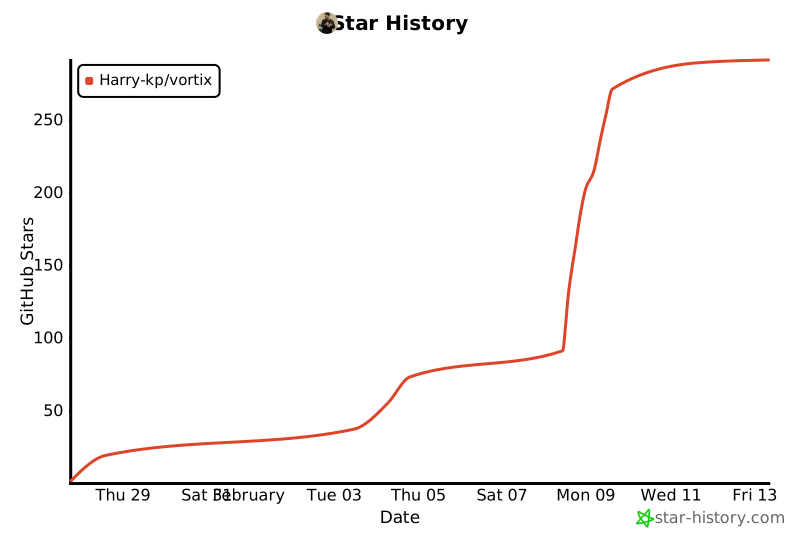](https://star-history.com/#Harry-kp/vortix&Date)