# Vortix
[](https://crates.io/crates/vortix)
[](https://crates.io/crates/vortix)
[](https://github.com/Harry-kp/vortix/actions/workflows/ci.yml)
[](LICENSE)
[](https://github.com/Harry-kp/vortix)
[](https://github.com/Harry-kp/vortix)
[](https://www.rust-lang.org/)
[](https://github.com/sponsors/Harry-kp)
[](https://github.com/Harry-kp/homebrew-tap)
[](https://www.npmjs.com/package/@harry-kp/vortix)
[](CONTRIBUTING.md)
[](https://github.com/Harry-kp/vortix)
Terminal UI for WireGuard and OpenVPN with real-time telemetry and leak guarding.

## Why Vortix?
I wanted a single interface to:
- See connection status, throughput, and latency at a glance
- Detect IPv6/DNS leaks without running separate tools
- Switch between VPN profiles without remembering CLI flags
Existing options (`wg show`, NetworkManager, Tunnelblick) either lack real-time telemetry or require a GUI.
| Memory usage | ~15MB | 200-500MB | ~5MB |
| Startup time | <100ms | 2-5s | Instant |
| Real-time telemetry | ✅ | ✅ | ❌ |
| Leak detection | ✅ | Some | ❌ |
| Kill switch | ✅ | ✅ | Manual |
| Keyboard-driven | ✅ | ❌ | ✅ |
| Works over SSH | ✅ | ❌ | ✅ |
## Features
- **WireGuard & OpenVPN** — Auto-detects `.conf` and `.ovpn` files
- **Advanced Telemetry** — Real-time throughput, latency, **jitter**, and **packet loss**
- **Geo-Location** — Instant detection of your exit IP's city and country
- **Leak detection** — Monitors for IPv6 leaks and DNS leaks in real-time
- **Kill Switch** — Built-in firewall management for maximum security
- **Interactive Import** — Easily add new profiles directly within the TUI
- **Config Viewer** — Inspect profile configurations directly within the TUI
- **Keyboard-driven** — No mouse required
## Requirements
### Runtime dependencies
| `curl` | Pre-installed | `apt install curl` | Telemetry and IP detection |
| `openvpn` | `brew install openvpn` | `apt install openvpn` | OpenVPN sessions |
| `wireguard-tools` | `brew install wireguard-tools` | `apt install wireguard-tools` | WireGuard sessions |
| `iptables` or `nftables` | N/A (uses `pfctl`) | Pre-installed | Kill switch |
| `iproute2` | N/A (uses `ifconfig`) | Pre-installed | Interface detection |
> Vortix checks for missing tools at startup and shows a warning toast with install instructions.
### Build dependencies (source installs only)
- Rust 1.75+
- macOS 12+ or Linux kernel 3.10+ (5.6+ recommended for native WireGuard)
### Quick install commands
**Ubuntu/Debian:**
```bash
sudo apt install curl wireguard-tools openvpn iptables iproute2
```
**Fedora/RHEL:**
```bash
sudo dnf install curl wireguard-tools openvpn iptables iproute
```
**Arch Linux** (only needed for source builds — `pacman -S vortix` handles deps automatically):
```bash
sudo pacman -S curl wireguard-tools openvpn iptables iproute2
```
> **DNS detection** uses `resolvectl` (systemd-resolved) as the primary method, with `nmcli` (NetworkManager) and `/etc/resolv.conf` as fallbacks. Non-systemd distros (Alpine, Void, Gentoo OpenRC) will use the `/etc/resolv.conf` fallback automatically.
## Installation
**Homebrew (macOS/Linux):**
```bash
brew install Harry-kp/tap/vortix
```
**npm/npx:**
```bash
npm install -g @harry-kp/vortix
# or run directly without installing:
npx @harry-kp/vortix
```
**From crates.io:**
```bash
cargo install vortix
```
**Arch Linux ([extra repo](https://archlinux.org/packages/extra/x86_64/vortix/)):**
```bash
pacman -S vortix
```
**Quick install (Binary):**
```bash
**Static binary (Linux):**
Download the `x86_64-unknown-linux-musl` release from the [releases page](https://github.com/Harry-kp/vortix/releases). This is a statically linked binary (no glibc needed), but you still need the runtime dependencies above (curl, openvpn/wireguard-tools, etc.).
**From source:**
```bash
git clone https://github.com/Harry-kp/vortix.git
cd vortix
cargo install --path .
```
### Linux: setting up sudo access
Vortix needs root to manage VPN connections and firewall rules. On Linux, `sudo` uses a restricted PATH (`secure_path` in `/etc/sudoers`) that **does not include** `~/.cargo/bin/` — so `sudo vortix` will fail with `command not found`.
**Fix (one-time):**
```bash
sudo ln -s ~/.cargo/bin/vortix /usr/local/bin/vortix
```
After this, `sudo vortix` works as expected.
**Who is affected:**
- `cargo install vortix` — yes
- Shell installer (`curl | sh`) — yes
- From source (`cargo install --path .`) — yes
- `pacman -S vortix` (Arch) — **no**, installs to `/usr/bin/`
- `brew install` (Homebrew) — **no**, installs to Homebrew prefix
- `npm install -g` (npm) — **no**, installs to npm global bin
- macOS — **no**, sudo preserves user PATH
## Usage
```bash
sudo vortix # Launch TUI (requires root for VPN operations)
vortix import <file> # Import a .conf or .ovpn profile
vortix info # Show config directory and version
vortix update # Self-update to latest release
```
### Keybindings
| `Tab` | Cycle Focus (All Panels) |
| `1-9` | Connect to Quick-Slot 1-9 |
| `Enter` | Connect / Toggle Profile |
| `d` | Disconnect Active Session |
| `r` | Reconnect Active Session |
| `i` | Import Profile (Direct) |
| `v` | View Profile Configuration |
| `y` | Copy Public IP to Clipboard |
| `K` | Toggle Kill Switch (Shift+K) |
| `z` | Toggle Zoom View (Panel) |
| `x` | Open Action Menu (Contextual) |
| `b` | Open Bulk Menu |
| `Del` | Delete Profile (Sidebar) |
| `q` | Quit Application |
## Configuration
### Config directory
By default, vortix stores profiles, auth credentials, and logs in `~/.config/vortix/`.
Override via CLI flag or environment variable:
```bash
sudo vortix --config-dir /path/to/custom/dir
# or
export VORTIX_CONFIG_DIR=/path/to/custom/dir
sudo vortix
```
Precedence: `--config-dir` flag > `VORTIX_CONFIG_DIR` env var > default path.
When running with `sudo`, vortix automatically resolves the invoking user's home directory (via `SUDO_USER`), so config files live in *your* home, not `/root/`.
### Directory structure
```
~/.config/vortix/
├── profiles/ VPN configuration files
│ ├── work.conf WireGuard profile
│ └── office.ovpn OpenVPN profile
├── auth/ Saved OpenVPN credentials
│ └── office Username + password for "office" profile
├── run/ OpenVPN runtime files (temporary)
│ ├── office.pid Daemon PID (source of truth for disconnect)
│ └── office.log Raw daemon output (monitors connect/failure)
├── logs/ Application logs (daily rotation)
│ └── 2026-02-09.log Same content as the TUI Logs panel
├── config.toml User settings (optional, see below)
├── metadata.json Profile metadata (last used, sort order)
└── killswitch.state Kill switch state for crash recovery
```
All files and directories are owned by your user account, even when vortix runs under `sudo`. You can read, modify, or delete anything here without elevated privileges.
| `profiles/` | `600` | Your `.conf` and `.ovpn` files. Added via `vortix import` or the TUI. |
| `auth/` | `600` | Saved OpenVPN username/password pairs. One file per profile. |
| `run/` | `644` | **OpenVPN only.** PID and log files created during a VPN session. The `.pid` file identifies which daemon to kill; the `.log` is polled for success/failure. Cleaned up on disconnect. WireGuard doesn't use this. |
| `logs/` | `644` | Application session logs (daily rotation, configurable size/retention). Not the raw OpenVPN output in `run/`. |
| `config.toml` | `644` | Optional user settings. Only exists if you create it manually (see below). |
| `metadata.json` | `644` | Internal bookkeeping (last used, sort order). Auto-managed. |
| `killswitch.state` | `644` | Persists kill switch mode across crashes. Auto-managed. |
### Config file
Create `~/.config/vortix/config.toml` to customize settings. All fields are optional -- missing fields use defaults:
```toml
# --- Timing ---
# UI refresh rate in milliseconds (default: 1000)
tick_rate = 1000
# Telemetry polling interval in seconds (default: 30)
telemetry_poll_rate = 30
# HTTP API timeout in seconds (default: 5)
api_timeout = 5
# Ping timeout in seconds (default: 2)
ping_timeout = 2
# OpenVPN connection timeout in seconds (default: 20)
connect_timeout = 20
# Max seconds to wait for a VPN disconnect before force-killing (default: 30)
disconnect_timeout = 30
# --- Logging ---
# Minimum log level shown in the TUI event log: "debug", "info", "warning", "error" (default: "info")
log_level = "info"
# Maximum log entries kept in the TUI event log (default: 1000)
max_log_entries = 1000
# Log file rotation size in bytes (default: 5242880 = 5 MB)
log_rotation_size = 5242880
# Days to retain old log files (default: 7)
log_retention_days = 7
# --- OpenVPN ---
# OpenVPN daemon verbosity level, --verb flag, range 0-11 (default: "3")
openvpn_verbosity = "3"
# --- Telemetry endpoints ---
# Ping targets for latency measurement (tried in order)
ping_targets = ["1.1.1.1", "8.8.8.8", "9.9.9.9", "208.67.222.222"]
# IPv6 leak detection endpoints
ipv6_check_apis = ["https://ipv6.icanhazip.com", "https://v6.ident.me", "https://api6.ipify.org"]
# Primary IP/ISP API
ip_api_primary = "https://ipinfo.io/json"
# Fallback IP APIs
ip_api_fallbacks = ["https://api.ipify.org", "https://icanhazip.com", "https://ifconfig.me/ip"]
```
## How It Works
**Telemetry:** A background thread polls system network stats every second for throughput (macOS: `netstat -ib`, Linux: `/proc/net/dev`). Network quality (latency, jitter, loss) is calculated using multi-packet ICMP probes. Public IP, ISP, and Geo-location data are fetched via `ipinfo.io/json`.
**Security (Kill Switch & Leak Detection):**
- **Kill Switch:** Platform-native firewall integration. macOS uses PF (Packet Filter) via `pfctl`. Linux supports both `iptables` (with a dedicated `VORTIX_KILLSWITCH` chain) and `nftables` (with an atomic `vortix_killswitch` table) for clean teardown. Automatically blocks all non-VPN traffic when connection drops.
- **IPv6 Leak:** Active monitoring via `api6.ipify.org`. Any IPv6 traffic detected while VPN is active triggers a leak warning.
- **DNS Leak:** Monitors DNS configuration to ensure nameservers align with the secure tunnel (macOS: `scutil --dns` / `networksetup`, Linux: `resolvectl` / `nmcli` / `/etc/resolv.conf`).
**WireGuard Integration:** macOS resolves interface names via `/var/run/wireguard/*.name`. Linux uses kernel WireGuard interfaces directly (`wg0`, `wg1`, etc.). Both platforms parse `wg show` for handshake timing, transfer stats, and endpoint metadata.
**OpenVPN Integration:** Tracks session uptime and connection status via `ps` proc parsing. Interface detection uses `ifconfig` on macOS and `ip addr` on Linux.
### Platform Notes
| Kill switch | `pfctl` (PF) | `iptables` or `nftables` |
| Network stats | `netstat -ib` | `/proc/net/dev` |
| Interface detection | `ifconfig` + `/var/run/wireguard/` | `ip addr` + `wg show` |
| DNS detection | `scutil --dns`, `networksetup` | `resolvectl`, `nmcli`, `/etc/resolv.conf` |
| Default VPN iface | `utun0` | `wg0` |
| Tested distros | macOS 12+ | Ubuntu, Fedora, Arch |
## Troubleshooting
**Profiles missing after upgrade (Linux)**
If you previously ran vortix with `sudo` and profiles were stored in `/root/.config/vortix/`, the app will offer a one-time migration prompt. Accept it to move your data to `~/.config/vortix/` under your real user account.
If you declined migration and want to keep using the old path:
```bash
sudo vortix --config-dir /root/.config/vortix
```
**Permission denied errors**
If config files are owned by root, fix ownership:
```bash
sudo chown -R $(whoami) ~/.config/vortix/
```
## Development
```bash
cargo build # Build binary
cargo test # Run unit/integration tests
cargo clippy # Enforce code quality (Fail-fast via pre-commit)
```
## Featured In
- [Terminal Trove](https://terminaltrove.com/vortix/) — The $HOME of all things in the terminal
## Star History
[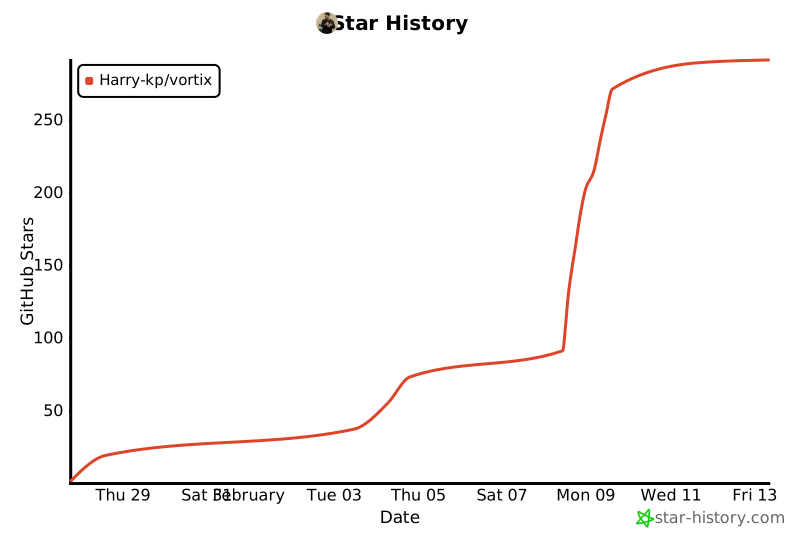](https://star-history.com/#Harry-kp/vortix&Date)