## vim-profiler 🕒
[](https://github.com/terror/zk/actions/workflows/build.yaml)
[](https://crates.io/crates/vim-profiler)
`vim-profiler` is a wrapper around the `(n)vim --startuptime` command, written in Rust. The binary is called
`vp` and has only been tested on a Unix based system.
### Demo
Here is a quick demo showcasing the main functionality of the program.
[](https://asciinema.org/a/ec3DhuwvAAoXCTs7pLdBG8JI6)
### Installation
You can install `vim-profiler` with the rust package manager Cargo:
```bash
$ cargo install vim-profiler
```
### Usage
```
vim-profiler 0.0.4
A vim profiling tool.
USAGE:
vp [FLAGS] [OPTIONS]
FLAGS:
-h, --help Prints help information
-r, --reverse Display the plugin times in reverse order (fastest first)
-s, --sys Show system plugins in the output
-V, --version Prints version information
-v, --verbose Add informative messages during program execution
OPTIONS:
-c, --command <command> The command to run, e.g vim or neovim [default: vim]
-n, --count <count> The number of plugins to list in the output
-e, --export <path> Export the results to a CSV file
-f, --file <file> A file to open
-i, --iter <iter> The number of iterations
-p, --plot <path> Plot the data and save it to a SVG file
-x, --precision <precision> Precision in the output
```
### Exporting results
This utility allows for exporting results to either in a `.svg` file in the form
of a plot or in a `.csv` file, where extra statistics are written.
#### Plot
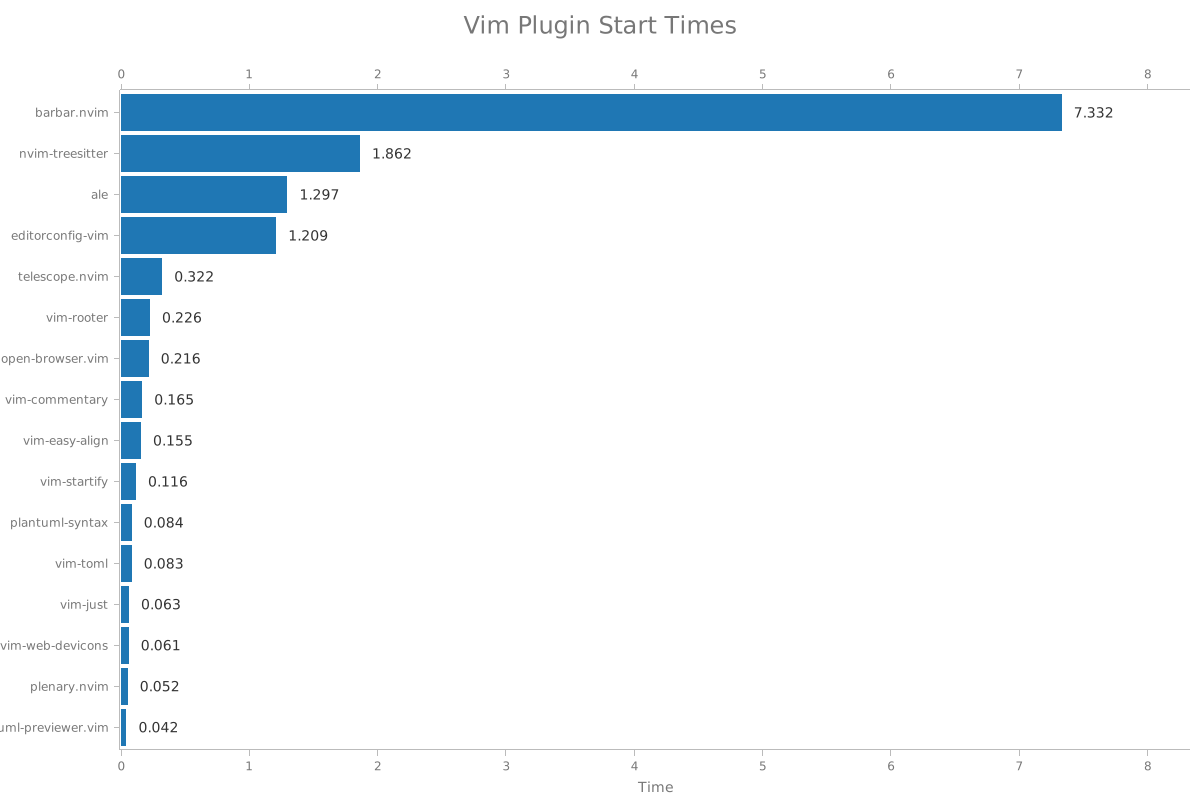
The plot visualizes the start times of each plugin in your plugin directory. If
you invoke `vp` with the `--plot` option, you will receive a plot in the form of
an SVG file in the specified path that looks something like:
#### CSV
The CSV file contains various other useful statistics such as:
- The average start time across all iterations
- The median start time across all iterations
- The standard deviation from the mean
If you invoke `vp` with the `--export` option you will receive a CSV file with
the additional statistics called in the specified path that looks something
like:
| vim-airline | 11.59700 | 9.37200 | 11.05550 | 10.83430 | 0.64257 |
| coc.nvim | 9.26900 | 6.92700 | 8.26750 | 8.03870 | 0.74723 |
| vimwiki | 7.74400 | 5.25200 | 6.83400 | 6.53550 | 0.81209 |
| vim-polyglot | 7.01600 | 3.62900 | 4.22350 | 4.70690 | 1.09417 |
| tabular | 4.18500 | 2.53700 | 3.21100 | 3.19110 | 0.50241 |
| vim-gitgutter | 3.35000 | 2.10800 | 2.63900 | 2.70540 | 0.45181 |
| emmet-vim | 3.36700 | 2.16800 | 2.30200 | 2.45460 | 0.34839 |
| ale | 3.21800 | 1.54900 | 1.85950 | 2.04930 | 0.52316 |
| vim-crypto | 2.99100 | 1.61400 | 1.81100 | 2.03940 | 0.43480 |
| fzf.vim | 1.83000 | 0.94600 | 1.13900 | 1.20210 | 0.26501 |
### Prior Art
The API is heavily inspired by the Python script that goes by the same name
[vim-profiler](https://github.com/bchretien/vim-profiler).
A few other notable vim profiling tools include:
- [`hyiltiz/vim-plugins-profile`](https://github.com/hyiltiz/vim-plugins-profile)
- [`dstein64/vim-startuptime`](https://github.com/dstein64/vim-startuptime)