Vigil
=====
[](https://github.com/valeriansaliou/vigil/actions?query=workflow%3A%22Test+and+Build%22) [](https://deps.rs/repo/github/valeriansaliou/vigil) [](https://www.buymeacoffee.com/valeriansaliou)
**Microservices Status Page. Monitors a distributed infrastructure and sends alerts (Slack, SMS, etc.).**
Vigil is an open-source Status Page you can host on your infrastructure, used to monitor all your servers and apps, and visible to your users (on a domain of your choice, eg. `status.example.com`).
It is useful in microservices contexts to monitor both apps and backends. If a node goes down in your infrastructure, you receive a status change notification in a Slack channel, Email, Twilio SMS or/and XMPP.
_Tested at Rust version: `rustc 1.49.0 (e1884a8e3 2020-12-29)`_
**🇭🇺 Crafted in Budapest, Hungary.**
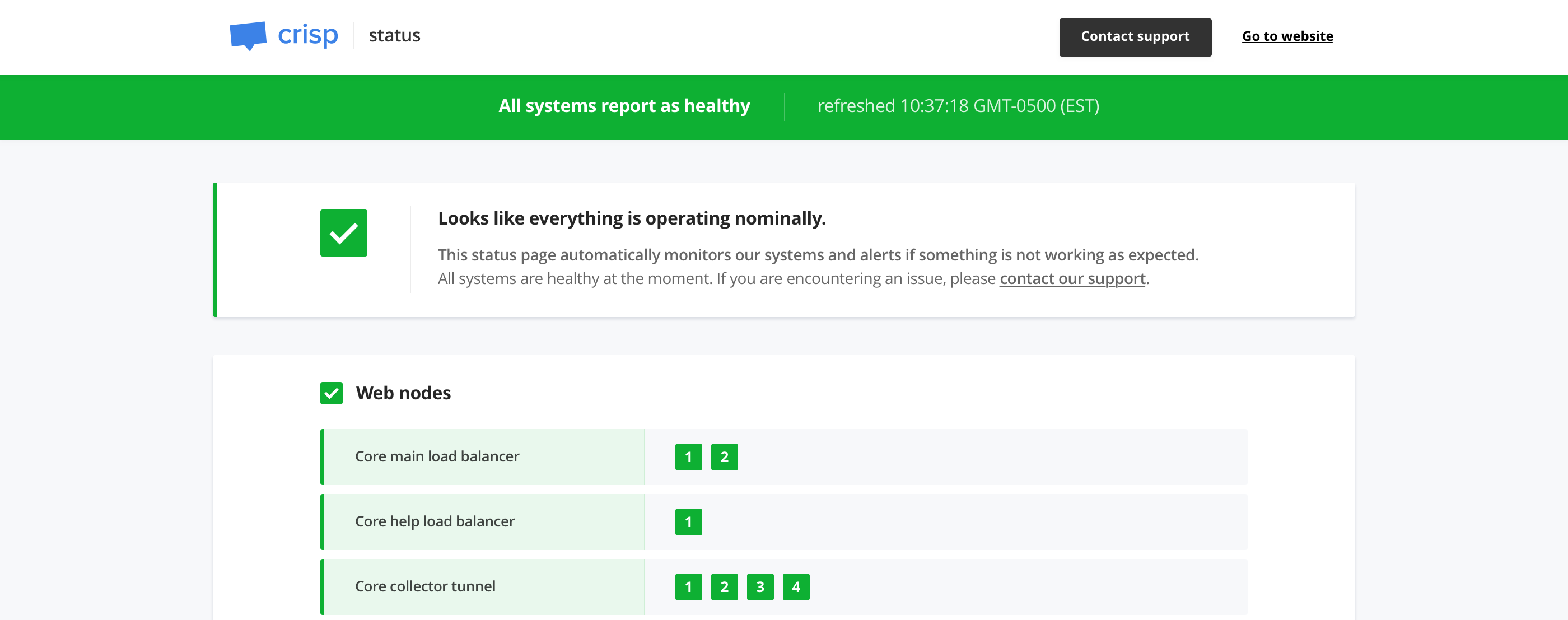
**👉 See a live demo of Vigil on [Crisp Status Page](https://status.crisp.chat/).**
**:newspaper: The Vigil project was announced in [a post on my personal journal](https://journal.valeriansaliou.name/announcing-vigil-how-we-monitor-crisp-at-scale/).**
[](https://status.crisp.chat/)
## Who uses it?
<table>
<tr>
<td align="center"><a href="https://crisp.chat/"><img src="https://valeriansaliou.github.io/vigil/images/crisp-icon.png" width="64" /></a></td>
<td align="center"><a href="https://www.meilisearch.com/"><img src="https://valeriansaliou.github.io/vigil/images/meili-icon.png" width="64" /></a></td>
<td align="center"><a href="https://miragespace.com/"><img src="https://valeriansaliou.github.io/vigil/images/miragespace-icon.png" width="64" /></a></td>
<td align="center"><a href="https://www.redsmin.com/"><img src="https://valeriansaliou.github.io/vigil/images/redsmin-icon.png" width="64" /></a></td>
<td align="center"><a href="https://www.image-charts.com/"><img src="https://valeriansaliou.github.io/vigil/images/imagecharts-icon.png" width="64" /></a></td>
</tr>
<tr>
<td align="center">Crisp</td>
<td align="center">Meili</td>
<td align="center">miragespace</td>
<td align="center">Redsmin</td>
<td align="center">Image-Charts</td>
</tr>
</table>
_👋 You use Vigil and you want to be listed there? [Contact me](https://valeriansaliou.name/)._
## Features
* **Monitors your infrastructure services automatically**
* **Notifies you when a service gets down** or gets back up via a configured channel:
* Email
* Twilio (SMS)
* Slack
* Telegram
* Pushover
* Gotify
* XMPP
* Matrix
* Webhook
* **Generates a status page**, that you can host on your domain for your public users (eg. `https://status.example.com`)
## How does it work?
Vigil monitors all your infrastructure services. You first need to configure target services to be monitored, and then Vigil does the rest for you.
**There are three kinds of services Vigil can monitor:**
* **HTTP / TCP / ICMP services**: Vigil frequently probes an HTTP, TCP or ICMP target and checks for reachability
* **Application services**: Install the Vigil Reporter library eg. on your NodeJS app and get reports when your app gets down, as well as when the host server system is overloaded
* **Local services**: Install a slave [Vigil Local](https://github.com/valeriansaliou/vigil-local) daemon to monitor services that cannot be reached by the Vigil master server (eg. services that are on a different LAN)
It is recommended to configure Vigil, Vigil Reporter or Vigil Local to send frequent probe checks, as to ensure you are quickly notified when a service gets down (thus to reduce unexpected downtime on your services).
## Hosted alternative to Vigil
**Vigil needs to be hosted on your own systems, and maintained on your end. If you do not feel like managing yet another service, [you may use Crisp Status instead](https://crisp.chat/en/status/).**
Crisp Status is a direct port of Vigil to the Crisp customer support platform.
Crisp Status hosts your status page on Crisp systems, and is able to do what Vigil does (and even more!). Crisp Status is integrated to other [Crisp](https://crisp.chat/en/) products (eg. [Crisp Chatbox](https://crisp.chat/en/livechat/) & [Crisp Helpdesk](https://crisp.chat/en/knowledge/)). It warns your users over chatbox and helpdesk if your status page reports as `dead` for an extended period of time.
_As an example of a status page running Crisp Status, check out [Enrich Status Page](https://status.enrich.email/en/)._
## How to use it?
### Installation
Vigil is built in Rust. To install it, either download a version from the [Vigil releases](https://github.com/valeriansaliou/vigil/releases) page, use `cargo install` or pull the source code from `master`.
**Install from Cargo:**
If you prefer managing `vigil` via Rust's Cargo, install it directly via `cargo install`:
```bash
cargo install vigil-server
```
Ensure that your `$PATH` is properly configured to source the Crates binaries, and then run Vigil using the `vigil` command.
**Install from source:**
The last option is to pull the source code from Git and compile Vigil via `cargo`:
```bash
cargo build --release
```
You can find the built binaries in the `./target/release` directory.
_Install `libssl-dev` (ie. OpenSSL headers) and `libstrophe-dev` (ie. XMPP library headers; only if you need the XMPP notifier) before you compile Vigil. SSL dependencies are required for the HTTPS probes and email notifications._
**Install from Docker Hub:**
You might find it convenient to run Vigil via Docker. You can find the pre-built Vigil image on Docker Hub as [valeriansaliou/vigil](https://hub.docker.com/r/valeriansaliou/vigil/).
> Pre-built Docker version may not be the latest version of Vigil available.
First, pull the `valeriansaliou/vigil` image:
```bash
docker pull valeriansaliou/vigil:v1.21.0
```
Then, seed it a configuration file and run it (replace `/path/to/your/vigil/config.cfg` with the path to your configuration file):
```bash
docker run -p 8080:8080 -v /path/to/your/vigil/config.cfg:/etc/vigil.cfg valeriansaliou/vigil:v1.21.0
```
In the configuration file, ensure that:
* `server.inet` is set to `0.0.0.0:8080` (this lets Vigil be reached from outside the container)
* `assets.path` is set to `./res/assets/` (this refers to an internal path in the container, as the assets are contained there)
Vigil will be reachable from `http://localhost:8080`.
### Configuration
Use the sample [config.cfg](https://github.com/valeriansaliou/vigil/blob/master/config.cfg) configuration file and adjust it to your own environment.
**Available configuration options are commented below, with allowed values:**
**[server]**
* `log_level` (type: _string_, allowed: `debug`, `info`, `warn`, `error`, default: `error`) — Verbosity of logging, set it to `error` in production
* `inet` (type: _string_, allowed: IPv4 / IPv6 + port, default: `[::1]:8080`) — Host and TCP port the Vigil public status page should listen on
* `workers` (type: _integer_, allowed: any number, default: `4`) — Number of workers for the Vigil public status page to run on
* `reporter_token` (type: _string_, allowed: secret token, default: no default) — Reporter secret token (ie. secret password)
**[assets]**
* `path` (type: _string_, allowed: UNIX path, default: `./res/assets/`) — Path to Vigil assets directory
**[branding]**
* `page_title` (type: _string_, allowed: any string, default: `Status Page`) — Status page title
* `page_url` (type: _string_, allowed: URL, no default) — Status page URL
* `company_name` (type: _string_, allowed: any string, no default) — Company name (ie. your company)
* `icon_color` (type: _string_, allowed: hexadecimal color code, no default) — Icon color (ie. your icon background color)
* `icon_url` (type: _string_, allowed: URL, no default) — Icon URL, the icon should be your squared logo, used as status page favicon (PNG format recommended)
* `logo_color` (type: _string_, allowed: hexadecimal color code, no default) — Logo color (ie. your logo primary color)
* `logo_url` (type: _string_, allowed: URL, no default) — Logo URL, the logo should be your full-width logo, used as status page header logo (SVG format recommended)
* `website_url` (type: _string_, allowed: URL, no default) — Website URL to be used in status page header
* `support_url` (type: _string_, allowed: URL, no default) — Support URL to be used in status page header (ie. where users can contact you if something is wrong)
* `custom_html` (type: _string_, allowed: HTML, default: empty) — Custom HTML to include in status page `head` (optional)
**[metrics]**
* `poll_interval` (type: _integer_, allowed: seconds, default: `120`) — Interval for which to probe nodes in `poll` mode
* `poll_retry` (type: _integer_, allowed: seconds, default: `2`) — Interval after which to try probe for a second time nodes in `poll` mode (only when the first check fails)
* `poll_http_status_healthy_above` (type: _integer_, allowed: HTTP status code, default: `200`) — HTTP status above which `poll` checks to HTTP replicas reports as `healthy`
* `poll_http_status_healthy_below` (type: _integer_, allowed: HTTP status code, default: `400`) — HTTP status under which `poll` checks to HTTP replicas reports as `healthy`
* `poll_delay_dead` (type: _integer_, allowed: seconds, default: `30`) — Delay after which a node in `poll` mode is to be considered `dead` (ie. check response delay)
* `poll_delay_sick` (type: _integer_, allowed: seconds, default: `10`) — Delay after which a node in `poll` mode is to be considered `sick` (ie. check response delay)
* `push_delay_dead` (type: _integer_, allowed: seconds, default: `20`) — Delay after which a node in `push` mode is to be considered `dead` (ie. time after which the node did not report)
* `push_system_cpu_sick_above` (type: _float_, allowed: system CPU loads, default: `0.90`) — System load indice for CPU above which to consider a node in `push` mode `sick` (ie. UNIX system load)
* `push_system_ram_sick_above` (type: _float_, allowed: system RAM loads, default: `0.90`) — System load indice for RAM above which to consider a node in `push` mode `sick` (ie. percent RAM used)
* `script_interval` (type: _integer_, allowed: seconds, default: `300`) — Interval for which to probe nodes in `script` mode
* `local_delay_dead` (type: _integer_, allowed: seconds, default: `40`) — Delay after which a node in `local` mode is to be considered `dead` (ie. time after which the node did not report)
**[plugins]**
**[plugins.rabbitmq]**
* `api_url` (type: _string_, allowed: URL, no default) — RabbitMQ API URL (ie. `http://127.0.0.1:15672`)
* `auth_username` (type: _string_, allowed: username, no default) — RabbitMQ API authentication username
* `auth_password` (type: _string_, allowed: password, no default) — RabbitMQ API authentication password
* `virtualhost` (type: _string_, allowed: virtual host, no default) — RabbitMQ virtual host hosting the queues to be monitored
* `queue_ready_healthy_below` (type: _integer_, allowed: any number, no default) — Maximum number of payloads in RabbitMQ queue with status `ready` to consider node `healthy`.
* `queue_nack_healthy_below` (type: _integer_, allowed: any number, no default) — Maximum number of payloads in RabbitMQ queue with status `nack` to consider node `healthy`.
* `queue_ready_dead_above` (type: _integer_, allowed: any number, no default) — Threshold on the number of payloads in RabbitMQ queue with status `ready` above which node should be considered `dead` (stalled queue).
* `queue_nack_dead_above` (type: _integer_, allowed: any number, no default) — Threshold on the number of payloads in RabbitMQ queue with status `nack` above which node should be considered `dead` (stalled queue).
* `queue_loaded_retry_delay` (type: _integer_, allowed: milliseconds, no default) — Re-check queue if it reports as loaded after delay; this avoids false-positives if your systems usually take a bit of time to process pending queue payloads (if any)
**[notify]**
* `startup_notification` (type: _boolean_, allowed: `true`, `false`, default: `true`) — Whether to send startup notification or not (stating that systems are `healthy`)
* `reminder_interval` (type: _integer_, allowed: seconds, no default) — Interval at which downtime reminder notifications should be sent (if any)
**[notify.email]**
* `to` (type: _string_, allowed: email address, no default) — Email address to which to send emails
* `from` (type: _string_, allowed: email address, no default) — Email address from which to send emails
* `smtp_host` (type: _string_, allowed: hostname, IPv4, IPv6, default: `localhost`) — SMTP host to connect to
* `smtp_port` (type: _integer_, allowed: TCP port, default: `587`) — SMTP TCP port to connect to
* `smtp_username` (type: _string_, allowed: any string, no default) — SMTP username to use for authentication (if any)
* `smtp_password` (type: _string_, allowed: any string, no default) — SMTP password to use for authentication (if any)
* `smtp_encrypt` (type: _boolean_, allowed: `true`, `false`, default: `true`) — Whether to encrypt SMTP connection with `STARTTLS` or not
* `reminders_only` (type: _boolean_, allowed: `true`, `false`, default: `false`) — Whether to send emails only for downtime reminders or everytime
**[notify.twilio]**
* `to` (type: _array[string]_, allowed: phone numbers, no default) — List of phone numbers to which to send text messages
* `service_sid` (type: _string_, allowed: any string, no default) — Twilio service identifier (ie. `Service Sid`)
* `account_sid` (type: _string_, allowed: any string, no default) — Twilio account identifier (ie. `Account Sid`)
* `auth_token` (type: _string_, allowed: any string, no default) — Twilio authentication token (ie. `Auth Token`)
* `reminders_only` (type: _boolean_, allowed: `true`, `false`, default: `false`) — Whether to send text messages only for downtime reminders or everytime
**[notify.slack]**
* `hook_url` (type: _string_, allowed: URL, no default) — Slack hook URL (ie. `https://hooks.slack.com/[..]`)
* `mention_channel` (type: _boolean_, allowed: `true`, `false`, default: `false`) — Whether to mention channel when sending Slack messages (using _@channel_, which is handy to receive a high-priority notification)
* `reminders_only` (type: _boolean_, allowed: `true`, `false`, default: `false`) — Whether to send Slack messages only for downtime reminders or everytime
**[notify.telegram]**
* `bot_token` (type: _string_, allowed: any strings, no default) — [Telegram bot token](https://core.telegram.org/bots/api#authorizing-your-bot)
* `chat_id` (type: _string_, allowed: any strings, no default) — Chat identifier where you want Vigil to send messages. Can be group chat identifier (eg. `"@foo"`) or user chat identifier (eg. `"123456789"`)
**[notify.pushover]**
* `app_token` (type: _string_, allowed: any string, no default) — Pushover application token (you need to create a dedicated Pushover application to get one)
* `user_keys` (type: _array[string]_, allowed: any strings, no default) — List of Pushover user keys (ie. the keys of your Pushover target users for notifications)
* `reminders_only` (type: _boolean_, allowed: `true`, `false`, default: `false`) — Whether to send Pushover notifications only for downtime reminders or everytime
**[notify.gotify]**
* `app_url` (type: _string_, allowed: URL, no default) - Gotify endpoint without trailing slash (eg. `https://push.gotify.net`)
* `app_token` (type: _string_, allowed: any string, no default) — Gotify application token
* `reminders_only` (type: _boolean_, allowed: `true`, `false`, default: `false`) — Whether to send Gotify notifications only for downtime reminders or everytime
**[notify.xmpp]**
**Notice: the XMPP notifier requires `libstrophe` (`libstrophe-dev` package on Debian) to be available when compiling Vigil, with the feature `notifier-xmpp` enabled upon Cargo build.**
* `to` (type: _string_, allowed: Jabber ID, no default) — Jabber ID (JID) to which to send messages
* `from` (type: _string_, allowed: Jabber ID, no default) — Jabber ID (JID) from which to send messages
* `xmpp_password` (type: _string_, allowed: any string, no default) — XMPP account password to use for authentication
* `reminders_only` (type: _boolean_, allowed: `true`, `false`, default: `false`) — Whether to send messages only for downtime reminders or everytime
**[notify.matrix]**
**Notice: the Matrix notifier requires the feature `notifier-matrix` enabled upon Cargo build.**
* `homeserver_url` (type: _string_, allowed: URL, no default) — Matrix server where the account has been created (eg. `https://matrix.org`)
* `username` (type: _string_, allowed: any string, no default) — Matrix username from which to send messages
* `password` (type: _string_, allowed: any string, no default) — Matrix username password
* `access_token` (type: _string_, allowed: any string, no default) — Alternatively to the `password` an access token from a previously created session can be used (eg. Element Web access token)
* `room_id` (type: _string_, allowed: any string, no default) — Matrix room ID which to send messages (eg. `!abc123:matrix.org`)
* `device_id` (type: _string_, allowed: any string, no default) — Matrix device ID associated to the user. It can be a `device_id` from a previous session (eg. Element Web) or a new `device_id` if it is a new session
* `reminders_only` (type: _boolean_, allowed: `true`, `false`, default: `false`) — Whether to send messages only for downtime reminders or everytime
**[notify.webhook]**
* `hook_url` (type: _string_, allowed: URL, no default) — Web Hook URL (eg. `https://domain.com/webhooks/[..]`)
**[probe]**
**[[probe.service]]**
* `id` (type: _string_, allowed: any unique lowercase string, no default) — Unique identifier of the probed service (not visible on the status page)
* `label` (type: _string_, allowed: any string, no default) — Name of the probed service (visible on the status page)
**[[probe.service.node]]**
* `id` (type: _string_, allowed: any unique lowercase string, no default) — Unique identifier of the probed service node (not visible on the status page)
* `label` (type: _string_, allowed: any string, no default) — Name of the probed service node (visible on the status page)
* `mode` (type: _string_, allowed: `poll`, `push`, `script`, `local`, no default) — Probe mode for this node (ie. `poll` is direct HTTP, TCP or ICMP poll to the URLs set in `replicas`, while `push` is for Vigil Reporter nodes, `script` is used to execute a shell script and `local` is for Vigil Local nodes)
* `replicas` (type: _array[string]_, allowed: TCP, ICMP or HTTP URLs, default: empty) — Node replica URLs to be probed (only used if `mode` is `poll`)
* `scripts` (type: _array[string]_, allowed: shell scripts as source code, default: empty) — Shell scripts to be executed on the system as a Vigil sub-process; they are handy to build custom probes (only used if `mode` is `script`)
* `http_body_healthy_match` (type: _string_, allowed: regular expressions, no default) — HTTP response body for which to report node replica as `healthy` (if the body does not match, the replica will be reported as `dead`, even if the status code check passes; the check uses a `GET` rather than the usual `HEAD` if this option is set)
* `rabbitmq_queue` (type: _string_, allowed: RabbitMQ queue names, no default) — RabbitMQ queue associated to node, which to check against for pending payloads via RabbitMQ API (this helps monitor unacked payloads accumulating in the queue)
### Run Vigil
Vigil can be run as such:
`./vigil -c /path/to/config.cfg`
## Usage recommendations
**Consider the following recommendations when using Vigil:**
* **Vigil should be hosted on a safe, separate server.** This server should run on a different physical machine and network than your monitored infrastructure servers.
* **Make sure to whitelist the Vigil server public IP (both IPv4 and IPv6)** on your monitored HTTP services; this applies if you use a bot protection service that challenges bot IPs, eg. Distil Networks or Cloudflare. Vigil will see the HTTP service as down if a bot challenge is raised.
## What status variants look like?
Vigil has 3 status variants, either `healthy` (no issue ongoing), `sick` (services under high load) or `dead` (outage):
### Healthy status variant

### Sick status variant

### Dead status variant

## What do alerts look like?
When a monitored backend or app goes down in your infrastructure, Vigil can let you know by Slack, Twilio SMS, Email and XMPP:
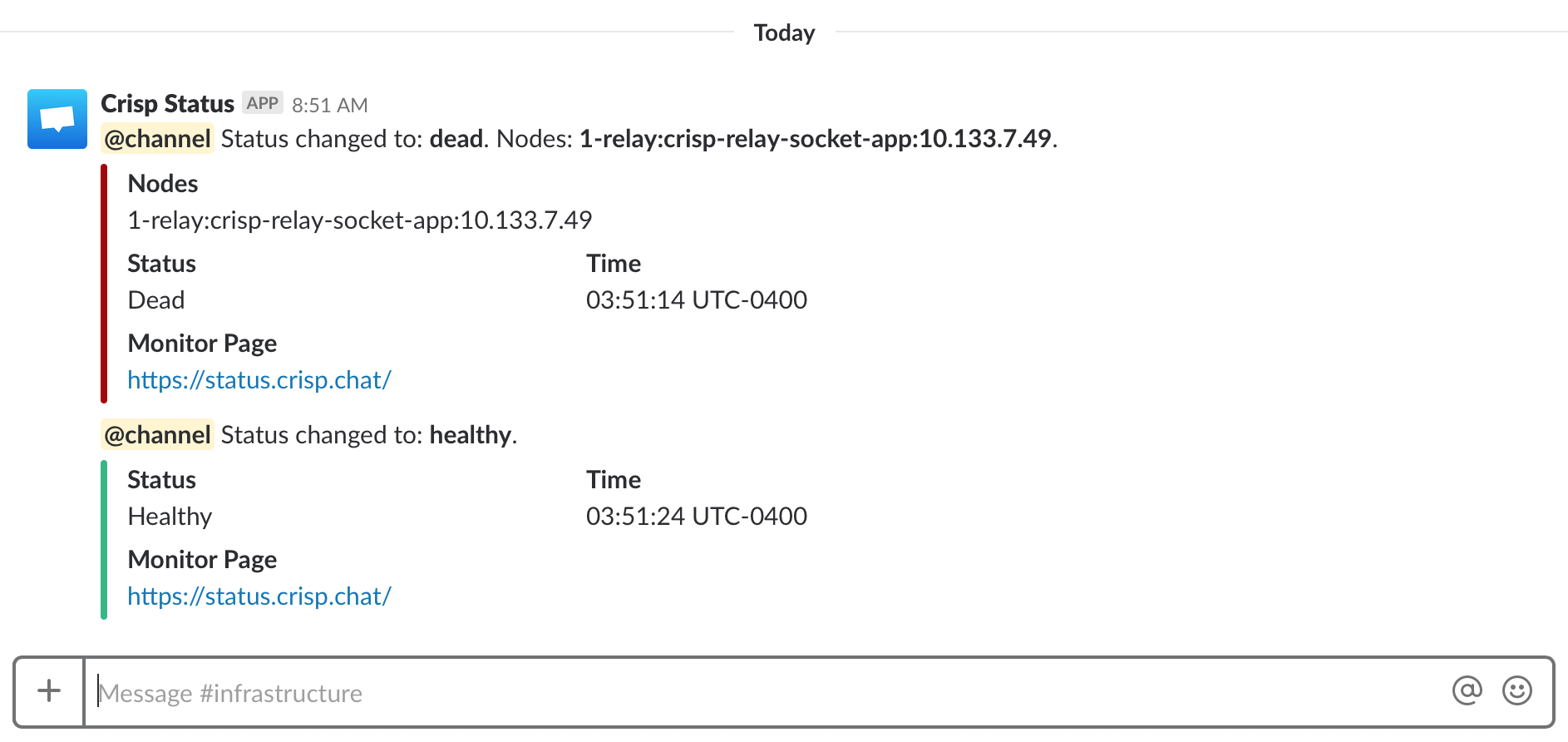
You can also get nice realtime `down` and `up` alerts on your eg. iPhone and Apple Watch:
<p align="center">
<img src="https://valeriansaliou.github.io/vigil/images/alert-slack-iphone.png" width="210" alt="Vigil down alert on iPhone (Slack)" />
<img src="https://valeriansaliou.github.io/vigil/images/alert-slack-watch.jpg" width="398" alt="Vigil up alert on Apple Watch (Slack)" />
<img src="https://valeriansaliou.github.io/vigil/images/alert-twilio-iphone.png" width="210" alt="Vigil alerts on iPhone (Twilio SMS)" />
<p>
## What do Webhook payloads look like?
If you are using the Webhook notifier in Vigil, you will receive a JSON-formatted payload with alert details upon any status change; plus reminders if `notify.reminder_interval` is configured.
**Here is an example of a Webhook payload:**
```json
{
"type": "changed",
"status": "dead",
"time": "08:58:28 UTC+0200",
"replicas": [
"web:core:tcp://edge-3.pool.net.crisp.chat:80"
],
"page": {
"title": "Crisp Status",
"url": "https://status.crisp.chat/"
}
}
```
Webhook notifications can be tested with eg. [Webhook.site](https://webhook.site/), before you integrate them to your custom endpoint.
_You can use those Webhook payloads to create custom notifiers to anywhere. For instance, if you are using Microsoft Teams but not Slack, you may write a tiny PHP script that receives Webhooks from Vigil and forwards a notification to Microsoft Teams. This can be handy; while Vigil only implements convenience notifiers for some selected channels, the Webhook notifier allows you to extend beyond that._
## How can I create script probes?
Vigil lets you create custom probes written as shell scripts, passed in the Vigil configuration as a list of scripts to be executed for a given node.
Those scripts can be used by advanced Vigil users when their monitoring use case requires scripting, ie. when `push` and `poll` probes are not enough.
The replica health should be returned by the script shell as return codes, where:
* **`rc=0`**: `healthy`
* **`rc=1`**: `sick`
* **`rc=2` and higher**: `dead`
As scripts are usually multi-line, script contents can be passed as a literal string, enclosed between `'''`.
As an example, the following script configuration always return as `sick`:
```
scripts = [
'''
# Do some work...
exit 1
'''
]
```
_Note that scripts are executed in a system shell ran by a Vigil-owned sub-process. Make sure that Vigil runs on an UNIX user with limited privileges. Running Vigil as root would let any configured script perform root-level actions on the machine, which is not recommended._
## How can I integrate Vigil Reporter in my code?
Vigil Reporter is used to actively submit health information to Vigil from your apps. Apps are best monitored via application probes, which are able to report detailed system information such as CPU and RAM load. This lets Vigil show if an application host system is under high load.
### Vigil Reporter Libraries
* **NodeJS**: **[node-vigil-reporter](https://www.npmjs.com/package/vigil-reporter)**
* **Python**: **[py-vigil-reporter](https://pypi.org/project/py-vigil-reporter/)**
* **Golang**: **[go-vigil-reporter](https://github.com/valeriansaliou/go-vigil-reporter)**
* **Rust**: **[rs-vigil-reporter](https://crates.io/crates/vigil-reporter)**
👉 Cannot find the library for your programming language? Build your own and be referenced here! ([contact me](https://valeriansaliou.name/))
### Vigil Reporter HTTP API
In case you need to manually report node metrics to the Vigil endpoint, use the following HTTP configuration (adjust it to yours):
#### 1️⃣ Report a replica
**Endpoint URL:**
`HTTP POST https://status.example.com/reporter/<probe_id>/<node_id>/`
Where:
* `node_id`: The parent node of the reporting replica
* `probe_id`: The parent probe of the node
**Request headers:**
* Add an `Authorization` header with a `Basic` authentication where the password is your configured `reporter_token`.
* Set the `Content-Type` to `application/json; charset=utf-8`, and ensure you submit the request data as UTF-8.
**Request data:**
Adjust the request data to your replica context and send it as `HTTP POST`:
```json
{
"replica": "<replica_id>",
"interval": 30,
"load": {
"cpu": 0.30,
"ram": 0.80
}
}
```
Where:
* `replica`: The replica unique identifier (eg. the server LAN IP)
* `interval`: The push interval (in seconds)
* `load.cpu`: The general CPU load, from `0.00` to `1.00` (can be more than `1.00` if the CPU is overloaded)
* `load.ram`: The general RAM load, from `0.00` to `1.00`
#### 2️⃣ Flush a replica
**Endpoint URL:**
`HTTP DELETE https://status.example.com/reporter/<probe_id>/<node_id>/<replica_id>/`
Where:
* `node_id`: The parent node of the reporting replica
* `probe_id`: The parent probe of the node
* `replica_id`: The replica unique identifier (eg. the server LAN IP)
**Request headers:**
* Add an `Authorization` header with a `Basic` authentication where the password is your configured `reporter_token`.
## How can I monitor services on a different LAN using Vigil Local?
Vigil Local is an (optional) slave daemon that you can use to report internal service health to your Vigil-powered status page master server. It is designed to be used behind a firewall, and to monitor hosts bound to a local loop or LAN network, that are not available to your main Vigil status page.
Vigil Local monitors local `poll` and `script` replicas, and reports their status to Vigil on a periodic basis.
You can [read more on Vigil Local](https://github.com/valeriansaliou/vigil-local) on its repository, and follow the setup instructions.
## :children_crossing: Troubleshoot Issues
### ICMP replicas always report as `dead`
On Linux systems, non-priviledge users cannot create raw sockets, which Vigil ICMP probing system requires. It means that, by default, all ICMP probe attempts will fail silently, as if the host being probed was always down.
This can easily be fixed by allowing Vigil to create raw sockets:
```bash
setcap 'cap_net_raw+ep' /bin/vigil
```
_Note that HTTP and TCP probes do not require those raw socket capabilities._
## :fire: Report A Vulnerability
If you find a vulnerability in Vigil, you are more than welcome to report it directly to [@valeriansaliou](https://github.com/valeriansaliou) by sending an encrypted email to [valerian@valeriansaliou.name](mailto:valerian@valeriansaliou.name). Do not report vulnerabilities in public GitHub issues, as they may be exploited by malicious people to target production servers running an unpatched Vigil server.
**:warning: You must encrypt your email using [@valeriansaliou](https://github.com/valeriansaliou) GPG public key: [:key:valeriansaliou.gpg.pub.asc](https://valeriansaliou.name/files/keys/valeriansaliou.gpg.pub.asc).**