# videocall.rs
<a href="https://crates.io/crates/videocall-cli"><img src="https://img.shields.io/crates/v/videocall-cli.svg" alt="Crates.io (videocall-cli)" height="28"></a>
<a href="https://opensource.org/licenses/MIT"><img src="https://img.shields.io/badge/License-MIT-blue.svg" alt="License: MIT" height="28"></a>
<a href="https://discord.gg/JP38NRe4CJ"><img src="https://img.shields.io/badge/Discord-Join%20Chat-7289DA?logo=discord&logoColor=white" alt="Discord" height="28"></a>
<a href="https://www.digitalocean.com/?refcode=6de4e19c5193&utm_campaign=Referral_Invite&utm_medium=Referral_Program&utm_source=badge"><img src="https://web-platforms.sfo2.cdn.digitaloceanspaces.com/WWW/Badge%201.svg" alt="DigitalOcean Referral Badge" height="28"></a>
An open-source, ultra-low-latency video conferencing platform and API built with Rust. Designed for software professionals, robotics, and embedded systems, it supports WebTransport with WebSocket fallback for high-performance real-time communication.
## ⚡ Quick Links
- **[Documentation](https://docs.videocall.rs)** - Comprehensive guides and API reference.
- **[Crates.io](https://crates.io/crates/videocall-cli)** - Download the CLI tool.
- **[Report a Bug](https://github.com/security-union/videocall-rs/issues)** - Help us improve.
## 🌟 Star History
[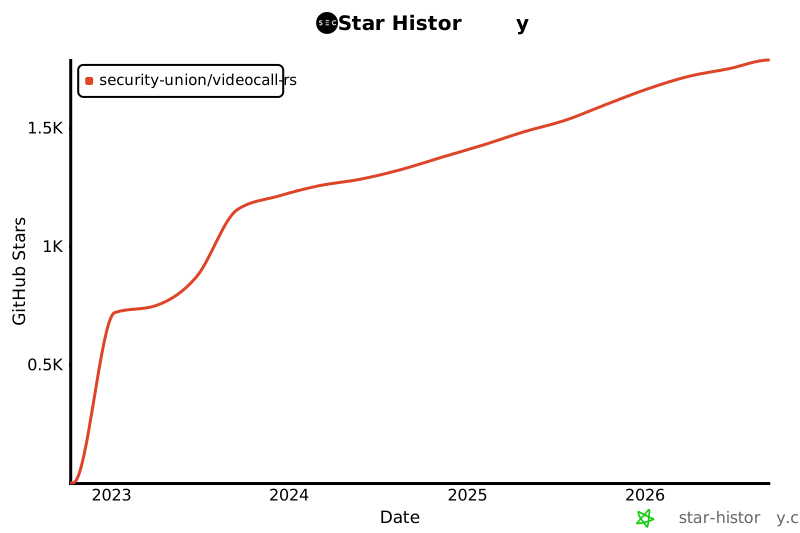](https://star-history.com/#security-union/videocall-rs&Date)
## Who is this for?
- **Software Professionals:** Build custom video applications with a modern, type-safe Rust API.
- **Robotics & IoT Engineers:** Stream ultra-low-latency video from drones, robots, and embedded devices (Raspberry Pi, Jetson Nano) using our lightweight CLI and SDKs.
- **Privacy Advocates:** Self-host your own video conferencing infrastructure with secure JWT authentication and SSO support.
## Table of Contents
- [Overview](#overview)
- [Features](#features)
- [Compatibility](#compatibility)
- [Why WebTransport Instead of WebRTC?](#why-webtransport-instead-of-webrtc)
- [System Architecture](#system-architecture)
- [Getting Started](#getting-started)
- [Prerequisites](#prerequisites)
- [Docker Setup](#docker-setup)
- [Nix Build System (WIP)](#nix-build-system-wip)
- [Manual Setup](#manual-setup)
- [Runtime Configuration](#runtime-configuration-frontend-configjs)
- [Local (no Docker)](#local-no-docker-create-yew-uiscriptsconfigjs)
- [Local/Docker](#localdocker-start-yewsh)
- [Kubernetes/Helm](#kuberneteshelm-configmap-configjsyaml)
- [Usage](#usage)
- [Meeting Management](#meeting-management)
- [Performance](#performance)
- [Security](#security)
- [Feature Flags](#feature-flags)
- [Testing](#testing)
- [UI Testing (yew-ui)](#ui-testing-yew-ui)
- [Backend Testing (actix-api)](#backend-testing-actix-api)
- [Roadmap](#roadmap)
- [Contributing](#contributing)
- [Project Structure](#project-structure)
- [Demos and Media](#demos-and-media)
- [Contributors](#contributors)
- [License](#license)
## Overview
videocall.rs is a modern, open-source video conferencing system written entirely in Rust. It is designed for software professionals and robotics engineers who need reliable, scalable, and secure real-time communication capabilities. It provides a robust foundation for building custom video communication solutions, from web apps to autonomous vehicle feeds, with support for both browser-based and native clients.
**Project Status:** Beta - Actively developed and suitable for non-critical production use
## Features
- **Ultra-Low Latency:** Built with Rust for sub-100ms latency, ideal for robotics and real-time control.
- **Multiple Transport Protocols:** WebTransport with automatic WebSocket fallback for maximum compatibility.
- **Secure Authentication:** JWT-based access control with SSO/OAuth support.
- **Scalable Architecture:** Designed with a pub/sub model using NATS for horizontal scaling (Mesh/SFU hybrid).
- **Cross-Platform Support:** Chromium-based browsers and Safari supported.
- **Robotics & Embedded:** High-performance CLI and SDK for headless streaming from Raspberry Pi, Jetson Nano, and other embedded Linux devices.
- **Open Source:** MIT licensed for maximum flexibility.
## Compatibility
| Chrome | ✅ |
| Brave | ✅ |
| Edge | ✅ |
| Safari (macOS, iOS) | ✅ |
| Firefox | ❌ |
## Why WebTransport Instead of WebRTC?
WebTransport is a core technology that differentiates videocall.rs from traditional video conferencing solutions. As a developer, here's why our WebTransport approach is technically superior:
### Technical Advantages
- **No SFUs, No NAT Traversal:** WebTransport eliminates the need for complex Selective Forwarding Units and NAT traversal mechanisms that plague WebRTC implementations and cause countless developer headaches.
- **Simplified Architecture**: No more complex STUN/TURN servers, ICE candidates negotiation, or complicated signaling dances required by WebRTC. Just direct, straightforward connections.
- **Protocol Efficiency**: Built on HTTP/3 and QUIC, WebTransport provides multiplexed, bidirectional streams with better congestion control and packet loss recovery than WebRTC's dated SCTP data channels.
- **Lower Latency**: QUIC's 0-RTT connection establishment reduces initial connection times compared to WebRTC's multiple roundtrips.
- **Clean Development Experience**: WebTransport offers a more intuitive developer API with a promise-based design and cleaner stream management.
- **Future-Proof**: As part of the modern web platform developed by the IETF and W3C, WebTransport has strong browser vendor support and an actively evolving specification.
### Developer Implications
For developers integrating videocall.rs, this means:
- ✅ Drastically simpler deployment architecture
- ✅ No complex network configuration or firewall issues
- ✅ Better performance in challenging network conditions
- ✅ More predictable behavior across implementations
- ✅ Less time spent debugging connectivity issues
- ✅ A forward-looking technology investment
Read our [Architecture Document](ARCHITECTURE.md) for a deep dive into how we implement WebTransport and the technical benefits it provides.
## System Architecture
videocall.rs follows a microservices architecture with these primary components:
```mermaid
graph TD
Clients[Clients<br>Browsers, Mobile, CLI] -->|WebSocket| ActixAPI[Actix API<br>WebSocket]
Clients -->|WebTransport| WebTransportServer[WebTransport<br>Server]
ActixAPI --> NATS[NATS<br>Messaging]
WebTransportServer --> NATS
```
1. **actix-api:** Rust-based backend server using Actix Web framework
2. **yew-ui:** Web frontend built with the Yew framework and compiled to WebAssembly
3. **videocall-types:** Shared data types and protocol definitions
4. **videocall-client:** Client library for native integration
5. **videocall-cli:** Command-line interface for headless video streaming
For a more detailed explanation of the system architecture, please see our [Architecture Document](ARCHITECTURE.md).
## Getting Started
**⭐ RECOMMENDED: Docker is the only fully supported development method ⭐**
We strongly recommend using the Docker-based setup for development, as it's well-maintained and provides consistent behavior across platforms. The manual setup described below is not as well maintained and may require additional troubleshooting.
### Prerequisites
- Modern Linux distribution, macOS, or Windows 10/11
- [Docker](https://docs.docker.com/engine/install/) and Docker Compose (for containerized setup)
- [Rust toolchain](https://rustup.rs/) 1.89+ (for manual setup)
- Chromium-based browser (Chrome, Edge, Brave) for frontend access - Firefox is not supported
- Safari both in iOS and macOS are supported for frontend access
### Docker Setup
The quickest way to get started is with our Docker-based setup:
1. Clone the repository:
```
git clone https://github.com/security-union/videocall-rs.git
cd videocall-rs
```
2. Start the server (replace `<server-ip>` with your machine's IP address):
```
make up
```
3. Open Chrome using the provided script for local WebTransport:
```
./launch_chrome.sh
```
4. Access the application at:
```
http://<server-ip>/meeting/<username>/<meeting-id>
```
### Nix Build System (WIP)
We are migrating the build infrastructure to [Nix](https://nixos.org/) for reproducible, fast builds. Currently the `leptos-website` is the first component being nixified.
**Status:** Work in progress — see the `nixify-docker-build` branch.
**What Nix replaces:** Previously, Docker builds spent 15-20 minutes compiling tools like `cargo-leptos` and `wasm-bindgen-cli` from source on every build. Nix provides these as pre-built binaries from the binary cache, reducing tool setup from minutes to seconds.
**What's done so far:**
- `flake.nix` at the repo root provides dev shells with pinned versions of the Rust nightly toolchain, `cargo-leptos`, `wasm-bindgen-cli`, `binaryen`, Node.js, and system dependencies
- `docker/Dockerfile.website` and `docker/Dockerfile.website.dev` use `nixos/nix` as a builder image
- `.github/workflows/leptos-website-build.yaml` uses `DeterminateSystems/nix-installer-action` with `magic-nix-cache-action` for cached CI builds
**Quick start (requires [Nix](https://install.determinate.systems/nix)):**
The integration is transparent to the user, and the development experience is the same as with Docker.
**What's next:** Nixifying additional components (actix-api, yew-ui) and evaluating [crane](https://github.com/ipetkov/crane) for full Nix-managed Rust dependency caching.
### Manual Setup (Experimental)
⚠️ **Warning**: This setup method is experimental and not as well maintained as the Docker approach. You may encounter issues that require manual debugging.
For advanced users who prefer to run services directly on their machine:
1. Create a PostgreSQL database:
```
createdb actix-api-db
```
2. Install required tools:
```
# Install NATS server
curl -L https://github.com/nats-io/nats-server/releases/download/v2.9.8/nats-server-v2.9.8-linux-amd64.tar.gz | tar xz
sudo mv nats-server-v2.9.8-linux-amd64/nats-server /usr/local/bin
# Install trurl
cargo install trurl
```
3. Start the development environment:
```
./start_dev.sh
```
4. Connect to:
```
http://localhost:8081/meeting/<meeting-id>
```
For detailed configuration options, see our [setup documentation](https://docs.videocall.rs/setup).
## Runtime Configuration (Frontend config.js)
The Yew UI is configured at runtime via a `window.__APP_CONFIG` object provided by a `config.js` file. The file is copied by Trunk and loaded at `/config.js` by `yew-ui/index.html`.
### Local (no Docker): create yew-ui/scripts/config.js
- Start services with `./start_dev.sh`.
- Create `yew-ui/scripts/config.js` that assigns `window.__APP_CONFIG = Object.freeze({...})`.
- Keep the keys in sync with the authoritative sources below. Trunk will copy the file and the app will pick it up on refresh.
- Tip: `mkdir -p yew-ui/scripts` to ensure the directory exists.
Authoritative keys and defaults: see `docker/start-yew.sh` and the Helm template referenced below.
### Local/Docker: start-yew.sh
`docker/start-yew.sh` generates `/app/yew-ui/scripts/config.js` from environment variables at container startup. For the current list of supported variables and defaults, refer directly to `docker/start-yew.sh`. Restart the container to apply changes.
### Kubernetes/Helm: configmap-configjs.yaml
`helm/rustlemania-ui/templates/configmap-configjs.yaml` renders `config.js` from `.Values.runtimeConfig`. Define `runtimeConfig` in your values file and deploy/upgrade. For the exact structure and latest behavior, refer to the template itself.
## Usage
### Browser-Based Clients
1. Navigate to your deployed instance or localhost setup:
```
http://<server-address>/meeting/<username>/<meeting-id>
```
2. Grant camera and microphone permissions when prompted
3. Click "Connect" to join the meeting
### CLI-Based Streaming
For headless devices like Raspberry Pi:
```bash
# Install the CLI tool
cargo install videocall-cli
# Stream from a camera
videocall-cli stream \
--user-id <your-user-id> \
--video-device-index 0 \
--meeting-id <meeting-id> \
--resolution 1280x720 \
--fps 30 \
--frame-format NV12 \
--bitrate-kbps 500
```
For detailed information about the CLI tool and all available options, see the [videocall-cli README](videocall-cli/README.md).
## Meeting Management
videocall.rs includes a comprehensive meeting management system with ownership, waiting rooms, and host controls.
### Key Features
- **Meeting Ownership**: Each meeting has an owner (the creator) identified by their email
- **My Meetings**: Users can view and manage all meetings they own from the home page
- **Waiting Room**: Non-owners enter a waiting room and must be admitted by an existing participant
- **Host Identification**: The meeting owner is visually identified with "(Host)" in the UI
- **Soft Delete**: Owners can delete their meetings; deleted meeting IDs can be reused
### Meeting Workflow
1. **Create/Join**: Navigate to `/meeting/{meeting-id}` - if the meeting doesn't exist, you become the owner
2. **Start/Join Button**: Owners see "Start Meeting", others see "Join Meeting"
3. **Waiting Room**: Non-owners wait for admission; admitted participants can manage the waiting room
4. **Auto-Join**: When admitted from the waiting room, participants automatically enter the meeting
### Documentation
For detailed information about the meeting system:
- **[Meeting Ownership & Workflow](docs/MEETING_OWNERSHIP.md)** - Ownership model, lifecycle, and user workflows
- **[Meeting API Reference](docs/MEETING_API.md)** - Complete API endpoint documentation
### Enabling Meeting Management
Meeting management requires the `FEATURE_MEETING_MANAGEMENT` flag:
```bash
export FEATURE_MEETING_MANAGEMENT=true
```
Or in Docker:
```bash
docker run -e FEATURE_MEETING_MANAGEMENT=true ...
```
## Performance
videocall.rs has been benchmarked and optimized for the following scenarios:
- **1-on-1 Calls:** Minimal resource utilization with <100ms latency on typical connections
- **Small Groups (3-10):** Efficient mesh topology with adaptive quality based on network conditions
- **Large Conferences:** Tested with up to 1000 participants using selective forwarding architecture
### Technical Optimizations
- **Zero-Copy Design:** Minimizes data copying between network stack and application code
- **Asynchronous Core:** Built on Rust's async/await ecosystem with Tokio runtime
- **SIMD-Accelerated Processing:** Uses CPU vectorization for media operations where available
- **Lock-Free Data Structures:** Minimizes contention in high-throughput scenarios
- **Protocol-Level Optimizations:** Custom-tuned congestion control and packet scheduling
### Resource Utilization
Our server-side architecture is designed for efficiency at scale:
- **Horizontal Scaling:** Linear performance scaling with additional server instances
- **Load Distribution:** Automatic connection balancing across server pool
- **Resource Governance:** Configurable limits for bandwidth, connections, and CPU utilization
- **Container-Optimized:** Designed for efficient deployment in Kubernetes environments
Performance metrics and tuning guidelines will be available in our [performance documentation](PERFORMANCE.md). (WIP)
## Security
Security is a core focus of videocall.rs:
- **Transport Security:** All communications use TLS/HTTPS.
- **Authentication:** Flexible integration with identity providers (SSO/OAuth).
- **Access Controls:** Fine-grained permission system for meeting rooms.
For details on our security model and best practices, see our [security documentation](https://docs.videocall.rs/security).
## Feature Flags
videocall.rs uses environment-based feature flags to enable or disable experimental or optional functionality at runtime. Flags are loaded lazily on first access and can be overridden for testing purposes.
### Configuration
Feature flags are set via environment variables with the `FEATURE_` prefix:
```bash
# Enable a feature flag
export FEATURE_MEETING_MANAGEMENT=true
# Or when running with Docker
docker run -e FEATURE_MEETING_MANAGEMENT=true ...
```
### Available Flags
| Meeting Management | `FEATURE_MEETING_MANAGEMENT` | Enable meeting lifecycle management including creation, tracking, and host controls | `false` |
### Truthy Values
The following values are recognized as enabling a flag (case-insensitive):
- `true`
- `1`
- `yes`
Any other value (or unset variable) is treated as `false`.
## Testing
### UI Testing (yew-ui)
The Yew frontend uses a three-layer testing pyramid, all running in a real
browser via `wasm-bindgen-test`:
| **Unit** | `MediaDeviceList` logic — hot-plug, fallback, device switching | `videocall-client/src/media_devices/media_device_list.rs` |
| **Component** | Isolated Yew components with mock `MediaDeviceInfo` objects | `yew-ui/tests/device_selector.rs`, `yew-ui/tests/video_control_buttons.rs` |
| **Integration** | Real Chrome fake devices → component rendering end-to-end | `yew-ui/tests/device_integration.rs` |
```bash
# Run UI component tests natively (requires Chrome + chromedriver)
make yew-tests
# Run in headed mode to watch the browser
make yew-tests HEADED=1
# Run UI component tests in Docker (no local deps needed)
make yew-tests-docker
```
CI runs these tests automatically via `.github/workflows/wasm-test.yaml`.
For the full testing guide — including how to write new tests, the test harness
API, and the mock device vs real fake device strategy — see
**[yew-ui/TESTING.md](yew-ui/TESTING.md)**.
### Backend Testing (actix-api)
The `actix-api` crate contains unit and integration tests that run against real
PostgreSQL and NATS instances, spun up via Docker Compose. Tests cover:
- **Session management** — meeting creation, multi-user join/leave, host
controls, system email rejection
- **WebSocket transport** — full meeting lifecycle over WebSocket connections
- **WebTransport** — meeting lifecycle over QUIC/HTTP3
- **Packet handling** — classification of empty, garbage, and RTT packets
- **Metrics server** — session tracking, health metrics export, stale session
cleanup, concurrent access
- **Feature flags** — behavior with `FEATURE_MEETING_MANAGEMENT` on and off
Tests use `#[serial_test::serial]` because they share a database, and each test
cleans up its own data. The infrastructure is defined in
`docker/docker-compose.integration.yaml`, which provides:
| `postgres:12` | Database for meetings and sessions |
| `nats:2.10-alpine` | Message broker with JetStream |
| `rust-tests` | Test runner (runs `dbmate` migrations, then `cargo test`) |
```bash
# Build + run all backend tests (PostgreSQL + NATS in Docker)
make tests_run
# Tear down test containers
make tests_down
```
CI runs these tests automatically via `.github/workflows/cargo-test.yaml`,
triggered on PRs that touch `actix-api/`, `videocall-types/`, or `protobuf/`.
For the full backend testing guide — including test patterns, database cleanup,
and how to write new tests — see **[actix-api/TESTING.md](actix-api/TESTING.md)**.
## Roadmap
| 0.6.0 | Q3 2023 | ✅ Safari Browser Support |
| 0.7.0 | Q4 2023 | ✅ Native Mobile SDKs |
| 0.5.0 | Q2 2023 | ✅ JWT Authentication & SSO |
| 0.8.0 | Q1 2024 | 🔄 Screen Sharing Improvements |
| 1.0.0 | Q2 2024 | 🔄 Production Release with Full API Stability |
## Contributing
We welcome contributions from the community! Here's how to get involved:
1. **Issues:** Report bugs or suggest features via [GitHub Issues](https://github.com/security-union/videocall-rs/issues)
2. **Pull Requests:** Submit PRs for bug fixes or enhancements
3. **RFC Process:** For significant changes, participate in our [RFC process](/rfc)
4. **Community:** Join our [Discord server](https://discord.gg/JP38NRe4CJ) to discuss development
See our [Contributing Guidelines](CONTRIBUTING.md) for more detailed information.
### Technology Stack
- **Backend**: Rust + Actix Web + PostgreSQL + NATS
- **Frontend**: Rust + Yew + WebAssembly + Tailwind CSS
- **Transport**: WebTransport (QUIC/HTTP3) + WebSockets (fallback)
- **Build System**: Cargo + Trunk + Nix (WIP) + Docker + Helm
- **Testing**: `cargo test` + `wasm-bindgen-test` (browser-based UI tests) + Docker Compose (backend integration)
### Key Technical Features
- **Bidirectional Streaming**: Fully asynchronous message passing using QUIC streams
- **Error Handling**: Comprehensive Result-based error propagation throughout the codebase
- **Modularity**: Clean separation of concerns with well-defined interfaces between components
- **Type Safety**: Extensive use of Rust's type system to prevent runtime errors
- **Binary Protocol**: Efficient Protocol Buffer serialization for all messages
For a more comprehensive technical overview, see the [Architecture Document](ARCHITECTURE.md).
### Git Hooks
This repository includes Git hooks to ensure code quality:
1. **Pre-commit Hook**: Automatically runs `cargo fmt` before each commit to ensure consistent code formatting.
2. **Post-commit Hook**: Runs `cargo clippy` after each commit to check for potential code improvements.
To install these hooks, run the following commands from the project root:
```bash
# Create the hooks directory if it doesn't exist
mkdir -p .git/hooks
# Create the pre-commit hook
cat > .git/hooks/pre-commit << 'EOF'
#!/bin/sh
# Run cargo fmt and check if there are changes
echo "Running cargo fmt..."
cargo fmt --all -- --check
# Check the exit code of cargo fmt
if [ $? -ne 0 ]; then
echo "cargo fmt found formatting issues. Please fix them before committing."
exit 1
fi
exit 0
EOF
# Create the post-commit hook
cat > .git/hooks/post-commit << 'EOF'
#!/bin/sh
# Run cargo clippy after the commit
echo "Running cargo clippy..."
ACTIX_UI_BACKEND_URL="" WEBTRANSPORT_HOST="" LOGIN_URL="" WEBTRANSPORT_URL="" ACTIX_API_URL="" cargo clippy -- -D warnings
# Check the exit code of cargo clippy
if [ $? -ne 0 ]; then
echo "Cargo clippy found issues in your code. Please fix them."
# We can't abort the commit since it's already done, but we can inform the user
echo "The commit was successful, but please consider fixing the clippy issues before pushing."
fi
exit 0
EOF
# Make the hooks executable
chmod +x .git/hooks/pre-commit .git/hooks/post-commit
```
These hooks help maintain code quality by ensuring proper formatting and checking for common issues.
## Demos and Media
### Technical Presentations
- [Scaling to 1000 Users Per Call](https://youtu.be/LWwOSZJwEJI)
- [Initial Proof of Concept (2022)](https://www.youtube.com/watch?v=kZ9isFw1TQ8)
### Channels
- [YouTube Channel](https://www.youtube.com/@dario.lencina)
## Contributors
<table>
<tr>
<td align="center"><a href="https://github.com/darioalessandro"><img src="https://avatars0.githubusercontent.com/u/1176339?s=400&v=4" width="100" alt=""/><br /><sub><b>Dario Lencina</b></sub></a></td>
<td align="center"><a href="https://github.com/majorrawdawg"><img src="https://avatars.githubusercontent.com/u/106711326?v=4" width="100" alt=""/><br /><sub><b>Seth Reid</b></sub></a></td>
<td align="center"><a href="https://github.com/griffobeid"><img src="https://avatars1.githubusercontent.com/u/12220672?s=400&u=639c5cafe1c504ee9c68ad3a5e09d1b2c186462c&v=4" width="100" alt=""/><br /><sub><b>Griffin Obeid</b></sub></a></td>
<td align="center"><a href="https://github.com/ronen"><img src="https://avatars.githubusercontent.com/u/125620?v=4" width="100" alt=""/><br /><sub><b>Ronen Barzel</b></sub></a></td>
<td align="center"><a href="https://github.com/leon3s"><img src="https://avatars.githubusercontent.com/u/7750950?v=4" width="100" alt=""/><br /><sub><b>Leone</b></sub></a></td>
<td align="center"><a href="https://github.com/JasterV"><img src="https://avatars3.githubusercontent.com/u/49537445?v=4" width="100" alt=""/><br /><sub><b>Victor Martínez</b></sub></a></td>
</tr>
</table>
## Ready to Build?
Start your journey with videocall.rs today. Whether you're building a robot, a drone, or a next-gen video app, we have the tools you need.
[**Get Started with Docker**](#docker-setup) or [**Download the CLI**](https://crates.io/crates/videocall-cli)
## License
This project is dual licensed under the MIT License and the Apache License 2.0. See the [LICENSE-APACHE](LICENSE-APACHE) and [LICENSE-MIT](LICENSE-MIT) files for details.