# uvt-plot
[](https://crates.io/crates/uvt-plot)
[](https://docs.rs/uvt-plot)
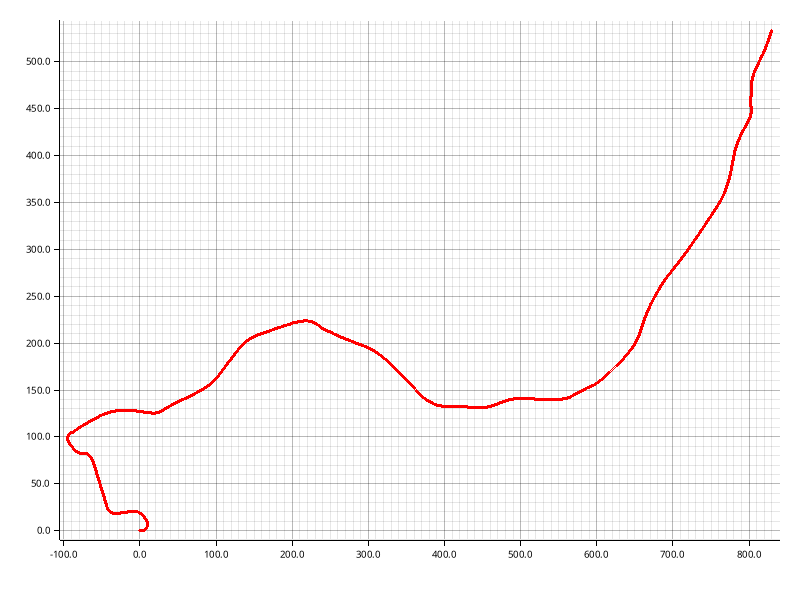
This crate provides utilities for showing the content of an _Uncrewed Vehicle Trajectory_ (UVT) file, by plotting a bird-eye view of the recorded trajectory.
The UVT format is an extension of the LTR file format introduced in [_Kilometer-Scale Autonomous Navigation in Subarctic Forests: Challenges and Lessons Learned_](https://doi.org/10.55417/fr.2022050).
A UVT file contains:
- a LiDAR map of the environment, stored in the [`VTK` format](https://vtk.org).
- A trajectory recorded by an uncrewed vehicle.
An example UVT file is available on [Zenodo](https://doi.org/10.5281/zenodo.16928365).
## Usage
### CLI tool
To use `uvt-plot` as a CLI tool, you can install this crate with:
```sh
cargo install uvt-plot
```
You can run `uvt-plot` from the terminal:
```console
$ uvt-plot --help
Utilities for plotting and displaying UVT data.
Usage: uvt-plot [OPTIONS] --input-file <INPUT_FILE>
Options:
-i, --input-file <INPUT_FILE> Input file path
-m, --mode <MODE> File mode [default: uvt] [possible values: uvt, rosbag, mcap]
--map-topic <MAP_TOPIC> Map topic [default: /map]
--traj-topic <TRAJ_TOPIC> Trajectory topic [default: /odom]
-h, --help Print help
-V, --version Print version
```
`uvt-plot` can be used with `.uvt` files and with rosbags, both with ROS (`.bag`) and with ROS 2 (`.mcap`):
```sh
# With a UVT file
uvt-plot -- --input-file example.uvt
# With a ROS bag file
uvt-plot -- --input-file example.bag --m rosbag --map-topic /my-map-topic --traj-topic /my-traj-topic
# With a ROS MCAP file
uvt-plot -- --input-file example.mcap --m mcap --map-topic /my-map-topic --traj-topic /my-traj-topic
```
### Library
To use `uvt-plot` as a library, simply add the crate name to your `Cargo.toml` file:
```rust
[dependencies]
uvt-plot = "0.1"
```
`uvt-plot` provides a function to plot the trajectory in a UVT file:
```rs
use std::io;
use uvt;
use uvt_plot;
fn main() -> Result<(), io::Error> {
// Open a UVT file
let my_uvt = uvt::Uvt::read_file("example.uvt")?;
// Plot trajectory
uvt_plot::plot_trajectory(my_uvt);
Ok(())
}
```
## Citation
If you use the code or data in an academic context, please cite the following work:
```bibtex
@article{Baril2022,
title = {Kilometer-Scale Autonomous Navigation in Subarctic Forests: Challenges and Lessons Learned},
volume = {2},
ISSN = {2771-3989},
url = {http://dx.doi.org/10.55417/fr.2022050},
DOI = {10.55417/fr.2022050},
journal = {Field Robotics},
publisher = {Institute of Electrical and Electronics Engineers (IEEE)},
author = {Baril, Dominic and Desch\^enes, Simon-Pierre and Gamache, Olivier and Vaidis, Maxime and LaRocque, Damien and Laconte, Johann and Kubelka, Vladimír and Giguère, Philippe and Pomerleau, Fran\c{c}ois},
year = {2022},
month = jul,
pages = {1628–1660}
}
```
## License
Licensed under either of
* Apache License, Version 2.0
([LICENSE-APACHE](LICENSE-APACHE) or <http://www.apache.org/licenses/LICENSE-2.0>)
* MIT license
([LICENSE-MIT](LICENSE-MIT) or <http://opensource.org/licenses/MIT>)
at your option.
## Contribution
Unless you explicitly state otherwise, any contribution intentionally submitted
for inclusion in the work by you, as defined in the Apache-2.0 license, shall be
dual licensed as above, without any additional terms or conditions.