
Urx is a command-line tool designed for collecting URLs from OSINT archives, such as the Wayback Machine and Common Crawl. Built with Rust for efficiency, it leverages asynchronous processing to rapidly query multiple data sources. This tool simplifies the process of gathering URL information for a specified domain, providing a comprehensive dataset that can be used for various purposes, including security testing and analysis.
Features
- Fetch URLs from multiple sources in parallel (Wayback Machine, Common Crawl, OTX)
- API key rotation support for VirusTotal and URLScan providers to mitigate rate limits
- Filter results by file extensions, patterns, or predefined presets (e.g., "no-image" to exclude images)
- URL normalization and deduplication: Sort query parameters, remove trailing slashes, and merge semantically identical URLs
- Support for multiple output formats: plain text, JSON, CSV
- Direct file input support: Read URLs directly from WARC files, URLTeam compressed files, and text files
- Output results to the console or a file, or stream via stdin for pipeline integration
- URL Testing:
- Filter and validate URLs based on HTTP status codes and patterns.
- Extract additional links from collected URLs
- Caching and Incremental Scanning:
- Local SQLite or remote Redis caching to avoid re-scanning domains
- Incremental mode to discover only new URLs since last scan
- Configurable cache TTL and automatic cleanup of expired entries
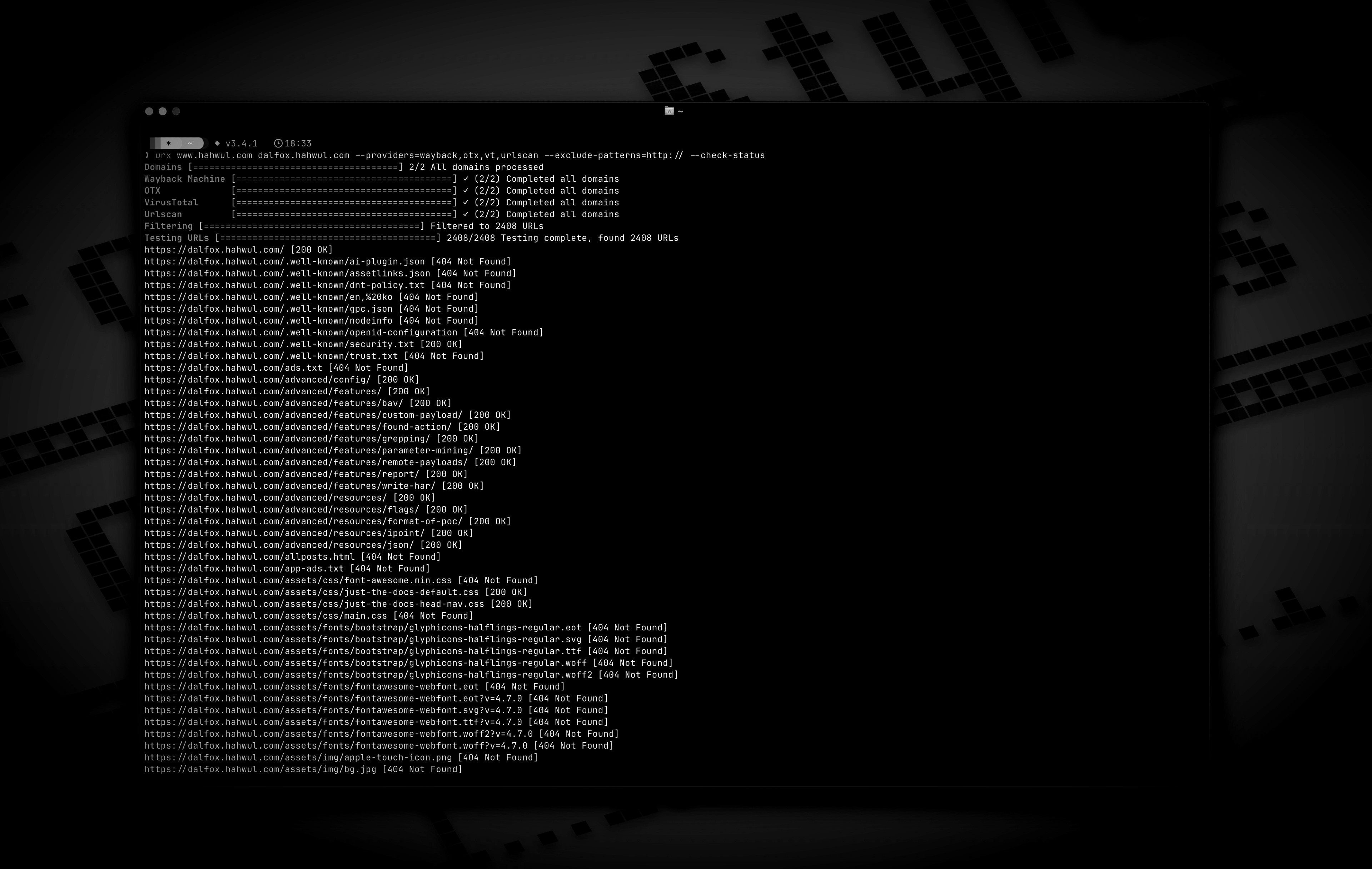
Installation
From Cargo
# https://crates.io/crates/urx
From Homebrew
# https://formulae.brew.sh/formula/urx
From Source
The compiled binary will be available at target/release/urx.
From Docker
Usage
Basic Usage
# Scan a single domain
# Scan multiple domains
# Scan domains from a file
|
Options
Usage: urx [OPTIONS] [DOMAINS]...

Arguments:
  [DOMAINS]...  Domains to fetch URLs for

Options:
  -c, --config <CONFIG>  Config file to load
  -h, --help             Print help
  -V, --version          Print version

Input Options:
      --files <FILES>...  Read URLs directly from files (supports WARC, URLTeam compressed, and text files). Use multiple --files flags or space-separate multiple files

Output Options:
  -o, --output <OUTPUT>  Output file to write results
  -f, --format <FORMAT>  Output format (e.g., "plain", "json", "csv") [default: plain]
      --merge-endpoint   Merge endpoints with the same path and merge URL parameters
      --normalize-url    Normalize URLs for better deduplication (sorts query parameters, removes trailing slashes)

Provider Options:
      --providers <PROVIDERS>
          Providers to use (comma-separated, e.g., "wayback,cc,otx,vt,urlscan") [default: wayback,cc,otx]
      --subs
          Include subdomains when searching
      --cc-index <CC_INDEX>
          Common Crawl index to use (e.g., CC-MAIN-2025-13) [default: CC-MAIN-2025-13]
      --vt-api-key <VT_API_KEY>
          API key for VirusTotal (can be used multiple times for rotation, can also use URX_VT_API_KEY environment variable with comma-separated keys)
      --urlscan-api-key <URLSCAN_API_KEY>
          API key for Urlscan (can be used multiple times for rotation, can also use URX_URLSCAN_API_KEY environment variable with comma-separated keys)

Discovery Options:
      --exclude-robots   Exclude robots.txt discovery
      --exclude-sitemap  Exclude sitemap.xml discovery

Display Options:
  -v, --verbose      Show verbose output
      --silent       Silent mode (no output)
      --no-progress  No progress bar

Filter Options:
  -p, --preset <PRESET>
          Filter Presets (e.g., "no-resources,no-images,only-js,only-style")
  -e, --extensions <EXTENSIONS>
          Filter URLs to only include those with specific extensions (comma-separated, e.g., "js,php,aspx")
      --exclude-extensions <EXCLUDE_EXTENSIONS>
          Filter URLs to exclude those with specific extensions (comma-separated, e.g., "html,txt")
      --patterns <PATTERNS>
          Filter URLs to only include those containing specific patterns (comma-separated)
      --exclude-patterns <EXCLUDE_PATTERNS>
          Filter URLs to exclude those containing specific patterns (comma-separated)
      --show-only-host
          Only show the host part of the URLs
      --show-only-path
          Only show the path part of the URLs
      --show-only-param
          Only show the parameters part of the URLs
      --min-length <MIN_LENGTH>
          Minimum URL length to include
      --max-length <MAX_LENGTH>
          Maximum URL length to include
      --strict
          Enforce exact host validation (default)

Network Options:
      --network-scope <NETWORK_SCOPE>  Control which components network settings apply to (all, providers, testers, or providers,testers) [default: all]
      --proxy <PROXY>                  Use proxy for HTTP requests (format: <http://proxy.example.com:8080>)
      --proxy-auth <PROXY_AUTH>        Proxy authentication credentials (format: username:password)
      --insecure                       Skip SSL certificate verification (accept self-signed certs)
      --random-agent                   Use a random User-Agent for HTTP requests
      --timeout <TIMEOUT>              Request timeout in seconds [default: 120]
      --retries <RETRIES>              Number of retries for failed requests [default: 2]
      --parallel <PARALLEL>            Maximum number of parallel requests per provider and maximum concurrent domain processing [default: 5]
      --rate-limit <RATE_LIMIT>        Rate limit (requests per second)

Testing Options:
      --check-status
          Check HTTP status code of collected URLs [aliases: ----cs]
      --include-status <INCLUDE_STATUS>
          Include URLs with specific HTTP status codes or patterns (e.g., --is=200,30x) [aliases: ----is]
      --exclude-status <EXCLUDE_STATUS>
          Exclude URLs with specific HTTP status codes or patterns (e.g., --es=404,50x,5xx) [aliases: ----es]
      --extract-links
          Extract additional links from collected URLs (requires HTTP requests)
Examples
# Save results to a file
# Output in JSON format
# Filter for JavaScript files only
# Exclude HTML and text files
# Filter for API endpoints
# Exclude specific patterns
# Use Fileter Preset (similar to --exclude-extensions=png,jpg,.....)
# Use specific providers
# Using VirusTotal and URLScan providers
# 1. Explicitly add to providers (with API keys via command line)
# 2. Using environment variables for API keys
URX_VT_API_KEY=*** URX_URLSCAN_API_KEY=***
# 3. Auto-enabling: providers are automatically added when API keys are provided
# 4. Multiple API key rotation (to mitigate rate limits)
# Using repeated flags for multiple keys
# Using environment variables with comma-separated keys
URX_VT_API_KEY=key1,key2,key3 URX_URLSCAN_API_KEY=ukey1,ukey2
# Combining CLI flags and environment variables (CLI keys are used first)
URX_VT_API_KEY=env_key1,env_key2
# URLs from robots.txt and sitemap.xml are included by default
# Exclude URLs from robots.txt files
# Exclude URLs from sitemap
# Include subdomains
# Check status of collected URLs
# Read URLs directly from a text file
# Combine file input with filtering
# Extract additional links from collected URLs
# Network configuration
# Advanced filtering
# HTTP Status code based filtering
# Disable host validation
# URL normalization and deduplication
# Normalize URLs by sorting query parameters and removing trailing slashes
# Combine normalization with endpoint merging for comprehensive deduplication
# URL normalization with file input
Caching and Incremental Scanning
Urx supports caching to improve performance for repeated scans and incremental scanning to discover only new URLs.
# Enable caching with SQLite (default)
# Use Redis for distributed caching
# Incremental scanning - only show new URLs since last scan
# Set cache TTL (time-to-live) to 12 hours
# Disable caching entirely
# Combine incremental scanning with filters
# Configuration file with caching settings
Caching Use Cases
# Daily monitoring - only alert on new URLs
|
# Efficient domain lists processing
|
# Distributed team scanning with Redis
# Fast re-scans during development
Integration with Other Tools
Urx works well in pipelines with other security and reconnaissance tools:
# Find domains, then discover URLs
| |
# Combine with other tools
| |
Inspiration
Urx was inspired by gau (GetAllUrls), a tool that fetches known URLs from AlienVault's Open Threat Exchange, the Wayback Machine, and Common Crawl. While sharing similar core functionality, Urx was built from the ground up in Rust with a focus on performance, concurrency, and expanded filtering capabilities.
Contribute
Urx is open-source project and made it with ❤️ if you want contribute this project, please see CONTRIBUTING.md and Pull-Request with cool your contents.
