
ufo-cli







ufo-cli is the host-side rover for UFO. It enrolls a local machine into a
UFO fleet, accepts queued operations, lets the assigned pilot drive
the rover in an isolated per-operation work directory, streams telemetry back
to the Hub, and keeps resulting diffs attached to the operation.
UFO is in public beta. Release notes call out upgrade caveats for each tagged release, and APIs, configuration, database schema, storage paths, and the rover protocol may still change before 1.0. Back up before upgrading, especially when testing arbitrary source commits.
Install
Shell installer (macOS, FreeBSD, Linux):
|
The installer puts ufo in ~/.local/bin by default. Override with
UFO_ROVER_INSTALL_DIR=/usr/local/bin, or pin a release with:
| UFO_ROVER_VERSION=v0.6.2
Homebrew (macOS, Linux):
Windows:
-
Download the Windows archive for your CPU from GitHub Releases and put
ufo.exeonPATH. -
Or use Cargo:
cargo install ufo-cli
Cargo fallback:
Rover CI runs tests on macOS, Linux, and Windows. Release CI builds archives for macOS, FreeBSD, Linux, and Windows. Other operating systems may work, but are not tested yet.
Enroll and start
Start the UFO Hub first, then enroll. The command opens the Rovers page, tells you to sign in if needed, pick the fleet/name/units/tags in the approval modal, waits until approval stores the rover token, then starts the rover.
First run:
Later runs:
You can also pass the Hub with UFO_HUB_URL=http://localhost:8080.
ufo rover start uses the Hub stored during enrollment.
Enrollments are stored in ~/.ufo/rovers.json, keyed by rover id. A host can
hold multiple enrollments, including enrollments for different Hubs. When you
run ufo rover start, it loads the stored enrollments, keeps each ready for
operation, and runs them concurrently according to each rover's units while
reusing the same local AI CLIs on PATH.
For code-based or non-browser enrollment, create an enrollment code from the
Rovers panel and pass it with UFO_ROVER_ENROLLMENT_CODE=<code> ufo rover enroll.
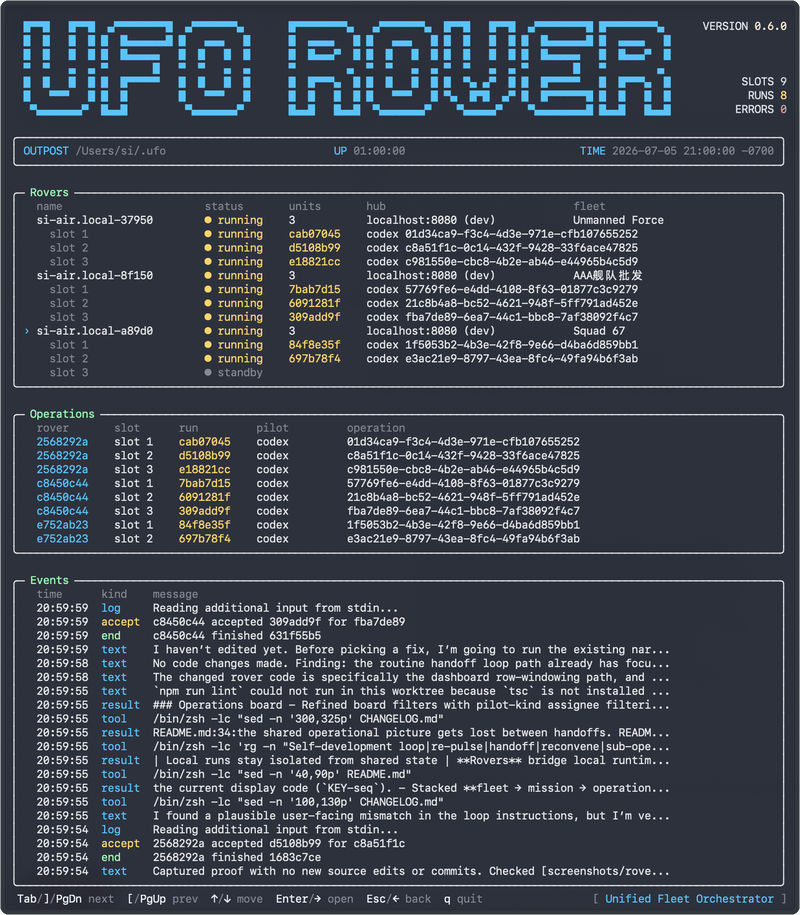
ufo rover enroll and ufo rover start open the live rover TUI when stdout
is an interactive terminal. They still run the rover daemon loop: each
enrollment stays ready for operation. Use ufo rover enroll --headless on
first run, or ufo rover start --headless later, for CI, launchd/systemd, or
old log-oriented output.
Use ufo rover enroll --auto-upgrade, ufo rover start --auto-upgrade, or
UFO_ROVER_AUTO_UPGRADE=1 to install and restart automatically when the Hub
requires a newer rover. On Windows, update from the release archive or Cargo
instead.
Useful commands:
|
Pilots and tags
The rover auto-detects local AI CLIs and reports capability tags for dispatch. UFO only lets a rover accept work when its tags match the queued operation.
| UFO pilot name | CLI on PATH | Capability tag |
|---|---|---|
| Claude Code | claude |
pilot:claude |
| Codex | codex |
pilot:codex |
| Antigravity | agy |
pilot:antigravity |
| Grok Build | grok |
pilot:grok |
| Cursor Agent | cursor-agent |
pilot:cursor |
| GitHub Copilot | copilot |
pilot:copilot |
| Amp Code | amp |
pilot:amp |
| OpenCode | opencode |
pilot:opencode |
| OpenClaw | openclaw |
pilot:openclaw |
| Hermes | hermes |
pilot:hermes |
| Pi | pi |
pilot:pi |
| Kimi | kimi |
pilot:kimi |
| Kiro | kiro-cli |
pilot:kiro |
| CodeBuddy Code | codebuddy |
pilot:codebuddy |
Rovers also report host tags such as os:macos and arch:aarch64.
You can add user dispatch tags during enrollment (comma-separated; : is
allowed inside a tag):
To enroll several code-based rovers in one command, repeat --config with the
same params as single enroll as pipe-separated key=value fields (\| for a
literal |):
Resolution for enroll (single flags or each --config field): explicit value
→ matching env → default. Env fallbacks shared by single and multi:
| Field | Env | Default |
|---|---|---|
| hub | UFO_HUB_URL |
http://localhost:8080 |
| code | UFO_ROVER_ENROLLMENT_CODE |
browser approve if unset (single); multi needs code= or env |
| units | UFO_ROVER_UNITS |
1 |
| name, tags | (none) | hostname / empty |
Set per-rover concurrency (1-100) in the web Rovers panel or during enrollment
with ufo rover enroll --units N or UFO_ROVER_UNITS=N. ufo rover start --units N and UFO_ROVER_UNITS on start are only startup overrides until hub
config is available.
Spend budget (optional enforcement)
Cost/usage is always recorded when the pilot reports it. Optional accept caps
use Hub metadata.budget on fleet, mission, operation, and/or rover
(period, max_runs, max_tokens, max_usd_micros). Every set layer is
enforced. Caps are per Hub resource — not process-wide env on multi-fleet
hosts.
Trust boundary
Pilots run local CLIs with the privileges of the user that started the rover. Use a dedicated low-privilege account, container, or isolated machine for rover hosts you share with a fleet.
See README.md for the Hub run guide and SECURITY.md for the trust model.
Update and uninstall
ufo rover enroll and ufo rover start check the latest GitHub release and
print a warning when the local rover is behind. The check is best effort and
never blocks enrollment or startup if it fails.
Update with ufo rover upgrade, by rerunning the curl installer, brew upgrade ufo-cli, or cargo install ufo-cli --force. On Windows, use the new
release archive or cargo install ufo-cli --force.
Remove the binary with rm -f ~/.local/bin/ufo, brew uninstall ufo-cli, or
cargo uninstall ufo-cli. Remove rover enrollments first with ufo rover remove --all; local enrollment and outpost data live under ~/.ufo unless
UFO_ROVER_CONFIG or UFO_ROVER_OUTPOST points elsewhere.
Release artifacts
GitHub releases publish one rover archive and one SHA-256 file per target:
ufo-aarch64-apple-darwin.tar.gz
ufo-x86_64-apple-darwin.tar.gz
ufo-x86_64-unknown-freebsd.tar.gz
ufo-aarch64-unknown-linux-gnu.tar.gz
ufo-x86_64-unknown-linux-gnu.tar.gz
ufo-aarch64-unknown-linux-musl.tar.gz
ufo-x86_64-unknown-linux-musl.tar.gz
ufo-aarch64-pc-windows-gnullvm.tar.gz
ufo-x86_64-pc-windows-gnullvm.tar.gz
ufo-aarch64-pc-windows-msvc.tar.gz
ufo-x86_64-pc-windows-msvc.tar.gz
Each archive contains the ufo binary (ufo.exe on Windows), license, and
rover README. The curl installer verifies the matching .sha256 before
installing. Release assets are not signed yet; publish signature files beside
the checksums before documenting signature verification.