
twyg





A tiny logging setup for Rust applications
I got used to logging my apps in with:
so here's something similar for Rust ;-)
Features
- 🎨 Beautiful colored output with fine-grained color customization
- ⏰ Multiple timestamp formats (RFC3339, Standard, Simple, TimeOnly)
- 📍 Optional caller information (file, line, function)
- 📏 Configurable level padding for perfect alignment
- 🎯 Structured logging with key-value pairs
- ⚙️ Simple configuration via builder pattern or config files
- 🔄 Both foreground and background color support
- 🚀 Zero-overhead when color is disabled
Installation
Add twyg to your Cargo.toml:
[]
= "0.6"
Quick Start
use ;
// Set up with default configuration
let opts = new
.coloured
.level
.report_caller
.build
.unwrap;
setup.expect;
// Now use standard Rust logging macros
info!;
debug!;
warn!;
error!;
Once the setup function has been called, all subsequent calls to the standard Rust logging macros will use this configuration, providing beautifully formatted output:
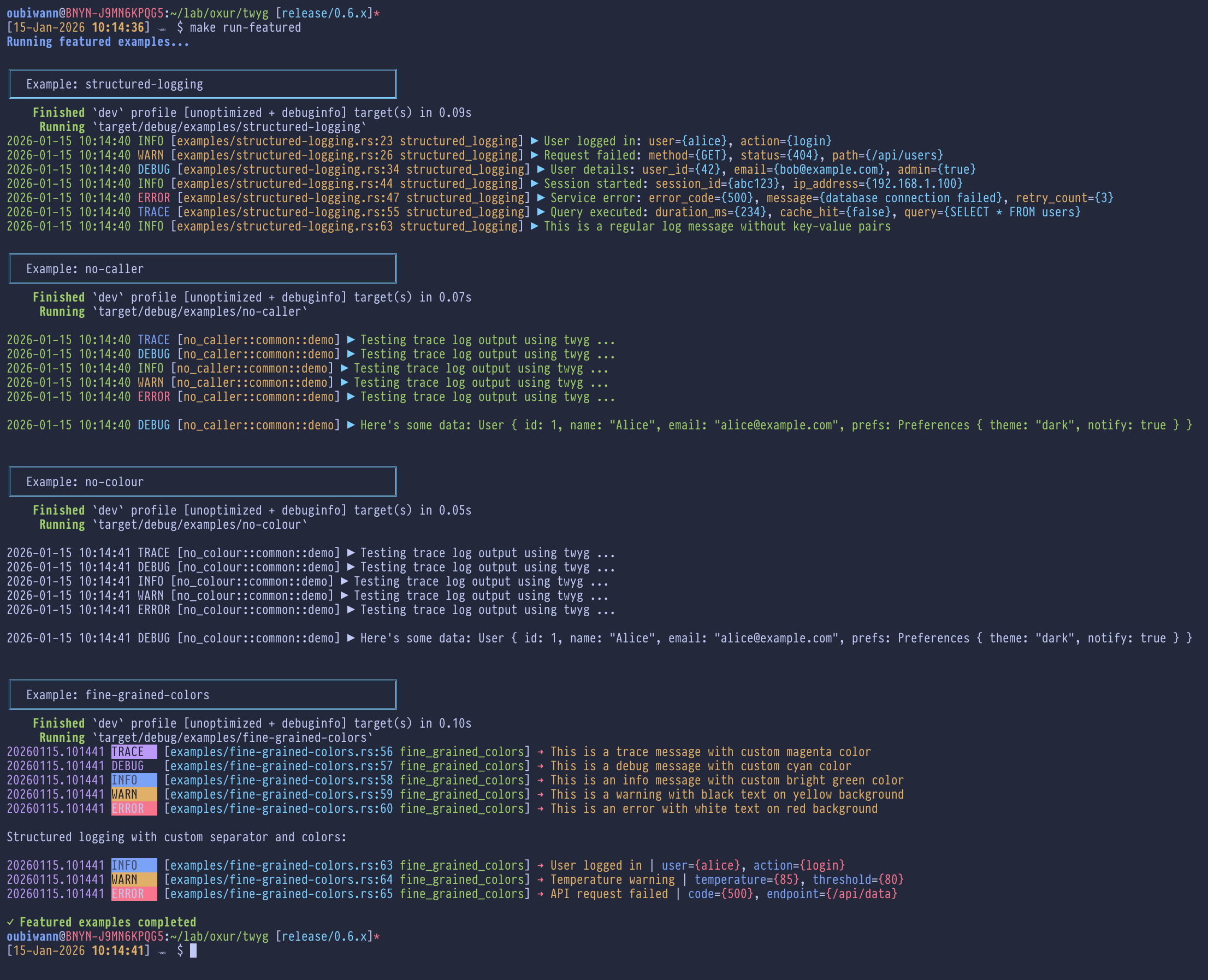
The output in the screenshot above (click for a full-sized view) is from
running the demos in the examples directory.
Configuration Options
| Option | Type | Default | Description |
|---|---|---|---|
coloured |
bool |
true |
Enable/disable ANSI color output |
output |
Output |
Stdout |
Output destination: Stdout, Stderr, or File(path) |
level |
LogLevel |
Info |
Minimum log level: Trace, Debug, Info, Warn, Error |
report_caller |
bool |
false |
Include file name and line number in output |
timestamp_format |
TSFormat |
Standard |
Timestamp format (see below) |
pad_level |
bool |
false |
Enable padding of log level strings for alignment |
pad_amount |
usize |
5 |
Number of characters to pad level strings to |
pad_side |
PadSide |
Right |
Padding side: Left (right-align) or Right (left-align) |
arrow_char |
String |
"▶" |
Arrow separator between metadata and message |
msg_separator |
String |
": " |
Separator before structured logging attributes |
colors |
Colors |
See below | Fine-grained color control for each component |
Timestamp Formats
twyg supports multiple timestamp format presets:
use TSFormat;
// RFC3339 format
RFC3339 // "2026-01-15T14:30:52-08:00"
// Standard format (default)
Standard // "2026-01-15 14:30:52"
// Compact format
Simple // "20260115.143052"
// Time only
TimeOnly // "14:30:52"
// Custom chrono format string
Custom // "14:30:52.123"
Output Format
twyg produces clean, readable log output with optional caller information and structured key-value pairs:
Without caller information:
2026-01-15 14:30:52 INFO  [myapp] ▶ Application started
2026-01-15 14:30:52 DEBUG [myapp::auth] ▶ Processing login request
2026-01-15 14:30:52 WARN  [myapp::config] ▶ Using default configuration: file={config.yaml}
2026-01-15 14:30:52 ERROR [myapp::db] ▶ Connection failed: host={localhost}, port={5432}
With caller information:
2026-01-15 14:30:52 INFO  [main.rs:42 myapp] ▶ Application started
2026-01-15 14:30:52 DEBUG [auth.rs:127 myapp::auth] ▶ User logged in: user={alice}, id={42}
With level padding and custom formatting:
20260115.143052 INFO  [main.rs:42 myapp] → Application started
20260115.143052 WARN  [config.rs:18 myapp::config] → Missing key | key={api_token}
20260115.143052 ERROR [db.rs:93 myapp::db] → Failed to connect | error={timeout}
Fine-Grained Color Configuration
twyg allows you to customize the foreground and background colors of every formatted element. By default, twyg uses sensible color defaults, but you can override any color you want.
Simple Example - Changing a Few Colors
You don't need to configure every color. Just customize the ones you want to change:
use ;
let mut colors = default;
// Customize just the colors you want to change
colors.level_error = Some;
colors.message = Some;
colors.arrow = Some;
let opts = new
.coloured
.colors
.build
.unwrap;
setup.unwrap;
error!;
info!;
Disabling Color for Specific Elements
To disable color for a specific element while keeping others colored, set both foreground and background to Reset:
let mut colors = default;
colors.timestamp = Some;
// Timestamp will now be uncolored, but everything else remains colored
Complete Color Configuration Reference
The Colors struct provides fine-grained control over every colored element:
Available Colors
ColorAttribute provides these options:
Standard colors:
Black,Red,Green,Yellow,Blue,Magenta,Cyan,White
Bright/high-intensity colors:
HiBlack,HiRed,HiGreen,HiYellow,HiBlue,HiMagenta,HiCyan,HiWhite
Special:
Reset- No color (use for both foreground and background to disable coloring for an element)
You can create colors with just foreground:
fg
Or with both foreground and background:
new // White text on red background
Global Color Disable
The coloured: false option continues to work and will disable ALL colors regardless of individual color settings:
let opts = new
.coloured // Disables all colors globally
.build
.unwrap;
Complete Example
See examples/fine-grained-colors.rs for a complete working example with custom colors, padding, and formatting options.
Examples
twyg includes several examples demonstrating different features:
# Run all examples
# Or run individual examples
Configuration Files
twyg works seamlessly with configuration libraries thanks to serde support.
Using with the config crate
Use with the config library:
1. Set up your configuration file (YAML example):
logging:
    coloured: true
    level: debug
    output: stdout
    report_caller: true
    timestamp_format: Standard  # Or: RFC3339, Simple, TimeOnly
    pad_level: true
    pad_amount: 7
    pad_side: Right
    arrow_char: "→"
    msg_separator: " | "
    colors:
        timestamp:
            fg: HiCyan
            bg: Reset
        level_info:
            fg: HiWhite
            bg: Blue
        message:
            fg: HiWhite
            bg: Reset
2. Add twyg to your config struct:
use Deserialize;
use Opts;
3. Load and apply configuration:
let cfg: AppConfig = builder
.add_source
.build?
.try_deserialize?;
setup?;
Using with confyg
For TOML configuration with the confyg library:
[]
= true
= "debug"
= "stdout"
= true
= "Simple"
= true
= 7
= "Right"
= "→"
= " | "
[]
= { = "HiBlack", = "Reset" }
= { = "HiGreen", = "Reset" }
= { = "White", = "Red" }
= { = "Cyan", = "Reset" }
See examples/config-full.toml for a comprehensive configuration example with all available options.
Using Environment Variables
Configuration via environment variables with the envy crate:
use Deserialize;
use Opts;
let logging: Opts = prefixed.from_env?;
setup?;
See examples/.env-example and examples/from-confyg-env.rs for complete examples.
Note: Configuration uses lowercase serialization for enums, so use strings like "debug", "info", "stdout", etc.
Migration Guide
Upgrading from v0.5 to v0.6
v0.6 adds fine-grained color configuration and new formatting options. All changes are backward compatible:
New Features (Optional)
All new fields have sensible defaults, so existing code works without changes:
// v0.5 code continues to work
let opts = new
.coloured
.level
.build
.unwrap;
To use new features:
use ;
let mut colors = default;
colors.level_error = Some;
let opts = new
.coloured
.level
.timestamp_format // NEW
.pad_level // NEW
.pad_amount // NEW
.pad_side // NEW
.arrow_char // NEW
.msg_separator // NEW
.colors // NEW
.build
.unwrap;
Deprecated Methods
The time_format() method is deprecated in favor of timestamp_format():
// Deprecated (still works)
.time_format
// Preferred
.timestamp_format
Upgrading from v0.4 to v0.5
v0.5 introduces type-safe enums and a builder pattern for better API ergonomics. Here's how to migrate:
1. Replace stringly-typed level functions with LogLevel enum
Before (v0.4):
use ;
let opts = Opts ;
After (v0.5):
use ;
let opts = new
.level
.build
.unwrap;
2. Replace stringly-typed output with Output enum
Before (v0.4):
use ;
let opts = Opts ;
After (v0.5):
use ;
let opts = new
.output
.build
.unwrap;
3. Use OptsBuilder instead of struct literals
Before (v0.4):
let opts = Opts ;
After (v0.5):
let opts = new
.coloured
.level
.report_caller
.build
.unwrap;
4. Error handling now uses custom TwygError
Before (v0.4):
match setup
After (v0.5):
match setup
Backwards Compatibility
The old stringly-typed functions are still available but deprecated:
level::debug(),level::info(), etc. → UseLogLevel::Debug,LogLevel::Infoout::stdout(),out::stderr()→ UseOutput::Stdout,Output::Stderr
License
Copyright © 2020-2026, Oxur Group
Apache License, Version 2.0