# TuneIn CLI 📻 🎵 ✨
<p>
<a href="https://flakehub.com/flake/tsirysndr/tunein-cli" target="_blank">
<img src="https://img.shields.io/endpoint?url=https://flakehub.com/f/tsirysndr/tunein-cli/badge" />
</a>
<a href="https://crates.io/crates/tunein-cli" target="_blank">
<img src="https://img.shields.io/crates/v/tunein-cli.svg" />
</a>
<a href="https://crates.io/crates/tunein-cli" target="_blank">
<img src="https://img.shields.io/crates/dr/tunein-cli" />
</a>
<a href="#">
<img alt="GitHub Downloads (all assets, all releases)" src="https://img.shields.io/github/downloads/tsirysndr/tunein-cli/total" />
</a>
<a href="LICENSE" target="./LICENSE">
<img alt="License: MIT" src="https://img.shields.io/badge/License-MIT-blue.svg" />
</a>
<a href="https://github.com/tsirysndr/tunein-cli/actions/workflows/ci.yml">
<img src="https://github.com/tsirysndr/tunein-cli/actions/workflows/ci.yml/badge.svg" />
</a>
</p>
A command line interface for [TuneIn Radio](https://tunein.com) / [Radio Browser](https://www.radio-browser.info/).<br />
You can search for stations, play them, and see what's currently playing.
<a href="https://pocketenv.io/new?repo=tangled:tsiry-sandratraina.com/tunein-cli" target="_blank"><img src="https://pocketenv.io/open-in-pocketenv.svg" alt="Open in Pocketenv" /></a>

## 🚚 Installation
Compile from source, without Nix:
```bash
# Install dependencies
brew install protobuf # macOS
sudo apt-get install -y libasound2-dev protobuf-compiler libdbus-1-dev # Ubuntu/Debian
# Compile and install
git clone https://github.com/tsirysndr/tunein-cli
cd tunein-cli
cargo install --path .
```
With Nix:
```bash
git clone https://github.com/tsirysndr/tunein-cli
cd tunein-cli
nix develop --experimental-features "nix-command flakes"
cargo install --path .
```
### macOS/Linux
Using Bash:
```bash
Using [Homebrew](https://brew.sh):
```bash
brew install tsirysndr/tap/tunein
```
Using [Nix](https://nixos.org/nix/):
```bash
cachix use tsirysndr
nix profile install --experimental-features "nix-command flakes" github:tsirysndr/tunein-cli
```
### Ubuntu/Debian
```bash
sudo apt-get install tunein-cli
```
### Fedora
Add the following to `/etc/yum.repos.d/fury.repo`:
```
[fury]
name=Gemfury Private Repo
baseurl=https://yum.fury.io/tsiry/
enabled=1
gpgcheck=0
```
Then run:
```bash
dnf install tunein-cli
```
### Arch Linux
Using [paru](https://github.com/Morganamilo/paru):
```bash
paru -S tunein-cli-bin
```
Or download the latest release for your platform [here](https://github.com/tsirysndr/tunein-cli/releases).
## 📦 Downloads
- `Mac`: arm64: [tunein_v0.4.1_aarch64-apple-darwin.tar.gz](https://github.com/tsirysndr/tunein-cli/releases/download/v0.4.1/tunein_v0.4.1_aarch64-apple-darwin.tar.gz) intel: [tunein_v0.4.1_x86_64-apple-darwin.tar.gz](https://github.com/tsirysndr/tunein-cli/releases/download/v0.4.1/tunein_v0.4.1_x86_64-apple-darwin.tar.gz)
- `Linux`: [tunein_v0.4.1_x86_64-unknown-linux-gnu.tar.gz](https://github.com/tsirysndr/tunein-cli/releases/download/v0.4.1/tunein_v0.4.1_x86_64-unknown-linux-gnu.tar.gz)
## 🚀 Usage
```
USAGE:
tunein <SUBCOMMAND>
OPTIONS:
-h, --help Print help information
-p, --provider <provider> The radio provider to use, can be 'tunein' or 'radiobrowser'.
Default is 'tunein' [default: tunein]
-V, --version Print version information
SUBCOMMANDS:
browse Browse radio stations
help Print this message or the help of the given subcommand(s)
play Play a radio station
search Search for a radio station
server Start the server
service Manage systemd service for tunein-cli server
```
Search for a radio station:
```bash
tunein search "BBC Radio 1"
```
Result:
```
```
Play a radio station:
```bash
tunein play "alternativeradio.us"
# Or by station ID
tunein play s221580
```
## 🧙 Systemd Service
Tunein daemon can be started as a systemd service. To enable and start the service, run the following command:
```bash
tunein service install
```
To disable and stop the service, run the following command:
```bash
tunein service uninstall
```
To check the status of the service, run the following command:
```bash
tunein service status
```
## API Documentation
[https://buf.build/tsiry/tuneinserverapis/docs/main:tunein.v1alpha1](https://buf.build/tsiry/tuneinserverapis/docs/main:tunein.v1alpha1)
You can start the server locally by running:
```bash
tunein server
```
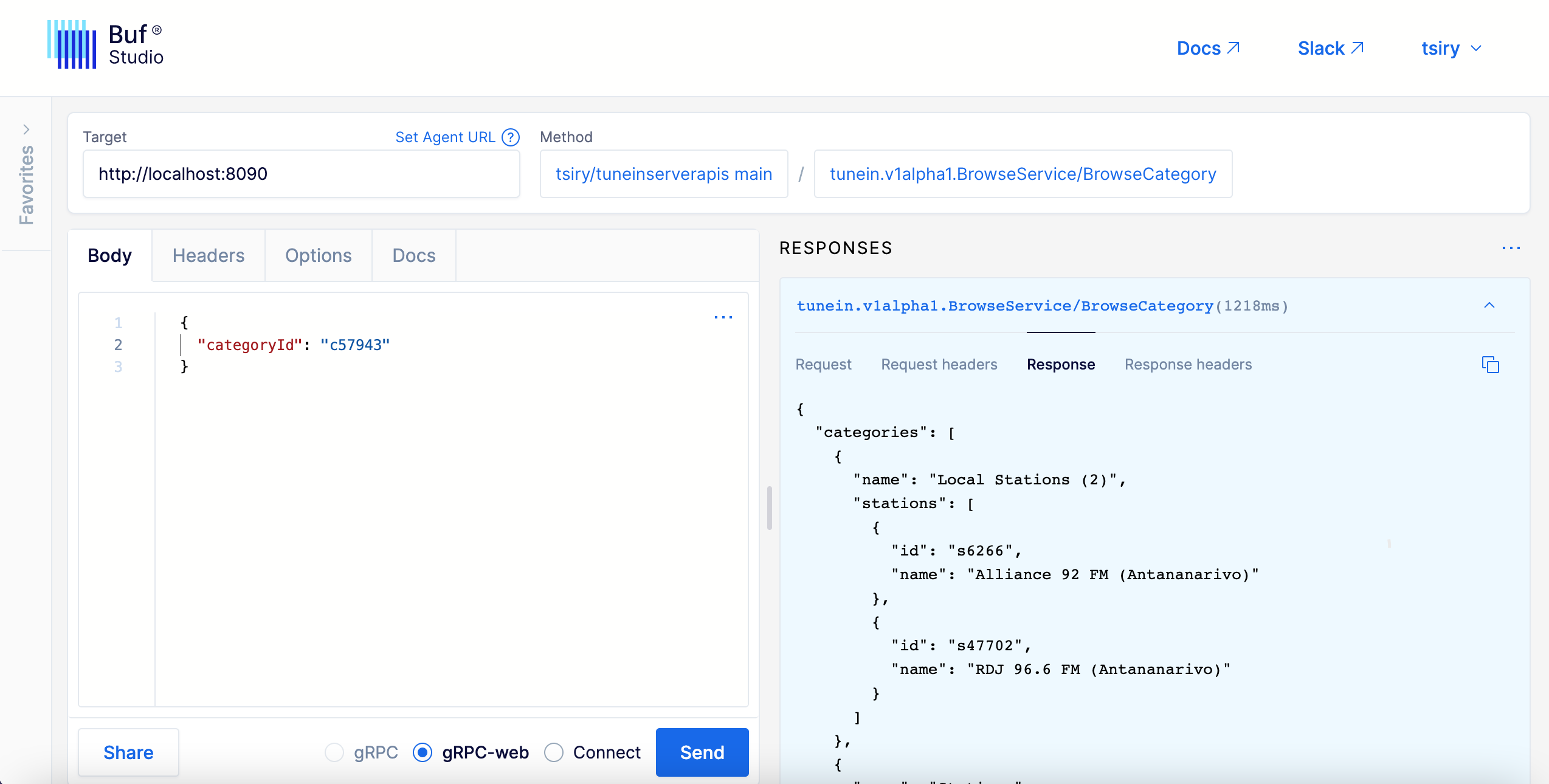
and then use [Buf Studio](https://studio.buf.build/tsiry/tuneinserverapis?selectedProtocol=grpc-web&target=http%3A%2F%2Flocalhost%3A8090) to make requests to the server
<img src="./api.png" />
## 📝 License
[MIT](LICENSE)