1
2
3
4
5
6
7
8
9
10
11
12
13
14
15
16
17
18
19
20
21
22
23
24
25
26
27
28
29
30
31
32
33
34
35
36
37
38
39
40
41
42
43
44
45
46
47
48
49
50
51
52
53
54
55
56
57
58
59
60
61
62
63
64
65
66
67
68
69
70
71
72
73
74
75
76
77
78
79
80
81
82
83
84
85
86
87
88
89
90
91
92
93
94
95
96
97
98
99
100
101
102
103
104
105
106
107
108
109
110
111
112
113
114
115
116
117
118
119
120
121
122
123
124
125
126
127
128
129
130
131
132
133
134
135
136
137
138
139
140
141
142
143
144
145
146
147
148
149
150
151
152
153
154
155
156
157
158
159
160
161
162
163
164
165
166
167
168
169
170
171
172
173
174
175
176
177
178
179
180
181
182
183
184
185
186
187
188
189
190
191
192
193
194
195
196
197
198
199
200
201
202
203
204
205
206
207
208
209
210
211
212
213
214
215
216
217
218
219
220
221
222
223
224
225
226
227
228
229
230
231
232
233
234
235
236
237
238
239
240
241
242
243
244
245
246
247
248
249
250
251
252
253
254
255
256
257
258
259
260
261
262
263
264
265
266
267
268
269
270
271
272
273
274
275
//! Tundra provides a framework and utilities for creating interactive terminal applications with
//! [Ratatui](ratatui).
//!
//! [Ratatui](ratatui) is a comprehensive library for creating singular user interfaces in the terminal, but
//! lacks features for organizing larger applications --- composed of several interfaces --- and for
//! receiving user data input.
//!
//! Tundra aims to extend the functionality of [Ratatui](ratatui) with utilities for:
//! - Defining [application states](State).
//! - Managing the terminal [environment and context](Context).
//! - Displaying messages through [modal dialogs](dialog).
//! - Receiving user input through [input forms](dialog::form!) and [fields](field).
//!
//! Tundra is also highly extensible with tools to easily define [your own dialogs](dialog::Dialog) and
//! [input fields](field::Field).
//!
//! It is **not** intended to be a replacement for or wrapper over [Ratatui](ratatui), nor the
//! [backend](ratatui::backend). [Ratatui](ratatui) is still required to draw the user interface of each
//! application state, and the [backend](ratatui::backend) is still required for low-level terminal
//! operations.
//!
//!
//! # Getting Started
//!
//! Add Tundra and Ratatui to the project dependencies, and note that the version of Ratatui used must be
//! [compatible](https://doc.rust-lang.org/cargo/reference/resolver.html#semver-compatibility) with the one
//! used by Tundra:
//! ```text
//! $ cargo add tundra ratatui@0.27
//! ```
//!
//! Next, import the [Tundra prelude](prelude), exposing symbols required in virtually all applications:
//! ```no_run
//! use tundra::prelude::*;
//! ```
//!
//!
//! # Basic Usage
//!
//! First construct a [context](Context). This represents the underlying [terminal](ratatui::Terminal), but
//! has added [RAII](https://en.wikipedia.org/wiki/Resource_acquisition_is_initialization) to automatically
//! initialize and reset the terminal environment.
//!
//! ```no_run
//! # use tundra::Context;
//! let ctx = Context::new()?;
//! # Ok::<(), std::io::Error>(())
//! ```
//!
//! This [context](Context) gets passed around between application states --- allowing them to draw to the
//! terminal.
//!
//! Next, create an application state. For this example, we'll create a state with a tally that increases
//! when the user presses `up`.
//!
//! ```no_run
//! struct Tally {
//! value: u32,
//! }
//! ```
//!
//! To define the event loop of the state, implement the [`State`] trait.
//!
//! ```no_run
//! use ratatui::widgets::Paragraph;
//! # use tundra::prelude::*;
//! # struct Tally{ value: u32 };
//!
//! impl State for Tally {
//! type Result<T> = T;
//! type Out = u32;
//! type Global = ();
//!
//! fn draw(&self, frame: &mut Frame) {
//! let widget = Paragraph::new(self.value.to_string());
//! frame.render_widget(widget, frame.size());
//! }
//!
//! fn input(mut self, key: KeyEvent, ctx: &mut Context) -> Signal<Self> {
//! match key.code {
//! KeyCode::Up => self.value += 1,
//! KeyCode::Enter => return Signal::Return(self.value),
//! _ => (),
//! }
//! Signal::Continue(self)
//! }
//! }
//! ```
//!
//! Some notes on the implementation:
//! - [`Result`](State::Result) can be used to specify what can go wrong when running the state --- analogous
//! to an error type but [more flexible](State#error-handling).
//! - [`Out`](State::Out) is the type that is returned from the state once it's done running.
//! - [`Global`](State::Global) can be used to store a
//! [global value inside the context](Context#application-defined-global).
//! - [`draw`](State::draw) is used to draw the user interface using [Ratatui](ratatui).
//! - [`input`](State::input) is used to handle key press events. The [`Signal`] return value indicates to
//! the event loop when and what to return.
//!
//! Our tally can now be ran using [`State::run`].
//!
//! ```no_run
//! # use tundra::prelude::*;
//! # struct Tally{ value: u32 };
//! # impl Tally{
//! # fn run(self, _: &mut Context) -> u32 { 0 }
//! # }
//! # let mut ctx = &mut Context::new().unwrap();
//! // returns the value when the user presses enter (per our State::input)
//! let value: u32 = Tally{ value: 0 }.run(ctx);
//! ```
//!
//! There is not much boiler-plate in running this simple example, but for more complex states, a wrapper
//! function that constructs and runs the state should be used.
//!
//! ```no_run
//! # use tundra::prelude::*;
//! # struct Tally{ value: u32 };
//! # impl Tally{
//! # fn run(self, _: &mut Context) -> u32 { 0 }
//! # }
//! pub fn tally(ctx: &mut Context) -> u32 {
//! Tally{ value: 0 }.run(ctx)
//! }
//! ```
//!
//! This interface can now be used from other states to "transition" to the `Tally` state! For the sake of
//! argument, let's create and run a new tally from within our existing tally whenever the user presses tab.
//! The current value will be multiplied with the value entered in the new tally (the "transitioned-to"
//! state).
//!
//! ```no_run
//! # use tundra::prelude::*;
//! # fn tally(_: &mut Context) -> u32 { 0 }
//! # struct Tally{ value: u32 };
//! # enum Signal<T> { Continue(T), Return(u32) };
//! # impl Tally {
//! fn input(mut self, key: KeyEvent, ctx: &mut Context) -> Signal<Self> {
//! match key.code {
//! KeyCode::Up => self.value += 1,
//! KeyCode::Tab => self.value *= tally(ctx),
//! KeyCode::Enter => return Signal::Return(self.value),
//! _ => (),
//! }
//! Signal::Continue(self)
//! }
//! # }
//! ```
//!
//! That's all you need to get started! See the
//! [`tally` example](https://github.com/user-simon/tundra/blob/main/examples/tally.rs) for the complete
//! code.
//!
//!
//! # Modal Dialogs
//!
//! Modal dialogs are small pop-up "windows" displayed atop a background state. They contain messages or
//! prompt for user input and are shown simply by calling a function. Here is an example of showing an error
//! message in a dialog:
//! ```no_run
//! # use tundra::prelude::*;
//! # let current_state = &();
//! # let ctx = &mut Context::new().unwrap();
//! // let current_state: &impl State
//! // let ctx: &mut Context<_>
//! dialog::error("Failed evicting tenant.", current_state, ctx);
//! ```
//!
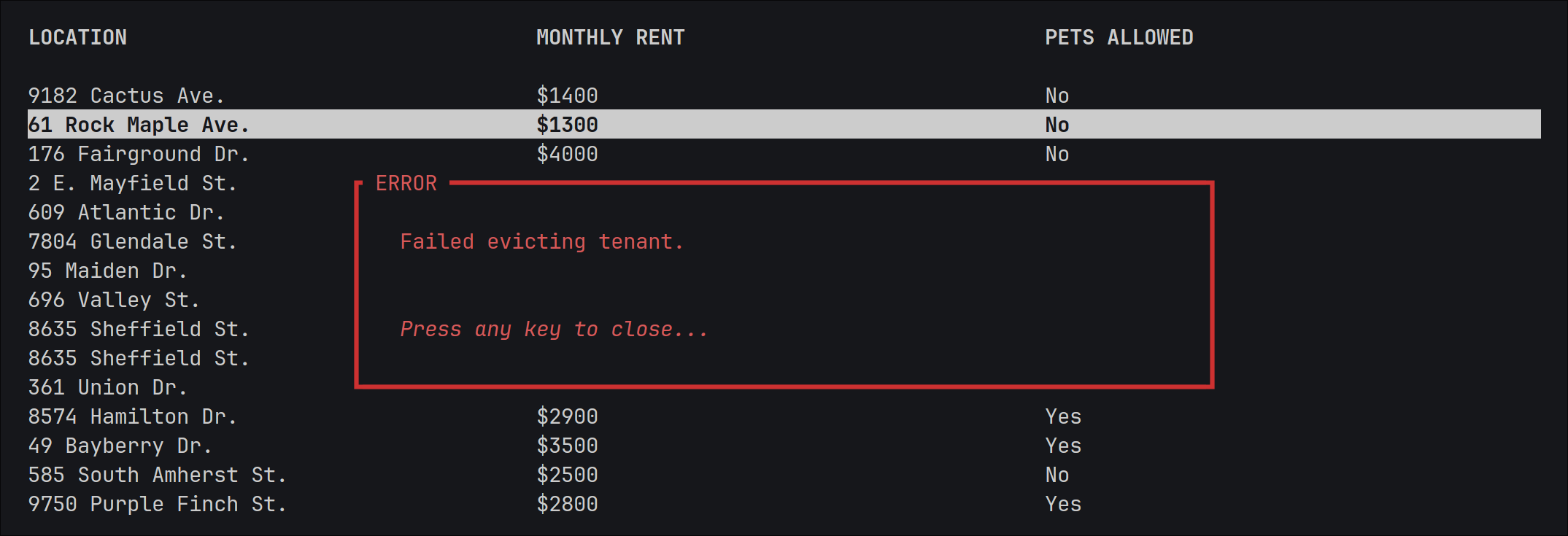
//! Here, `current_state` is a reference to whatever state the dialog should be drawn over. If the dialog is
//! being invoked from within a state, this would be `&self`. The error dialog --- and the [`dialog::error`]
//! function by extension --- returns once the user presses a key, acknowledging the error. Above some state
//! with a [Ratatui table](ratatui::widgets::Table), this shows as:
//!
//! 
//!
//! See the [dialog module](dialog) for a full list of the dialogs provided by Tundra, and for how to create
//! your own!
//!
//! Note that there is nothing magic about dialogs; they are implemented using the same machinery as any
//! other state, but have added logic to store a reference to the background state and to draw it before the
//! dialog.
//!
//!
//! # User Input
//!
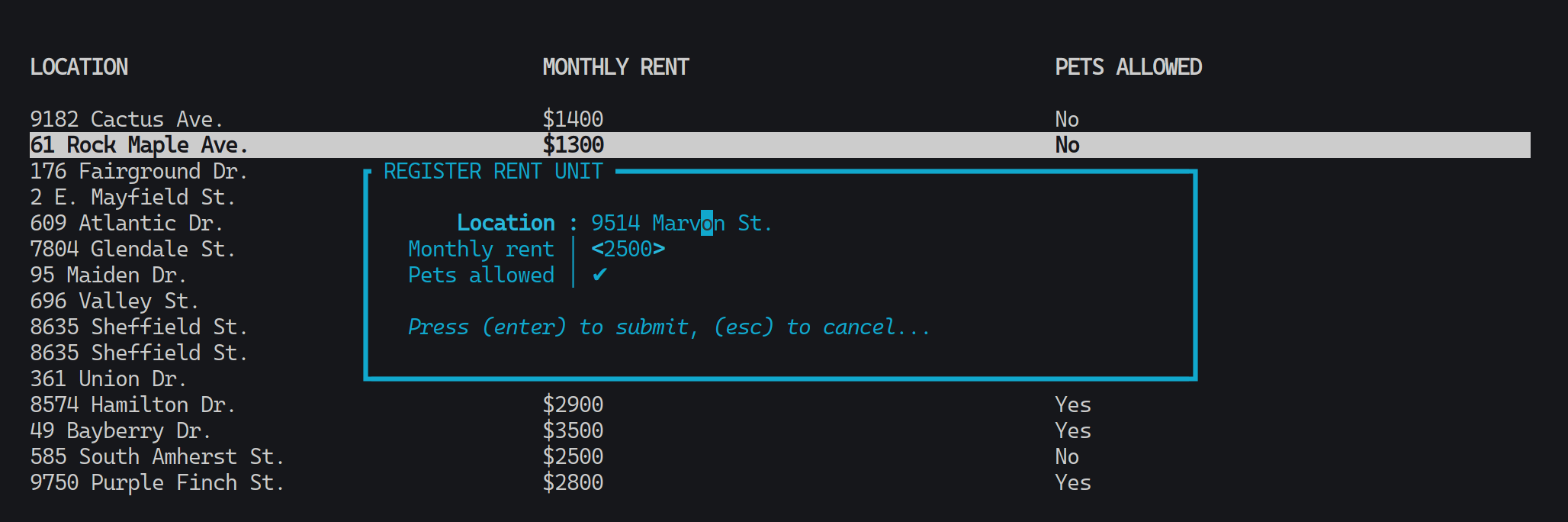
//! User input is facilitated through the [form macro](dialog::form!), which displays a dialog containing a
//! specified set of [input fields](field). The return value of the macro invocation is a struct containing
//! the values entered by the user for each field. Here is an example of showing a form, and once it's been
//! submitted, retrieving the entered values:
//! ```no_run
//! use tundra::field::*;
//! # use tundra::{prelude::*};
//!
//! # let current_state = &();
//! # let ctx = &mut Context::new().unwrap();
//! // let current_state: &impl State
//! // let ctx: &mut Context<_>
//!
//! let values = dialog::form!{
//! location: Textbox{ name: "Location" },
//! rent: Slider<u32>{ name: "Monthly rent", range: 1..=5000, step: 50, prefix: "$" },
//! pets_allowed: Checkbox{ name: "Pets allowed" },
//! [title]: "Register Rent Unit",
//! [context]: ctx,
//! [background]: current_state,
//! };
//!
//! if let Some(values) = values {
//! let location: String = values.location;
//! let rent: u32 = values.rent;
//! let pets_allowed: bool = values.pets_allowed;
//! }
//! ```
//!
//! Some notes about the example:
//! - As with other dialogs, a context and background state must be provided. For forms, this is done with
//! the `[context]` and `[background]` "meta-fields."
//! - The values (and the fields) are stored as members of unspellable structs created inside the macro ---
//! no runtime lookup is required! Values are accessed using the same identifers that the corresponding
//! fields were declared with.
//! - Forms can be cancelled by the user, which is represented by a `None` return value.
//! - The type annotations for the field values are not required.
//!
//! Above some state with a [Ratatui table](ratatui::widgets::Table) (and with some example data entered),
//! this shows as:
//!
//! 
//!
//! See the [form macro](dialog::form!) for the complete macro specification, and see the
//! [field module](field) for a full list of the field types provided by Tundra, and for how to create your
//! own!
//!
//!
//! # A Note on the Backend
//!
//! [Ratatui](ratatui) has support for several terminal [backends](ratatui::backend). If you don't know what
//! that means, this note holds no significance for you.
//!
//! Tundra currently only supports the [crossterm] backend. This is due to a lack of abstraction over the
//! different backends. Code --- particularly pertaining to [context](Context) and event handling --- would
//! have to be written and repeated for each backend.
//!
//! If you need another backend for your project, Tundra is not for you --- at least for the moment.
//!
//!
//! # Examples
//!
//! See the [examples folder](https://github.com/user-simon/tundra/tree/main/examples) on GitHub.
pub use ;
pub use Frame;
pub use crate::;
/// Exposes symbols required in virtually all applications.