

🚀 tun-rs
High-Performance Cross-Platform TUN/TAP Library for Rust




Features • Performance • Installation • Examples • Platforms
📖 Overview
tun-rs is a powerful, production-ready Rust library for creating and managing TUN and TAP virtual network interfaces. Built with performance and cross-platform compatibility in mind, it provides both synchronous and asynchronous APIs to suit your application's needs.
🎯 Why Choose tun-rs?
- 🏆 Exceptional Performance: Achieves up to 70.6 Gbps throughput with concurrent operations and offload features
- 🌍 True Cross-Platform: Consistent API across Windows, Linux, macOS, BSD, iOS, Android, and more
- ⚡ Async-Ready: Native support for
tokioandasync-ioruntimes - 🔧 Feature-Rich: Multiple IP addresses, DNS support, hardware offload, multi-queue, and more
- 🛡️ Production-Tested: Used in real-world VPN and networking applications
- 📦 Zero Hassle: Minimal dependencies and straightforward API design
🌟 Key Features
Core Capabilities
- ✅ Dual Mode Support: Both TUN (Layer 3) and TAP (Layer 2) interfaces
- ✅ Multiple IP Addresses: Assign multiple IPv4 and IPv6 addresses to a single interface
- ✅ Sync & Async APIs: Choose between synchronous blocking or async non-blocking operations
- ✅ Runtime Flexibility: Optional
tokioorasync-iointegration for async operations
Platform-Specific Optimizations
- 🚀 Hardware Offload: TSO/GSO support on Linux for maximum throughput
- 🔀 Multi-Queue: Leverage multiple CPU cores with multi-queue support on Linux
- 🍎 macOS TAP: Native TAP implementation using
fethpairs - 🪟 Windows DNS: Full DNS configuration support on Windows
Developer Experience
- 🎯 Consistent Behavior: Unified packet format across all platforms (no platform-specific headers)
- 🔄 Automatic Routing: Consistent route setup behavior when creating devices
- 🛑 Graceful Shutdown: Proper cleanup and shutdown support for sync operations
- 📝 Rich Examples: Comprehensive examples for common use cases
💻 Supported Platforms
| Platform | TUN | TAP | Notes |
|---|---|---|---|
| Linux | ✅ | ✅ | Full offload & multi-queue support |
| Windows | ✅ | ✅ | Requires wintun.dll / tap-windows |
| macOS | ✅ | ✅* | TAP via feth pairs |
| FreeBSD | ✅ | ✅ | Full support |
| OpenBSD | ✅ | ✅ | Full support |
| NetBSD | ✅ | ✅ | Full support |
| Android | ✅ | - | Via VpnService API |
| iOS | ✅ | - | Via NEPacketTunnelProvider |
| tvOS | ✅ | - | Via NEPacketTunnelProvider |
| OpenHarmony | ✅ | - | TUN support |
| Other Unix* | ✅ | - | Via raw file descriptor |
Note: For unlisted Unix-like platforms, you can use the raw file descriptor API to integrate with platform-specific TUN implementations.
🚀 Performance Benchmarks
tun-rs delivers exceptional performance compared to other TUN implementations. Benchmarks conducted on Linux (Ubuntu 20.04, i7-13700K, DDR5 32GB) using tun-benchmark2 show impressive results:
🏆 Highlights
- Peak Performance: Up to 70.6 Gbps with concurrent sync operations + offload
- Best Async Performance: 35.7 Gbps async without channel buffering + offload
- Optimized Async: 31.4 Gbps with BytesPool optimization
- Rust vs Go: Peak-to-peak, tun-rs achieves 2.3x higher throughput (70.6 vs 30.1 Gbps)
📊 Performance Comparison
| Configuration | Throughput | CPU Usage | Memory | Retransmissions |
|---|---|---|---|---|
| Sync + Offload + Concurrent | 🥇 70.6 Gbps | 124% | 10.6 MB | 2748 |
| Async + Offload | 🥈 35.7 Gbps | 64.9% | 7.4 MB | 0 |
| Async + Offload + BytesPool | 🥉 31.4 Gbps | 93.0% | 16.0 MB | 0 |
| Sync + Offload + Channel | 29.5 Gbps | 90.4% | 14.9 MB | 0 |
| Go + Offload + BytesPool | 30.1 Gbps | 101.6% | 39.5 MB | 0 |
| Go + Offload | 28.8 Gbps | 64.1% | 4.2 MB | 0 |
| Async (no offload) | 8.84 Gbps | 87.6% | 3.7 MB | 326 |
💡 Key Takeaways
- Hardware Offload is Critical: TSO/GSO increases throughput by 3-4x
- Concurrent I/O Scales: Dual-threaded sync operations achieve the highest throughput
- Memory Efficiency: tun-rs uses significantly less memory than Go alternatives
- Zero Retransmissions: Offload configurations achieve reliable, lossless transmission
- Flexible Performance Profile: Choose async for low CPU usage or sync+concurrent for maximum throughput
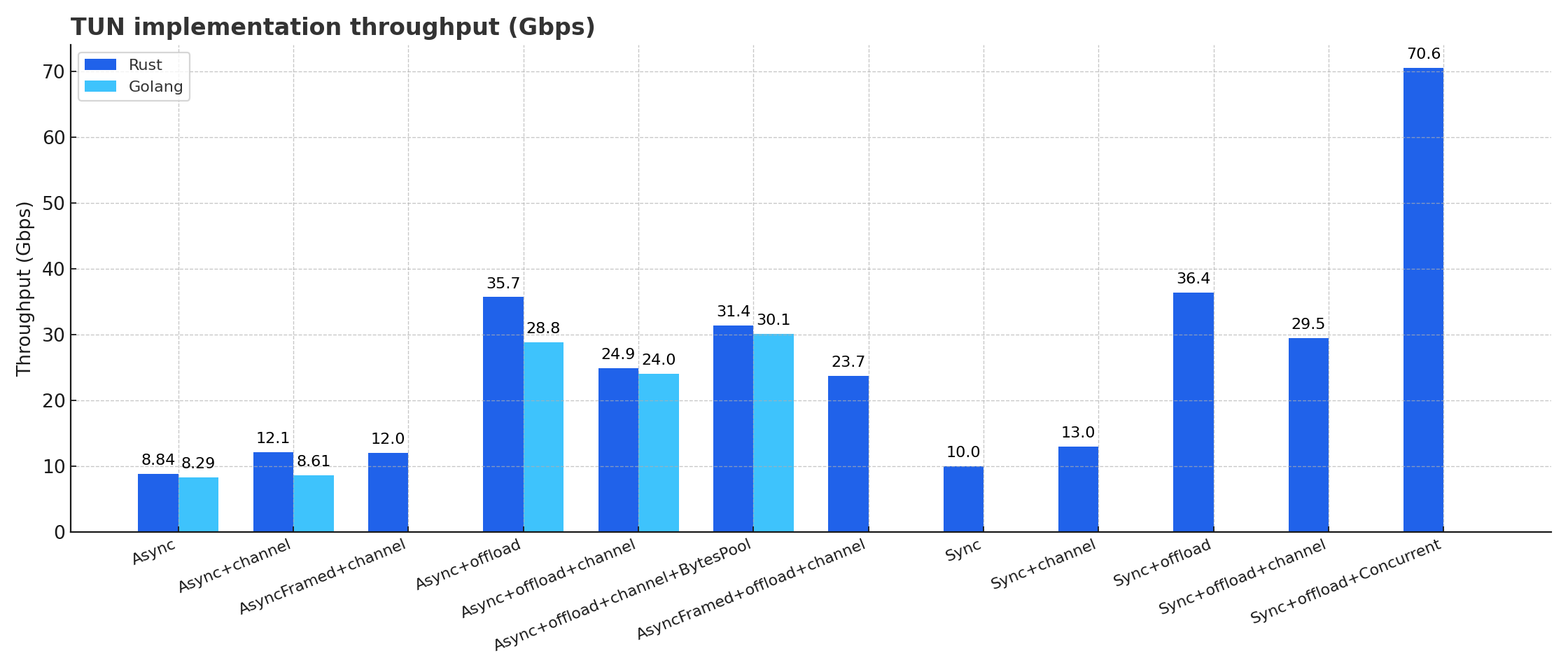
For detailed benchmark methodology and results, visit tun-benchmark2
📦 Installation
Add tun-rs to your Cargo.toml:
[]
# Base synchronous API (no async runtime required)
= "2"
# For Tokio async runtime
= { = "2", = ["async"] }
# For async-std, smol, or other async-io based runtimes
= { = "2", = ["async_io"] }
# For framed codec support (with tokio)
= { = "2", = ["async", "async_framed"] }
🎓 Quick Start
Basic Synchronous TUN Interface
Create and use a TUN interface in just a few lines:
use DeviceBuilder;
Asynchronous TUN with Tokio
Use async/await for non-blocking I/O:
use DeviceBuilder;
async
📚 Examples
Multiple IP Addresses
Assign multiple IP addresses to a single interface:
use DeviceBuilder;
async
Using Raw File Descriptor (Unix)
Create a device from an existing file descriptor (useful for iOS, Android, or custom TUN implementations):
use SyncDevice;
use RawFd;
// NOTE: This is example-only code. In real applications, obtain the fd from:
// - iOS: tunFd = packetFlow.value(forKeyPath: "socket.fileDescriptor") as! Int32
// - Android: fd = vpnInterface.getFd() (from VpnService.Builder().establish())
// - Linux: fd = open("/dev/net/tun", O_RDWR) or use DeviceBuilder instead
Linux Hardware Offload (TSO/GSO)
Maximize performance with hardware offload features:
use DeviceBuilder;
use ;
TAP Interface (Layer 2)
use ;
async
💡 More Examples: Check out examples/ for additional use cases including:
- ICMP ping responder
- iOS/Android integration
- Framed codec usage
- Interruptible operations
- And more!
🔧 Platform-Specific Setup
Linux
Requirements:
- TUN kernel module must be loaded:
sudo modprobe tun - Root privileges or
CAP_NET_ADMINcapability required
Performance Tips:
- Enable hardware offload for 3-4x throughput improvement
- Use multi-queue for concurrent operations across multiple cores
- Consider using
recv_multiple()for batch packet processing
# Load TUN module
# Run your application
macOS & BSD
Automatic Routing: tun-rs automatically configures routes based on your IP settings:
# Example: This route is added automatically for 10.0.0.0/24
TAP Mode on macOS:
- Implemented using
fethinterface pairs - Interfaces persist until explicitly destroyed
- Uses BPF for I/O operations
- Multiple file descriptors involved (be careful with
AsRawFd)
use ;
Windows
TUN Mode:
- Download wintun.dll matching your architecture (x64, x86, ARM, or ARM64)
- Place
wintun.dllin the same directory as your executable - Run your application as Administrator
TAP Mode:
- Install tap-windows matching your architecture
- Run your application as Administrator
use DeviceBuilder;
iOS / tvOS
Integrate with NEPacketTunnelProvider:
// Swift
class PacketTunnelProvider: NEPacketTunnelProvider {
    override func startTunnel(options: [String : NSObject]?, completionHandler: @escaping (Error?) -> Void) {
        let tunnelNetworkSettings = createTunnelSettings() // Configure TUN address, DNS, mtu, routing...
        setTunnelNetworkSettings(tunnelNetworkSettings) { [weak self] error in
            // Get the file descriptor from packet flow
            let tunFd = self?.packetFlow.value(forKeyPath: "socket.fileDescriptor") as! Int32
            DispatchQueue.global(qos: .default).async {
                start_tun(tunFd)
            }
            completionHandler(nil)
        }
    }
}
// Rust FFI
pub extern "C"
Android
Integrate with Android VpnService:
// Java
private void
// Rust JNI binding
pub extern "C"
🤝 Comparison with Other Libraries
| Feature | tun-rs | go-tun | tun-tap/tokio-tun |
|---|---|---|---|
| Peak Throughput | 70.6 Gbps | 30.1 Gbps | Not benchmarked |
| Memory Usage | ✅ Low (3-16 MB) | ❌ High (39-43 MB) | Unknown |
| Cross-Platform | ✅ 11+ platforms | ⚠️ Limited | ⚠️ Linux/macOS only |
| Async Support | ✅ Tokio + async-io | ✅ Go runtime | ⚠️ Varies by lib |
| Hardware Offload | ✅ TSO/GSO/Multi-queue | ✅ TSO/GSO | ❌ No |
| Multiple IPs | ✅ Yes | ❌ No | ❌ No |
| TAP on macOS | ✅ Yes (feth) | ❌ No | ❌ No |
| Mobile Support | ✅ iOS/Android | ❌ No | ❌ No |
Note: Benchmarks for go-tun were conducted in the same environment. Other Rust TUN libraries lack comprehensive cross-platform support and haven't been benchmarked in our test suite.
🛠️ API Overview
Device Creation
use ;
// Build with configuration
let dev = new
.name // Optional: specify interface name
.layer // L3 (TUN) or L2 (TAP)
.ipv4 // IPv4 address, prefix, destination
.ipv6 // IPv6 address, prefix
.mtu // Set MTU
.offload // Enable offload (Linux only)
.multi_queue // Enable multi-queue (Linux only)
.build_sync?; // Or build_async()
Core Operations
// Receive packet
let mut buf = vec!;
let len = dev.recv?;
// Send packet
dev.send?;
// Device information
let name = dev.name?;
let mtu = dev.mtu?;
let addresses = dev.addresses?;
let if_index = dev.if_index?;
// Address management
dev.add_address_v4?;
dev.add_address_v6?;
dev.remove_address?;
Async Operations
// Async recv/send
let len = dev.recv.await?;
dev.send.await?;
// Use with tokio::select!
select!
📖 Documentation
- API Documentation: docs.rs/tun-rs
- Examples: github.com/tun-rs/tun-rs/tree/main/examples
- Benchmark Details: github.com/tun-rs/tun-benchmark2
🐛 Troubleshooting
Linux/BSD/macOS: Run with sudo or grant CAP_NET_ADMIN capability:
# Or grant capability
Windows: Run as Administrator
Android/iOS: Use platform VPN APIs to obtain file descriptor
# Make it persistent
|
- Download from wintun.net
- Extract the DLL for your architecture (x64, x86, ARM, ARM64)
- Place in the same directory as your executable
On Linux, enable hardware offload for 3-4x performance boost:
let dev = new
.offload
.build_sync?;
🙏 Contributing
Contributions are welcome! Please feel free to submit a Pull Request. For major changes, please open an issue first to discuss what you would like to change.
Development
# Clone repository
# Run tests (requires root/admin)
# Build examples
# Run example
📄 License
Licensed under the Apache License 2.0
🌟 Acknowledgments
- Thanks to all contributors
- Inspired by the networking community's need for high-performance TUN/TAP implementations
- Special thanks to the Rust async ecosystem (tokio, async-io) for making async networking seamless
Made with ❤️ by the tun-rs team