1
2
3
4
5
6
7
8
9
10
11
12
13
14
15
16
17
18
19
20
21
22
23
24
25
26
27
28
29
30
31
32
33
34
35
36
37
38
39
40
41
42
43
44
45
46
47
48
49
50
51
52
53
54
55
56
57
58
59
60
61
62
63
64
65
66
67
68
69
70
71
72
73
74
75
76
77
78
79
80
81
82
83
84
85
86
87
88
89
90
91
92
93
94
95
96
97
98
99
100
101
102
103
104
105
106
107
108
109
110
111
112
113
114
115
116
117
118
119
120
121
122
123
124
125
126
127
128
129
130
131
132
133
134
135
136
137
138
139
140
141
142
143
144
145
146
147
148
149
150
151
152
153
154
155
156
157
158
159
160
161
162
163
164
165
166
167
168
169
170
171
172
173
174
175
176
177
178
179
180
181
182
183
184
185
186
187
188
189
190
191
192
193
194
195
196
197
198
199
200
201
202
203
204
205
206
207
208
209
210
211
212
213
214
215
216
217
218
219
220
221
222
223
224
225
226
227
228
229
230
231
232
233
234
235
236
237
238
239
240
241
242
243
244
245
246
247
248
249
250
251
252
253
254
255
256
257
258
259
260
261
262
263
264
265
266
267
268
269
270
271
272
273
274
275
276
277
278
279
280
281
282
283
284
285
286
287
288
289
290
291
292
293
294
295
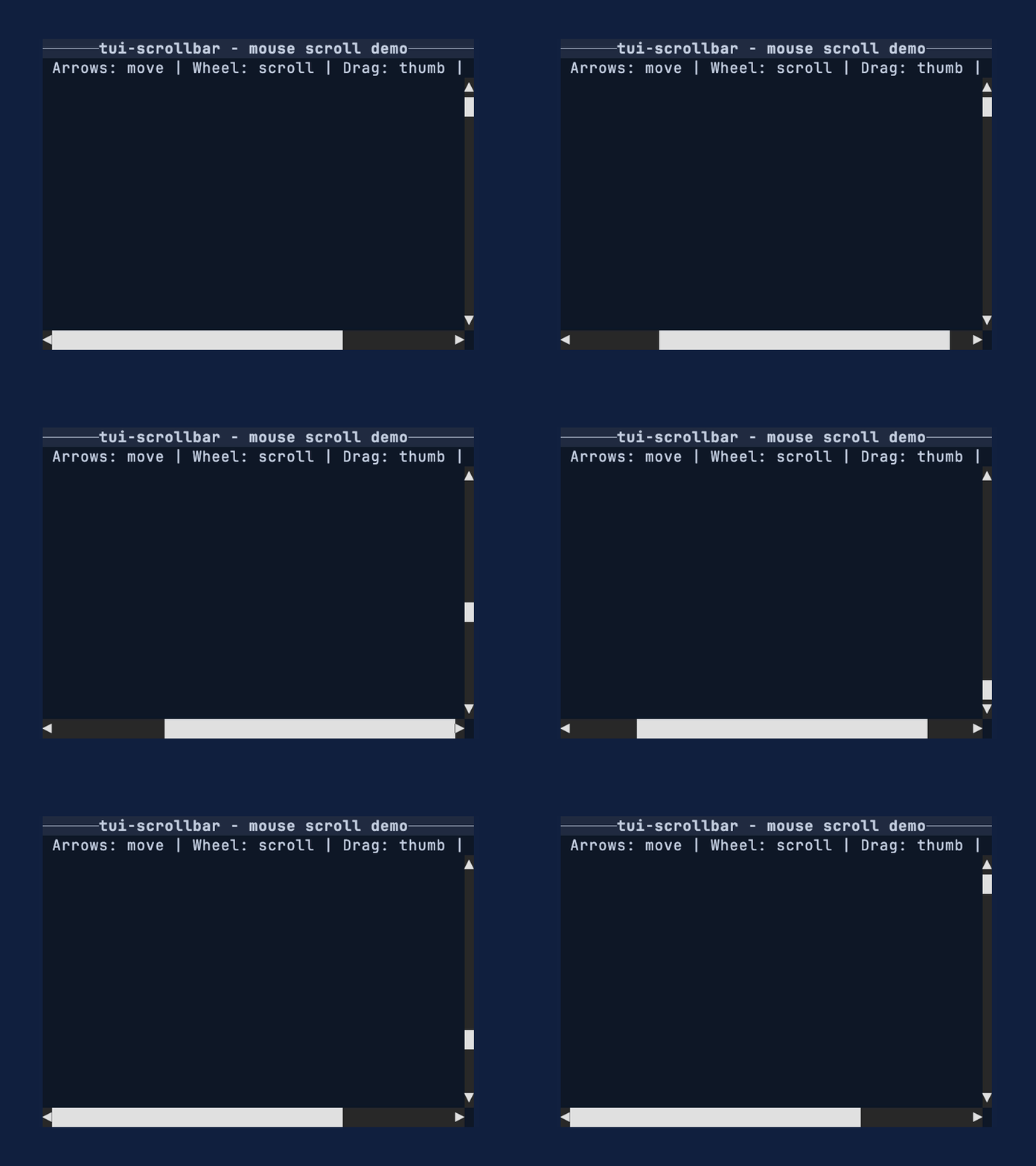
//! Smooth, fractional scrollbars for Ratatui. Part of the [tui-widgets] suite by [Joshka].
//!
//! 
//!
//! [![Crate badge]][Crate]
//! [![Docs Badge]][Docs]
//! [![Deps Badge]][Dependency Status]
//! [![License Badge]][License]
//! [![Coverage Badge]][Coverage]
//! [![Discord Badge]][Ratatui Discord]
//!
//! [GitHub Repository] · [API Docs] · [Examples] · [Changelog] · [Contributing] · [Crate source]
//!
//! Use this crate when you want scrollbars that communicate position and size more precisely than
//! full-cell glyphs. The widget renders into a [`Buffer`] for a given [`Rect`] and stays reusable
//! by implementing [`Widget`] for `&ScrollBar`.
//!
//! # Feature highlights
//!
//! - Fractional thumbs: render 1/8th-cell steps for clearer position/size feedback.
//! - Arrow endcaps: optional start/end arrows with click-to-step support.
//! - Backend-agnostic input: handle pointer + wheel events without tying to a backend.
//! - Stateless rendering: render via [`Widget`] for `&ScrollBar` with external state.
//! - Metrics-first: [`ScrollMetrics`] exposes pure geometry for testing and hit testing.
//!
//! # Why not Ratatui's scrollbar?
//!
//! Ratatui's built-in scrollbar favors simple full-cell glyphs and a stateful widget workflow.
//! This crate chooses fractional glyphs for more precise thumbs, keeps rendering stateless, and
//! exposes a small interaction API plus pure metrics so apps can control behavior explicitly.
//!
//! # Installation
//!
//! ```shell
//! cargo add tui-scrollbar
//! ```
//!
//! # Quick start
//!
//! This example renders a vertical [`ScrollBar`] into a [`Buffer`] using a fixed track size and
//! offset. Use it as a minimal template when you just need a thumb and track on screen.
//! If you prefer named arguments, use [`ScrollLengths`].
//!
//! ```rust
//! use ratatui_core::buffer::Buffer;
//! use ratatui_core::layout::Rect;
//! use ratatui_core::widgets::Widget;
//! use tui_scrollbar::{ScrollBar, ScrollBarArrows, ScrollLengths};
//!
//! let area = Rect::new(0, 0, 1, 6);
//! let lengths = ScrollLengths {
//! content_len: 120,
//! viewport_len: 30,
//! };
//! let scrollbar = ScrollBar::vertical(lengths)
//! .arrows(ScrollBarArrows::Both)
//! .offset(45);
//!
//! let mut buffer = Buffer::empty(area);
//! scrollbar.render(area, &mut buffer);
//! ```
//!
//! # Conceptual overview
//!
//! The scrollbar works in three pieces:
//!
//! 1. Your app owns `content_len`, `viewport_len`, and `offset` (lengths along the scroll axis).
//! 2. [`ScrollMetrics`] converts those values into a thumb position and size.
//! 3. [`ScrollBar`] renders the track + thumb using fractional glyphs.
//!
//! Most apps update `offset` in response to input events and re-render each frame.
//!
//! ## Units and subcell conversions
//!
//! `content_len`, `viewport_len`, and `offset` are measured in logical units along the scroll
//! axis. For many apps, those units are items or lines. The ratio between `viewport_len` and
//! `content_len` is what matters, so any consistent unit works.
//!
//! Zero lengths are treated as 1.
//!
//! # Layout integration
//!
//! This example shows how to reserve a column for a vertical [`ScrollBar`] alongside your content.
//! Use the same pattern for a horizontal [`ScrollBar`] by splitting rows instead of columns.
//!
//! ```rust,no_run
//! use ratatui_core::buffer::Buffer;
//! use ratatui_core::layout::{Constraint, Layout, Rect};
//! use ratatui_core::widgets::Widget;
//! use tui_scrollbar::{ScrollBar, ScrollLengths};
//!
//! let area = Rect::new(0, 0, 12, 6);
//! let [content_area, bar_area] = area.layout(&Layout::horizontal([
//! Constraint::Fill(1),
//! Constraint::Length(1),
//! ]));
//!
//! let lengths = ScrollLengths {
//! content_len: 400,
//! viewport_len: 80,
//! };
//! let scrollbar = ScrollBar::vertical(lengths).offset(0);
//!
//! let mut buffer = Buffer::empty(area);
//! scrollbar.render(bar_area, &mut buffer);
//! ```
//!
//! # Interaction loop
//!
//! This pattern assumes you have enabled mouse capture in your terminal backend and have the
//! scrollbar [`Rect`] (`bar_area`) from your layout each frame. Keep a [`ScrollBarInteraction`] in
//! your app state so drag operations persist across draws. Mouse events are handled via
//! [`ScrollBar::handle_mouse_event`], which returns a [`ScrollCommand`] to apply.
//!
//! ```rust,no_run
//! use ratatui_core::layout::Rect;
//! use tui_scrollbar::{ScrollBar, ScrollBarInteraction, ScrollCommand, ScrollLengths};
//!
//! let bar_area = Rect::new(0, 0, 1, 10);
//! let lengths = ScrollLengths {
//! content_len: 400,
//! viewport_len: 80,
//! };
//! let scrollbar = ScrollBar::vertical(lengths).offset(0);
//! let mut interaction = ScrollBarInteraction::new();
//! let mut offset = 0;
//!
//! # #[cfg(any(feature = "crossterm_0_28", feature = "crossterm_0_29"))]
//! # {
//! # use tui_scrollbar::crossterm::event::{self, Event};
//! if let Event::Mouse(event) = event::read()? {
//! if let Some(ScrollCommand::SetOffset(next)) =
//! scrollbar.handle_mouse_event(bar_area, event, &mut interaction)
//! {
//! offset = next;
//! }
//! }
//! # }
//! # let _ = offset;
//! # Ok::<(), std::io::Error>(())
//! ```
//!
//! # Metrics-first workflow
//!
//! This example shows how to compute thumb geometry without rendering via [`ScrollMetrics`]. It's
//! useful for testing, hit testing, or when you want to inspect thumb sizing directly.
//!
//! ```rust
//! use tui_scrollbar::{ScrollLengths, ScrollMetrics, SUBCELL};
//!
//! let track_cells = 12;
//! let viewport_len = track_cells * SUBCELL;
//! let content_len = viewport_len * 6;
//! let lengths = ScrollLengths {
//! content_len,
//! viewport_len,
//! };
//! let metrics = ScrollMetrics::new(lengths, 0, track_cells as u16);
//! assert!(metrics.thumb_len() >= SUBCELL);
//! ```
//!
//! # Glyph selection
//!
//! The default glyphs include [Symbols for Legacy Computing] so the thumb can render upper/right
//! partial fills that are missing from the standard block set. Use [`GlyphSet`] when you want to
//! switch to a glyph set that avoids legacy symbols.
//!
//! ```rust
//! use tui_scrollbar::{GlyphSet, ScrollBar, ScrollLengths};
//!
//! let lengths = ScrollLengths {
//! content_len: 10,
//! viewport_len: 5,
//! };
//! let scrollbar = ScrollBar::vertical(lengths).glyph_set(GlyphSet::unicode());
//! ```
//!
//! # API map
//!
//! ## Widgets
//!
//! - [`ScrollBar`]: renders vertical or horizontal scrollbars with fractional thumbs.
//!
//! ## Supporting types
//!
//! - [`ScrollBarInteraction`]: drag capture state for pointer interaction.
//! - [`ScrollMetrics`]: pure math for thumb sizing and hit testing.
//! - [`GlyphSet`]: glyph selection for track and thumb rendering.
//! - [`ScrollBarArrows`]: arrow endcap configuration.
//!
//! ## Enums and events
//!
//! - [`ScrollBarOrientation`], [`ScrollBarArrows`], [`TrackClickBehavior`]
//! - [`ScrollEvent`], [`ScrollCommand`]
//! - [`PointerEvent`], [`PointerEventKind`], [`PointerButton`]
//! - [`ScrollWheel`], [`ScrollAxis`]
//!
//! # Features
//!
//! - `crossterm`: enables crossterm mouse events (latest supported version, currently `crossterm`
//! 0.29).
//! - `crossterm_0_28`: enables crossterm mouse events using `crossterm` 0.28.
//! - `crossterm_0_29`: enables crossterm mouse events using `crossterm` 0.29.
//!
//! When multiple crossterm versions are enabled, the latest one is used.
//! The selected version is re-exported as `tui_scrollbar::crossterm`.
//!
//! # Important
//!
//! - Zero lengths are treated as 1.
//! - Arrow endcaps are disabled by default; configure them with [`ScrollBarArrows`].
//! - The default [`GlyphSet`] hides the track using spaces; use [`GlyphSet::box_drawing`] or
//! [`GlyphSet::unicode`] for a visible track.
//! - The default glyphs use [Symbols for Legacy Computing] for missing upper/right eighth blocks.
//! Use [`GlyphSet::unicode`] if you need only standard Unicode block elements.
//!
//! # See also
//!
//! - [tui-scrollbar examples]
//! - [`scrollbar_mouse` example]
//! - [`scrollbar` example]
//! - [`Widget`]
//! - [Ratatui]
//!
//! # More widgets
//!
//! For the full suite of widgets, see [tui-widgets].
//!
//! [Ratatui]: https://crates.io/crates/ratatui
//! [Crate]: https://crates.io/crates/tui-scrollbar
//! [Docs]: https://docs.rs/tui-scrollbar/
//! [Dependency Status]: https://deps.rs/repo/github/ratatui/tui-widgets
//! [Coverage]: https://app.codecov.io/gh/ratatui/tui-widgets
//! [Ratatui Discord]: https://discord.gg/pMCEU9hNEj
//! [Crate badge]: https://img.shields.io/crates/v/tui-scrollbar?logo=rust&style=flat
//! [Docs Badge]: https://img.shields.io/docsrs/tui-scrollbar?logo=rust&style=flat
//! [Deps Badge]: https://deps.rs/repo/github/ratatui/tui-widgets/status.svg?style=flat
//! [License Badge]: https://img.shields.io/crates/l/tui-scrollbar?style=flat
//! [License]: https://github.com/ratatui/tui-widgets/blob/main/LICENSE-MIT
//! [Coverage Badge]:
//! https://img.shields.io/codecov/c/github/ratatui/tui-widgets?logo=codecov&style=flat
//! [Discord Badge]: https://img.shields.io/discord/1070692720437383208?logo=discord&style=flat
//! [GitHub Repository]: https://github.com/ratatui/tui-widgets
//! [API Docs]: https://docs.rs/tui-scrollbar/
//! [Examples]: https://github.com/ratatui/tui-widgets/tree/main/tui-scrollbar/examples
//! [Changelog]: https://github.com/ratatui/tui-widgets/blob/main/tui-scrollbar/CHANGELOG.md
//! [Contributing]: https://github.com/ratatui/tui-widgets/blob/main/CONTRIBUTING.md
//! [Crate source]: https://github.com/ratatui/tui-widgets/blob/main/tui-scrollbar/src/lib.rs
//! [`scrollbar_mouse` example]: https://github.com/ratatui/tui-widgets/tree/main/tui-scrollbar/examples/scrollbar_mouse.rs
//! [`scrollbar` example]: https://github.com/ratatui/tui-widgets/tree/main/tui-scrollbar/examples/scrollbar.rs
//! [tui-scrollbar examples]: https://github.com/ratatui/tui-widgets/tree/main/tui-scrollbar/examples
//! [`Buffer`]: ratatui_core::buffer::Buffer
//! [`Rect`]: ratatui_core::layout::Rect
//! [`Widget`]: ratatui_core::widgets::Widget
//! [Symbols for Legacy Computing]: https://en.wikipedia.org/wiki/Symbols_for_Legacy_Computing
//!
//! [Joshka]: https://github.com/joshka
//! [tui-widgets]: https://crates.io/crates/tui-widgets
/// Re-export of the selected crossterm version.
///
/// See `tui_scrollbar::crossterm` for the version selection rules.
pub use crossterm_0_28 as crossterm;
/// Re-export of the selected crossterm version.
///
/// This crate supports multiple crossterm versions via feature flags:
///
/// - `crossterm` selects the latest supported crossterm version (currently 0.29).
/// - `crossterm_0_28` selects `crossterm` 0.28.
/// - `crossterm_0_29` selects `crossterm` 0.29.
///
/// When both 0.28 and 0.29 are enabled, this re-export points to 0.29. Downstream code can use
/// `tui_scrollbar::crossterm::event::*` without needing to match the dependency name/version
/// selection logic.
pub use crossterm_0_29 as crossterm;
pub use crateGlyphSet;
pub use crate;
pub use crateScrollLengths;
pub use crate;
pub use crate;