tui_scrollbar/lib.rs
1//! Smooth, fractional scrollbars for Ratatui. Part of the [tui-widgets] suite by [Joshka].
2//!
3//! 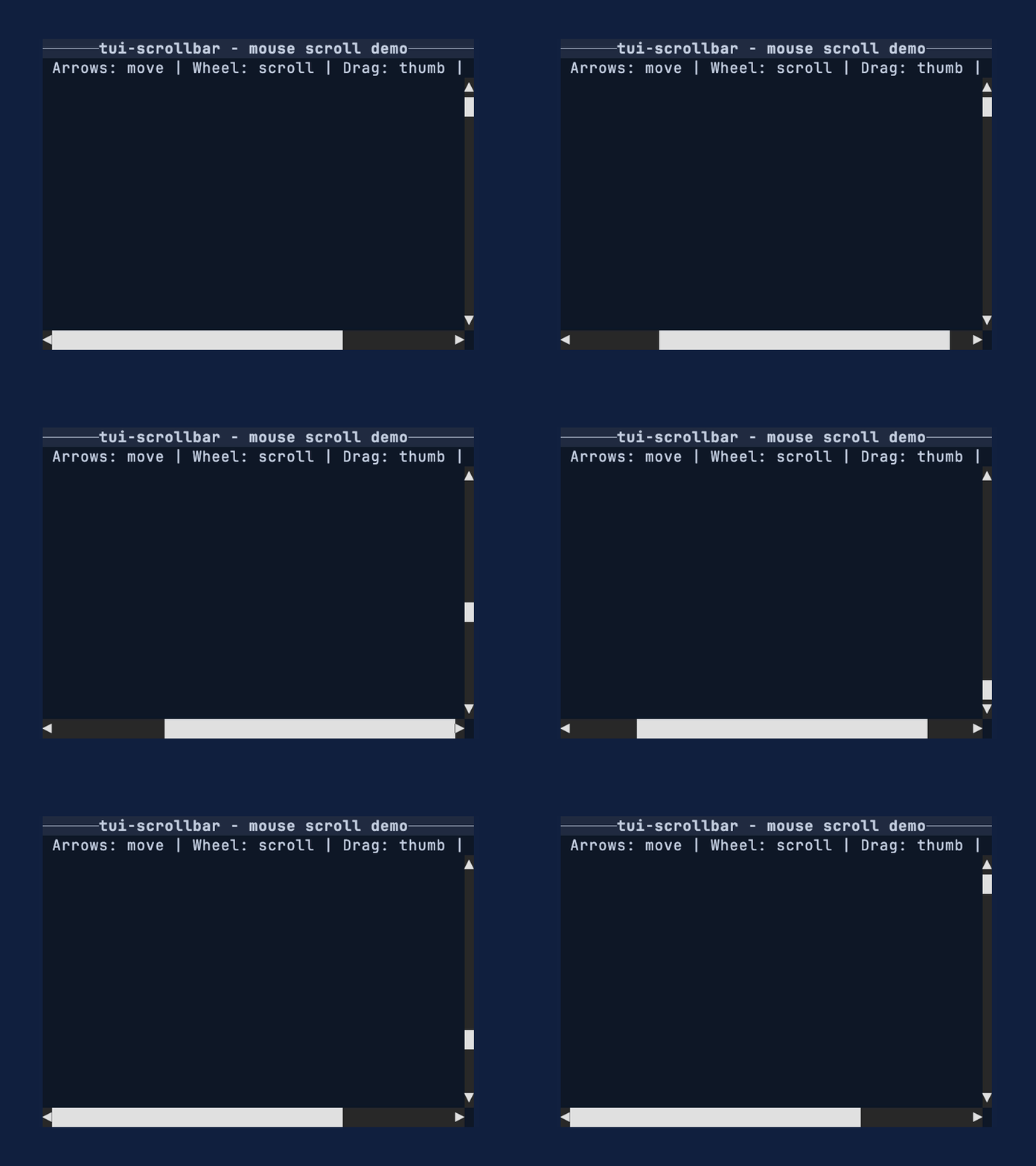
4//!
5//! [![Crate badge]][Crate]
6//! [![Docs Badge]][Docs]
7//! [![Deps Badge]][Dependency Status]
8//! [![License Badge]][License]
9//! [![Coverage Badge]][Coverage]
10//! [![Discord Badge]][Ratatui Discord]
11//!
12//! [GitHub Repository] · [API Docs] · [Examples] · [Changelog] · [Contributing] · [Crate source]
13//!
14//! Use this crate when you want scrollbars that communicate position and size more precisely than
15//! full-cell glyphs. The widget renders into a [`Buffer`] for a given [`Rect`] and stays reusable
16//! by implementing [`Widget`] for `&ScrollBar`.
17//!
18//! # Feature highlights
19//!
20//! - Fractional thumbs: render 1/8th-cell steps for clearer position/size feedback.
21//! - Arrow endcaps: optional start/end arrows with click-to-step support.
22//! - Backend-agnostic input: handle pointer + wheel events without tying to a backend.
23//! - Stateless rendering: render via [`Widget`] for `&ScrollBar` with external state.
24//! - Metrics-first: [`ScrollMetrics`] exposes pure geometry for testing and hit testing.
25//!
26//! # Why not Ratatui's scrollbar?
27//!
28//! Ratatui's built-in scrollbar favors simple full-cell glyphs and a stateful widget workflow.
29//! This crate chooses fractional glyphs for more precise thumbs, keeps rendering stateless, and
30//! exposes a small interaction API plus pure metrics so apps can control behavior explicitly.
31//!
32//! # Installation
33//!
34//! ```shell
35//! cargo add tui-scrollbar
36//! ```
37//!
38//! # Quick start
39//!
40//! This example renders a vertical [`ScrollBar`] into a [`Buffer`] using a fixed track size and
41//! offset. Use it as a minimal template when you just need a thumb and track on screen.
42//! If you prefer named arguments, use [`ScrollLengths`].
43//!
44//! ```rust
45//! use ratatui_core::buffer::Buffer;
46//! use ratatui_core::layout::Rect;
47//! use ratatui_core::widgets::Widget;
48//! use tui_scrollbar::{ScrollBar, ScrollBarArrows, ScrollLengths};
49//!
50//! let area = Rect::new(0, 0, 1, 6);
51//! let lengths = ScrollLengths {
52//! content_len: 120,
53//! viewport_len: 30,
54//! };
55//! let scrollbar = ScrollBar::vertical(lengths)
56//! .arrows(ScrollBarArrows::Both)
57//! .offset(45);
58//!
59//! let mut buffer = Buffer::empty(area);
60//! scrollbar.render(area, &mut buffer);
61//! ```
62//!
63//! # Conceptual overview
64//!
65//! The scrollbar works in three pieces:
66//!
67//! 1. Your app owns `content_len`, `viewport_len`, and `offset` (lengths along the scroll axis).
68//! 2. [`ScrollMetrics`] converts those values into a thumb position and size.
69//! 3. [`ScrollBar`] renders the track + thumb using fractional glyphs.
70//!
71//! Most apps update `offset` in response to input events and re-render each frame.
72//!
73//! ## Units and subcell conversions
74//!
75//! `content_len`, `viewport_len`, and `offset` are measured in logical units along the scroll
76//! axis. For many apps, those units are items or lines. The ratio between `viewport_len` and
77//! `content_len` is what matters, so any consistent unit works.
78//!
79//! Zero lengths are treated as 1.
80//!
81//! # Layout integration
82//!
83//! This example shows how to reserve a column for a vertical [`ScrollBar`] alongside your content.
84//! Use the same pattern for a horizontal [`ScrollBar`] by splitting rows instead of columns.
85//!
86//! ```rust,no_run
87//! use ratatui_core::buffer::Buffer;
88//! use ratatui_core::layout::{Constraint, Layout, Rect};
89//! use ratatui_core::widgets::Widget;
90//! use tui_scrollbar::{ScrollBar, ScrollLengths};
91//!
92//! let area = Rect::new(0, 0, 12, 6);
93//! let [content_area, bar_area] = area.layout(&Layout::horizontal([
94//! Constraint::Fill(1),
95//! Constraint::Length(1),
96//! ]));
97//!
98//! let lengths = ScrollLengths {
99//! content_len: 400,
100//! viewport_len: 80,
101//! };
102//! let scrollbar = ScrollBar::vertical(lengths).offset(0);
103//!
104//! let mut buffer = Buffer::empty(area);
105//! scrollbar.render(bar_area, &mut buffer);
106//! ```
107//!
108//! # Interaction loop
109//!
110//! This pattern assumes you have enabled mouse capture in your terminal backend and have the
111//! scrollbar [`Rect`] (`bar_area`) from your layout each frame. Keep a [`ScrollBarInteraction`] in
112//! your app state so drag operations persist across draws. Mouse events are handled via
113//! [`ScrollBar::handle_mouse_event`], which returns a [`ScrollCommand`] to apply.
114//!
115//! ```rust,no_run
116//! use ratatui_core::layout::Rect;
117//! use tui_scrollbar::{ScrollBar, ScrollBarInteraction, ScrollCommand, ScrollLengths};
118//!
119//! let bar_area = Rect::new(0, 0, 1, 10);
120//! let lengths = ScrollLengths {
121//! content_len: 400,
122//! viewport_len: 80,
123//! };
124//! let scrollbar = ScrollBar::vertical(lengths).offset(0);
125//! let mut interaction = ScrollBarInteraction::new();
126//! let mut offset = 0;
127//!
128//! # #[cfg(feature = "crossterm")]
129//! # {
130//! # use crossterm::event::{self, Event};
131//! if let Event::Mouse(event) = event::read()? {
132//! if let Some(ScrollCommand::SetOffset(next)) =
133//! scrollbar.handle_mouse_event(bar_area, event, &mut interaction)
134//! {
135//! offset = next;
136//! }
137//! }
138//! # }
139//! # let _ = offset;
140//! # Ok::<(), std::io::Error>(())
141//! ```
142//!
143//! # Metrics-first workflow
144//!
145//! This example shows how to compute thumb geometry without rendering via [`ScrollMetrics`]. It's
146//! useful for testing, hit testing, or when you want to inspect thumb sizing directly.
147//!
148//! ```rust
149//! use tui_scrollbar::{ScrollLengths, ScrollMetrics, SUBCELL};
150//!
151//! let track_cells = 12;
152//! let viewport_len = track_cells * SUBCELL;
153//! let content_len = viewport_len * 6;
154//! let lengths = ScrollLengths {
155//! content_len,
156//! viewport_len,
157//! };
158//! let metrics = ScrollMetrics::new(lengths, 0, track_cells as u16);
159//! assert!(metrics.thumb_len() >= SUBCELL);
160//! ```
161//!
162//! # Glyph selection
163//!
164//! The default glyphs include [Symbols for Legacy Computing] so the thumb can render upper/right
165//! partial fills that are missing from the standard block set. Use [`GlyphSet`] when you want to
166//! switch to a glyph set that avoids legacy symbols.
167//!
168//! ```rust
169//! use tui_scrollbar::{GlyphSet, ScrollBar, ScrollLengths};
170//!
171//! let lengths = ScrollLengths {
172//! content_len: 10,
173//! viewport_len: 5,
174//! };
175//! let scrollbar = ScrollBar::vertical(lengths).glyph_set(GlyphSet::unicode());
176//! ```
177//!
178//! # API map
179//!
180//! ## Widgets
181//!
182//! - [`ScrollBar`]: renders vertical or horizontal scrollbars with fractional thumbs.
183//!
184//! ## Supporting types
185//!
186//! - [`ScrollBarInteraction`]: drag capture state for pointer interaction.
187//! - [`ScrollMetrics`]: pure math for thumb sizing and hit testing.
188//! - [`GlyphSet`]: glyph selection for track and thumb rendering.
189//! - [`ScrollBarArrows`]: arrow endcap configuration.
190//!
191//! ## Enums and events
192//!
193//! - [`ScrollBarOrientation`], [`ScrollBarArrows`], [`TrackClickBehavior`]
194//! - [`ScrollEvent`], [`ScrollCommand`]
195//! - [`PointerEvent`], [`PointerEventKind`], [`PointerButton`]
196//! - [`ScrollWheel`], [`ScrollAxis`]
197//!
198//! # Features
199//!
200//! - `crossterm`: enables the `handle_mouse_event` adapter for crossterm mouse events.
201//!
202//! # Important
203//!
204//! - Zero lengths are treated as 1.
205//! - Arrow endcaps are disabled by default; configure them with [`ScrollBarArrows`].
206//! - The default [`GlyphSet`] hides the track using spaces; use [`GlyphSet::box_drawing`] or
207//! [`GlyphSet::unicode`] for a visible track.
208//! - The default glyphs use [Symbols for Legacy Computing] for missing upper/right eighth blocks.
209//! Use [`GlyphSet::unicode`] if you need only standard Unicode block elements.
210//!
211//! # See also
212//!
213//! - [tui-scrollbar examples]
214//! - [`scrollbar_mouse` example]
215//! - [`scrollbar` example]
216//! - [`Widget`]
217//! - [Ratatui]
218//!
219//! # More widgets
220//!
221//! For the full suite of widgets, see [tui-widgets].
222//!
223//! [Ratatui]: https://crates.io/crates/ratatui
224//! [Crate]: https://crates.io/crates/tui-scrollbar
225//! [Docs]: https://docs.rs/tui-scrollbar/
226//! [Dependency Status]: https://deps.rs/repo/github/joshka/tui-widgets
227//! [Coverage]: https://app.codecov.io/gh/joshka/tui-widgets
228//! [Ratatui Discord]: https://discord.gg/pMCEU9hNEj
229//! [Crate badge]: https://img.shields.io/crates/v/tui-scrollbar?logo=rust&style=flat
230//! [Docs Badge]: https://img.shields.io/docsrs/tui-scrollbar?logo=rust&style=flat
231//! [Deps Badge]: https://deps.rs/repo/github/joshka/tui-widgets/status.svg?style=flat
232//! [License Badge]: https://img.shields.io/crates/l/tui-scrollbar?style=flat
233//! [License]: https://github.com/joshka/tui-widgets/blob/main/LICENSE-MIT
234//! [Coverage Badge]:
235//! https://img.shields.io/codecov/c/github/joshka/tui-widgets?logo=codecov&style=flat
236//! [Discord Badge]: https://img.shields.io/discord/1070692720437383208?logo=discord&style=flat
237//! [GitHub Repository]: https://github.com/joshka/tui-widgets
238//! [API Docs]: https://docs.rs/tui-scrollbar/
239//! [Examples]: https://github.com/joshka/tui-widgets/tree/main/tui-scrollbar/examples
240//! [Changelog]: https://github.com/joshka/tui-widgets/blob/main/tui-scrollbar/CHANGELOG.md
241//! [Contributing]: https://github.com/joshka/tui-widgets/blob/main/CONTRIBUTING.md
242//! [Crate source]: https://github.com/joshka/tui-widgets/blob/main/tui-scrollbar/src/lib.rs
243//! [`scrollbar_mouse` example]: https://github.com/joshka/tui-widgets/tree/main/tui-scrollbar/examples/scrollbar_mouse.rs
244//! [`scrollbar` example]: https://github.com/joshka/tui-widgets/tree/main/tui-scrollbar/examples/scrollbar.rs
245//! [tui-scrollbar examples]: https://github.com/joshka/tui-widgets/tree/main/tui-scrollbar/examples
246//! [`Buffer`]: ratatui_core::buffer::Buffer
247//! [`Rect`]: ratatui_core::layout::Rect
248//! [`Widget`]: ratatui_core::widgets::Widget
249//! [Symbols for Legacy Computing]: https://en.wikipedia.org/wiki/Symbols_for_Legacy_Computing
250//!
251//! [Joshka]: https://github.com/joshka
252//! [tui-widgets]: https://crates.io/crates/tui-widgets
253#![cfg_attr(docsrs, doc = "\n# Feature flags\n")]
254#![cfg_attr(docsrs, doc = document_features::document_features!())]
255#![deny(missing_docs)]
256
257mod glyphs;
258mod input;
259mod lengths;
260mod metrics;
261mod scrollbar;
262
263pub use crate::glyphs::GlyphSet;
264pub use crate::input::{
265 PointerButton, PointerEvent, PointerEventKind, ScrollAxis, ScrollBarInteraction, ScrollCommand,
266 ScrollEvent, ScrollWheel,
267};
268pub use crate::lengths::ScrollLengths;
269pub use crate::metrics::{CellFill, HitTest, ScrollMetrics, SUBCELL};
270pub use crate::scrollbar::{ScrollBar, ScrollBarArrows, ScrollBarOrientation, TrackClickBehavior};