1
2
3
4
5
6
7
8
9
10
11
12
13
14
15
16
17
18
19
20
21
22
23
24
25
26
27
28
29
30
31
32
33
34
35
36
37
38
39
40
41
42
43
44
45
46
47
48
49
50
51
52
53
54
55
56
57
58
59
60
61
62
63
64
65
66
67
68
69
70
71
72
73
74
75
76
77
78
79
80
81
82
83
84
85
86
87
88
89
90
91
92
93
94
95
96
97
98
99
100
101
102
103
104
105
106
107
108
109
110
111
112
113
114
115
116
117
118
119
120
121
122
123
124
125
126
127
128
129
130
131
132
133
134
135
136
137
138
139
140
141
142
143
144
145
146
147
148
149
150
151
152
153
154
155
156
157
158
159
160
161
162
163
164
165
166
167
168
169
170
171
172
173
174
//! A [Ratatui] widget set for friendly prompts and input flows. Part of the [tui-widgets] suite by
//! [Joshka].
//!
//! [![Crate badge]][Crate]
//! [![Docs Badge]][Docs]
//! [![Deps Badge]][Dependency Status]
//! [![License Badge]][License]
//! [![Coverage Badge]][Coverage]
//! [![Discord Badge]][Ratatui Discord]
//!
//! [GitHub Repository] · [API Docs] · [Examples] · [Changelog] · [Contributing]
//!
//! # Installation
//!
//! ```shell
//! cargo add ratatui tui-prompts crossterm
//! ```
//!
//! # Usage
//!
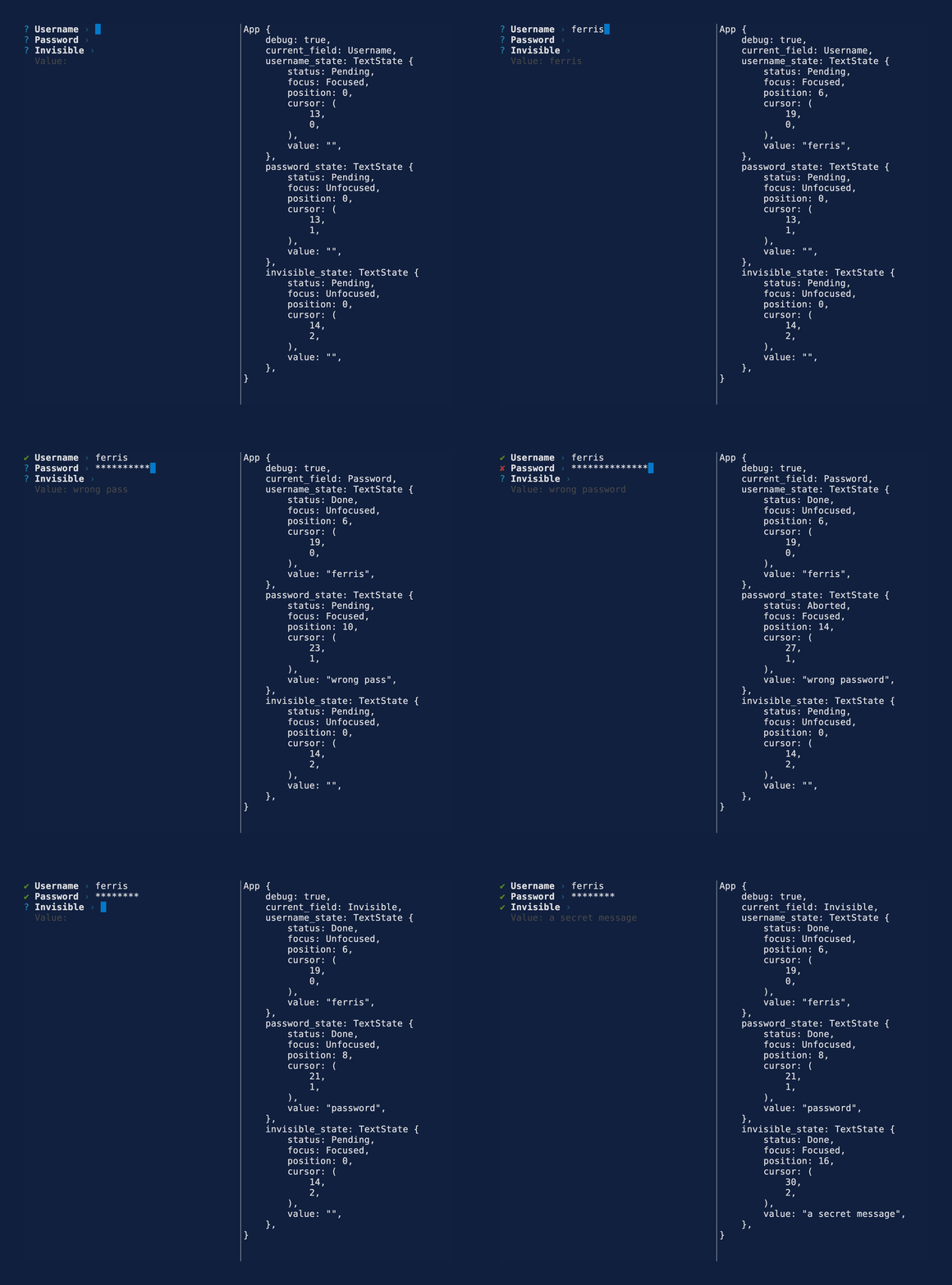
//! Pick a prompt type, keep its state, and render it inside your UI.
//!
//! ## Text Prompt
//!
//! <details>
//! <summary>Code</summary>
//!
//! ```rust
//! use ratatui::layout::{Constraint, Direction, Layout, Rect};
//! use ratatui::Frame;
//! use tui_prompts::{Prompt, TextPrompt, TextRenderStyle, TextState};
//!
//! struct App<'a> {
//! username_state: TextState<'a>,
//! password_state: TextState<'a>,
//! invisible_state: TextState<'a>,
//! }
//!
//! impl<'a> App<'a> {
//! fn draw_ui(&mut self, frame: &mut Frame) {
//! let (username_area, password_area, invisible_area) = split_layout(frame.area());
//!
//! TextPrompt::from("Username").draw(frame, username_area, &mut self.username_state);
//!
//! TextPrompt::from("Password")
//! .with_render_style(TextRenderStyle::Password)
//! .draw(frame, password_area, &mut self.password_state);
//!
//! TextPrompt::from("Invisible")
//! .with_render_style(TextRenderStyle::Invisible)
//! .draw(frame, invisible_area, &mut self.invisible_state);
//! }
//! }
//!
//! fn split_layout(area: Rect) -> (Rect, Rect, Rect) {
//! let rows = Layout::default()
//! .direction(Direction::Vertical)
//! .constraints([
//! Constraint::Length(1),
//! Constraint::Length(1),
//! Constraint::Length(1),
//! ])
//! .split(area);
//! (rows[0], rows[1], rows[2])
//! }
//! ```
//!
//! </details>
//!
//! 
//!
//! See the [text example] for more details.
//!
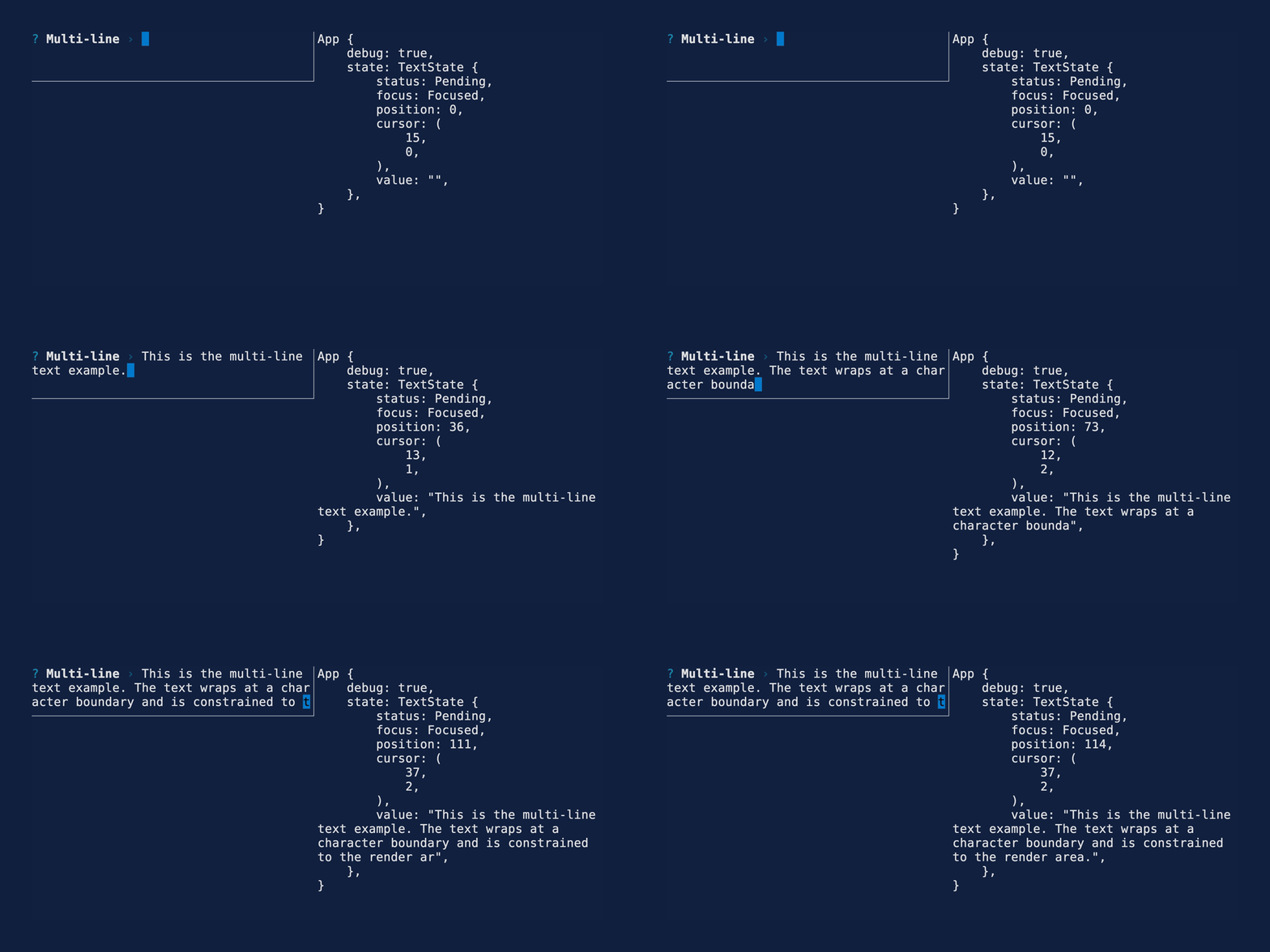
//! ## Soft Wrapping
//!
//! Text is automatically character wrapped to fit in the render area.
//!
//! 
//!
//! See the [multi line example] for more details.
//!
//! # Features
//!
//! - [x] Text prompt
//! - [x] Password prompt
//! - [x] Invisible prompt
//! - [x] Readline / emacs style Key Bindings
//! - [x] Crossterm backend
//! - [x] Soft wrapping single lines
//! - [ ] Multi-line input
//! - [ ] Scrolling
//! - [ ] More prompt types:
//! - [ ] Number
//! - [ ] Confirm
//! - [ ] List
//! - [ ] Toggle
//! - [ ] Select
//! - [ ] Multi-select
//! - [ ] Autocomplete
//! - [ ] Autocomplete multi-select
//! - [ ] Date
//! - [ ] Bracketed paste
//! - [ ] Validation
//! - [ ] Default initial value
//! - [ ] Custom style
//! - [ ] Themes
//! - [ ] Custom formatting
//! - [ ] Backend agnostic keyboard event handling
//! - [Termion]
//! - [Termwiz]
//! - [ ] Customizable key bindings
//! - [ ] Handle more advanced multi-key bindings e.g. `^[b` and `^[f`
//! - [ ] Prompt chaining
//!
//! # Key Bindings
//!
//! | Key | Action |
//! | --- | --- |
//! | Home, Ctrl+A | Move cursor to beginning of line |
//! | End, Ctrl+E | Move cursor to end of line |
//! | Left, Ctrl+B | Move cursor one character left |
//! | Right, Ctrl+F | Move cursor one character right |
//! | Backspace (Delete on Mac), Ctrl+H | Delete character before cursor |
//! | Delete (Fn+Delete on Mac), Ctrl+D | Delete character at cursor |
//! | Ctrl+K | Delete all characters from the cursor to the end of line |
//! | Ctrl+U | Delete the entire line |
//! | Enter | Complete the prompt |
//! | Escape, Ctrl+C | Abort the prompt |
//!
//! # More widgets
//!
//! For the full suite of widgets, see [tui-widgets].
//!
//! [Joshka]: https://github.com/joshka
//! [tui-widgets]: https://crates.io/crates/tui-widgets
//! [Crate]: https://crates.io/crates/tui-prompts
//! [Docs]: https://docs.rs/tui-prompts/
//! [Dependency Status]: https://deps.rs/repo/github/ratatui/tui-widgets
//! [Coverage]: https://app.codecov.io/gh/ratatui/tui-widgets
//! [Ratatui Discord]: https://discord.gg/pMCEU9hNEj
//! [GitHub Repository]: https://github.com/ratatui/tui-widgets
//! [API Docs]: https://docs.rs/tui-prompts/
//! [Examples]: https://github.com/ratatui/tui-widgets/tree/main/tui-prompts/examples
//! [text example]: https://github.com/ratatui/tui-widgets/tree/main/tui-prompts/examples/text.rs
//! [multi line example]: https://github.com/ratatui/tui-widgets/tree/main/tui-prompts/examples/multi_line.rs
//! [Changelog]: https://github.com/ratatui/tui-widgets/blob/main/tui-prompts/CHANGELOG.md
//! [Contributing]: https://github.com/ratatui/tui-widgets/blob/main/CONTRIBUTING.md
//! [Crate badge]: https://img.shields.io/crates/v/tui-prompts?logo=rust&style=flat
//! [Docs Badge]: https://img.shields.io/docsrs/tui-prompts?logo=rust&style=flat
//! [Deps Badge]: https://deps.rs/repo/github/ratatui/tui-widgets/status.svg?style=flat
//! [License Badge]: https://img.shields.io/crates/l/tui-prompts?style=flat
//! [License]: https://github.com/ratatui/tui-widgets/blob/main/LICENSE-MIT
//! [Coverage Badge]:
//! https://img.shields.io/codecov/c/github/ratatui/tui-widgets?logo=codecov&style=flat
//! [Discord Badge]:
//! https://img.shields.io/discord/1070692720437383208?logo=discord&style=flat
//! [Ratatui]: https://crates.io/crates/ratatui
//! [Termion]: https://crates.io/crates/termion
//! [Termwiz]: https://crates.io/crates/termwiz
pub use *;
pub use *;
pub use *;
pub use *;