

tui-prompts






tui-prompts is a Rust crate that provides prompt widgets for the Ratatui crate. It allows for easy
creation of interactive command-line interfaces with various types of prompts. Inspired by
https://www.npmjs.com/package/prompts and various other prompt libraries.
Examples
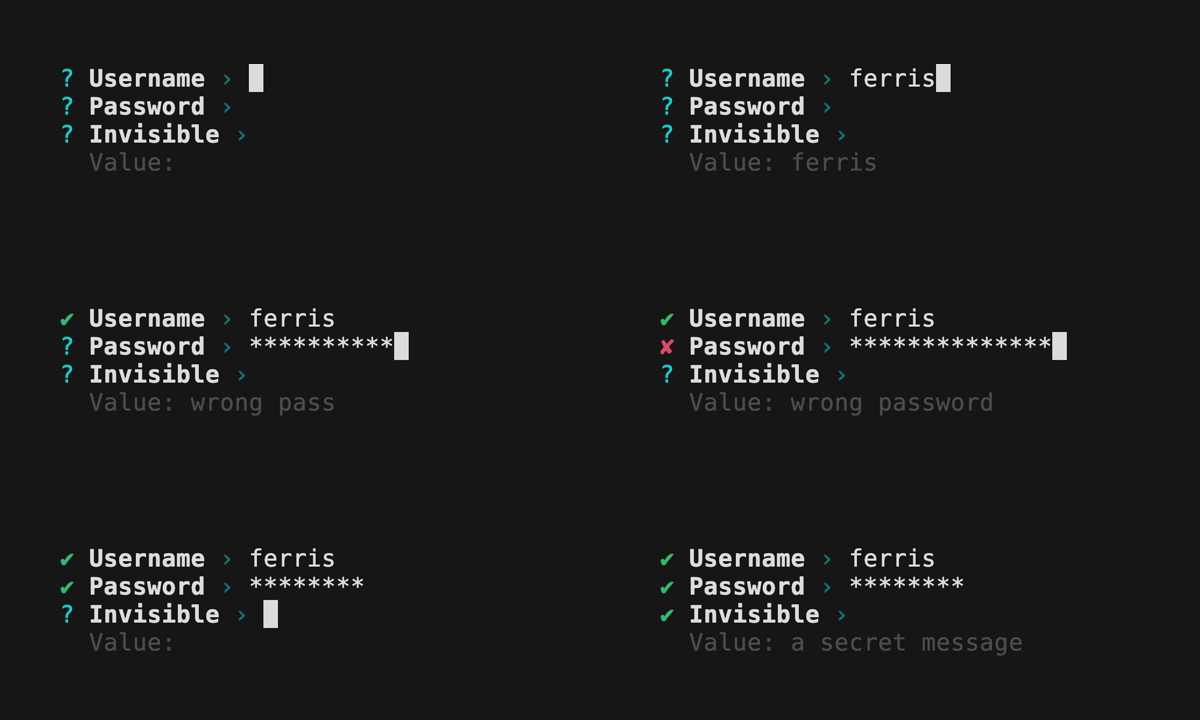
Text Prompt
Features
- Text prompt
- Password prompt
- Invisible prompt
- Readline / emacs style Key Bindings
- Crossterm backend
- Soft wrapping single lines
- Multi-line input
- Scrolling
- More prompt types:
- Number
- Confirm
- List
- Toggle
- Select
- Multi-select
- Autocomplete
- Autocomplete multi-select
- Date
- Bracketed paste
- Validation
- Default initial value
- Custom style
- Themes
- Custom formatting
- Backend agnostic keyboard event handling (Termion and Termwiz)
- Customizable key bindings
- Handle more advanced multi-key bindings e.g.
^[band^[ffor start / end of line - Prompt chaining
Installation
cargo add ratatui
cargo add tui-prompts
Or add the following to your Cargo.toml file:
[]
= "0.22.0"
= "0.2.0"
Key Bindings
| Key | Action |
|---|---|
| Home, Ctrl+A | Move cursor to beginning of line |
| End, Ctrl+E | Move cursor to end of line |
| Left, Ctrl+B | Move cursor one character left |
| Right, Ctrl+F | Move cursor one character right |
| Backspace (Delete on Mac), Ctrl+H | Delete character before cursor |
| Delete (Fn+Delete on Mac), Ctrl+D | Delete character at cursor |
| Ctrl+K | Delete all characters from the cursor to the end of line |
| Ctrl+U | Delete the entire line |
| Enter | Complete the prompt |
| Escape, Ctrl+C | Abort the prompt |
License
Dual-licensed under Apache 2.0 or MIT.