tui_equalizer/lib.rs
1
2
3
4
5
6
7
8
9
10
11
12
13
14
15
16
17
18
19
20
21
22
23
24
25
26
27
28
29
30
31
32
33
34
35
36
37
38
39
40
41
42
43
44
45
46
47
48
49
50
51
52
53
54
55
56
57
58
59
60
61
62
63
64
65
66
67
68
69
70
71
72
73
74
75
76
77
78
79
80
81
82
83
84
85
86
87
88
89
90
91
92
93
94
95
96
97
98
99
100
101
102
103
104
105
106
107
108
109
110
111
112
113
114
115
116
117
118
119
120
121
122
123
124
125
126
127
128
129
130
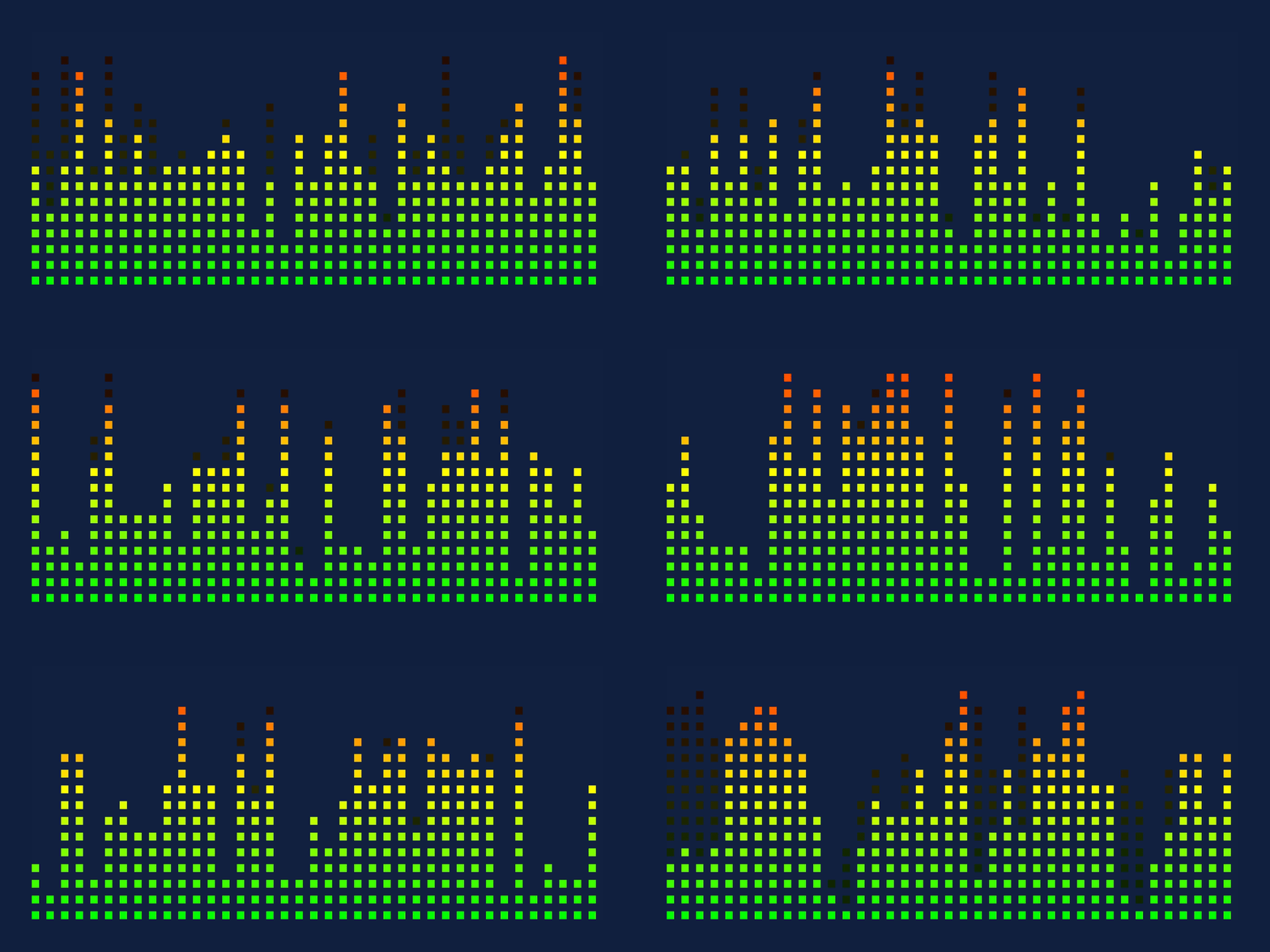
//! An equalizer widget for [Ratatui] with multiple frequency bands.
//!
//! The equalizer is a vertical bar chart where each band represents a frequency range. Each band
//! can display a value from 0.0 to 1.0, where 1.0 is the maximum value.
//!
//! 
//!
//! This demo can be found in the examples folder in the git repo.
//!
//! ```shell
//! cargo run --example demo
//! ```
//!
//! Inspired by [a comment in the ratatui
//! repo](https://github.com/ratatui/ratatui/issues/1325#issuecomment-2335095486).
//!
//! # Example
//!
//! ```rust
//! use tui_equalizer::{Band, Equalizer};
//!
//! let equalizer = Equalizer {
//! bands: vec![
//! Band::from(0.5),
//! Band::from(0.8),
//! Band::from(0.3),
//! ],
//! };
//! equalizer.render(area, buf);
//! ```
//!
//! # License
//!
//! Copyright (c) Josh McKinney
//!
//! This project is licensed under either of:
//!
//! - Apache License, Version 2.0 ([LICENSE-APACHE] or <http://www.apache.org/licenses/LICENSE-2.0>)
//! - MIT license ([LICENSE-MIT] or <http://opensource.org/licenses/MIT>)
//!
//! at your option.
//!
//! [LICENSE-APACHE]: ./LICENSE-APACHE
//! [LICENSE-MIT]: ./LICENSE-MIT
//!
//!
//! [Ratatui]: https://crates.io/crates/ratatui
use std::iter::zip;
use ratatui::{
buffer::Buffer,
layout::{Constraint, Layout, Rect},
style::Color,
widgets::Widget,
};
/// An equalizer widget with multiple frequency bands.
///
/// The equalizer is a vertical bar chart where each band represents a frequency range.
///
/// # Example
///
/// ```
/// use tui_equalizer::{Band, Equalizer};
///
/// # let area = ratatui::layout::Rect::default();
/// # let mut buf = ratatui::buffer::Buffer::empty(area);
/// let equalizer = Equalizer {
/// bands: vec![
/// Band::from(0.5),
/// Band::from(0.8),
/// Band::from(0.3),
/// ],
/// };
/// equalizer.render(area, buf);
/// ```
#[derive(Debug)]
pub struct Equalizer {
/// A vector of `Band` structs representing each frequency band.
pub bands: Vec<Band>,
pub brightness: f64,
}
/// A struct representing a single frequency band in the equalizer.
#[derive(Debug, Clone)]
pub struct Band {
/// The normalized value of the band, where the maximum is 1.0.
pub value: f64,
}
impl From<f64> for Band {
fn from(value: f64) -> Self {
Self { value }
}
}
impl Widget for Equalizer {
fn render(self, area: Rect, buf: &mut Buffer) {
let areas = Layout::horizontal(vec![Constraint::Length(2); self.bands.len()]).split(area);
for (band, area) in zip(self.bands, areas.iter()) {
band.render(*area, buf, self.brightness);
}
}
}
impl Band {
fn render(self, area: Rect, buf: &mut Buffer, brightness: f64) {
let value = self.value.clamp(0.0, 1.0);
let height = (value * area.height as f64) as u16;
// Calculate the color gradient step
let color_step = 1.0 / area.height as f64;
// Iterate over each segment and render it with the corresponding color
for i in 0..height {
// Green to Yellow to Red gradient
let v = i as f64 * color_step;
let vv = 1.0 - v;
let br = brightness.clamp(0.0, 1.0) * 255.0;
let r = if v < 0.5 { v * 2.0 * br } else { br } as u8;
let g = if v < 0.5 { br } else { vv * 2.0 * br } as u8;
let b = 0;
let color = Color::Rgb(r, g, b);
buf[(area.left(), area.bottom().saturating_sub(i + 1))]
.set_fg(color)
.set_symbol(ratatui::symbols::bar::HALF);
}
}
}