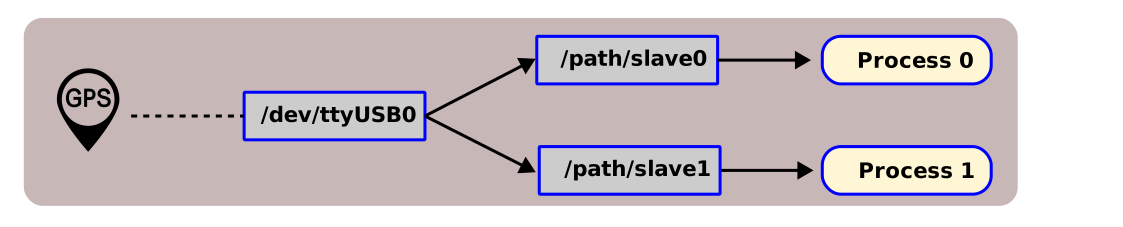
### For people new to rust we left here an easy copy paste doc to get you running if you want to contribute to this crate.
#### First you need to install rust stable.
Check first if on your distrib if they provide rustup:
For example on Arch Linux it is in the extra repro:
```
pacman -Ss rustup
[...]
extra/rustup 1.26.0-3 (2.5 MiB 7.0 MiB) (Installed)
The Rust toolchain installer
[...]
```
Otherwise you can install it through the shell installer:
```bash
You need then to install toolchains, let's start with the stable and native to your platform that will allow to
compile and test locally:
```bash
rustup toolchain install stable
```
#### Running
Note: ttytee is executed and the `--help` is the passed to it so it prints its help.
```bash
cargo run -- --help
Compiling ttytee v0.1.0 (/home/gbin/projects/jet/telemetry/ttytee)
Finished dev [unoptimized + debuginfo] target(s) in 0.44s
Running `target/debug/ttytee --help`
Usage: ttytee [OPTIONS]
Options:
-m, --master <MASTER> [default: /dev/skywaysgps1]
--baudrate <BAUDRATE> [default: 9600]
--slave0 <SLAVE0> [default: slave0.pty]
--slave1 <SLAVE1> [default: slave1.pty]
--master-read-timeout <MASTER SERIAL TIMEOUT> [default: 1000]
--slave-read-timeout <SLAVE READ TIMEOUT> [default: 1000]
--log-path <LOG_PATH>
-h, --help Print help
-V, --version Print version
```
#### Testing
```
cargo test
```
#### Formatting the entire project
```
cargo fmt
```
### Cross compiling for ARM targets
#### For the old 32bit version
First you need to add the crosscompiling and system part of the toolchain:
Here we use the musl variation of the libc because the system is so old it is hard to target for.
Musl enables us to build a fully static executable.
```bash
wget https://more.musl.cc/11.2.1/x86_64-linux-musl/arm-linux-musleabihf-cross.tgz
# somewhere you like you can decompress the tarball (I usually use ~/prefix).
tar xvf arm-linux-musleabihf-cross.tgz
```
Then in `~/.cargo/config.toml` you can inform Rust which linker you need to use for which target:
```toml
[target.armv7-unknown-linux-musleabihf]
linker = "[where you uncompressed it]/arm-linux-musleabihf-cross/bin/arm-linux-musleabihf-gcc"
```
Then finally we need to install the rust portion of it.
```bash
rustup target add armv7-unknown-linux-gnueabihf
```
To compile it for a target, just add it to any of the cargo command like (run, test ...):
- *Debug* build:
```bash
cargo build --target=armv7-unknown-linux-musleabihf
file target/armv7-unknown-linux-musleabihf/debug/ttytee
target/armv7-unknown-linux-musleabihf/debug/ttytee: ELF 32-bit LSB executable, ARM, EABI5 version 1 (SYSV), statically linked, with debug_info, not stripped
```
- *Release* build [recommended for prod]:
```bash
cargo build --release --target=armv7-unknown-linux-musleabihf
file target/armv7-unknown-linux-musleabihf/release/ttytee
target/armv7-unknown-linux-musleabihf/release/ttytee: ELF 32-bit LSB executable, ARM, EABI5 version 1 (SYSV), statically linked, with debug_info, not stripped
```
- *Super tight prod* build added as an example if we target embedded systems:
```bash
cargo build --profile=stripped --target=armv7-unknown-linux-musleabihf
file target/armv7-unknown-linux-musleabihf/stripped/ttytee`
target/armv7-unknown-linux-musleabihf/stripped/ttytee: ELF 32-bit LSB executable, ARM, EABI5 version 1 (SYSV), statically linked, stripped
```
#### For an ARM 64bit version
The standard arm toolchain from arm then works, not that you can probably find it in your distribution too.
Same as the previous steps with
```bash
wget https://developer.arm.com/-/media/Files/downloads/gnu-a/10.3-2021.07/binrel/gcc-arm-10.3-2021.07-x86_64-aarch64-none-linux-gnu.tar.xz
tar xvf gcc-arm-10.3-2021.07-x86_64-aarch64-none-linux-gnu.tar.xz
rustup target add aarch64-unknown-linux-gnu
```
in ~/.cargo/config.toml
```toml
[target.aarch64-unknown-linux-gnu]
linker = "[path to where you uncompressed it]/gcc-arm-10.3-2021.07-x86_64-aarch64-none-linux-gnu/bin/aarch64-none-linux-gnu-gcc"
```