1
2
3
4
5
6
7
8
9
10
11
12
13
14
15
16
17
18
19
20
21
22
23
24
25
26
27
28
29
30
31
32
33
34
35
36
37
38
39
40
41
42
43
44
45
46
47
48
49
50
51
52
53
54
55
56
57
58
59
60
61
62
63
64
65
66
67
68
69
70
71
72
73
74
75
76
77
78
79
80
81
82
83
84
85
86
87
88
89
90
91
92
93
94
95
96
97
98
99
100
101
102
103
104
105
106
107
108
109
110
111
112
113
114
115
116
117
118
119
120
121
122
123
124
125
126
127
128
129
130
131
132
133
134
135
136
137
138
139
140
141
142
143
144
145
146
147
148
149
150
151
152
153
154
155
156
157
158
159
160
161
162
163
164
165
166
167
168
169
170
171
172
173
174
175
176
177
178
179
180
181
182
183
184
185
186
187
188
189
190
191
192
193
194
195
196
197
198
199
200
201
202
203
204
205
206
207
208
209
210
211
212
213
214
215
216
217
218
219
220
221
222
223
224
225
226
227
228
229
230
231
232
233
234
235
236
237
238
239
240
241
242
243
244
245
246
247
248
249
250
251
252
253
254
255
256
257
258
259
260
261
262
263
264
265
266
267
268
269
270
271
272
273
274
275
276
277
278
279
280
281
282
283
284
285
286
287
288
289
290
291
292
293
294
295
296
297
298
299
300
301
302
303
304
305
306
307
308
309
310
311
312
313
314
315
316
317
318
319
320
321
322
323
324
325
326
327
328
329
330
331
332
333
334
335
336
337
338
339
340
341
342
343
344
345
346
347
348
349
350
351
352
353
354
355
356
357
358
359
360
361
362
363
364
365
366
367
368
369
370
371
372
373
374
375
376
377
378
379
380
381
382
383
384
385
386
387
388
389
390
391
392
393
394
395
396
397
398
399
400
401
402
403
404
405
406
407
408
409
410
411
412
413
414
415
416
417
418
419
420
421
422
423
424
425
426
427
428
429
430
431
432
433
434
435
436
437
438
439
440
441
/* SPDX-License-Identifier: BSD-3-Clause */
/*******************************************************************************
* Copyright 2024-2025 Fraunhofer SIT, sponsored by the ELISA research project.
* All rights reserved.
******************************************************************************/
//! [](https://www.rust-lang.org/)
//! [](https://crates.io/crates/tss2-fapi-rs)
//! [](https://docs.rs/tss2-fapi-rs/latest/tss2_fapi_rs/)
//! [](https://opensource.org/licenses/BSD-3-Clause)
//!
//! # TSS 2.0 FAPI Rust Wrapper
//!
//! The **`tss2-fapi-rs`** Rust crate provides an interface to the [**TCG TSS 2.0 Feature API (FAPI)**](https://trustedcomputinggroup.org/resource/tss-fapi/).
//!
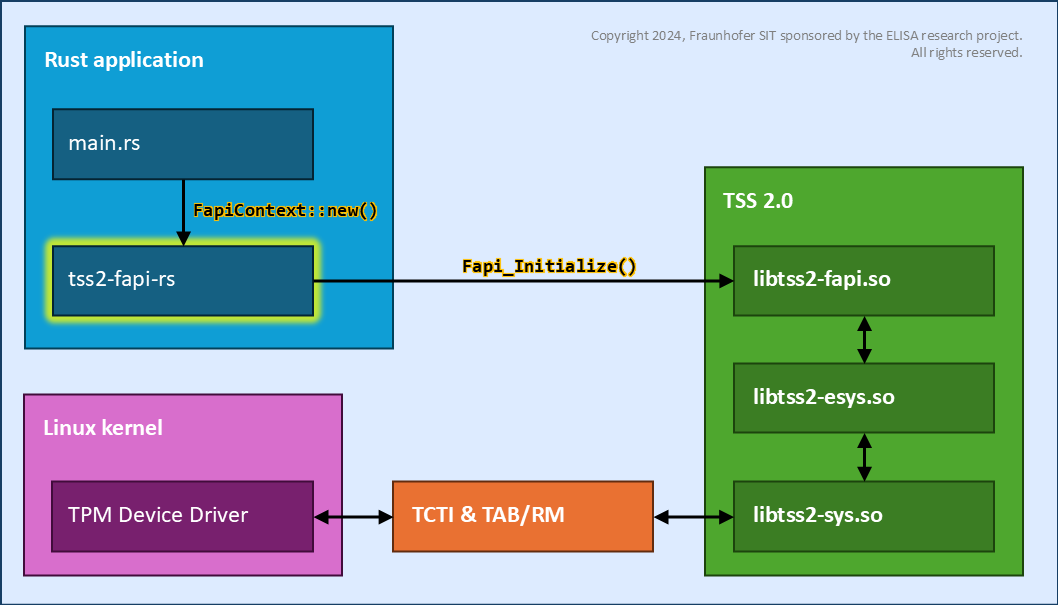
//! *Architectural overview:*
//! 
//!
//! ### Disclaimer
//!
//! The current version of the API does not offer any security or code safety guarantees. The implementation that is provided is suitable for exploratory testing and experimentation only. This test implementation does not offer any tangible security benefits and therefore is not suitable for use in production. Documentation pages may be incomplete and are subject to change without notice. Interfaces may change in such a way as to break compatibility with client code.
//!
//! ### Getting started
//!
//! The following example illustrates how to use the TSS 2.0 FAPI in Rust:
//!
//! ```rust no_run
//! use env_logger::Builder as EnvLogger;
//! use log::{error, info, warn, LevelFilter};
//! use std::num::NonZeroUsize;
//! use tss2_fapi_rs::FapiContext;
//!
//! fn main() {
//! // Initialize the logger
//! EnvLogger::new().filter_level(LevelFilter::Info).init();
//!
//! // Create a new FAPI context
//! info!("Creating FAPI context, please wait...");
//! let mut context = match FapiContext::new() {
//! Ok(fpai_ctx) => fpai_ctx,
//! Err(error) => panic!("Failed to create context: {:?}", error),
//! };
//!
//! // Perform the provisioning, if it has not been done yet
//! info!("Provisioning, please wait...");
//! match context.provision(None, None, None) {
//! Ok(_) => info!("Success."),
//! Err(error) => warn!("Provisioning has failed: {:?}", error),
//! }
//!
//! // Generate random
//! info!("Generating random data...");
//! for _i in 0..8 {
//! match context.get_random(NonZeroUsize::new(32).unwrap()) {
//! Ok(random) => info!("Random data: {}", hex::encode(&random[..])),
//! Err(error) => error!("get_random() failed: {:?}", error),
//! }
//! }
//! }
//! ```
//!
//! In this example, it is assumed that a valid [FAPI configuration](https://github.com/tpm2-software/tpm2-tss/blob/master/doc/fapi-config.md) has already been set up on the target system.
//!
//! Please see the **[`FapiContext`]** documentation for more details!
//!
//! #### Callback functions
//!
//! Various use-cases of the FAPI require implementing and installing ***callback functions***, for example:
//!
//! ```rust no_run
//! use std::borrow::Cow;
//! use log::info;
//! use tss2_fapi_rs::{FapiContext, AuthCallback, AuthCallbackParam};
//!
//! fn main() {
//! // Create a new FAPI context
//! let mut context = FapiContext::new().expect("Failed to create context!");
//!
//! // Set up "auth" callback function
//! match context.set_auth_callback(AuthCallback::new(my_auth_func)) {
//! Ok(_) => info!("Callback installed."),
//! Err(error) => panic!("Failed to install callback: {:?}", error)
//! }
//! }
//!
//! // Application-defined callback function
//! fn my_auth_func(param: AuthCallbackParam) -> Option<Cow<'static, str>> {
//! info!("Auth value for {:?} requested!", param.object_path);
//! Some(Cow::from("my password"))
//! }
//! ```
//!
//! ### Usage instructions
//!
//! In order to use the **`tss2-fapi-rs`** library in your Rust project, simply add it to your `Cargo.toml` file:
//!
//! ```toml
//! [dependencies]
//! tss2-fapi-rs = "0.5.3"
//! ```
//!
//! **Note:** Please also consider the [prerequisites](#prerequisites) that are required to use the `tss2-fapi-rs` library!
//!
//! ### Build instructions
//!
//! In order to build **`tss2-fapi-rs`** from the sources, run the following command in the project root directory:
//!
//! ```sh
//! $ cargo build --release
//! ```
//!
//! Alternatively, the provided `Makefile`, in the project root directory, may be invoked for building the library:
//!
//! ```sh
//! $ make build
//! ```
//!
//! **Note:** Please also consider the [prerequisites](#prerequisites) that are required to build the `tss2-fapi-rs` library!
//!
//! #### Building with Docker
//!
//! Building **`tss2-fapi-rs`** in the fully self-contained [Docker environment](#docker-environment) (see below) has the advantage that the library can be built *without* the need to install any of the prerequisites – except for Docker and the Compose V2 plug-in – on the "host" system.
//!
//! With Docker Compose V2 installed, simply run the following `make` command in the project root directory:
//!
//! ```sh
//! $ make docker.build
//! ```
//!
//! ### Examples
//!
//! Some examples demonstrating how to use the `tss2-fapi-rs` library are provided in the **`examples`** sub-directory.
//!
//! In order to build and run an example, simply run the following command in the project root directory:
//!
//! ```sh
//! $ cargo run --example <example_name>
//! ```
//!
//! **Note:** Please also consider the [prerequisites](#prerequisites) that are required to use the `tss2-fapi-rs` library!
//!
//! #### Configuration
//!
//! An example *FAPI configuration* is provided in the **`examples/data`** sub-directory. It can be applied as follows:
//!
//! * Copy the configuration files to the "home" directory:
//! ```sh
//! $ mkdir ~/my-fapi-config
//! $ cp -r examples/data/* ~/my-fapi-config
//! ```
//!
//! * Run the example with the desired FAPI configuration:
//! ```sh
//! $ TSS2_FAPICONF=~/my-fapi-config/fapi-config.json cargo run --example [...]
//! ```
//!
//! ### Prerequisites
//!
//! The following prerequisites are required for building or using the `tss2-fapi-rs` library:
//!
//! ##### *libtss2‑fapi*
//!
//! The native **`libtss2‑fapi`** library, version 3.2.0 or later, and its associated header files must be available:
//!
//! - On Ubuntu 22.04 (Jammy), Debian 12.0 (Bookworm) or later:
//! * Install the TSS 2.0 FAPI library with the packet manager via the `libtss2-dev` package.
//! * Furthermore, it may be necessary to additionally install the following *transitive* dependencies:
//! `uuid-dev`, `libjson-c-dev`, `libcrypt-dev` and `libcurl4-openssl-dev`
//!
//! - On older OS versions or other platforms:
//! * It may be necessary to compile and install the TSS 2.0 FAPI library manually from the source code.
//! * Please refer to the official build and installation instructions for the TSS libraries at:
//! <https://github.com/tpm2-software/tpm2-tss/blob/master/INSTALL.md>
//!
//! **Note:** By default, the native FAPI library is detected automatically, using the [pkg-config](https://en.wikipedia.org/wiki/Pkg-config) utility. If the required metadata file `tss2-fapi.pc` can *not* be found, please set or update your `PKG_CONFIG_PATH` as needed! Alternatively, the location of the native FAPI library and its associated header files can be specified explicitly via the *environment variables* described below.
//!
//! ##### *C compiler*
//!
//! A working **C compiler** (`cc`) is required for Rust/Cargo to build some of the required dependencies.
//!
//! On Ubuntu 22.04 (Jammy), Debian 12.0 (Bookworm) or later, it can be installed via the `build-essential` package.
//!
//! ##### *libclang*
//!
//! Rust's [`bindgen`](https://github.com/rust-lang/rust-bindgen?tab=readme-ov-file) tool requires that **`libclang`** is available on the system.
//!
//! On Ubuntu 22.04 (Jammy), Debian 12.0 (Bookworm) or later, it can be installed via the `libclang-dev` package.
//!
//! #### Environment
//!
//! The following environment variables may specify the location of the native FAPI library during the *build* process:
//!
//! * **`TSS2_INCLUDE_PATH`**
//! Location of the TSS 2.0 header files. If specified, this path shall contain the `tss2_fapi.h` header file.
//! This variable must be set in conjunction with `TSS2_LIBRARY_PATH` to be effective!
//!
//! * **`TSS2_LIBRARY_PATH`**
//! Location of the TSS 2.0 library files. If specified, this path shall contain the `libtss2-fapi.so` file.
//! This variable must be set in conjunction with `TSS2_INCLUDE_PATH` to be effective!
//!
//! * **`TSS2_LIBRARY_VERS`**
//! Version of the TSS 2.0 library. If specified, the version string shall have the `"major.minor.patch"` format.
//!
//! The following environment variables can be used to control the *runtime* behavior:
//!
//! * **`LD_LIBRARY_PATH`**
//! On Linux/Unix systems, this can be set to control the location to load the native FAPI library from.
//!
//! ### Testing
//!
//! Integration tests for *all* the supported FAPI functions are provided in the **`tests`** sub-directory.
//!
//! These tests also serve as additional usage examples for the respective functions.
//!
//! In order to execute the integration tests, simply run the following command in the project root directory:
//!
//! ```sh
//! $ cargo test --release [<test_name>]
//! ```
//!
//! If a test name is **not** specified, then *all* available (non-ignored) tests will be executed.
//!
//! Alternatively, the provided `Makefile`, in the project root directory, may be invoked for running the tests:
//!
//! ```sh
//! $ make tests
//! ```
//!
//! #### Test Prerequisites
//!
//! The integration tests require that a working TPM is available. Using a TPM emulator is recommended for testing!
//!
//! ##### *Software TPM Emulator*
//!
//! The *Software TPM Emulator* (SWTPM) created by Stefan Berger can be used testing purposes:
//! <https://github.com/stefanberger/swtpm>
//!
//! In order to use the SWTPM, the TCTI needs to be configured as follows, specifying the proper IP address and port number:
//! ```sh
//! $ export FAPI_RS_TEST_TCTI="swtpm:host=<ip-address>,port=<port-number>"
//! ```
//!
//! ##### *Docker Environment*
//!
//! A fully self-contained [Docker Compose](https://docs.docker.com/compose/) (V2) setup for running the tests, based on SWTPM, is provided at **`tools/docker`**.
//!
//! The following prerequisites are required for using the Docker environment:
//!
//! * On Ubuntu 22.04 (Jammy) or later:
//! - Docker Compose V2 can be installed via the `docker-compose-v2` package.
//!
//! * On Debian 12.0 (Bookworm) or later:
//! - Please set up the Docker.io repository as described here:
//! <https://docs.docker.com/engine/install/debian/#install-using-the-repository>
//! - Finally, install the following packages:
//! `docker-ce`, `docker-ce-cli`, `containerd.io` and `docker-compose-plugin`.
//!
//! With Docker Compose V2 installed, you can run the following `make` commands in the project root directory:
//!
//! * Runs the test suite completely in the Docker environment:
//! ```sh
//! $ make docker.tests
//! ```
//!
//! * Starts just the SWTPM container, e.g. if you want to run `cargo test` natively:
//! ```sh
//! $ make docker.swtpm
//! ```
//!
//! ##### *libtpms*
//!
//! As a more lightweight alternative to SWTPM, the integration tests may also be run using the *libtpms* library:
//! <https://github.com/stefanberger/libtpms>
//!
//! On Ubuntu 24.04 (Noble), Debian 12.0 (Bookworm) or later, *libtpms* can be installed via the `libtpms-dev` package.
//!
//! In order to use the *libtpms* library, the TCTI needs to be configured as follows:
//! ```sh
//! $ export FAPI_RS_TEST_TCTI="libtpms:tpm_state.dat"
//! ```
//!
//! Be aware that it is necessary to save the state to the filesystem by specifying a file name when using *libtpms* for testing!
//!
//! With the *libtpms* installed, you can run the following `make` commands in the project root directory:
//!
//! * Runs the test suite by using *libtpms* as its TPM emulator:
//! ```sh
//! $ make libtpms
//! ```
//!
//! #### Environment
//!
//! The following environment variables can be set as needed:
//!
//! * **`FAPI_RS_TEST_TCTI`**
//! The TCTI connection string to be used for testing. By default, `swtpm:host=127.0.0.1,port=2321` is used.
//! *See also:* <https://github.com/tpm2-software/tpm2-tss/blob/master/doc/tcti.md>
//!
//! * **`FAPI_RS_TEST_PROF`**
//! The FAPI profile to be used for testing. By default, `RSA2048SHA256` is used. May be set to `ECCP256SHA256`.
//!
//! * **`FAPI_RS_TEST_LOOP`**
//! The number of times to repeat each test. Default is **3**.
//!
//! * **`RUST_LOG`**
//! Controls the logging level. Set to, for example, `debug` in order to enable additional logging outputs.
//!
//! * **`TSS2_LOG`**
//! Controls the logging level of the underlying native TSS2 libraries. This can be set to `all+none` in order to silence all outputs from the native TSS2 libraries. It can also be set `all+debug` in order to enable some additional debug outputs.
//!
//! * **`LD_LIBRARY_PATH`**
//! On Linux/Unix systems, this can be set to control the location to load the native `libtss2-fapi.so` library from. This is useful if you want to test with a "custom" build of `tpm2-tss` instead of using the version provided by the operating system.
//!
//! #### Configuration
//!
//! The integration tests automatically create and use a temporary FAPI configuration. It is generated from the template at:
//! **`tests/data/fapi-config.json.template`**
//!
//! The FAPI profiles that are intended to be used by the integration tests are stored at:
//! **`tests/data/profiles/*.json`**
//!
//! ## Troubleshooting
//!
//! * **Error message:**
//! ```txt
//! pkg_config: Required library "tss2-fapi" not found!
//! The system library `tss2-fapi` required by crate `tss2-fapi-rs` was not found.
//! ```
//! *Solution:*
//! The native TSS 2.0 FAPI library, or one of its dependencies, can not be found by `pkg-config`. Please make sure that the required library and all of its dependencies are installed! If the `tss2-fapi.pc` resides at a non-standard location, set `PKG_CONFIG_PATH` accordingly. Also, the command `pkg-config --libs tss2-fapi` may be useful for debugging.
//!
//! * **Error message:**
//! ```txt
//! error: linker `cc` not found
//! note: No such file or directory (os error 2)
//! ```
//! *Solution:*
//! The C compiler could not be found. Please install a working C compiler (e.g. `gcc` or `clang`) and then try again.
//!
//! * **Error message:**
//! ```txt
//! error: failed to run custom build command for `tss2-fapi-rs`
//! Unable to generate bindings: "fatal error: 'tss2_fapi.h' file not found"
//! ```
//! *Solution:*
//! The header file for the native TSS 2.0 FAPI library is missing. Make sure that the native TSS 2.0 FAPI library and its header files are installed. If the `tss2_fapi.h` is installed at a non-standard location, set `TSS2_INCLUDE_PATH` as needed.
//! Be aware that the "include" directory shall contain a sub-directory named `tss2` containing the actual `tss2_fapi.h` file.
//!
//! * **Error message:**
//! ```txt
//! error: failed to run custom build command for `tss2-fapi-rs`
//! Unable to generate bindings: "fatal error: 'stddef.h' file not found"
//! ```
//! *Solution:*
//! The C Standard Library header files can not be found. This usually indicates an incomplete/broken installation of the Clang compiler, as used by Rust's `bindgen` tool. Can be fixed, e.g., by (re)installing the `clang` or `libclang-dev` package.
//!
//! * **Error message:**
//! ```txt
//! error: linking with `cc` failed: exit status: 1
//! /usr/bin/ld: cannot find -ltss2-fapi: No such file or directory
//! ```
//! *Solution:*
//! The native TSS 2.0 FAPI library is missing. Make sure that the native TSS 2.0 FAPI library is actually installed (or has been built from the sources). If the `libtss2-fapi.so` resides at a non-standard location, set `TSS2_LIBRARY_PATH` as needed.
//!
//! * **Error message:**
//! ```txt
//! error: failed to run custom build command for `tss2-fapi-rs`
//! Unable to find libclang: "couldn't find any valid shared libraries matching ..."
//! ```
//! *Solution:*
//! Indicates that Rust's `bindgen` tool was unable to load the required Clang library. This is usually fixed, e.g., by installing the `libclang-dev` package. If the `libclang.so` resides at a non-standard location, set `LIBCLANG_PATH` as needed.
//!
//! * **Error message:**
//! ```txt
//! error while loading shared libraries: libtss2-fapi.so.1:
//! cannot open shared object file: No such file or directory
//! ```
//! *Solution:*
//! The native TSS 2.0 FAPI library could not be loaded at runtime. Make sure that the native TSS 2.0 FAPI library is actually installed, and that it is located in one of the directories where the dynamic linker/loader is looking for shared libraries. If the `libtss2-fapi.so.1` resides at a non-standard location, you may update the `LD_LIBRARY_PATH` as needed.
//!
//! * **Error message:**
//! ```txt
//! ERROR:tcti:src/tss2-tcti/tcti-swtpm.c:617:Tss2_Tcti_Swtpm_Init()
//! Cannot connect to swtpm TPM socket
//! Failed to create context: OtherError(IoError)
//! ```
//! ```txt
//! Failed to connect to the software TPM! Is the software TPM running?
//! Connection refused
//! ```
//! *Solution:*
//! If this message appears at runtime, e.g. when trying to run the test cases, it indicates that the connection to the software TPM could not be established. Make sure that the software TPM is actually running and ready for incoming connections! One simple way to get a running software TPM is by using the Docker environment provided in the `etc/docker/swtpm` directory.
//!
//! * **Error message:**
//! ```txt
//! socket_connect() Failed to connect to host 10.0.0.1, port 2321:
//! errno 99: Cannot assign requested address
//! ```
//! *Solution:*
//! The native TSS 2.0 FAPI library was unable to connect to the software TPM. This error may occur, after some time, when too many TPM commands are sent to the software TPM at a high rate. There currently is **no** known solution, but a possible workaround is to simply slow down the sequence of TPM commands, e.g., by adding an artificial delay after each command. Furthermore, adding the `disconnect` option to the SWTPM `--server` parameter seems to attenuate the problem.
//!
//! ### Source Code
//!
//! The `tss2-fapi-rs` source code can be found at the official GitHub repository:
//! <https://github.com/tpm2-software/rust-tss-fapi/>
//!
//! ### Contact
//!
//! For bug reports, feature requests, etc., please refer to the issue tracker at:
//! <https://github.com/tpm2-software/rust-tss-fapi/issues/>
//!
//! #### Security Reporting
//!
//! Security vulnerabilities *should be emailed* to **all** members of the [MAINTAINERS](https://github.com/tpm2-software/rust-tss-fapi/blob/main/MAINTAINERS.md) file.
//!
//! ### License
//!
//! Copyright © 2024-2025 [Fraunhofer SIT](https://www.sit.fraunhofer.de/en/offers/projekte/elisa/), sponsored by the [ELISA](https://novomotive.de/#module-jltabs-143-particle) research project.
//! All rights reserved.
//!
//! This work is released under the [**3-Clause BSD License**](https://opensource.org/license/bsd-3-clause) (SPDX short identifier: `BSD-3-Clause`).
pub use HashAlgorithm;
pub use ;
pub use FapiContext;
pub use ;
pub use ;
pub use ;