<p align="center">
<img src="https://raw.githubusercontent.com/tassiovirginio/try-rs.site/refs/heads/main/logo2.png" alt="Centered image" height="150">
</p>
<p align="center">
<a href="https://try-rs.org">try-rs.org</a>
<br>
A blazing fast, Rust-based workspace manager for your temporary experiments.
<br>
</p>
<p align="center">
<a href="https://github.com/tassiovirginio/try-rs/actions/workflows/rust.yml">
<img src="https://github.com/tassiovirginio/try-rs/actions/workflows/rust.yml/badge.svg" alt="Build Status">
</a>
<img src="https://img.shields.io/badge/license-MIT-blue.svg" alt="License">
<img src="https://img.shields.io/badge/built_with-Rust-d45500.svg" alt="Rust">
<a href="https://github.com/tassiovirginio/try-rs">
<img src="https://img.shields.io/badge/nix-ready-brightgreen?logo=nixos" alt="Nix ready">
</a>
<a href="https://aur.archlinux.org/packages/try-rs-bin">
<img src="https://img.shields.io/aur/version/try-rs-bin" alt="AUR version">
</a>
</p>
**try-rs** is a CLI tool designed to manage the chaos of temporary projects. Instead of cluttering your Desktop or `/tmp` with `test1`, `new-test`, and `final-test`, `try-rs` organizes them into date-prefixed directories, offering a robust TUI (Terminal User Interface) to create, navigate, and clean up your experiments.
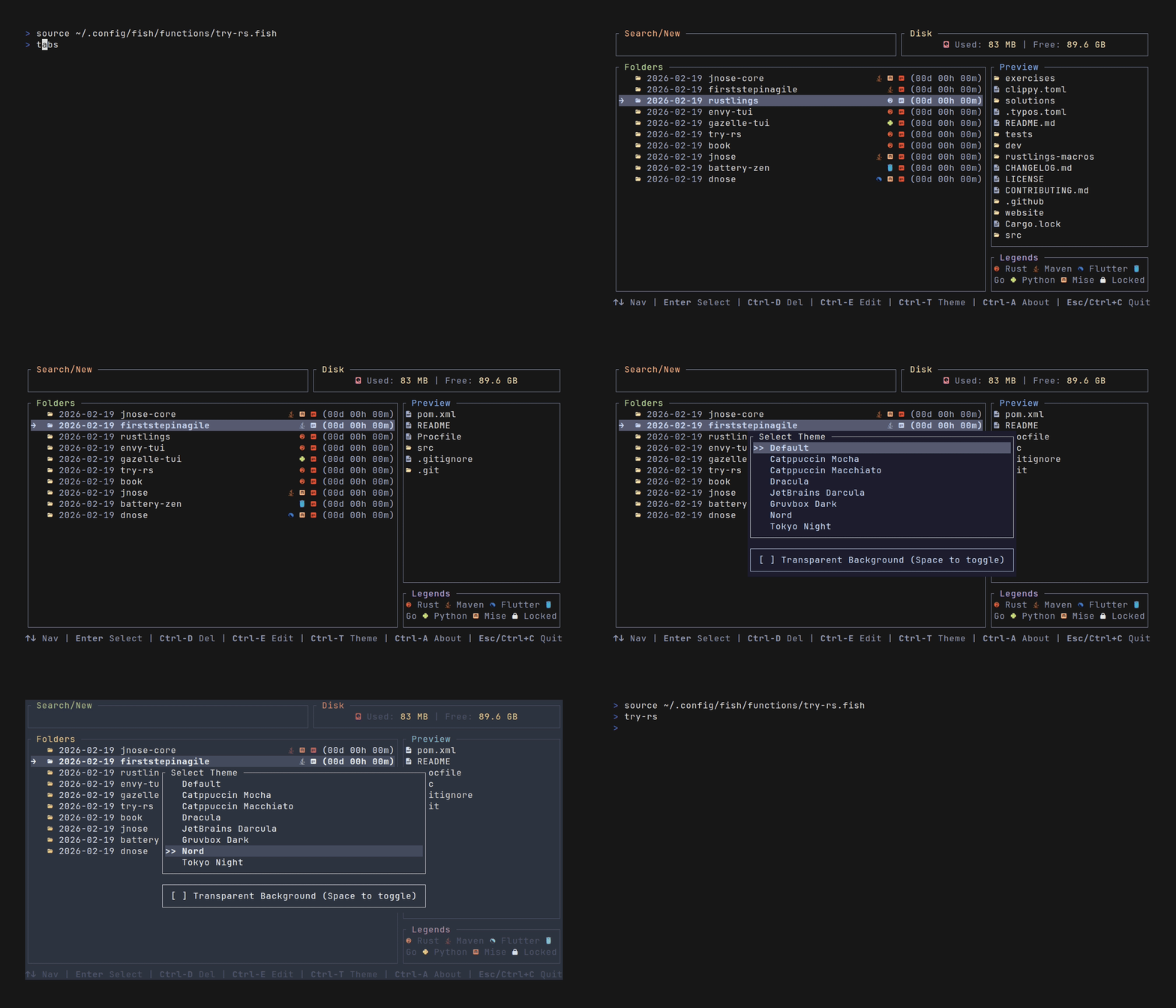
## Features
| **Blazing Fast** | Built in Rust, compiled to native binary. No interpreter lag. |
| **Rich TUI** | Beautiful terminal interface built with [Ratatui](https://github.com/ratatui/ratatui). |
| **Fuzzy Search** | Instantly find old experiments with smart matching. |
| **Auto-Dating** | Creates directories like `rust-test` automatically. |
| **Git Integration** | Auto-clones URLs (`try-rs <url>`) and marks repos with (). |
| **Content Preview** | Inspect files inside a folder before entering it. |
| **Editor Integration** | Open experiments directly in your editor (`Ctrl+E`). |
| **Theming** | Switch themes at runtime (`Ctrl+T`) or set a default in config. |
| **Safe Deletion** | Delete old experiments via UI with confirmation (`Ctrl+D`). |
| **Configurable** | Supports XDG Base Directory (view section [Configuration](#configuration)). |
| **Multi-Shell Support** | Supports Fish, Zsh, Bash, Power Shell and Nushell. |
| **Inline Picker** | Adds support for a non-fullscreen picker. |
| **Multi-OS Support** | Supports Linux, macOS and Windows. |
| **Shell Tab Completion** | Dynamic tab completion for directory names from your tries path. |
| **Icons Identification** | Supports icons identification projects (` `). |
## Installation
### Prerequisites
- A shell (Fish, Zsh, Bash, Power Shell or Nushell).
- A **Nerd Font** installed (required for icons like and 🦀).
### Building from source
```bash
git clone https://github.com/tassiovirginio/try-rs.git
cd try-rs
cargo install --path . --bin try-rs
```
### Cargo install try-rs
```bash
cargo install try-rs
```
### Eget
```bash
eget tassiovirginio/try-rs
```
### Install in Archlinux
```bash
yay -S try-rs-bin
```
### Ubuntu/Debian (APT Repository)
```bash
# Add the repository
# Update and install
sudo apt update
sudo apt install try-rs
```
### Ubuntu/Debian (.deb manual)
- Download the latest `.deb` for your architecture (amd64/arm64) from the Releases page and install it:
```bash
# Replace X.Y.Z with the latest version and choose amd64 or arm64
wget https://github.com/tassiovirginio/try-rs/releases/download/vX.Y.Z/try-rs_X.Y.Z-1_amd64.deb
sudo apt install ./try-rs_X.Y.Z-1_amd64.deb
```
- Alternatively, browse all assets at: <https://github.com/tassiovirginio/try-rs/releases>
### Windows (Releases)
- Download the Windows build from the Releases downloads: <https://github.com/tassiovirginio/try-rs/releases/download/>
- Unzip or place the binary somewhere on your `PATH` (e.g., add the folder to the System Environment `Path`) so you can run `try-rs` from any terminal (PowerShell, Command Prompt).
### Homebrew
```bash
brew install try-rs
```
### Nix Install (flakes)
```bash
nix profile install github:tassiovirginio/try-rs
```
### Automatic Setup
On the first run, **try-rs** will attempt to detect your shell and ask if you want to automatically configure the shell integration.
## Configuration
1. Setup the Shell Integration
Since try-rs needs to change your shell's current directory, it requires a small wrapper function.
- Fish Shell (Recommended)
```bash
try-rs --setup fish
```
(Optional) Create an alias:
```bash
alias try "try-rs"
```
To bind the inline (non-fullscreen) picker to `Ctrl+T`, append this to `~/.config/fish/config.fish`:
```fish
bind \ct try-rs-picker
bind -M insert \ct try-rs-picker
```
- Use `Ctrl+T` at the Fish prompt to open the picker and jump directly into a selected folder.
- Optional: set `TRY_RS_PICKER_HEIGHT` to control picker height in rows (default: `18`).
```fish
set -Ux TRY_RS_PICKER_HEIGHT 22
```
- Zsh
```bash
try-rs --setup zsh
```
- Bash
```bash
try-rs --setup bash
```
- Power-shell
```bash
try-rs --setup power-shell
```
- Nushell
```bash
try-rs --setup nu-shell
```
### Shell Tab Completion (Optional)
`try-rs` supports dynamic tab completion for directory names in your `tries_path`. When you type `try-rs <partial-name>` and press `<Tab>`, it will suggest existing directories from your tries folder.
To enable tab completion, run:
```bash
# For Bash
try-rs --completions bash >> ~/.bashrc
# For Zsh
try-rs --completions zsh >> ~/.zshrc
# For Fish
try-rs --completions fish > ~/.config/fish/completions/try-rs.fish
# For PowerShell
try-rs --completions power-shell >> $PROFILE
# For Nushell
try-rs --completions nu-shell >> ~/.config/nushell/config.nu
```
Or generate the completion script to stdout and redirect it manually:
```bash
try-rs --completions bash
```
The completion script automatically detects your `tries_path` from:
1. The `TRY_PATH` environment variable (highest priority)
2. The `tries_path` setting in your config file
3. The default `~/work/tries` path
**Example usage:**
If you have folders like `rust-test`, `go-playground`, and `python-ml` in your tries path:
```bash
$ try-rs ru<Tab>
# Completes to: try-rs rust-test
$ try-rs go<Tab>
# Completes to: try-rs go-playground
$ try-rs py<Tab>
# Completes to: try-rs python-ml
```
You can also use it with the TUI - typing a partial name will fuzzy-match existing directories.
### 2. Config File
The configuration file is stored in a platform-specific directory:
| **Linux** | `$XDG_CONFIG_HOME` or `$HOME/.config` | `/home/tassio/.config/try-rs` |
| **macOS** | `$HOME/Library/Application Support` | `/Users/tassio/Library/Application Support/try-rs` |
| **Windows** | `{FOLDERID_RoamingAppData}` | `C:\Users\tassio\AppData\Roaming\try-rs` |
By default, experiments are stored in `~/work/tries`. You can customize the path, choose a theme, and configure the editor. To change this, create `config.toml` in the directory shown above:
```toml
# config.toml
tries_path = "~/Development/playground"
editor = "code" # Optional: code, nvim, hx, etc.
apply_date_prefix = true # optional, default is false
transparent_background = true # optional, default is true (uses terminal background)
# Theme configuration (choose one of the available themes)
theme = "Catppuccin Mocha"
```
**Background Transparency:**
By default, try-rs uses a transparent background (inherits from your terminal). Each theme includes its own background color that will be used when `transparent_background = false`. You can control this with:
```toml
# Use theme's background color (solid background)
transparent_background = false
# Use terminal's background (transparent/inherit) - default
transparent_background = true
```
**Available Themes:**
You can use any of these theme names in your configuration:
- `"Default"`
- `"Catppuccin Mocha"`
- `"Catppuccin Macchiato"`
- `"Dracula"`
- `"JetBrains Darcula"`
- `"Gruvbox Dark"`
- `"Nord"`
- `"Tokyo Night"`
- `"One Dark Pro"`
- `"Everforest"`
- `"SynthWave '84"`
- `"OLED True Black"`
- `"Silver Gray"`
- `"Black & White"`
- `"Matrix"`
- `"Tron"`
### 3. Environment Variables
You can also configure **try-rs** using environment variables:
| `TRY_PATH` | Overrides the path where experiments are stored. |
| `TRY_CONFIG_DIR` | Overrides the default configuration directory. |
| `TRY_CONFIG` | Overrides the config filename (defaults to `config.toml`). |
| `VISUAL` / `EDITOR` | Default editor to use if not specified in `config.toml`. |
## Usage
Simply type try-rs (or your alias) in your terminal.
### Key Bindings
| `Type` | Filter the list (Fuzzy Search) |
| `↑` / `↓` / `Ctrl+K` / `Ctrl+J` / `Ctrl+P` / `Ctrl+N` | Navigate the list |
| `Ctrl+U` | Clear the search box |
| `Enter` | Select directory (or create new if text doesn't match) |
| `Ctrl+D` | Delete the selected directory (triggers popup) |
| `Ctrl+E` | Open in editor (configured in config.toml) |
| `Ctrl+T` | Open theme selector |
| `Ctrl+A` | Open about popup |
| `Esc/Ctrl+C` | Cancel / Close Popup / Exit |
#### Theme Selector Key Bindings
| `↑` / `↓` / `j` / `k` / `n` / `p` | Navigate themes |
| `Enter` | Select theme |
| `Esc/Ctrl+C` | Close theme selector |
## Themes
You can switch between themes at runtime by pressing `Ctrl+T`. The following themes are available:
- **Default**
- **Catppuccin Mocha**
- **Catppuccin Macchiato**
- **Dracula**
- **JetBrains Darcula**
- **Gruvbox Dark**
- **Nord**
- **Tokyo Night**
- **One Dark Pro**
- **Everforest**
- **SynthWave '84**
- **OLED True Black**
- **Silver Gray**
- **Black & White**
- **Matrix**
- **Tron**
## CLI Commands
You can also bypass the UI:
| `try-rs` | Opens the TUI |
| `try-rs <name>` | Create (or jump to) a named experiment |
| `try-rs <https://github.com/user/repo>` | Clones a repository into a dated folder |
| `try-rs <https://github.com/user/repo> <name>` | Clones a repository into a specific folder name (destination) |
| `try-rs -s <url>` / `try-rs --shallow-clone` | Shallow clone (--depth 1) when cloning repositories |
| `try-rs -w <name>` / `try-rs --worktree` | Create a git worktree from current repository (must be inside repo) |
| `try-rs --setup <shell>` | Setup shell integration (fish, zsh, bash, nu-shell, power-shell) |
| `try-rs --setup-stdout <shell>` | Print shell integration script to stdout (for manual setup) |
| `try-rs --completions <shell>` | Generate shell completion script for tab completion |
| `try-rs --inline-picker [--inline-height <n>]` | Open the picker inline (non-fullscreen) in the current terminal |
| `try-rs --version` | Show application version |
| `try-rs --help` | Show help message |
## Contribution
Thank you to all the people who already contributed to Thaw!
<a href="https://github.com/tassiovirginio/try-rsgraphs/contributors">
<img src="https://contrib.rocks/image?repo=tassiovirginio/try-rs" />
</a>
## Inspiration
This project is a Rust port and re-imagination of the excellent [try](https://github.com/tobi/try) tool by **Tobi Lütke**.
While the original is a lightweight Ruby script, **try-rs** aims to bring the same philosophy, "Your experiments deserve a home", but with the performance, type safety, and modern TUI capabilities (using [Ratatui](https://github.com/ratatui/ratatui)) of the Rust ecosystem.
## Contributing
Pull requests are welcome! For major changes, please open an issue first to discuss what you would like to change.
📄 License
[MIT](LICENSE)
