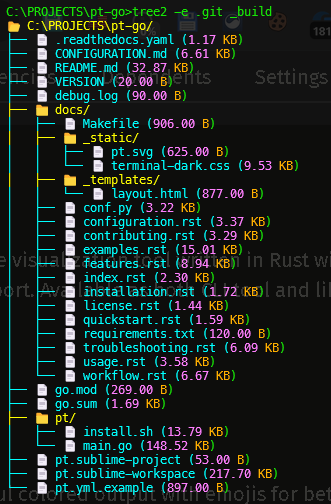
# Tree2
A high-performance directory tree visualization tool written in Rust with colors, emojis, and comprehensive ignore file support. Available as both CLI tool and library crate. **Fully compatible with Linux `tree` command options.**
<p align="center">
<img src="https://raw.githubusercontent.com/cumulus13/tree2/master/tree2.png" alt="Tree2">
</p>
## 🎦 Demo
<div align="center">
<a href="https://youtu.be/1BrUiQWi47Y">
<img src="https://i.ytimg.com/an_webp/1BrUiQWi47Y/mqdefault_6s.webp?du=3000&sqp=CLzY-skG&rs=AOn4CLAfcZjbkZ_1Zw1Yn-fAFJuaUKa88w" alt="How to use mks - tree2 -pt" style="width:100%;">
</a>
<br>
<a href="https://youtu.be/1BrUiQWi47Y">Demo</a>
</div>
## ✨ Features
- 🎨 **Colorful Output**: Beautiful colored output with emojis for better visualization
- 📊 **File Sizes**: Human-readable file sizes with color-coded values
- 🚫 **Multiple Ignore Files**: Automatic support for `.gitignore`, `.dockerignore`, `.pt`, and more
- 🔒 **Default System Exclusions**: `.git`, `.svn`, and other system folders hidden by default
- 🎯 **Exception Patterns**: Wildcard and regex support to override ignore rules
- 📋 **Clipboard Support**: Copy tree output directly to clipboard with `-c` flag
- 🐧 **Linux `tree` Compatible**: Supports all major flags from the Linux `tree` command
- ⚡ **Blazing Fast**: Optimized Rust implementation for maximum performance
- 🌐 **Cross-Platform**: Works on Windows, macOS, Linux (x86_64, ARM64, ARMv7, i686)
- 📦 **Library & CLI**: Available as both command-line tool and Rust library
- 🦀 **Memory Safe**: Rust's safety guarantees ensure reliability
## 🎨 Color Scheme
- **Folders**: Bright Yellow (#FFFF00) with 📁 emoji
- **Files**: Bright Cyan (#00FFFF) with 📄 emoji
- **Symlinks**: Bright Green (#00FF80) with `->` target path
- **Size Values**: Light magenta (#FF80FF) — White on red background if size is 0
- **Size Units**: Orange (#FFB380)
- **Meta info** (permissions, date, owner): Gray (#A0A0A0)
- **Permission Denied**: White on red background with 🔒 emoji
## 🛠️ Installation
### Using Pre-built Binaries (Recommended)
Download the appropriate binary for your platform from [GitHub Releases](https://github.com/cumulus13/tree2/releases):
#### Linux
```bash
# x86_64 (Standard)
wget https://github.com/cumulus13/tree2/releases/latest/download/tree2-linux-amd64.tar.gz
tar xzf tree2-linux-amd64.tar.gz
sudo mv tree2 /usr/local/bin/
# ARM64 (Raspberry Pi 4+, AWS Graviton)
wget https://github.com/cumulus13/tree2/releases/latest/download/tree2-linux-arm64.tar.gz
tar xzf tree2-linux-arm64.tar.gz
sudo mv tree2 /usr/local/bin/
# ARMv7 (Raspberry Pi 2/3)
wget https://github.com/cumulus13/tree2/releases/latest/download/tree2-linux-armv7.tar.gz
tar xzf tree2-linux-armv7.tar.gz
sudo mv tree2 /usr/local/bin/
```
#### Windows
Download from [releases page](https://github.com/cumulus13/tree2/releases) and extract to a folder in your PATH.
#### macOS
```bash
# Intel Macs
wget https://github.com/cumulus13/tree2/releases/latest/download/tree2-macos-amd64.tar.gz
tar xzf tree2-macos-amd64.tar.gz
sudo mv tree2 /usr/local/bin/
# Apple Silicon (M1/M2/M3)
wget https://github.com/cumulus13/tree2/releases/latest/download/tree2-macos-arm64.tar.gz
tar xzf tree2-macos-arm64.tar.gz
sudo mv tree2 /usr/local/bin/
```
### From crates.io
```bash
cargo install tree2
```
### From Source
```bash
git clone https://github.com/cumulus13/tree2
cd tree2
cargo install --path .
```
## 🌐 Platform Support
Tree2 supports **11 different platforms**:
| 🐧 Linux | x86_64, ARM64, ARMv7, i686 (+ musl variants) |
| 🪟 Windows | x86_64, ARM64, i686 |
| 🍎 macOS | Intel (x86_64), Apple Silicon (ARM64) |
For detailed platform information, see [PLATFORM_SUPPORT.md](PLATFORM_SUPPORT.md).
## 📖 Usage
### Basic Usage
```bash
# Show current directory tree
tree2
# Show specific directory
tree2 /path/to/directory
# Copy output to clipboard (plain text, no ANSI codes)
tree2 -c
# Show system folders (.git, etc.)
tree2 -a
# Show version info
tree2 -V
# Show help
tree2 --help
```
> **Note:** `-h` is `--human-readable` (Linux `tree` compatibility), not `--help`. Use `--help` for the help screen.
## 📋 Full Options Reference
```
Usage: tree2 [OPTIONS] [PATH]
Arguments:
[PATH] Target directory [default: .]
```
### Original tree2 flags
| `-V`, `--version` | Print version information |
| `-e`, `--exclude <NAME>...` | Exclude directories/files by exact name |
| `-c`, `--clipboard` | Copy output to clipboard (plain text) |
| `-i`, `--ignore-file <FILE>...` | Specific ignore file(s) to use |
| `--exception <PATTERN>...` | Exception patterns — matching entries will NOT be excluded (supports wildcards and `regex:` prefix) |
| `-a`, `--all` | Show hidden system folders (`.git`, `.svn`, etc.) |
### Listing & filtering (Linux `tree` compatible)
| `-d`, `--dirs-only` | List directories only |
| `-f`, `--full-path` | Print full path prefix for each entry |
| `-l`, `--follow-links` | Follow symbolic links like directories |
| `-L`, `--level <N>` | Max display depth |
| `-P`, `--pattern <GLOB>` | Only show files matching wildcard pattern (e.g. `"*.rs"`) |
| `-I`, `--ignore-pattern <GLOB>` | Exclude files matching wildcard pattern (e.g. `"*.o"`) |
| `--ignore-case` | Case-insensitive `-P` / `-I` matching |
| `--dirsfirst` | List directories before files |
| `-t`, `--sort-time` | Sort by last modification time (oldest first) |
| `-r`, `--reverse` | Reverse sort order |
| `--filelimit <N>` | Don't descend directories with more than N entries |
| `--prune` | Omit empty directories from output |
| `-x`, `--xdev` | Stay on current filesystem (don't cross mount points) — Unix only |
### File metadata display (Linux `tree` compatible)
| `-p`, `--protections` | Print permissions like `[drwxr-xr-x]` |
| `-u`, `--owner` | Print file owner name / UID — Unix only |
| `-g`, `--group` | Print group name / GID — Unix only |
| `-s`, `--size` | Print size in raw bytes |
| `-h`, `--human-readable` | Human-readable size (already the default; explicit flag for compat) |
| `--si` | Human-readable with SI units (powers of 1000) |
| `-D`, `--date` | Print last modification date/time |
| `-F`, `--classify` | Append type indicators: `/` dirs, `*` executables, `@` symlinks, `\|` FIFOs, `=` sockets |
| `--du` | Report directory size as accumulation of all contained file sizes |
| `--inodes` | Print inode number — Unix only |
| `--device` | Print device number — Unix only |
### Output control (Linux `tree` compatible)
| `--noreport` | Suppress the final `N directories, M files` summary |
| `-o`, `--output <FILE>` | Write output to file (plain text, no ANSI codes) |
| `-n`, `--nocolor` | Disable all ANSI colors |
| `-q`, `--quote-chars` | Replace non-printable characters with `?` |
| `-Q`, `--quote` | Wrap filenames in double quotes |
## 💡 Usage Examples
### Depth & filtering
```bash
# Show only 2 levels deep
tree2 -L 2
# Show only Rust source files
tree2 -P "*.rs"
# Show only directories, 3 levels deep
tree2 -d -L 3
# Exclude all .o files
tree2 -I "*.o"
# Case-insensitive pattern match
tree2 -P "*.RS" --ignore-case
```
### Sorting
```bash
# Directories first
tree2 --dirsfirst
# Sort by modification time, newest last
tree2 -t
# Reverse order
tree2 -r
# Newest first (reverse time sort)
tree2 -t -r
```
### Metadata display
```bash
# Show permissions
tree2 -p
# Show permissions + owner + group
tree2 -p -u -g
# Show modification date
tree2 -D
# Show size in bytes
tree2 -s
# Show size with SI units (1000-based)
tree2 --si
# Show accumulated directory sizes
tree2 --du
# Show inode numbers (Unix only)
tree2 --inodes
# Show all metadata at once
tree2 -p -u -g -D --inodes
```
### Output
```bash
# Save to file (no ANSI codes)
tree2 -o output.txt
# Copy to clipboard
tree2 -c
# No colors
tree2 -n
# Suppress file/dir count summary
tree2 --noreport
# Quote all filenames
tree2 -Q
```
### Combining flags
```bash
# Use only .gitignore, keep all .log files
tree2 -i .gitignore --exception "*.log"
# Show all files matching pattern, dirs first, with dates
tree2 -P "*.toml" --dirsfirst -D
# Complex metadata view with depth limit
tree2 -p -u -D -L 3 --dirsfirst
# Stay on current filesystem only (Unix)
tree2 -x
# Full path + classify indicators
tree2 -f -F
```
### Exception patterns
```bash
# Wildcard: keep all .log files even if in .gitignore
tree2 --exception "*.log"
# Exact match: keep node_modules
tree2 --exception "node_modules"
# Regex pattern: keep test/spec Rust files
tree2 --exception "*.log" "*.md" "important_*"
```
## 📄 Creating a .pt File
The `.pt` file works like `.gitignore` but is specific to tree2:
```bash
cat > .pt << EOF
# Custom ignores for tree2
*.tmp
*.cache
local_settings.json
dev_notes/
EOF
# tree2 will automatically use it
tree2
```
## 📋 Output Example
```
📂 /home/user/project/
├── 📁 src/
│ ├── 📄 main.rs (12.45 KB)
│ └── 📄 lib.rs (2.34 KB)
├── 📁 tests/
│ └── 📄 integration_test.rs (2.10 KB)
├── 📄 Cargo.toml (1.20 KB)
├── 📄 README.md (4.50 KB)
└── 🔒 [Permission Denied]
2 directories, 4 files
```
### With metadata flags (`-p -u -D`)
```
📂 /home/user/project/
├── [-rwxr-xr-x] alice [2025-11-22 14:30] 📁 src/
│ └── [-rw-r--r--] alice [2025-11-20 09:15] 📄 main.rs (12.45 KB)
└── [-rw-r--r--] alice [2025-11-21 11:00] 📄 Cargo.toml (1.20 KB)
1 directory, 2 files
```
### Clipboard Output
When using `-c`, the output copied to clipboard is **plain text without ANSI color codes**, making it perfect for pasting into documentation, emails, Markdown files, or code reviews.
## 🚀 Performance
- Zero-cost abstractions
- Minimal memory allocations
- Efficient directory traversal
- Fast pattern matching with HashSet
- Optimized wildcard matching algorithm
## 📚 Library Usage
Add to your `Cargo.toml`:
```toml
[dependencies]
tree2 = "2.0"
```
### Basic Example
```rust
use tree2::TreeBuilder;
fn main() {
let tree = TreeBuilder::new()
.path(".")
.excludes(vec!["target", ".git"])
.build();
tree.print();
}
```
### Advanced Example
```rust
use tree2::{TreeBuilder, TreeConfig};
fn main() {
let config = TreeConfig {
path: ".".into(),
excludes: vec!["target".into(), ".git".into()],
ignore_files: vec![".gitignore".into(), ".dockerignore".into()],
exceptions: vec!["*.log".into()],
show_all: false,
max_depth: Some(5),
};
let tree = TreeBuilder::from_config(config).build();
tree.print();
// Or get the output as string
let output = tree.to_string();
println!("{}", output);
}
```
## 🔧 Dependencies
```toml
[dependencies]
clap = { version = "4.0", features = ["derive"] }
dunce = "1.0.4"
cli-clipboard = "0.4"
clap-version-flag = "1.0.5"
regex = "1.10"
```
## 🏗️ Building from Source
### Prerequisites
- Rust 1.70 or higher
- Cargo
### Build Steps
```bash
git clone https://github.com/cumulus13/tree2
cd tree2
# Debug build
cargo build
# Release build
cargo build --release
# Run tests
cargo test
# Run clippy
cargo clippy -- -D warnings
# Check formatting
cargo fmt --all -- --check
```
### Cross-Compilation
```bash
# Install target
rustup target add aarch64-unknown-linux-gnu
# Build
cargo build --release --target aarch64-unknown-linux-gnu
# Or use cross for easier cross-compilation
cargo install cross
cross build --release --target aarch64-unknown-linux-gnu
```
## 🤝 Contributing
We welcome contributions!
1. Fork the repository
2. Create your feature branch (`git checkout -b feature/amazing-feature`)
3. Commit your changes (`git commit -m 'Add some amazing feature'`)
4. Push to the branch (`git push origin feature/amazing-feature`)
5. Open a Pull Request
## 📄 License
This project is licensed under the MIT License - see the LICENSE file for details.
## 👤 Author
**Hadi Cahyadi**
- Email: cumulus13@gmail.com
- GitHub: [cumulus13](https://github.com/cumulus13)
[](https://www.buymeacoffee.com/cumulus13)
[](https://ko-fi.com/cumulus13)
[Support me on Patreon](https://www.patreon.com/cumulus13)
## 💬 Support
If you encounter any issues or have questions:
1. Check the [Issues](https://github.com/cumulus13/tree2/issues) page
2. Create a new issue with detailed description
3. Read the [Documentation](PLATFORM_SUPPORT.md)
4. Contact: cumulus13@gmail.com
## 📝 Changelog
### v1.0.14 (Latest)
- ✨ **Added**: Full Linux `tree` command compatibility
- ✨ **Added**: `-L/--level` max depth flag
- ✨ **Added**: `-d/--dirs-only` directories-only listing
- ✨ **Added**: `-f/--full-path` full path prefix display
- ✨ **Added**: `-P/--pattern` and `-I/--ignore-pattern` wildcard filtering
- ✨ **Added**: `--ignore-case` for case-insensitive pattern matching
- ✨ **Added**: `--dirsfirst` sort order
- ✨ **Added**: `-t/--sort-time` and `-r/--reverse` sort flags
- ✨ **Added**: `-p/--protections` permissions display (Unix)
- ✨ **Added**: `-u/--owner` and `-g/--group` metadata (Unix)
- ✨ **Added**: `-s/--size` raw bytes, `-h/--human-readable`, `--si` size flags
- ✨ **Added**: `-D/--date` modification date display
- ✨ **Added**: `-F/--classify` type indicator suffixes
- ✨ **Added**: `--filelimit` directory entry limit
- ✨ **Added**: `--prune` empty directory pruning
- ✨ **Added**: `--du` accumulated directory sizes
- ✨ **Added**: `--noreport` suppress summary line
- ✨ **Added**: `-o/--output` write to file
- ✨ **Added**: `-n/--nocolor` disable ANSI colors
- ✨ **Added**: `-q/--quote-chars` and `-Q/--quote` filename quoting
- ✨ **Added**: `-x/--xdev` stay on current filesystem (Unix)
- ✨ **Added**: `--inodes` and `--device` inode/device display (Unix)
- ✨ **Added**: Summary line `N directories, M files` at end of output
- ✨ **Added**: Symlink display with `->` target in bright green
- ✨ **Added**: Meta-info prefix colored in gray
- 🐛 **Fixed**: Cross-platform build — all Unix-specific APIs gated with `#[cfg(unix)]`
- 🐛 **Fixed**: All clippy warnings (`is_multiple_of`, `sort_by_key`, argument count)
- ⚠️ **Breaking**: `-h` is now `--human-readable` (Linux tree compat). Use `--help` for help.
### v1.0.13
- 🐛 **Fixed**: Wildcard pattern matching in ignore files (`.gitignore`, `.pt`, etc.)
- 🐛 **Fixed**: Tree connector logic for correct display
- ✨ **Added**: Default system folder exclusion (`.git`, `.svn`, etc.)
- ✨ **Added**: `-a/--all` flag to show hidden system folders
- 📚 **Improved**: Documentation and troubleshooting guides
### v1.0.10
- ✨ **Added**: Multiple ignore file support (`.gitignore`, `.dockerignore`, `.pt`, etc.)
- ✨ **Added**: Exception patterns with wildcard, regex, and exact match
- ✨ **Added**: Selective ignore file usage with `-i` flag
- ✨ **Added**: Custom `.pt` ignore file support
- 🚀 **Improved**: Pattern matching algorithm
- 📚 **Added**: Comprehensive documentation (QUICKSTART, EXAMPLES, TROUBLESHOOTING)
### v1.0.9
- ✅ Fixed exact match exclusion (`.git` no longer excludes `.github`)
- ✨ Added clipboard support with `-c` flag
- 📝 Improved version info with `-V` flag
- 🎨 Better color scheme with true color support
- ⚡ Performance optimizations
## 🔗 Links
- [QUICKSTART Guide](QUICKSTART.md) - Get started in 5 minutes
- [Examples](EXAMPLES.md) - 48+ practical usage examples
- [Platform Support](PLATFORM_SUPPORT.md) - Detailed platform information
- [Changelog](CHANGELOG.md) - Full version history
---
**Enjoy blazing-fast directory visualization with Tree2!** 🚀🦀