# tracing-scribe
[](https://crates.io/crates/tracing-scribe)
[](https://docs.rs/tracing-scribe)
[](LICENSE)
A `tracing-subscriber` layer for beautifully printing spans and events to the
terminal.
This crate provides a `ConsoleLayer` that can be used with `tracing` to format
and display log messages in a hierarchical and easy-to-read format. It is
designed to make command line applications more pleasant by providing clear
visual cues for different log levels, tracking the duration of spans, and
indicating success or failure states.
## Features
- **Pretty Printing**: Spans and events are displayed with icons, colors, and
indentation to create a clear visual hierarchy.
- **Automatic `Result` Handling**: The `console!` macro automatically logs
the outcome of a `Result`, indicating success or failure.
- **Span Timings**: The layer automatically tracks and displays the execution
time of each span.
- **Error Propagation**: Errors inside spans are propagated to parent spans,
marking them as failed.
## Installation
```toml
[dependencies]
tracing-scribe = "0.1"
```
## Usage
To use `ConsoleLayer`, add it to your `tracing` subscriber registry. The
`console!` macro can then be used to log events with different status levels.
### Example
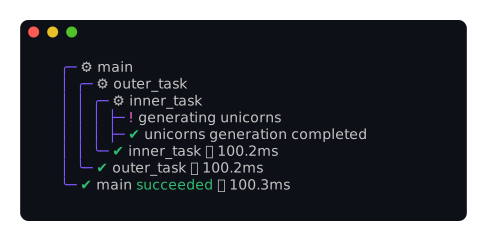
Here is a complete example demonstrating a successful execution with nested
spans and `#[tracing::instrument]`.
```rust
use tracing::info_span;
use tracing_scribe::console;
use tracing_subscriber::prelude::*;
use tracing_subscriber::registry::Registry;
#[tracing::instrument]
fn outer_task() {
inner_task();
}
#[tracing::instrument]
fn inner_task() {
console!(notice, "generating unicorns");
std::thread::sleep(std::time::Duration::from_millis(100));
console!(info, "unicorns generation completed");
}
let subscriber = Registry::default().with(tracing_scribe::ConsoleLayer::default());
tracing::subscriber::with_default(subscriber, || {
let _span = info_span!("main").entered();
outer_task();
});
```
This will produce the following output:
### Error Handling
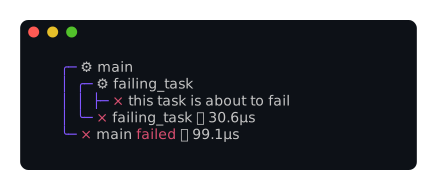
The `ConsoleLayer` also handles errors gracefully. When a span instrumented
with `#[tracing::instrument(err)]` returns an error, the span and its parents
are marked as failed.
```rust
use std::error::Error;
use std::fmt;
use tracing::info_span;
use tracing_scribe::console;
use tracing_subscriber::prelude::*;
use tracing_subscriber::registry::Registry;
#[derive(Debug)]
struct MyError;
impl Error for MyError {}
impl fmt::Display for MyError {
fn fmt(&self, f: &mut fmt::Formatter<'_>) -> fmt::Result {
write!(f, "something went wrong")
}
}
#[tracing::instrument(err)]
fn failing_task() -> Result<(), MyError> {
console!(error, "this task is about to fail");
Err(MyError)
}
let subscriber = Registry::default().with(tracing_scribe::ConsoleLayer::default());
tracing::subscriber::with_default(subscriber, || {
let _span = info_span!("main").entered();
failing_task().ok();
});
```
This will produce the following output:
### Asynchronous tasks
Asynchronous tasks are handled their own way by tracing. To make sure they end
up with the right indentation, you might have to wrap them with a tracing
instrumentation call.
```rust
use tracing::Instrument;
use tracing_scribe::console;
#[tracing::instrument]
async fn outer_task() {
tokio::spawn(
inner_task().instrument(tracing::Span::current())
);
}
#[tracing::instrument]
async fn inner_task() {
console!(notice, "generating async unicorns");
tokio::time::sleep(std::time::Duration::from_millis(100)).await;
console!(info, "async unicorns generation completed");
}
```
### Attaching Extra Information
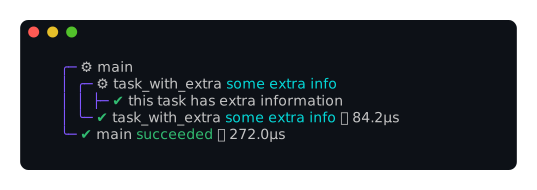
The `extra` field can be used to attach additional context to a span, which
will be displayed alongside the span name.
```rust
use tracing::info_span;
use tracing_scribe::console;
use tracing_subscriber::prelude::*;
use tracing_subscriber::registry::Registry;
#[tracing::instrument(fields(extra = "some extra info"))]
fn task_with_extra() {
console!(info, "this task has extra information");
}
let subscriber = Registry::default().with(tracing_scribe::ConsoleLayer::default());
tracing::subscriber::with_default(subscriber, || {
let _span = info_span!("main").entered();
task_with_extra();
});
```
This will produce the following output:
### Custom Colors
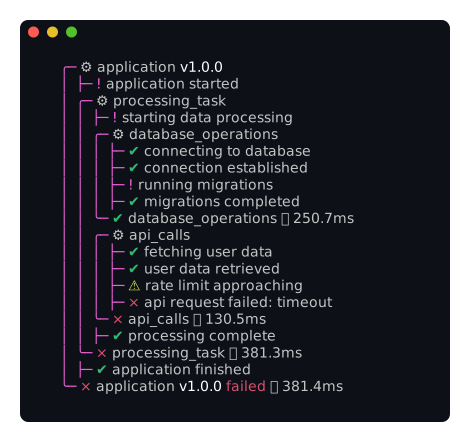
You can customize colors via the `ColorScheme` builder.
```rust
use owo_colors::colors;
use tracing_scribe::{ColorScheme, ConsoleLayer};
let colors = ColorScheme::default()
.with_success_color(colors::BrightGreen)
.with_error_color(colors::BrightRed)
.with_tree_color(colors::Cyan);
let layer = ConsoleLayer::default().with_colors(colors);
```
See `examples/custom_colors.rs` for a full example:
### Custom Status
The `with_status` method allows you to customize the icons used for the
different statuses. See the API documentation for the `Status` and
`StatusFactory` traits.
## Examples
Run the bundled examples to see the layer in action:
```bash
cargo run --example full
cargo run --example custom_colors
```
## License
Licensed under the Apache License, Version 2.0 ([LICENSE](LICENSE) or
<http://www.apache.org/licenses/LICENSE-2.0>).