# tracexec
A small utility for tracing execve{,at} and pre-exec behavior.
tracexec helps you to figure out what and how programs get executed when you execute a command.
It's useful for debugging build systems, understanding what shell scripts actually do, figuring out what programs
does a proprietary software run, etc.
**Warning**: You are viewing the documentation for the upcoming 0.1.0 release. The current stable release is 0.0.5.
## Showcases
### TUI mode with pseudo terminal
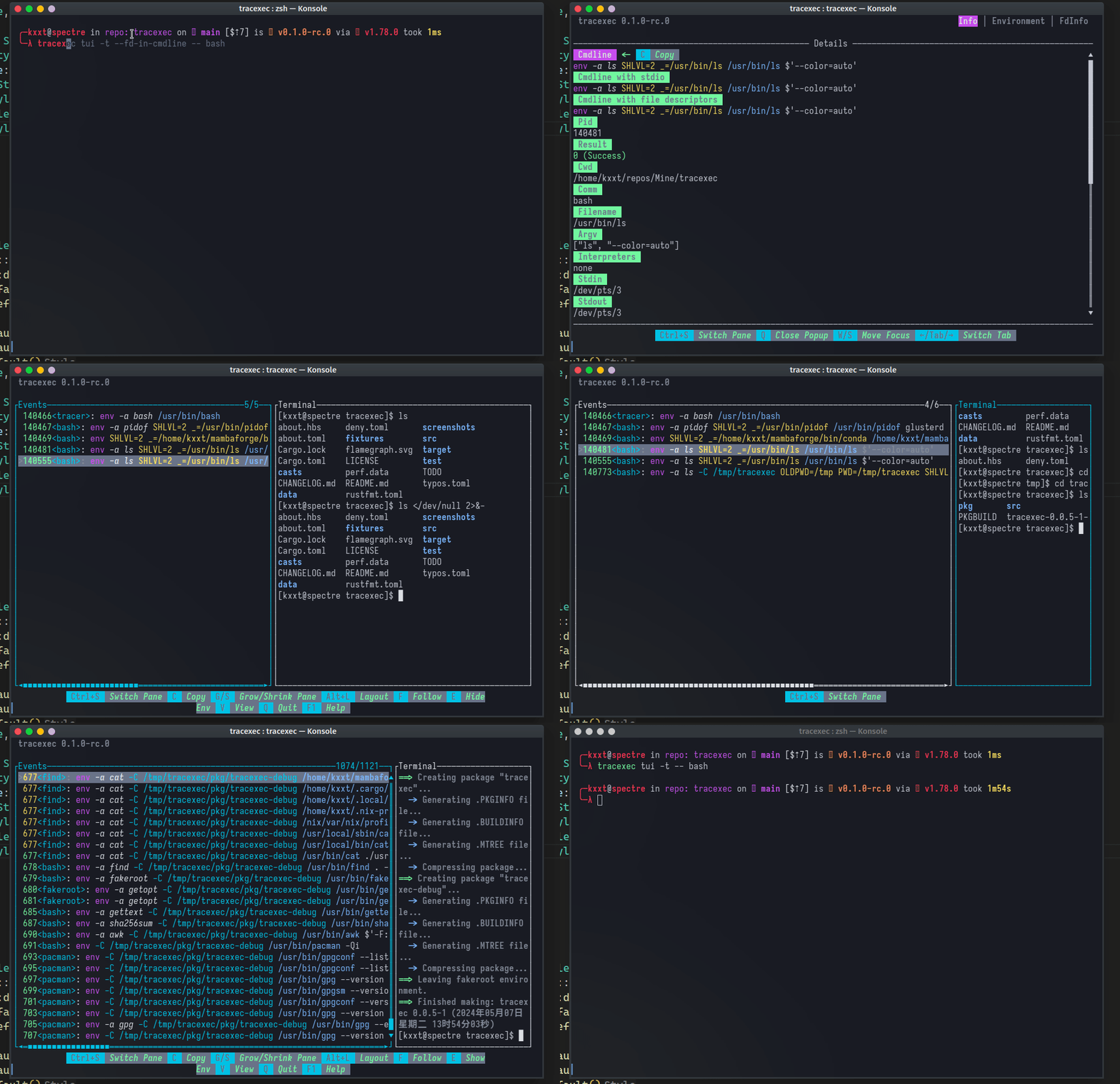
In TUI mode with a pseudo terminal, you can view the details of exec events and interact with the processes
within the pseudo terminal at ease.
### Tracing setuid binaries
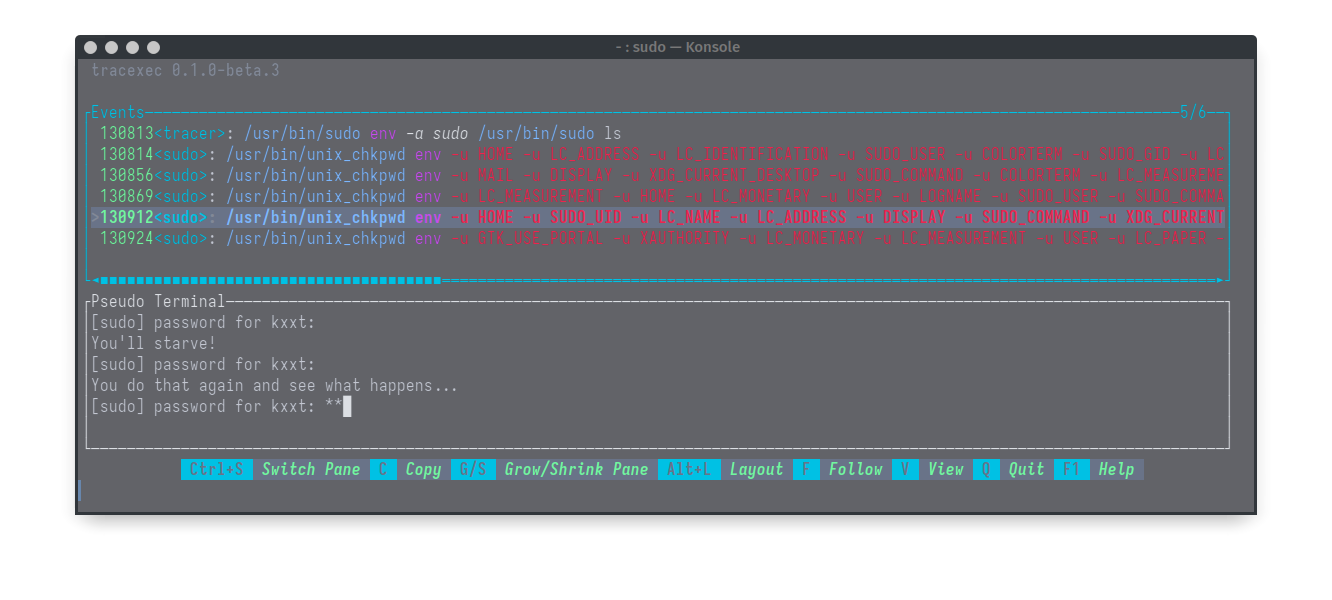
With root privileges, you can also trace setuid binaries and see how they work.
But do note that this is not compatible with seccomp-bpf optimization so it is much less performant.
```
sudo tracexec --user $(whoami) tui -t -- sudo ls
```
Nested setuid binary tracing is also possible: A real world use case is to trace `extra-x86_64-build`(Arch Linux's build tool that requires sudo):
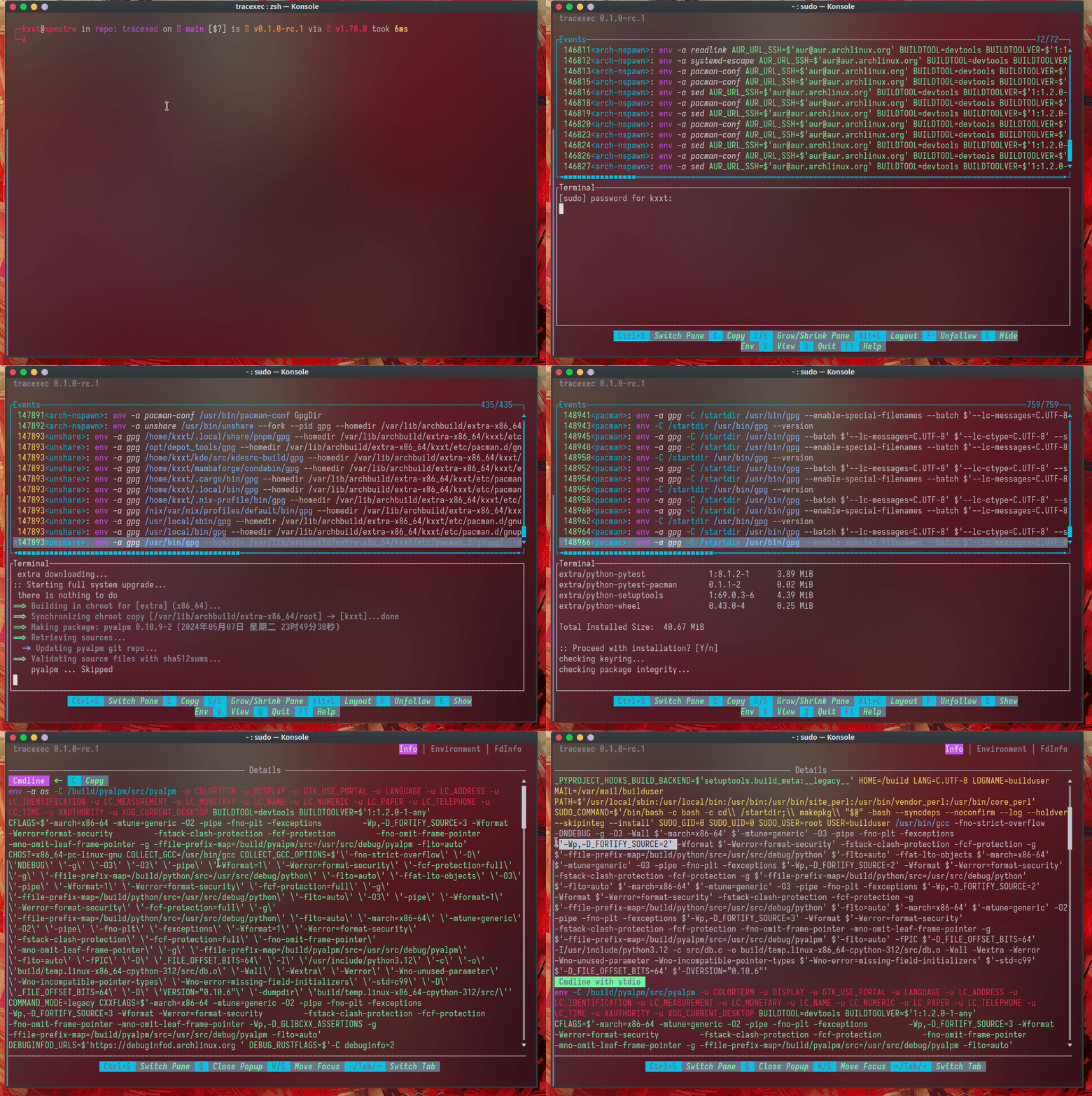
In this real world example, we can easily see that `_FORTIFY_SOURCE` is redefined from `2` to `3`, which lead to a compiler error.
### Log mode
In log mode, by default, `tracexec` will print filename, argv and the diff of the environment variables and file descriptors.
example: `tracexec log -- bash` (In an interactive bash shell)
[](https://asciinema.org/a/sNptWG6De3V5xwUvXJAxWlO3i)
### Reconstruct the command line with `--show-cmdline`
```bash
$ tracexec log --show-cmdline -- <command>
# example:
$ tracexec log --show-cmdline -- firefox
```
[](https://asciinema.org/a/AWTG4iHaFPMcEGCVtqAl44YFW)
### Try to reproduce stdio in the reconstructed command line
`--stdio-in-cmdline` and `--fd-in-cmdline` can be used to reproduce(hopefully) the stdio used by a process.
But do note that the result might be inaccurate when pipes, sockets, etc are involved.
```bash
tracexec log --show-cmdline --stdio-in-cmdline -- bash
```
[](https://asciinema.org/a/NkBTaoNHS7P7bolO0hNuRwGlQ)
### Show the interpreter indicated by shebang with `--show-interpreter`
And show the cwd with `--show-cwd`.
```bash
$ tracexec log --show-interpreter --show-cwd -- <command>
# example: Running Arch Linux makepkg
$ tracexec log --show-interpreter --show-cwd -- makepkg -f
```
[](https://asciinema.org/a/7jDtrlNRx5XUnDXeDBsMRj09p)
## Installation
### From source
Via cargo:
```bash
cargo install tracexec --bin tracexec
```
You can also install `tracexec` from AUR.
### Binary
You can download the binary from the [release page](https://github.com/kxxt/tracexec/releases)
You can also install `tracexec-bin` from AUR.
## Usage
General CLI help:
```bash
A small utility for tracing execve{,at} and pre-exec behavior
Usage: tracexec [OPTIONS] <COMMAND>
Commands:
log Run tracexec in logging mode
tui Run tracexec in TUI mode, stdin/out/err are redirected to /dev/null by default
help Print this message or the help of the given subcommand(s)
Options:
--color <COLOR> Control whether colored output is enabled. This flag has no effect on TUI mode. [default: auto] [possible values: auto, always, never]
-C, --cwd <CWD> Change current directory to this path before doing anything
-u, --user <USER> Run as user. This option is only available when running tracexec as root
-h, --help Print help
-V, --version Print version
```
TUI Mode:
```bash
Run tracexec in TUI mode, stdin/out/err are redirected to /dev/null by default
Usage: tracexec tui [OPTIONS] -- <CMD>...
Arguments:
<CMD>... command to be executed
Options:
--seccomp-bpf <SECCOMP_BPF>
seccomp-bpf filtering option [default: auto] [possible values: auto, on, off]
--successful-only
Only show successful calls
--fd-in-cmdline
[Experimental] Try to reproduce file descriptors in commandline. This might result in an unexecutable cmdline if pipes, sockets, etc. are involved.
--stdio-in-cmdline
[Experimental] Try to reproduce stdio in commandline. This might result in an unexecutable cmdline if pipes, sockets, etc. are involved.
--show-all-events
Set the default filter to show all events. This option can be used in combination with --filter-exclude to exclude some unwanted events.
--filter <FILTER>
Set the default filter for events. [default: warning,error,exec,tracee-exit]
--filter-include <FILTER_INCLUDE>
Aside from the default filter, also include the events specified here. [default: <empty>]
--filter-exclude <FILTER_EXCLUDE>
Exclude the events specified here from the default filter. [default: <empty>]
-t, --tty
Allocate a pseudo terminal and show it alongside the TUI
-f, --follow
Keep the event list scrolled to the bottom
--terminate-on-exit
Instead of waiting for the root child to exit, terminate when the TUI exits
--kill-on-exit
Instead of waiting for the root child to exit, kill when the TUI exits
-A, --active-pane <ACTIVE_PANE>
Set the default active pane to use when TUI launches [default: terminal] [possible values: terminal, events]
-L, --layout <LAYOUT>
Set the layout of the TUI when it launches [default: horizontal] [possible values: horizontal, vertical]
-F, --frame-rate <FRAME_RATE>
Set the frame rate of the TUI [default: 60.0]
-h, --help
Print help
```
Log Mode:
```bash
Run tracexec in logging mode
Usage: tracexec log [OPTIONS] -- <CMD>...
Arguments:
<CMD>... command to be executed
Options:
--show-cmdline
Print commandline that (hopefully) reproduces what was executed. Note: file descriptors are not handled for now.
--show-interpreter
Try to show script interpreter indicated by shebang
--more-colors
More colors
--less-colors
Less colors
--diff-fd
Diff file descriptors with the original std{in/out/err}
--no-diff-fd
Do not diff file descriptors
--show-fd
Show file descriptors
--no-show-fd
Do not show file descriptors
--diff-env
Diff environment variables with the original environment
--no-diff-env
Do not diff environment variables
--show-env
Show environment variables
--no-show-env
Do not show environment variables
--show-comm
Show comm
--no-show-comm
Do not show comm
--show-argv
Show argv
--no-show-argv
Do not show argv
--show-filename
Show filename
--no-show-filename
Do not show filename
--show-cwd
Show cwd
--no-show-cwd
Do not show cwd
--decode-errno
Decode errno values
--no-decode-errno
--seccomp-bpf <SECCOMP_BPF>
seccomp-bpf filtering option [default: auto] [possible values: auto, on, off]
--successful-only
Only show successful calls
--fd-in-cmdline
[Experimental] Try to reproduce file descriptors in commandline. This might result in an unexecutable cmdline if pipes, sockets, etc. are involved.
--stdio-in-cmdline
[Experimental] Try to reproduce stdio in commandline. This might result in an unexecutable cmdline if pipes, sockets, etc. are involved.
--show-all-events
Set the default filter to show all events. This option can be used in combination with --filter-exclude to exclude some unwanted events.
--filter <FILTER>
Set the default filter for events. [default: warning,error,exec,tracee-exit]
--filter-include <FILTER_INCLUDE>
Aside from the default filter, also include the events specified here. [default: <empty>]
--filter-exclude <FILTER_EXCLUDE>
Exclude the events specified here from the default filter. [default: <empty>]
-o, --output <OUTPUT>
Output, stderr by default. A single hyphen '-' represents stdout.
-h, --help
Print help
```
The recommended way to use `tracexec` is to create an alias with your favorite options in your bashrc:
```bash
alias tracex='tracexec log --show-cmdline --show-interpreter --show-children --show-filename --'
alias txtui='tracexec tui -t --'
# Now you can use
tracex <command>
txtui <command>
```
## Known issues
- Non UTF-8 strings are converted to UTF-8 in a lossy way, which means that the output may be inaccurate.
- The output is not stable yet, which means that the output may change in the future.
- Test coverage is not good enough.
- The pseudo terminal can't pass through certain key combinations and terminal features.
## Origin
This project was born out of the need to trace the execution of programs.
Initially I simply use `strace -Y -f -qqq -s99999 -e trace=execve,execveat <command>`.
But the output is still too verbose so that's why I created this project.
## Credits
This project takes inspiration from [strace](https://strace.io/) and [lurk](https://github.com/JakWai01/lurk).