# TPC-H Data Generator CLI
`tpchgen-cli` is a high-performance, parallel command line interface for
generating [TPC-H] data.
> **Note:** See [`tpcgen-cli`] to create both TPC-H and TPC-DS data and the
> [tpcgen-rs project] for the full project details.
[TPC-H]: https://www.tpc.org/tpch/
[`tpcgen-cli`]: https://github.com/datafusion-contrib/tpcgen-rs/blob/main/tpcgen-cli/README.md
[tpcgen-rs project]: https://github.com/datafusion-contrib/tpcgen-rs
This tool is more than 10x faster than the next fastest TPC-H generator we know
of (`duckdb`). On a 2023 Mac M3 Max laptop, it easily generates data faster than
can be written to SSD. See [BENCHMARKS.md] for more details on performance and
benchmarking.
[BENCHMARKS.md]: https://github.com/datafusion-contrib/tpcgen-rs/blob/main/tpchgen-cli/benchmarks/BENCHMARKS.md
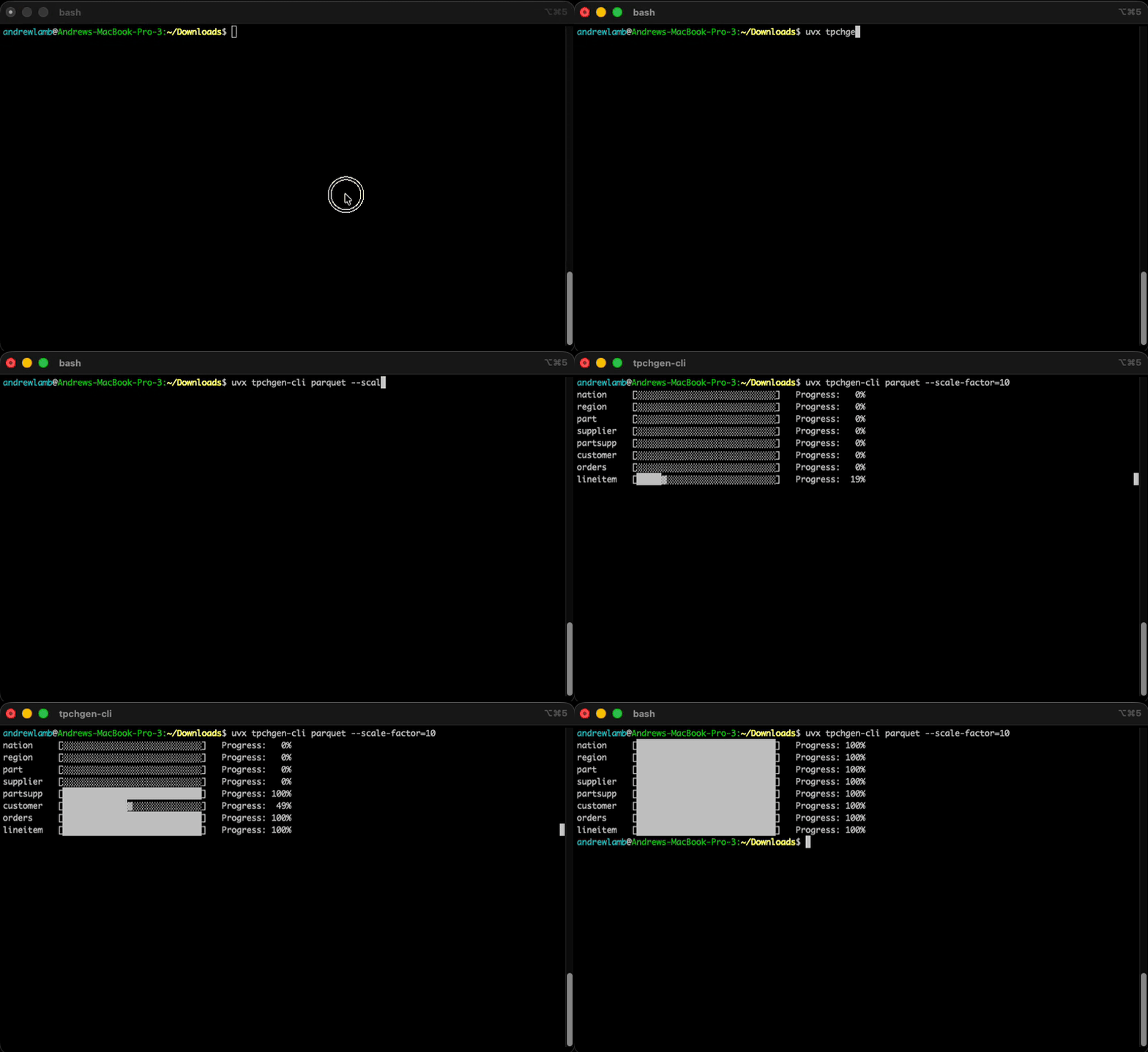
## Try with `uvx`
```shell
uvx tpchgen-cli parquet -s 1 --output-dir /tmp/tpch
```
## Install with `pip`
```shell
python -m pip install tpchgen-cli
```
## Install via Rust
[Install Rust](https://www.rust-lang.org/tools/install) and compile
```shell
```
Then generate TPC-H data:
```shell
tpchgen-cli parquet -s 1 --output-dir /tmp/tpch
```
## Examples
```shell
# Scale Factor 10, all tables, in Apache Parquet format in the current directory
# (3.6GB, 8 files, 60M lineitem rows, in 5 seconds on a modern laptop)
tpchgen-cli parquet -s 10
# Scale Factor 10, all tables, in `tbl`(csv like) format in the `sf10` directory
# (10GB, 8 files, 60M lineitem rows)
# Note: `tpchgen-cli tbl` also works explicitly
tpchgen-cli -s 10 --output-dir sf10
# Scale Factor 1000, lineitem table, in Apache Parquet format in sf1000 directory,
# 20 part(itions), 100MB row groups
# (220GB, 20 files, 6B lineitem rows, 3.5 minutes on a modern laptop)
tpchgen-cli parquet -s 1000 --tables lineitem --parts 20 --row-group-bytes=100MB --output-dir sf1000
# Per-column encodings (overrides Parquet writer defaults for named columns)
tpchgen-cli parquet -s 1 --tables lineitem --column-encoding=l_comment=DELTA_LENGTH_BYTE_ARRAY,l_shipinstruct=DELTA_LENGTH_BYTE_ARRAY
# Scale Factor 10, partition 2 and 3 of 10 in partitioned directory
#
# partitioned/
# ├── lineitem
# │ ├── lineitem.2.tbl
# │ └── lineitem.3.tbl
# └── orders
# ├── orders.2.tbl
# └── orders.3.tbl
#
for PART in `seq 2 3`; do
tpchgen-cli --tables lineitem,orders --scale-factor=10 --output-dir partitioned --parts 10 --part $PART
done
```
By default `tpchgen-cli` shows a per-table progress bar on stderr while data
is generated. Pass `--no-progress` to disable it (it is also disabled
automatically when `--quiet` is set, when `--stdout` is used, or when stderr
is not a terminal, e.g. in CI logs).
## Performance
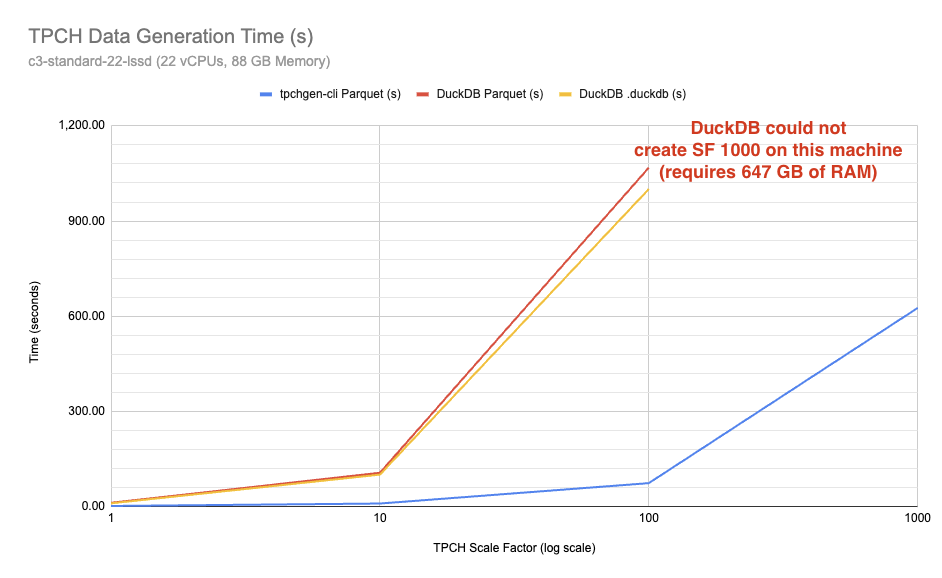
Times to create TPC-H tables in Parquet format using `tpchgen-cli` and `duckdb` for various scale factors.
| 1 | `0:02.24` | `0:12.29` | `0:10.68` |
| 10 | `0:09.97` | `1:46.80` | `1:41.14` |
| 100 | `1:14.22` | `17:48.27` | `16:40.88` |
| 1000 | `10:26.26` | N/A (OOM) | N/A (OOM) |
- DuckDB (proprietary) is the time required to create TPC-H data using the
proprietary DuckDB format
- Creating Scale Factor 1000 using DuckDB [required 647 GB of memory](https://duckdb.org/docs/lts/core_extensions/tpch#resource-usage-of-the-data-generator),
which is why it is not included in the table above.
## More information
* Watch this [demo](https://www.youtube.com/watch?v=UYIC57hlL14) by
[@alamb](https://github.com/alamb) to see `tpchgen-cli` in action
* Read the companion blog post in the
[DataFusion
blog](https://datafusion.apache.org/blog/2025/04/10/fastest-tpch-generator/) to learn about the project's history
## References
- The TPC-H Specification, see the specification [page](https://www.tpc.org/tpc_documents_current_versions/current_specifications5.asp).
- The Original `dbgen` Implementation you must submit an official request to access the software `dbgen` at their official [website](https://www.tpc.org/tpch/)