# tomesole
[](https://github.com/ChrisThoma/tomesole/actions/workflows/ci.yml)
[](https://crates.io/crates/tomesole)
[](https://github.com/ChrisThoma/tomesole/releases/latest)
[](LICENSE)
A terminal client for searching and downloading from Library Genesis, with both
a full-screen interface and a scriptable CLI.
Libgen has no stable address and is run by people you have no reason to trust.
Most of the work here goes into those two problems: finding a mirror that
works, and treating everything it sends back as hostile until proven otherwise.
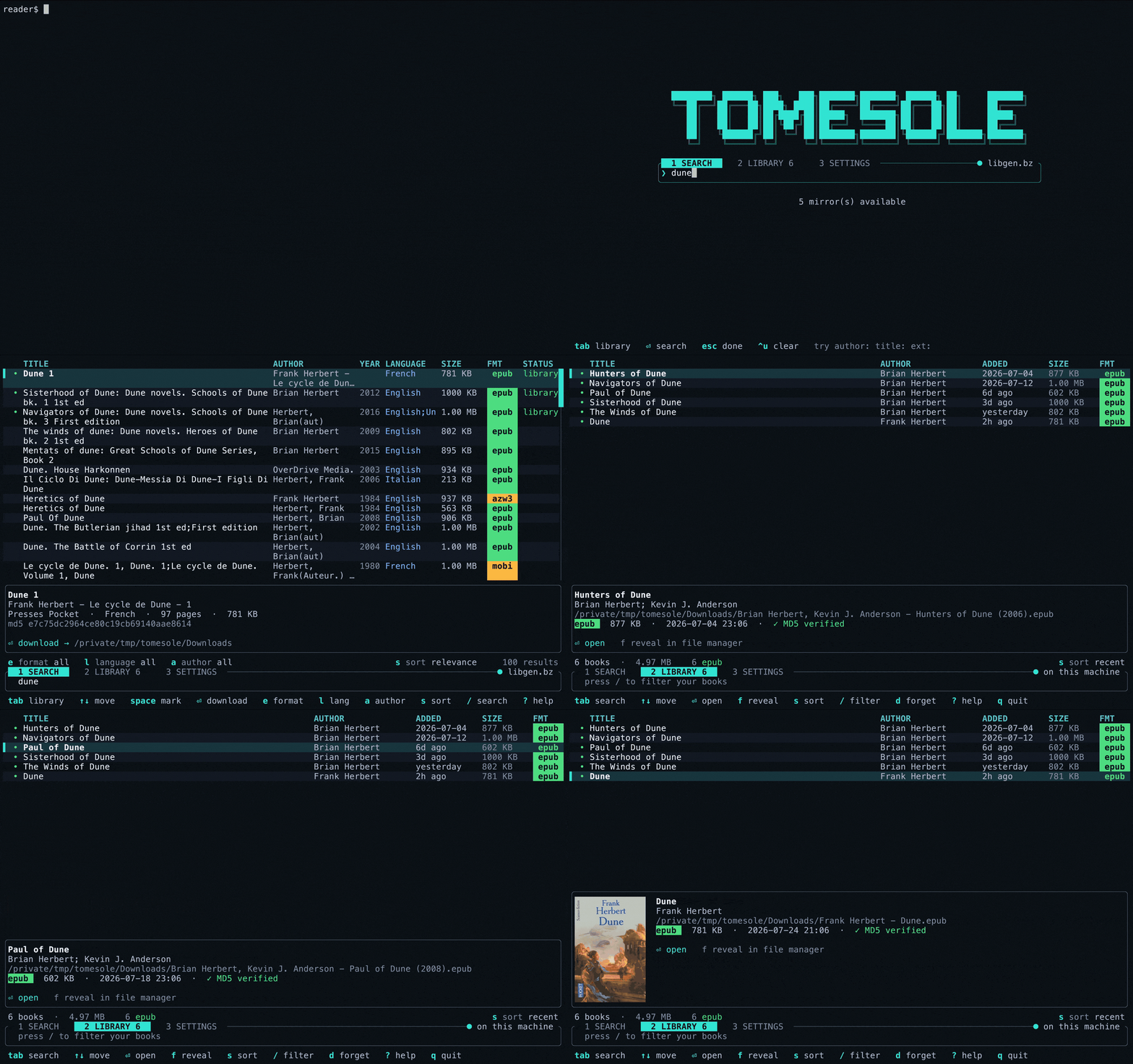
Run `tomesole` with no arguments for the full-screen interface. It has three
tabs: **Search** for finding books, **Library** for the ones you already have,
and **Settings** for editing the configuration. `Tab` cycles through them, even
while typing, and `1`/`2`/`3` jumps straight to one while browsing:
```
╭ 1 SEARCH 2 LIBRARY 12 3 SETTINGS ────────────────── ● libgen.li ╮
│❯ dune │
╰─────────────────────────────────────────────────────────────────────────╯
e format all l language English 6 a author all x clear s sort year ▼
TITLE AUTHOR YEAR LANG SIZE FMT STATUS ╭──╮
▌ Dune Frank Herbert 1965 English 781 KB epub library│▄▄│
Dune Messiah Frank Herbert 1969 English 922 KB epub │██│
Children of Dune Frank Herbert 1976 English 1.1 MB pdf │▀▀│
╰──╯
tab library ↑↓ move ⏎ download e format l lang a author s sort ? help
```
The interface uses its own colours (a deep blue-grey background with
zebra-striped rows) rather than inheriting the terminal's. Colour is meaningful:
teal marks interactive elements, amber marks emphasis, each file format gets its
own hue as a solid chip (`epub` green, `pdf` coral, `djvu` violet), and languages
share one blue. The highlighted book's record and cover sit in a band along the
bottom, so the results table keeps the full width of the screen and never
fights a side panel for room.
## Filtering and sorting
A search returns whatever the mirror has, which is often a lot of near-duplicates:
*Das Kapital* comes back as forty German editions with the English translations
mixed in. Results can be narrowed in place without re-searching. `e`, `l` and `a`
open menus of the formats, languages and authors actually present, each with a
count of what choosing it would leave. The menus are pick-lists rather than
cycles: type a fragment to narrow them (`guin` finds *Le Guin, Ursula* among
eighty names), arrow or Enter to choose, and `⇥` switches between the three
facets without closing the pop-over. The bar under the search box shows how much
of the result set is visible (`4 of 40 shown`). Filters persist across searches,
and `x` clears them.
`s` opens the sort menu: relevance (the mirror's own ordering), title, author,
year, size. The current order is marked with its direction; `←`/`→` flip the
direction and `S` reverses in place without opening the menu. Size and year
default to largest- and newest-first.
Editions you have already downloaded are marked `library` in their own column
and with a green dot, so you don't fetch the same book twice. When several
results are marked for a batch download, the strip totals what they will pull
(`3 marked 24 MB`) before you commit. `y` copies the highlighted book's MD5 to
the clipboard.
## The Library tab
The Library tab lists every book you have downloaded, newest first, and persists
between sessions; it is a view onto `tomesole/history.tsv` under
`$XDG_DATA_HOME` (by default `~/.local/share/tomesole/history.tsv`). A strip
under the box summarises the collection (`12 books · 1.2 GB` and a breakdown
of the four commonest formats), and the same `s` sort orders it by title,
author, size or date added.
`⏎` opens the highlighted book in your reader, `f` reveals it in the file
manager, `/` filters by title, author or filename, and `d` forgets an entry
without deleting the file. Books whose files have moved are greyed out and
marked `missing`.
Searching and downloading run on worker threads, so the interface stays
responsive while a large file downloads. Downloads run one at a time, since
parallel requests to a volunteer-run mirror tend to get rate-limited.
Covers are drawn as real pixels in kitty, Ghostty, WezTerm and iTerm2, and as
half-block characters (sketched above) elsewhere. On the Library tab the cover
is read out of the downloaded file itself (an EPUB or CBZ is a zip with the
image inside, a MOBI/AZW embeds it). If the file has no cover, tomesole tries
one cached from an earlier search, then asks the mirror as a last resort.
## The Settings tab
The Settings tab edits the same values as the config file: cover art, history,
download verification and size limits, reader, download directory, result
limit, collections, preferred mirrors and whether cleartext HTTP is allowed.
Move with `↑`/`↓`, press `⏎` to edit a value, or press `space` to toggle a
yes/no setting. Collection and mirror rows expand into their own lists; mirrors
can be added with `a` and removed with `d`. Changes are saved as they are made.
Settings concerned with startup network policy and search defaults are marked
as taking effect on the next launch.
## Keys
| `Tab` `1` `2` `3` | cycle through the Search, Library and Settings tabs, or jump straight to one |
| `/` `i` | type in the box (search terms, or a library filter) |
| `⏎` | search / download the selection, open a library book, or edit a setting |
| `↑` `↓` `k` `j` | move; `PgUp`/`PgDn` for ten, `g`/`G` for ends |
| `e` `l` `a` | open the format / language / author menu (type to narrow, `⏎` to choose, `⇥` to switch facet); `x` clears every filter |
| `s` | open the sort menu (relevance, title, author, year, size; `←`/`→` set direction); `S` reverses in place |
| `space` | mark a result; `A` marks or unmarks everything showing |
| `y` | copy the highlighted book's MD5 to the clipboard |
| `o` `f` | open a downloaded book, or show it in the file manager |
| `d` | forget a library entry (the file stays) |
| `r` | re-run the search / re-read the library |
| `m` | re-probe mirrors and pick a new one |
| `?` | key help |
| `q` | quit while browsing; `esc` also quits Search and Library, and cancels Settings edits; `^c` quits from anywhere |
## The CLI
The same functionality from the command line, for scripting and one-off
downloads:
```
$ tomesole --title "the rust programming language" -n 4
4 results from libgen.li
# Title Author Year Lang Size Fmt
─── ───────────────────────────── ─────────────────── ──── ──────── ──────── ─────
1 The Rust Programming Languag… Steve Klabnik 2019 English 3.00 MB epub
2 The Rust Programming Languag… Steve Klabnik 2019 English 5.00 MB pdf
3 The Rust Programming Languag… Steve Klabnik 2019 English 3.00 MB lit
4 The Rust Programming Languag… Steve Klabnik 2019 English 5.00 MB fb2
Select 1-4 (e.g. 3, or 1-4; Enter to cancel) › 1
↓ The Rust Programming Language
✓ Steve Klabnik - The Rust Programming Language (2019).epub
~/Downloads · 3.00 MB · MD5 verified
```
## Searching by field
Any query, in the box or on the command line, can carry tags:
```
author:herbert title:dune ext:epub
title:"the dispossessed" lang:english
le guin year:1974
```
`author:` `title:` `series:` `publisher:` `year:` `isbn:` narrow which column is
matched. `ext:` and `lang:` filter what comes back. `topic:` picks the
collection. Quote a value to keep spaces in it.
Anything that is not one of those keys is left exactly as typed, so `Dune:
Messiah` searches for `Dune: Messiah` rather than being read as a tag.
## Covers
The full-screen interface shows the cover of whatever is highlighted, once the
selection has been still for a moment. A cover costs two requests, and firing
those off while somebody holds a cursor key down would hammer the mirror.
Answers are cached, including "this one has no cover".
How it draws depends on the terminal:
| kitty, Ghostty, WezTerm | kitty graphics protocol: real pixels |
| iTerm2 | inline image protocol: real pixels |
| anything else with colour | half-block characters, two pixels per cell |
A search result is only an MD5, so its cover is fetched from the mirror. A book
in your library is a file on disk, and most formats carry their own cover image,
so the Library tab first tries to read it straight out of the file (EXTH record
201 in a MOBI, the cover image inside an EPUB or CBZ zip). Those bytes are
treated as hostile: offsets and lengths are bounds-checked, nothing is
decompressed in place, the extracted bytes must begin with a real image
signature, and a truncated or malformed book yields no cover rather than a
crash. If the file has no usable cover, the tab tries the cover cache and then
the mirror.
Terminal detection reads the environment rather than writing a query escape and
waiting for a reply, which would race with the keyboard reader for the answer.
`tomesole doctor` reports which method it picked. `--no-covers`, or
`covers = false` in the config, turns covers off entirely.
Two of those three drawing paths need pixels rather than a file, so there is a
baseline JPEG decoder in-tree (`src/jpeg.rs`). During development it was
compared against Apple's decoder on a real cover: mean absolute error 0.54 per
channel, maximum 4. The in-tree tests check quadrant colours and greyscale
neutrality rather than repeating that comparison.
## Past downloads
Every completed download is recorded (what it was, where it went, and whether
it verified), so it can be found again later without going back to Libgen.
```
$ tomesole history
# Title Author When Size Fmt
─── ─────────────────────────────── ─────────────── ─────── ──────── ─────
1 Navigators of Dune Brian Herbert 2h ago 2.10 MB epub
2 The Dispossessed Ursula K. Le Gu… 3d ago 781 KB epub
3 The Rust Programming Language Steve Klabnik 2026-06… 3.00 MB pdf
$ tomesole open 1 # in your reader
$ tomesole reveal 1 # in Finder / your file manager
$ tomesole open --with Preview 2
$ tomesole open --find dispossessed
```
`tomesole open` with no argument takes the most recent. Inside the interface,
the Library tab (`2`) shows the same list: `⏎` opens, `f` reveals, and `d`
forgets an entry without touching the file.
The list is a table at `tomesole/history.tsv` under `$XDG_DATA_HOME` (by default
`~/.local/share/tomesole/history.tsv`), mode `0600`, capped at the last thousand
downloads. Files that have been moved or deleted stay listed and are marked
missing rather than disappearing. `tomesole history --clear` forgets everything,
cached covers included; `history = false` in the config stops it recording at
all.
Which application opens a book is `reader` in the config, or `--with`. On macOS
that names an application (`Books`, `Preview`); elsewhere it is a command run
with the file as its argument (`zathura`). Unset means the system default.
## Install
```sh
cargo install tomesole
```
Or from a clone:
```sh
cargo build --release
cp target/release/tomesole ~/.local/bin/
```
Needs Rust 1.91 or newer. No other build dependencies.
## Use
```sh
tomesole # full-screen interface
tomesole tui dune # interface, query pre-filled
tomesole dune # search, then pick
tomesole -a "Ursula K. Le Guin" -e epub # by author, EPUB only
tomesole author:herbert title:dune # the same, as tags
tomesole -t "moby dick" --first # take the top hit, no prompt
tomesole --json -t dune --no-download # machine-readable
tomesole get 1b9159991f7fb1b3910c0be9ebf7e595
tomesole history # what has been downloaded
tomesole open 1 # read the newest of them
tomesole mirrors --refresh # which mirrors work right now
tomesole doctor # check the whole setup
```
`history`, `open` and `reveal` are also ordinary words you might want a book
about, so they only mean the command when what follows fits: `tomesole history`
lists downloads, `tomesole history of the peloponnesian war` searches for one.
Selections accept single numbers, lists and ranges: `3`, `1,4,7`, `2-5`.
`tomesole config --init` writes a commented `tomesole/config.conf` under
`$XDG_CONFIG_HOME` (by default `~/.config/tomesole/config.conf`). Flags always
override it.
## Finding a live mirror
Mirror domains get seized, expire, or start serving an anti-bot challenge. The
failure that drives the design is subtler: a mirror will serve a perfectly
healthy front page while its search endpoint returns HTTP 500. During
development, three of the nine built-in mirrors were doing exactly that.
So the health check runs a **real search and requires parseable results back**. A
mirror counts as up only if it can do the thing it is needed for.
In order, `tomesole`:
1. uses mirrors you configured explicitly, without second-guessing them;
2. falls back to a cached ranking from a probe in the last 6 hours;
3. otherwise probes the built-in list concurrently and ranks by search latency;
4. and if the entire built-in list is dead, asks any reachable mirror for its
own list of siblings, so a new domain works without a new release.
The result is a pool, not a single pick. If the chosen mirror fails partway
through, the next one is tried automatically.
```
$ tomesole mirrors
Mirror Status Detail
───────── ──────── ────────────────────────────
libgen.la up 1248 ms, 25 results
libgen.li up 1594 ms, 25 results
libgen.bz up 2105 ms, 25 results
libgen.gs down nodename nor servname provided, or not known
```
## Security
Every byte, header and filename from a mirror is treated as attacker-controlled.
**Integrity.** Libgen indexes files by MD5, which gives a free end-to-end check.
The hash is computed as the bytes stream past, and the file is moved into place
only if it matches. A mismatch is deleted, not quarantined for later. To be clear about the
limits: MD5 is broken for collision resistance, so this catches
corruption, truncation and opportunistic substitution, but not an attacker who
can craft a collision. It is the strongest check the catalogue offers.
**Filenames** are built from catalogue metadata, never from the server's
`Content-Disposition`: that header is the mirror's to choose and the obvious
place to attempt a path traversal. Path separators, control characters and
leading dots are stripped, Windows reserved names are escaped, and long titles
are truncated on character boundaries.
**Extensions** are allowlisted. A "book" claiming to be `.exe`, `.dmg`, `.sh` or
`.jar` is refused outright; anything unrecognised is saved as `.bin` so it cannot
be launched by double-clicking. A title ending in `.exe` becomes `-exe` rather
than producing a `payload.exe.epub` double extension.
**Network.** TLS is always verified and there is deliberately no flag to disable
it. Cleartext `http` is refused without `--allow-http`. Redirects are followed
manually, one hop at a time, and re-validated at every hop, so a mirror cannot
bounce the client onto `localhost`, a link-local address, or a cloud metadata
endpoint. Hostnames are resolved and checked against private and reserved ranges
before connecting.
URLs are validated with ureq's re-exported `http::Uri` rather than a separate URL
crate, so the address being checked is parsed by exactly the same code that opens
the socket. A second parser would reintroduce the parsing differential the guard
exists to prevent.
**Responses** are size-capped twice, against the advertised `Content-Length` and
again against bytes actually received. An HTML response is rejected as a captcha
or error page. Downloads land in a `0600` temp file and are renamed only after
verification. Existing files are never overwritten without `--force`. On macOS
the result gets the same quarantine attribute a browser would set, so Gatekeeper
still gets a say.
**Covers** are the one place a mirror gets to choose a URL that is then fetched,
so: the image URL has to be on the same host as the mirror that named it, the
response has to be small, and it has to begin with an image signature. A captcha
page served in its place is discarded rather than cached. Cache filenames come
from the record's MD5, never from the URL. The JPEG decoder checks every length,
table id and index the file gives it before use, and the tests fuzz it by
truncating and corrupting a real image at every offset.
**Opening a file** starts another program, so the path is passed as a single
argument to `exec` with no shell in the chain (the one exception is revealing
a file on Windows, where Explorer is reached through `cmd /C start`). It is
canonicalised first, which both proves the file is still there and makes it
absolute, so a filename cannot be read as a flag by whatever it is handed to.
## Dependencies
Four on any one target: `ureq` for HTTPS, `ratatui` and `crossterm` for the
full-screen interface, plus `xattr` on Unix for the macOS quarantine flag or
`windows-sys` on Windows for atomic file replacement.
Everything else is in-tree (argument parsing, HTML scanning, MD5, JSON output,
base64, the JPEG decoder, the CLI progress bar, table layout and terminal
sizing) because each was a few dozen lines against a dependency tree that was
considerably larger. MD5 is implemented directly rather than pulled in because
the algorithm is fixed and verifiable against the published RFC 1321 vectors,
which the tests check.
The TUI is the one place that judgement went the other way. Layout, diffed
redrawing, resize handling and input decoding are real work, and getting them
subtly wrong is very visible, so ratatui and crossterm earn their place. They
account for roughly two thirds of the crate count; the CLI alone builds from
about thirty.
The HTML scanner is worth a caveat: it is a scanner, not a parser, written to
tolerate the specific sloppiness Libgen emits (unclosed rows, markup inside
attribute values, and stray doubled quotes) and to return nothing rather than
misbehave on anything else. It is tested against a saved copy of a real results
page.
## Tests
```sh
cargo test
```
308 tests: three are ignored by default and one is Linux-only (file-URI
escaping for the file manager), so `cargo test` runs 304 on macOS and 305 on
Linux, all without the network. They
cover the MD5 vectors, the SSRF and scheme guards, filename sanitising against
traversal and executable extensions, HTML scanning against real markup, and the
streaming download path, including that a file failing its checksum is discarded
and leaves nothing behind, against a throwaway loopback server.
The JPEG decoder is tested against real files produced by `sips`, colour and
greyscale, then hardened by decoding a truncated copy at every length and a
corrupted copy at every third byte, requiring an error or a picture but never a
panic. The history file is round-tripped with tabs and newlines embedded in the
metadata, since the format is tab-separated and the metadata comes from Libgen.
The TUI is tested through ratatui's off-screen backend: key handling, cover
placement, and that it draws without panicking on terminals from 20×8 through
80×24 up to 200×60, and at extremes like 250×12.
Small terminals matter: an earlier version silently clipped the download
progress bar out of the details pane because the box was one row too short.
Three tests are `#[ignore]`d. `covers_can_be_fetched_from_a_real_mirror` needs the network; it
fetches real covers from a live mirror, which is how the hotlink protection on
cover images was found in the first place. `extracts_from_a_real_file` wants an
ebook on disk to pull a cover out of. `dump_design_previews` renders the
interface's main states to a styled HTML page for design review. Set
`TOMESOLE_PREVIEW_DIR` to somewhere writable and run it with `--ignored`.
## Legal
This is a client for a public search index. What you download with it, and
whether you are entitled to, is your call and your responsibility.