# toad
Toad is a simple cli app for testing REST services. It's kind of like curl, but focused on REST operations. It's still
in its infancy, but the goal is to be simple, useful, and have sane default behavior. I created this tool as an answer
to the frustations I experienced with Postman and Jetclient. As I was thinking about alternatives I asked myself,
"Why can't this just be a CLI?" and then there was toad.
## Installation
- Mac OS (Homebrew) `brew tap benabernathy/toad && brew install toad`
- Using cargo `cargo install toad-cli`
- Releases for most popular OSes and architectures can be downloaded from the [Releases](https://github.com/benabernathy/toad/releases) page.
- You may install it using cargo after cloning this repo, run `cargo install --path .`
## Quick Start
New to toad? The [Getting Started tutorial](doc/getting_started.md) walks through building a collection step by
step. All the guides are listed in [doc/README.md](doc/README.md).
It's pretty simple, you create a toml file that defines your operations and then you give the file to toad.
You can do some cool stuff like this:
```toml
[vars]
base_url = "https://jsonplaceholder.typicode.com"
[create-post]
method = "POST"
url = "{{base_url}}/posts"
body = """
{
"title": "Hello",
"userId": 1
}
"""
[get-user]
# Fetch a user
method = "GET"
url = "{{base_url}}/users/1"
expect_status = [200]
[get-posts]
method = "GET"
url = "{{base_url}}/posts"
[get-posts.query]
userId = "1"
_limit = "3"
[not-found]
# Born to fail
method = "GET"
url = "{{base_url}}/users/999999"
expect_status = [404]
```
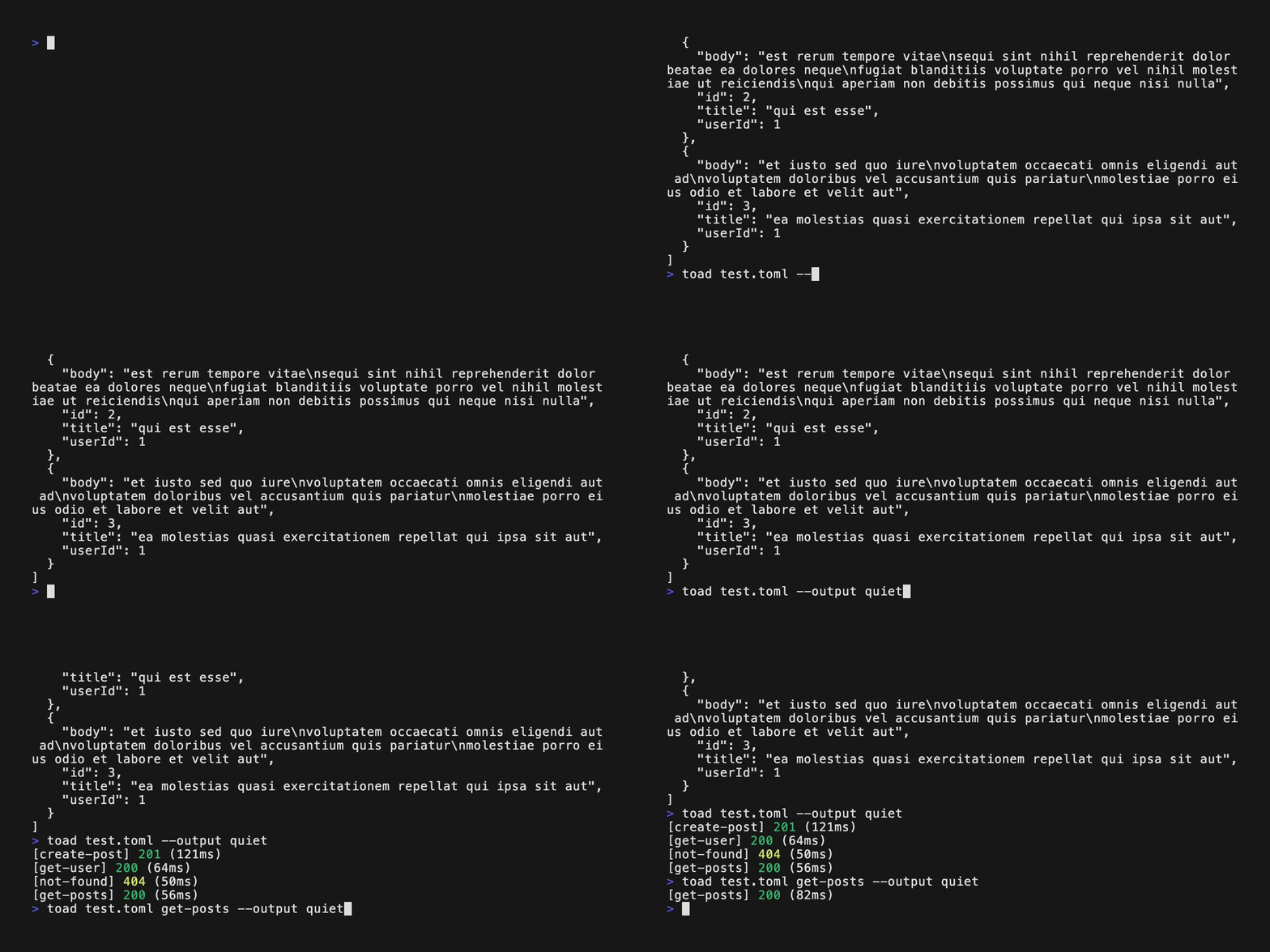
- Then you can run toad and have it run all the operations: `toad test.toml`.
- You can also tell toad to run a single operation: `toad test.toml get-posts`.
- You can also tell toad to quiet its outputs: `toad test.toml -o quiet`. It'll only output the operation name, code, and elapsed time.
- You can also tell toad to be really quiet (aka silent): `toad test.toml -o silent`. Toad will only use the return code and produce no stdout. Just a 0 if all's swell or 1 otherwise.
- Finally, you can tell toad to shout it's output: `toad test.toml -o verbose`. Toad will show you the resolved URL, headers, body, and response. See [doc/output_format.md](doc/output_format.md) for all the output modes.
### Usage
### Run A Single Operation and Save Output Only
1. Add the operation to the TOML file, if you haven't done so already.
```toml
[get-posts]
method = "GET"
url = "{{base_url}}/posts"
```
2. Run toad with `-o response-only` and redirect the output to a file: `toad test.toml get-posts -o response-only > get-posts.json`
### Listen Mode
Toad can also flip roles and act as a simple capture server: instead of running a collection file, it listens on a
port and logs/records every inbound request it receives (URL with query params, headers, and body), always
responding with `200 OK`. This is handy for inspecting what a webhook or client is actually sending.
- Start listening on a port: `toad --listen 8080`. Every request is printed to stdout as it arrives.
- Append captured requests to a file instead of printing them: `toad --listen 8080 --output-file requests.log`.
When `--output-file` is set, stdout only logs a short line (timestamp, method, URL) per request; the full
detail (headers + body) goes to the file.
- `--listen` and a collection file are mutually exclusive — listen mode doesn't use a TOML file at all.
### Authentication
Instead of hand-building an `Authorization` header, use the `auth` shorthand:
```toml
[get-user]
method = "GET"
url = "{{base_url}}/users/1"
auth = "bearer {{token}}"
```
`bearer` and `basic` (`auth = "basic {{user}}:{{pass}}"`, base64-encoded for you) are both supported.
Set `auth` in `[config]` to apply it to every request in the collection by default, and override it
per-request when needed. See [doc/auth.md](doc/auth.md) for details, precedence rules, and
troubleshooting.
### Variable Capture
A request can capture values from its response for later requests to use:
```toml
[create-user]
method = "POST"
url = "{{base_url}}/users"
body = '{"name": "Toad"}'
[create-user.capture]
user_id = "$.id" # JSONPath into the response body
location = "header:Location" # a response header
[get-user]
method = "GET"
url = "{{base_url}}/users/{{user_id}}"
```
Captures can use JSONPath (RFC 9535) queries, response headers, the status code, or the raw body. A request
that uses an undefined `{{variable}}` fails instead of sending the literal text. To send literal braces, write
`\{{` or set `interpolate_body = false` on the request. See
[doc/variable_capture.md](doc/variable_capture.md) for examples, including logging in and reusing a token.
### Response Time Assertions
Fail a request that takes too long with `expect_max_ms`, per request or as a `[config]` default:
```toml
[config]
expect_max_ms = 1000
[search]
url = "{{base_url}}/search"
expect_max_ms = 2000
```
To relax every limit at once in a slower environment, use `--time-scale 2` or `TOAD_TIME_SCALE=2` (the flag wins
if both are set), or `off` to skip time limits. See [doc/response_time.md](doc/response_time.md) for what is timed,
warnings, and troubleshooting.
### Retry on Failure
Retry failed requests with `retry`, per request or as a `[config]` default:
```toml
[config]
retry = 3 # up to 3 more attempts
retry_delay_ms = 1000 # wait between attempts (default 1000)
[create-order]
method = "POST"
url = "{{base_url}}/orders"
retry = 0 # don't send this one twice
```
Connection errors, `expect_status`, `expect_max_ms`, and capture failures are retried. `--retry <N|off>` or
`TOAD_RETRY` changes retries for a run without editing the file. See [doc/retry.md](doc/retry.md), including the
section on requests that change data.
### Custom CA
If a server presents a certificate signed by a CA that isn't in your system's trust
store (an internal/corporate root, for example), point toad at it instead of falling
back to `ignore_ssl`:
```toml
[config]
use_custom_ca = "./internal-ca.pem"
```
The path is resolved relative to the collection file. The file itself is
content-sniffed, so it can be:
- A PEM file or bundle (one or more `-----BEGIN CERTIFICATE-----` blocks)
- A Java KeyStore (`.jks`)
- A PKCS12 keystore (`.p12`/`.pfx`)
`toad test.toml --use-custom-ca ./other-ca.pem` overrides whatever `use_custom_ca`
is set to in the TOML.
JKS and PKCS12 files are password protected. Toad never reads a keystore password
from the TOML file itself (so it can't end up committed to source control) — supply
it with `--use-custom-ca-password` or the `TOAD_CA_PASSWORD` environment variable
(the flag wins if both are set). PEM files don't need a password.
See [doc/custom_ca.md](doc/custom_ca.md) for more detail, including troubleshooting.