# tiny - Yet another console IRC client
[](https://travis-ci.org/osa1/tiny)
[](./LICENSE)
[](https://crates.io/crates/tiny)
tiny is an IRC client written in Rust.
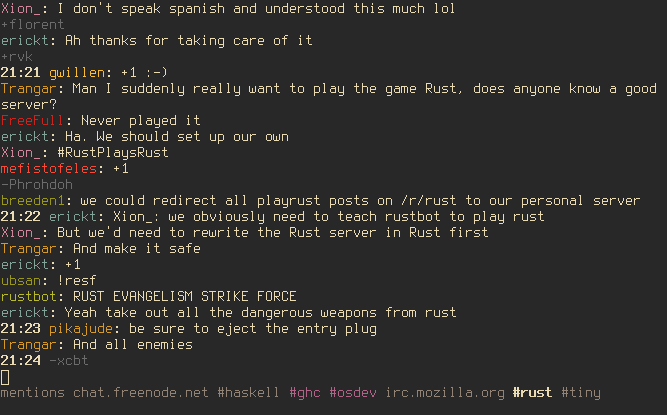
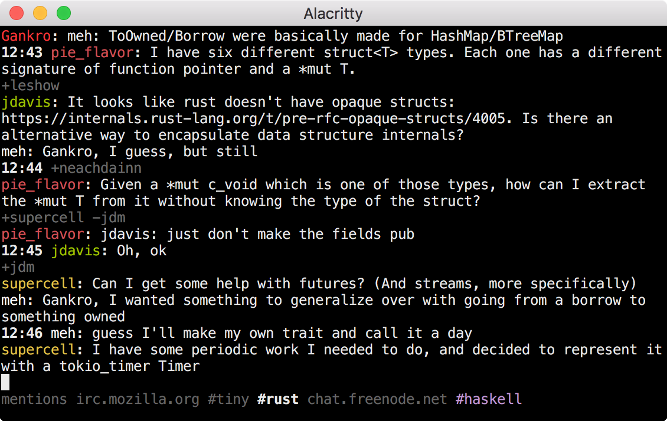
## Features
- Clean UI: consecutive join/part/quit messages are shown in a single line, time
stamps for a message is omitted if it's the same as the message before.
(inspired by [irc-core](https://github.com/glguy/irc-core))
- All mentions to the user are collected in a "mentions" tab, including server
and channel information. "mentions" tab solves the problem of missing mentions
to you in channels after hours of inactivity.
- Mentions to the user in a channel is highlighted (the channel tab is also
highlighted in the tab list)
- Simple config file format for automatically connecting to servers, joining
channels, registering the nickname etc. See [configuration
section](#configuration) below.
- Nick tab-completion in channels
- Nicks in channels are colored.
- Disconnect detection and automatic reconnects. You can keep tiny running on
your laptop and it automatically reconnects after a sleep etc.
- Key bindings inspired by terminal emulators and vim. See [key bindings
section](#key-bindings) below.
- Configurable colors
## Installation
Install the Rust nightly toolchain, clone the repo, and run `cargo install` (or
`cargo install --force` if you already have an older version installed). There's
currently no way to publish a crate on crates.io without publishing all the
dependencies, so tiny won't be on crates.io for a while.
tiny is tested on Linux and OSX.
## Configuration
When tiny couldn't find a config file at `~/.tinyrc.yml` it creates one with
some defaults and exits. Edit that file before re-running tiny to change the
defaults. If you want to create the file yourself, the default file looks like
this:
```yaml
# Servers to auto-connect
servers:
- addr: irc.mozilla.org
port: 6697
# optional field, defaults to false:
tls: true
hostname: yourhost
realname: yourname
nicks: [tiny_user]
auto_cmds:
- 'msg NickServ identify hunter2'
- 'join #tiny'
# Defaults used when connecting to servers via the /connect command
defaults:
nicks: [tiny_user]
hostname: yourhost
realname: yourname
auto_cmds: []
# Where to put log files
log_dir: '/home/user/tiny_logs'
# Color theme based on 256 colors (if supported). Colors can be defined as color
# indices (0-255) or with their names.
#
# Accepted color names are:
# default (0), black (0), maroon (1), green (2), olive (3), navy (4),
# purple (5), teal (6), silver (7), gray (8), red (9), lime (10),
# yellow (11), blue (12), magenta (13), cyan (14), white (15)
#
# Attributes can be combined (e.g [bold, underline]), and valid values are bold
# and underline
colors:
nick: [ 1, 2, 3, 4, 5, 6, 7, 9, 10, 11, 12, 13, 14 ]
clear:
fg: default
bg: default
user_msg:
fg: black
bg: default
err_msg:
fg: black
bg: maroon
attrs: [bold]
topic:
fg: cyan
bg: default
attrs: [bold]
cursor:
fg: black
bg: default
join:
fg: lime
bg: default
attrs: [bold]
part:
fg: maroon
bg: default
attrs: [bold]
nick_change:
fg: lime
bg: default
attrs: [bold]
faded:
fg: 242
bg: default
exit_dialogue:
fg: default
bg: navy
highlight:
fg: red
bg: default
attrs: [bold]
completion:
fg: 84
bg: default
timestamp:
fg: 242
bg: default
tab_active:
fg: default
bg: default
attrs: [bold]
tab_normal:
fg: gray
bg: default
tab_new_msg:
fg: purple
bg: default
tab_highlight:
fg: red
bg: default
attrs: [bold]
```
## Command line arguments
By default (i.e. when no command line arguments passed) tiny connects to all
servers listed in the config. tiny considers command line arguments as patterns
to be matched in server addresses, so you can pass command line arguments to
connect to only a subset of servers specified in the config. For example, in
this config:
```yaml
servers:
- addr: irc.mozilla.org
...
- addr: chat.freenode.net
...
```
By default tiny connects to both servers. You can connect to only the second
server by passing `freenode` as a command line argument.
## Key bindings
- `C-a`/`C-e` to move cursor beginning/end in the input field
- `C-k` for deleting rest of the line
- `C-w` for deleting a word
- `C-left`/`C-right` for moving one word backward/forward
- `page up`/`page down` or `shift-up`/`shift-down` or for scrolling
- `C-n`/`C-p` for next/previous tab
- `C-c enter` to quit.
- `alt-{1,9}` switch to tab
- `alt-0` switch to last tab
## Commands
Commands start with `/` character.
- `/msg <nick> <message>`: Send a message to a user. Creates a new tab.
- `/join <channel>`: Join to a channel
- `/close`: close the current tab. Leaves the channel if the current tab is a
channel. Leaves the server if the tab is a server.
- `/connect <hostname>:<port>`: Connect to a server. Uses `defaults` in the
config file for nick, realname, hostname and auto cmds.
- `/connect`: Reconnect to the current server. Use if you don't want to wait
tiny to reconnect automatically after a connectivity problem.
- `/away <msg>`: Set away status
- `/away`: Remove away status
- `/nick <nick>`: Change nick
- `/names`: List all nicks in the current channel
- `/reload`: Reload configuration
- `/clear`: Clears tab contents
## Development
tiny is in early stages of development. Some of features that you might think
are essential may be missing. Please open an issue for those features (or even
better, a pull request!).
Being a Rust n00b, I spent a lot of time trying to convince borrow checker,
failing at that, and either adding bunch of ugly hacks (e.g. instead a loop that
modifies single element implementing a loop that finds an index and modifying
that index after the loop), or using a simpler but less efficient code (e.g.
cloning things redundantly to avoid borrow checking). Still, I think the
connection manager (`conn.rs`) and UI parts (`tui` module) are not too bad.
Mess is mostly in `lib.rs` which implements the main logic (command and message
handling etc.).
Any suggestions / code reviews / pull requests are very welcome!
If you're looking to contribute, see TODOs below. If you don't know where to
start, open an issue and I'd love to help.
## TODOs
- Paste events are ignored when string includes newline characters (`\n`). It'd
be nice to use $EDITOR for editing multi-line pastes before sending.
- Logging should be improved. Currently messages are logged in raw form in
`<log dir>/server_raw.log`, but outgoing message are not logged. Channel logs
are printed in a weird format etc.
- Only a small subset of IRC messages are implemented. I don't moderate
channels, so my needs are simple. For moderation commands or other commands
that tiny currently doesn't support, maybe we should implement a "send raw
message" command so that any user can directly send an IRC message to a server
without any support from tiny.
- Implement system notification support for private messages and highlights.
When to show (and maybe even how to show) a notification should be
configurable as otherwise it may be annoying.

