
tinsel



Clean terminal output for Rust CLIs, with a little sparkle. Live step lists, spinners, tables, trees, prompts and error reports that all look like they belong together.
use *;
let live = new;
let build = live.step;
let upload = live.step;
build.start;
build.done;
upload.start;
upload.progress;
upload.done;
live.finish_with_card;
  deploy  my-app → production

    ●    Build                                                        1.2s
    ●    Upload                                                       1.7s

  ╭────────────────────────────────────────────────────────────────────────╮
  │  ● deployed in 3.8s                                                    │
  │                                                                        │
  │  url       https://my-app.example.com                                  │
  ╰────────────────────────────────────────────────────────────────────────╯
Why tinsel?
Most CLIs bolt together a spinner crate, a table crate, a prompt crate and a colour crate, and end up looking like four different programs. tinsel is one small library with one visual language: pink accents, quiet greys, eased animation, and a twinkle when something finishes.
- It learns: steps remember how long they took, so next run a spinner becomes a real estimate:
usually 42s · 18s left - It knows if you're watching: switch windows during a long run and you get a desktop notification when it ends; come back and whatever finished meanwhile twinkles
- It fits your terminal: detects light and dark backgrounds and redraws the palette to suit, or in another accent colour for your brand
- It speaks JSON too: one switch turns every step, message and error into JSON lines for tools, or quiets everything but problems
- Zero dependencies: nothing in your lockfile but tinsel
- One shape for everything: one-liners print; anything bigger is a
Blockyou can print, format, or test - Builders that read like the output:
Card::success("deployed").kv("url", …) - Errors you can match on: prompts return
prompt::Error::Cancelled, not a mysteryio::Error - Behaves in CI: no colour or animation when piped,
NO_COLORrespected, plain[ok] Build (1.2s)lines in logs - Panics stay tidy: a panic mid-run leaves the last frame on screen and prints a proper report, not a scrambled terminal
- Testable:
set_color_mode(ColorMode::None)and.plain()give you exact text to assert on, andLive::headlessruns a display on a clock you control
Install
Quickstart
One task with a spinner, then a message:
let files = spin;
success;
A step list for anything with stages: see the example at the top. Steps can run at the same time from different threads, have sub-steps, and log lines above the display:
let build = live.step;
let targets = ; // drawn indented, folded once they pass
build.start;
scope;
build.done;
live.log; // printed above, kept on screen
Steps that don't run can say why: lint.skip("nothing changed"), upload.cancel("stopped by hand"), or release.wait("waiting for approval") until someone says go, then
release.start(). A failed step can start() again, and its timer starts over.
Progress bars can be a thin line (the default) or a waveform that lights up as it plays
through, like an audio track: Live::new(…).bar(BarStyle::Waveform).
Run real commands as steps. The latest line of output shows as the step's detail; if it fails, its last lines stay under it:
use Command;
build.run?;
push.command
.timeout
.retries
.run?;
fetch.retry?; // any closure returning a Result
See where the time went, with live.finish_with_timeline():
  Build      ━━━━━━━━━━━━━━━━━━━━━━━━━━━━━━━━                  1.7s
    linux    ━━━━━━━━━━━━━━━━━━━━━━━                           1.2s
    macos    ━━━━━━━━━━━━━━━━━━━━━━━━━━━━━━━━                  1.7s
  Publish                                    ━━━━━━━━━━━━━     0.7s
             ──────────────────────────────────────────────
             0s                                          2.9s
Anything else, redrawn in place: a Region calls your closure a few times a second and
draws the Block it returns, a table of services say, with lines logged above it. It's
cleared when it finishes, unless you keep() the last frame:
let region = new.keep;
region.log;
region.finish;
A loop with a progress bar:
use ProgressIterator;
for file in files.iter.progress
Ask questions, and handle someone pressing Ctrl-C. Long lists filter as you type:
use prompt;
match select
Text questions can validate, and ask again until the answer passes:
let port = new
.placeholder
.validate
.ask?;
let replicas: u32 = number?;
let live_on = date?; // a calendar
let notes = editor?; // opens $EDITOR
let region = new.suggestions.ask?; // Tab completes
let path = new.paths.ask?; // like a shell
confirm_typing?; // type it to go on
Lists can be grouped, and say why an option can't be picked:
let service = new
.heading.option.disabled
.heading.options
.back // ← returns prompt::Error::Back
.ask?;
let version = new
.option.note.badge
.option.note
.allow_custom // or type a version that isn't listed
.ask?;
Help that looks like the rest of your CLI, with a short entrance on a terminal: lines fade in one after another while the name shimmers:
new
.version
.usage
.command
.flag
.example
.animate;
Documents: tinsel::markdown(changelog).page() draws Markdown (headings, lists, tables,
code coloured by language) and pages it if it's long; tinsel::json(body)? indents and
colours JSON.
Show data:
use ;
new
.row
.row
.sort_by_desc // by value: 1.2s before 84ms
.border
.print;
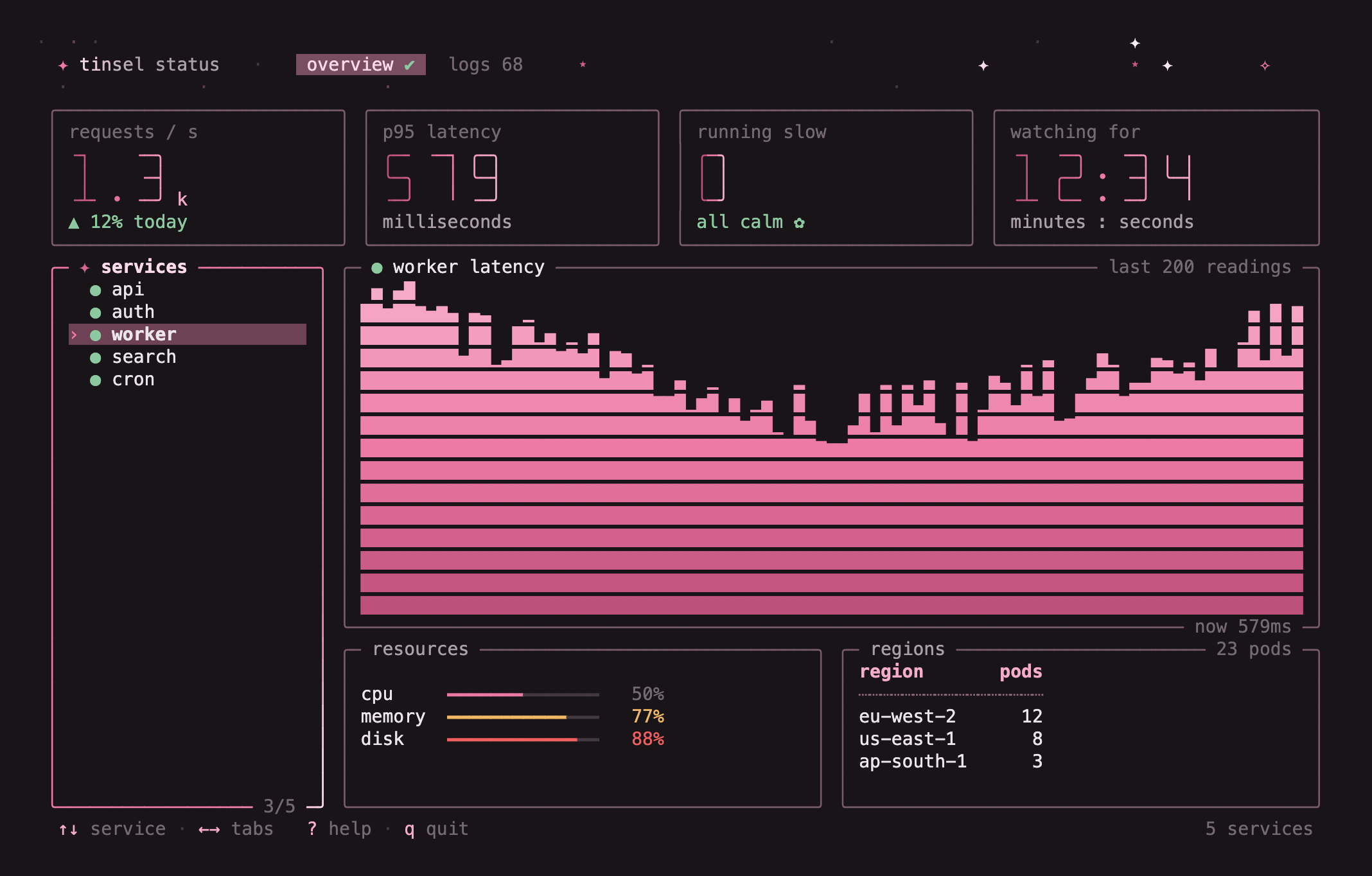
Full-screen apps: dashboards, pickers, little toys. Write a struct, draw it in view,
change it in event; app::run takes over the screen and gives it back afterwards (even on
a panic). Panels shimmer when focused, lists scroll themselves, and numbers can be drawn big:
use ;
run?; // q or Esc quits
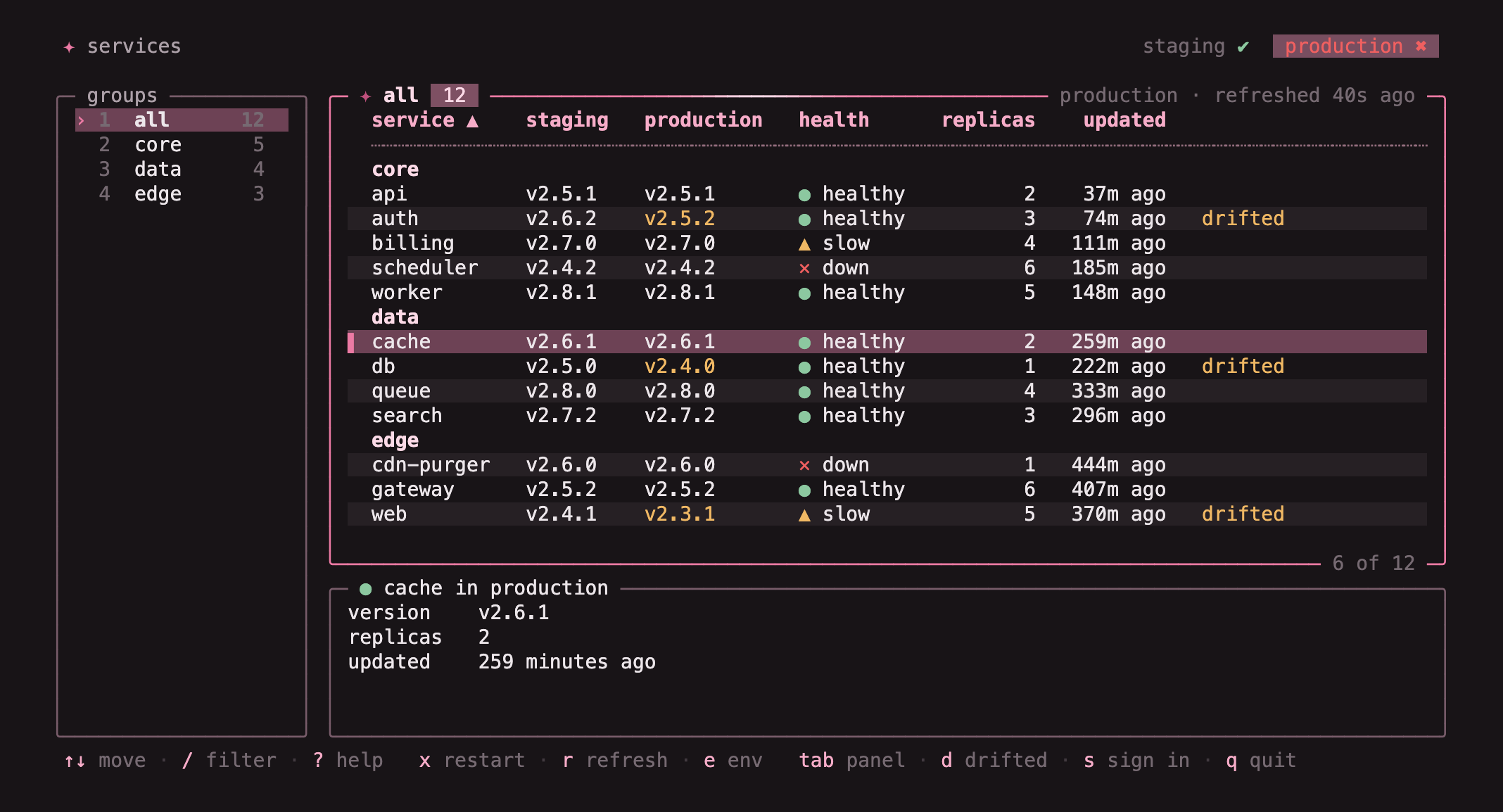
Grid is a table with a cursor, for lists you move through: rows can sit under group
headings, a panel can say where its data came from on its top border, and tabs can carry
their own colour and a mark:
Anything tinsel draws (tables, trees, cards, any Block) goes straight into a panel, next to
List, Tabs, Plot, Stat, big text, hints and twinkling Sparkles.
app::snapshot(&app, 80, 24) draws a frame without a terminal, for tests, and
Frame::html() (or Block::html()) turns one into a web page that looks just like it, for
screenshots.
Report an error with its whole cause chain:
from_error
.hint
.eprint;
  ✕  couldn't start
     ╰─ couldn't read app.toml
        ╰─ No such file or directory (os error 2)
  →  create app.toml, or pass --config <path>
…and point at the problem:
new
.cause
.code
.eprint;
  ✕  couldn't read app.toml
     ╰─ port must be a number
       ╭─ app.toml:3
     2 │ host = "0.0.0.0"
     3 › port = "eighty"
       │        ^^^^^^^^ not a number
     4 │ workers = 4
Panics, drawn the same way, with the terminal put back first:
For scripts and tools, one switch from a --json or --quiet flag:
set_output; // or TINSEL_OUTPUT=json
{"event":"step","title":"deploy","step":"Build","path":["Build"],"state":"done","secs":1.204}
{"event":"error","title":"couldn't start","causes":["couldn't read app.toml"],"code":[],"hint":"…"}
When stdout isn't yours, because it carries a command's output or data for another program, draw on stderr instead:
set_target; // or TINSEL_TARGET=stderr
See it
What's in it
| live work | Live step lists with sub-steps, parallel steps and log · skipped, cancelled and waiting steps · Region for any block · commands as steps with timeouts and retries · timeline · spin / try_spin · Progress with rate and time left, unknown or growing totals · .progress() on any iterator · bars as a line or a waveform · seven Spinners (sparkle twinkles, and is the default) |
| messages | success · info · warn · error · hint · counter · title · rule · callout · Report (with code excerpts) |
| data | Table (numbers right-align and sort by value, units and all; borders, wrapping, footers, highlighted rows) · Tree · pairs · columns |
| charts | sparkline · bars · meter · histogram · heatmap |
| code | diff · Code excerpts with syntax colouring (Rust, TOML, JSON, YAML, shell, Python, JS), a highlighted line and a caret under the problem |
| documents | markdown (and markdown::wrapped) · json · Help with an animated entrance · Block::page |
| inline | badge · link (clickable) · Card · paint, paint_on, paint_bg, bold, dim, italic, underline · style::gradient · anim for shimmering labels, moving bars and values that glide into place (Glide, Glider) |
| apps | app::run full-screen apps, drawn only when something changes or a frame asks (animate, animate_at, redraw_at) · Panel · List · Grid · ScrollView · TextInput (with a History and its own idea of a word) · TextArea · Scrollbar · Tabs · Plot · Stat · big · hints · Sparkles · Rect layout with rows / columns · keys with their modifiers, read and written in vim's notation (<C-a>) and shown as symbols (⌃A), mouse and resize events · Job for work on another thread · app::snapshot for tests · Frame::html for screenshots |
| questions | prompt::confirm · input / Input (validation, placeholders, line editing) · password · number · date · select / Select · multiselect / MultiSelect (filter as you type, headings, disabled options with a reason, validation) · Dropdown for long lists (notes, badges, your own answer) · .back() to go back a question · editor · suggestions and path completion · confirm_typing |
| setup | install_panic_hook · set_output (Json, Quiet) · set_target (stderr) · set_focus · set_history · set_accent · set_theme · set_color_mode · set_fps · set_ctrl_c · timings |
| helpers | text::{width, width_with_tabs, pad, truncate, truncate_start, wrap, strip_ansi, content_width, fuzzy, highlight} · terminal_width · format::{bytes, duration, count, grouped, ago, ago_long, plural, local_clock} · clipboard::{copy, paste} (system tools, or OSC 52 over ssh) |
Full reference with examples for every item: docs.rs/tinsel.
Testing what you print
Catch everything your own code prints through tinsel, as it would come out into a pipe: messages, steps, spinners, tables and errors, in order, without colour:
One piece on its own needs no capturing: .plain() gives any block's text.
For the colour codes themselves, tinsel::with_color_mode(ColorMode::TrueColor, || …)
turns colour on for that closure, on that thread alone, so tests beside it aren't affected.
A Live display can run headless, on a clock that only moves when you say:
Things it does on its own
Estimates from history. Live steps remember their durations in ~/.cache/tinsel (or
$XDG_CACHE_HOME/tinsel), one small file per program. A step with no progress of its own
gets an estimate bar from its recent median, and says slower than usual when it is. Only
successful steps on a terminal are recorded. Live::remember_as("name") picks the file,
.no_history(), tinsel::set_history(false) or TINSEL_NO_HISTORY=1 (any value but an empty one) turns it off. tinsel::timings(Some("my-app"))
shows what's been learned, and flags a step whose last run was unusually slow.
Focus. In terminals that report window focus (iTerm2, kitty, WezTerm, Ghostty,
Alacritty, foot, …), animation slows while you're away, a run of 10s or more that finishes
while you're away sends a notification (.notify_after(…), .no_notify()), and returning
re-twinkles what finished. Keys typed during a run are held back from the display and handed
to the shell afterwards. .no_focus(), tinsel::set_focus(false) or TINSEL_NO_FOCUS=1
turns all of this off, and leaves stdin alone. tinsel::notify sends a
notification yourself.
Tall displays. A Live display taller than the terminal leaves its top rows in
scrollback and keeps redrawing what fits, so long step lists don't scramble the screen.
Theme. Decided once from TINSEL_THEME=light|dark, then COLORFGBG, then by asking the
terminal for its background colour. Override with tinsel::set_theme.
Accent. Pink unless TINSEL_ACCENT (violet, blue, teal, orange, or a hue in
degrees) or tinsel::set_accent says otherwise. Every pink moves, including the faint tint
in the greys; red, amber and sage keep their meaning.
When it decides wrong, tinsel doctor says what it decided and why (colour off: stdout isn't a terminal, theme light: COLORFGBG=0;15) and warns about any setting it can't use,
like a misspelt TINSEL_THEMES or TINSEL_OUTPUT=jsn. tinsel::doctor() gives you the same
report, to print from a --debug-terminal flag of your own.
Platform notes
Everything works on macOS, Linux and Windows. Ctrl-C puts the cursor and the terminal back everywhere.
- Raw mode on Unix shells out to
stty, to stay free of dependencies. Prompts,Keysand full-screen apps need it, so a minimal container without coreutils can't read single keypresses (everything that only draws still works). - Terminal size comes from
ioctlon macOS and Linux. Other Unixes, the BSDs among them, fall back to$COLUMNSand$LINES, then 80×24. - Widths follow the Unicode 17 tables built into tinsel, so CJK, emoji and combining marks line up without a lookup at run time.
- Windows uses the console API for keys and size (Windows Terminal or a Windows 10+ console). Focus awareness and background detection need a terminal that answers, which there means Windows Terminal; the older console quietly goes without rather than wait for answers that never come.
- Colour is truecolor when
COLORTERMsays so, the 16 basic colours whenTERMnames a terminal without256color, and 256 colours otherwise.NO_COLOR,FORCE_COLORandCLICOLORare respected.
Stability
tinsel follows semantic versioning from 1.0: nothing public changes
in a way that breaks your code without a new major version. Enums and structs that are
likely to grow are #[non_exhaustive], so a new key, colour mode or event can arrive in a
minor release; match them with a _ arm.
The minimum supported Rust version is 1.85. Raising it is a minor release, not a major one, and is said so in the changelog.