**Markdeep Feature Demo**
Morgan McGuire
This demonstration documents the features of
[Markdeep](http://casual-effects.com/markdeep) and acts as a test for
it. Markdeep is a text formatting syntax that extends Markdown, and a
Javascript program for making it work in browsers. The two most
powerful features are its ability to run in any **web browser** on the
client side and the inclusion of **diagrams**.
[Click here](https://casual-effects.com/markdeep/features.md.html?noformat)
to see this document without automatic formatting.
Markdeep is free and easy to use. It doesn't need a plugin, or
Internet connection. There's nothing to install. Just start
writing in Vi, Nodepad, Zed, Emacs, Visual Studio, Atom, or another
editor! You don't have to export, compile, or otherwise process
your document.
If you want to support development of Markdeep, just buy my
[Graphics Codex](http://graphicscodex.com) book for $10 on Amazon. Revenue from that funds my
open source projects.
Basic Formatting
=======================================================================================
Text formatting:
Source | Result
`__bold__` | __bold__
`*italic*` | *italic*
`_italic_` | _italic_
`~~strikethrough~~` | ~~strikethrough~~
<code>`inline code`</code> | `inline code`
`5 kg/m^3` | 5 kg/m^3
You can add CSS to change the styles. See the Custom Formatting section
for some examples.
Formatted text may **cross
lines** and be as small as **a** single character. It can _also
be indented and
split across lines_ simultaneously.
Markdeep intelligently does not apply bold or italic formatting to
math expressions such as x = 3 * y - 2 * z or WORDS_WITH_INTERNAL_UNDERSCORES.
It also protects HTML `<tags>` in code blocks from disappearing.
If you _want_ italics or bold inside of a word, for example in: SCUBA = <b>S</b>elf <b>C</b>ontained
<b>U</b>nderwater <b>B</b>reathing <b>A</b>pparatus, then just use HTML `<b>` and `<i>`
tags---a markdown syntax won't be any more readable in that case.
Exponents only work for positive and negative integers. For arbitrary exponents,
use LaTeX notation: `$x^y$` ==> $x^y$, or HTML tags: `x<sup>y</sup>` ==> x<sup>y</sup>.
Links
---------------------------------------------------------------------------------------
There are many forms of implicit and explicit links:
Source | Result
`[hyperlink]("http://casual-effects.com")` | [hyperlink]("http://casual-effects.com")
`<http://casual-effects.com>` | <http://casual-effects.com>
`http://casual-effects.com` | http://casual-effects.com
`morgan@casual-effects.com` | morgan@casual-effects.com
`test@foo.co.uk` | test@foo.co.uk
`<test@foo.co.uk>` | <test@foo.co.uk>
`Lists section` | Lists section
`Tiny Grids subsection` | Tiny Grids subsection
`Section [Lists]` | Section [Lists]
`sec. [lists]` | sec. [lists]
`subsection [lists]` | subsection [lists]
`table [states]` | table [states]
`tbl. [states]` | tbl. [states]
`Table [states]` | Table [states]
`figure [robot]` | figure [robot]
`fig. [robot]` | fig. [robot]
`Figure [robot]` | Figure [robot]
`lst. [sort]` | lst. [sort]
`listing [sort]` | listing [sort]
`Listing [sort]` | Listing [sort]
`[New York Times][nyt]` | [New York Times][nyt]
`[Google][]` | [Google][]
`footnote [^syntax]` | footnote
`[#Kajiya86]` | [#Kajiya86]
Any section header name followed by "section", "subsection", or "sec." will automatically be
linked to that section. To link by number, use one of those key words followed by the section
name in brackets. This won't work if you use the actual word "section" _as the title of a
section_...but it would be unexpected to have a section named "section" in a real document
anyway.
You can also insert HTML anchor (`<a>`) tags to create arbitrary internal links.
Reference-style links include arbitrary formatted text in brackets
followed by a case-insensitive symbolic name that must be defined
elsewhere in the document:
- Example using a symbolic name: [New York Times][nyt]
- Example using the text as its own symbol: [Google][]
Put the definitions at a convenient location elsewhere in the document:
~~~~~~~~~~~~none
[nyt]: http://nytimes.com
[google]: http://google.com
~~~~~~~~~~~~
Markdeep also supports footnotes, endnotes [^syntax], and citations
[#Kajiya86] using a similar syntax. The actual notes and bibliography
may be placed at the bottom of the document:
~~~~~~~~~~~~~~~~none
[#Kajiya86]: James T. Kajiya. 1986 ...
[^syntax]: Endnotes look like ...
~~~~~~~~~~~~~~~~
Regular links may also have attributes, for example,
[this link will directly download](http://casual-effects.com/markdeep/robot.jpg download).
URLs in explicit links may be surrounded by optional `"` quotation `"` marks. If your URL
contains parentheses, then it _must_ be surrounded in quotation marks to make it unambigious:
- [a link with parens]("http://casual-effects.com(bar)")
- []("http://casual-effects.com(bar)")
URLs with various forms of special characters are handled well even without quotation marks:
- [hyperlinks to URLs with underscores](https://archive.org/stream/Bazin_Andre_What_Is_Cinema_Volume_1/Bazin_Andre_What_Is_Cinema_Volume_1_djvu.txt)
- https://archive.org/stream/Bazin_Andre_What_Is_Cinema_Volume_1/Bazin_Andre_What_Is_Cinema_Volume_1_djvu.txt
You can also use the CommonMark angle bracket syntax
`<http://foo.com/bar?arg=value&hello>` ==>
<http://foo.com/bar?arg=value&hello> provided that your URL only
contains lower-case letters. Otherwise the browser interprets it
as a tag and converts it to lowercase before Markdeep runs.
**Bibliography**:
[#Kajiya86]: James T. Kajiya. 1986. The Rendering Equation.
In _Proceedings of Computer Graphics and Interactive Techniques
(SIGGRAPH '86)_, ACM, 143-150. http://dx.doi.org/10.1145/15922.15902
field. Endnotes may not contain multiple paragraphs (sorry, David
Foster Wallace), although they may refer to _other_ endnotes.
[nyt]: http://nytimes.com
[google]: http://google.com
Lists
---------------------------------------------------------------------------------------
A blank line or line ending in a colon must precede lists. Lists have lines that begin with a
number (which is not required to increment) and a period, or a bullet character (-, *, +). They
can also be nested. Example:
~~~~~~~~~~~~~~~~~~~~~~~
1. Monday
2. Tuesday
1. Morning
2. Afternoon
3. Wednesday
- Bullets
- Bullets
1. Thursday
+ Bullets
+ Bullets
1. Friday
* Bullets
~~~~~~~~~~~~~~~~~~~~~~~
Examples of lists and floating diagrams:
*****************************
1. Monday * A B C *
2. Tuesday * *-------->o<------->o *
1. Morning * ^ / ^ | *
2. Afternoon * | v \ v *
3. Wednesday * o----->o---->o<---->* *
- Bullets * D E F G *
- Bullets *****************************
4. Thursday
5. Friday
A list with just bullets:
- Bread
- Fish
- Milk
- Cheese
A list containing a code block:
1. This is the first list item.
~~~~~~
// This is a code block
if (x > 0) printf("hello!\n");
~~~~~~
1. This is the second list item.
- Level 1
- Level 2
- Level 3
- Level 1 again
- 1
- 1.a
- 1.a.i
- 1.a.ii
- 1.b
Lists can also:
* Use asterisks
* Instead of
* Minus signs
* `or have code`
* *and* other formatting
or
+ Use plus
+ Signs
Lists with blank lines between the elements are formatted with more spacing. There's actually
nothing special about this...that's just the regular paragraph separator.
1. Here's a list with some large elements that I chose to format by putting a blank line
between the elements to make them more visually distinguished.
2. That's necessary with paragraph-sized elements; otherwise the
text would appear to run together into a wall of text!
- You can also
- Nest lists within lists with spaces
Lists that begin with a number other than 1 use that number as the start index. The subsequent
numbers are irrelevant and automatically replaced with ascending numbers:
6. A list that starts at six!
1. and just
1. keeps going...
Task Lists
------------------------------------------------------------------------------
You can use the strikethrough syntax for task lists:
~~~~~~~~~~~~~~~~~~~~~~~~~~~~~
1. ~~completed~~
1. ~~subtask~~
1. uncompleted
~~~~~~~~~~~~~~~~~~~~~~~~~~~~~
which will format as:
1. ~~completed~~
1. ~~subtask~~
1. uncompleted
or, use github or streamlined checkbox syntax for task lists :
~~~~~~~~~~~~~~~~~~~~~~~~~~~~~~~~
github:
- [x] completed
- [x] subtask
- [ ] uncompleted
streamlined:
[x] completed
[x] subtask
[ ] uncompleted
~~~~~~~~~~~~~~~~~~~~~~~~~~~~~~~~~
github:
- [x] completed
- [x] subtask
- [ ] uncompleted
streamlined:
[x] completed
[x] subtask
[ ] uncompleted
Definition Lists
------------------------------------------------------------------------------
Apple
: Pomaceous fruit of plants of the genus Malus in
the family Rosaceae.
Multiple paragraphs are supported.
Orange
: The fruit of an evergreen tree of the genus Citrus.
- Can also
- Put lists
- In definitions
Definition lists with short definitions are formatted more tersely:
Grapes
: Available in purple ("red") and green ("white") varieties.
Bananas
: Only yellow.
Schedule Lists
------------------------------------------------------------------------------
Schedule lists contain titles that begin with a valid date. After the
title, arbitrary indented content appears, including lists, text, and
equations:
~~~~~~~~~~~~none
Tuesday Feb 16, 2016: Project Launch
- Create specifications
- Initialize revision control system
Friday Feb 19, 2016: Build Milestone
- Build system fully functional
- Placeholder unit tests committed
⋮
(Monday Feb 29, 2016): Office Closed
~~~~~~~~~~~~
If the schedule is sufficiently long and dense, then a calendar preview
is shown before it. Entries in parenthesis with no further details
are formatted with a more subtle style.
Formatted schedule lists
look like:
Tuesday Feb 16, 2016: Project Launch
- Create specifications
- Initialize revision control system
Friday Feb 19, 2016: Build Milestone
- Build system fully functional
- Placeholder unit tests committed
_Plan for weekend overtime if we miss this milestone_
Wednesday Feb 24, 2016: Site Visit
**Whole team vistits client**. Dress appropriately.
Friday Feb 26, 2016: Demo Milestone
- Internal demonstrations for management
- QA reports due
(Monday Feb 29, 2016): Office Closed
Tuesday Mar 1, 2016: Code Freeze
- Commit final features before this date
- Only priority 1 fixes with issue tracking numbers
after this point
Monday Mar 7, 2016: Beta
Wednesday Mar 16, 2016: Gold
Dates can be in any unambigous format that includes a month, day, and
four-digit year between 1000 and 2999, such as:
- 2001-03-01
- 1 Apr. 1999
- 4-07-1976
- February 16, 2016
- 2020 Jan. 15
- May 15th, 1982
The US date format MM/DD/YYYY is not supported because it is
ambiguous. The date may include the name of a day of the week
(e.g., Sunday). It will be replaced with the correct day.
When months are given by name, they must match the localization
settings.
Block Quotes
------------------------------------------------------------------------------
Email-style indenting creates a blockquote:
> This is an indented blockquote: Ut at felis diam. Aliquam massa odio, pharetra ut neque sed, commodo
> dignissim orci. Curabitur quis velit gravida, blandit diam nec,
> lacinia quam. Maecenas pharetra, velit in vestibulum auctor, diam
> ipsum suscipit arcu, non sodales orci nibh sit amet leo. Nulla dictum
Blockquotes formatted in the style of an actual quotation receive
special treatment for fancy quoting:
> "You want to make it seem alive and effortless and fun, but that's an
> art that took me 25 years to really learn. I wanted to do it very much
> 25 years ago, but I didn't know how."
>
> -- David O. Russell, director of American Hustle
Tables
------------------------------------------------------------------------------
Source:
~~~~~~~~~~~~none
1 | 4 | 10
ME | IA | CO
Blue | Red | Brown
[Optional caption]
1 | 4 | 10
ME | IA | CO
Blue | Red | Brown
[Table [states]: Caption with label.]
Fish | F | 1.00
Axe | W | 3.25
Gold | I |20.50
| B |
| C |
| D |
~~~~~~~~~~~~
Result:
1 | 4 | 10
ME | IA | CO
Blue | Red | Brown
[Optional caption]
1 | 4 | 10
ME | IA | CO
Blue | Red | Brown
[Table [states]: Caption with label.]
With alignment:
Fish | F | 1.00
Axe | W | 3.25
Gold | I |20.50
Single-column:
| B |
| C |
| D |
Page Breaks
------------------------------------------------------------------------------
To support other markdown conventions, `\pagebreak` and `\newpage` will insert a page break in
a document when printed or converted to PDF. You can also use a pattern of a series of five `+`
signs on their own line, which will form a horizontal rule on screen and a new page when
printed.
++++++++++++++++++++++++++++++++++++++++++++++++++++++++++++++++++++
To make top-level section headers also force page breaks, add the following to your
document or CSS file:
~~~~~~~~~~~~~~~~~~~~~~~~~~~~~~~~~~~~~~~~~
<style>.md h1, .md .nonumberh1 {page-break-before:always}</style>
~~~~~~~~~~~~~~~~~~~~~~~~~~~~~~~~~~~~~~~~~
Images
------------------------------------------------------------------------------
There's no natural way to embed an image into a document that is also readable as plain
text. Markdeep follows markdown's somewhat reasonable syntax. The source
` `
becomes:

Optional labels may be applied:
` ![Figure [robot]: A picture of a robot](robot.jpg)`
![Figure [robot]: A picture of a robot](robot.jpg)
Any text after the URL is used as HTML attributes. If the attributes
include width or height specifications, then the image is linked to
the original.
````
![Figure [robot2]: A picture of a robot with a caption larger
than it.](robot.jpg width="150px" border="1")
````
![Figure [robot2]: A picture of a robot with a caption larger
than it.](robot.jpg width="150px" border="1")
 If the image is embedded in a
paragraph and has a caption, then it floats right and any width
specification is propagated to the full captioned image, for example,
the image to the right of this paragraph. Use a space as your caption
if you want this behavior but don't actually want a visible caption.
You can also just use a raw HTML `<img>` tag:
` <img src="robot.jpg" width="128" border="2">`
<img src="robot.jpg" width="128" border="2">
Captionless images work as well. Source `` becomes:

Images are centered if they appear in their own paragraph block and inlined otherwise. Grids of
images are recognized and laid out as grids using HTML tables:
  
  
Reference Images
----------------------------------------------------------------
Markdeep introduces a new feature called "reference images". These have several nice properties:
* Put long image URLs elsewhere in the document for clarity
* Indirection so that multiple images can reference a symbolic URL
* Embed [base64 encoded images as data URIs](https://www.base64-image.de/) directly in a Markdeep text file
~~~~~~~~~~~~~~~~~~~~~~~~~~~~~~~~~~~~~~~~~~~~~~
![This is a bas64 embedded reference image][hasselhoff.png]
[hasselhoff.png]: data:image/png;base64,iVBORw0KGgoAAAANSUhEUgAAA...
~~~~~~~~~~~~~~~~~~~~~~~~~~~~~~~~~~~~~~~~~~~~~~
![This is a base64 embedded reference image][hasselhoff.png]
The syntax is the same as CommonMark reference _links_, just with square brackets.
You can use all of the Markdeep image features with reference images, including
image grids, floating images, and images with attributes.
Videos
----------------------------------------------------------------
Video file extensions are automatically detected and will embed a small video
player:

URLs for Youtube and Vimeo videos will also automatically embed a video player:

![Figure [fig:boy]: The Boy with a Camera For a Face](https://vimeo.com/channels/staffpicks/151493973)
URLs for images may be surrounded in optional `"` quotation `"` marks. If your URL contains
parentheses, then it _must_ be surrounded in quotation marks to make it unambigious.
Recall that URLs are not permitted to contain spaces (by their specification), so to embed
a local image whose filename has a space, either rename the file or replace the spaces
with `%20` in the URL version of the name.
Audio
------------------------------------------------------------------------------
MP3, WAV, OGG, etc. audio for music and podcasts are supported using the same
syntax as for images and video:
~~~~~~~~~~~~~~~~~~~~~~~~~~~~~~~~~~

~~~~~~~~~~~~~~~~~~~~~~~~~~~~~~~~~~
Creates:

Symbol Substitutions
------------------------------------------------------------------------------
Markdeep converts `<->`, `<==>`, `->`, `-->`, `<-`, `<--`, `==>`, and `<==` to arrows if they
aren't in a code block or latex expression and are surrounded by whitespace. Examples:
- if this ==> then that
- here <== there
- this <==> that
- A <- B
- X -> Y
- back <-> forth
- long --> way
- back <-- there
Two or three minus signs are converted to an em dash--like that.
An "x" between numbers, such as 1920x1080 or 3 x 4, will be converted to the times
symbol.
Negative numbers, such as -5 and minus signs between numbers such as
2 - 1, will have a minus sign instead of a hyphen.
Degrees are reformatted to the degree symbol:
- Cold, 37-degree F water.
- A 45-degree angle.
- A right angle's measure is 90 degrees.
It doesn't reformat the word "degree" when not following digits:
- Don't give me the third degree!
- I have two degrees from MIT.
"Smart quotes" are applied for double-quote marks based on position
relative to whitespace:
"a" b c
a "b" c
a b "c"
a "b!" c
a "b," c
a "b". C
a, "b" c
a---"b"---c
a ("b") c
"error" ==> "correction"
Inch or minute markers such as 3' 9" are not converted. Quotation
marks in <span style="color:#F00">HTML attributes</span> and
in code blocks, e.g., `var x = "hello world"`, are not converted.
Admonitions
-----------------------------------------------------------------------------
Admonitions are small break-out boxes with notes, tips, warnings, etc. for the reader. They
begin with a title line of a pattern of three exclaimation marks, an optional CSS class, and an
optional title. All following lines that are indented at least three spaces are included in the
body, which may include multiple paragraphs.
The default stylesheet provides classes for "note" (default), "tip", "warning", and "error".
These are case insensitive and ignore any colon after the CSS class. Here are some examples:
````````````````````````````````````````````````````````````` none
!!!
I'm a note. Don't mind me, I'm just sitting here.
!!! note
Another note.
!!! Tip
Close the door on the way out.
!!! WARNING
I'm a warning, perhaps. *Something might happen!*
!!! ERROR: Seriously
Watch out, something **bad** could happen.
This is still more error text.
`````````````````````````````````````````````````````````````
!!!
I'm a note. Don't mind me, I'm just sitting here.
!!! note
Another note.
!!! Tip
Close the door on the way out.
!!! WARNING
I'm a warning, perhaps. *Something might happen!*
!!! ERROR: Seriously
Watch out, something **bad** could happen.
This is still more error text.
Fenced Code Blocks
------------------------------------------------------------------------------
Set off large blocks of code using equal-length strings of tilde `~`
or back-tick <code>`</code> characters. Each produces a different CSS
class so that they can be styled differently.
By default, tilde blocks have lines before and after them and are
inset for use as code listings instead of large inline code
blocks. Both styles receive syntax coloring and automatic programming
language detection.
You can override automatic programming language detection by putting
the name of the language immediately following the first fence. You can
specify a custom CSS class for a code block by placing its name after the
language name.
<pre>
<code>~~~~~~~~~~~~~~~~~~~~~~~~~~~~~~~~~~~ C</code>
void insertion_sort(int data[], int length) {
for (int i = 0; i < length; ++i) {
...
}
}
<code>~~~~~~~~~~~~~~~~~~~~~~~~~~~~~~~~~~~</code>
</pre>
~~~~~~~~~~~~~~~~~~~~~~~~~~~~~~~~~~~ C
void insertion_sort(int data[], int length) {
for (int i = 0; i < length; ++i) {
...
}
}
~~~~~~~~~~~~~~~~~~~~~~~~~~~~~~~~~~~
Alternative back-tick markup:
````````````````````````````````````
def insertionSort(data):
for i in range(0, len(data)):
j = i;
while (j > 0) and (data[j] < data[j - 1]):
temp = data[j]
data[j] = data[j - 1]
data[j] = temp
--j
````````````````````````````````````
### HTML and LaTeX Blocks
You can even have HTML in a code block:
~~~~~~~~~~~~~~~~~~~~~~~~~~~~~~~~~~~~~
<b>Show this</b> HTML as <i>source</i>,
<code>not code</code>.
<img src="robot.jpg">
~~~~~~~~~~~~~~~~~~~~~~~~~~~~~~~~~~~~~
`<img src="robot.jpg">`
`````````
<img src="robot.jpg">
`````````
LaTeX and other languages that use dollar signs work fine inside code
fences:
~~~~~~~~~~~~~~~~~~~~~~~~~~~~~~~~~~~~~
$ \int_0^1 x^2 dx $
$$$a = $$$e
~~~~~~~~~~~~~~~~~~~~~~~~~~~~~~~~~~~~~
...and of course, Markdeep inside Markdeep:
~~~~~~~~~~~~~~~~~~~~~~~~~~~~~~~~~~~~~
- Do not
- Format
- this as a **list**!
~~~~~~~~~~~~~~~~~~~~~~~~~~~~~~~~~~~~~
### Code Blocks with Captions
Code listings may have captions:
~~~~~~~~~~~~~~~~~~~~~~~~~~~~~~~~~~~~~~ Python
def insertionSort(data):
for i in range(0, len(data)):
j = i;
while (j > 0) and (data[j] < data[j - 1]):
temp = data[j]
data[j] = data[j - 1]
data[j] = temp
--j
~~~~~~~~~~~~~~~~~~~~~~~~~~~~~~~~~~~~~~
[Listing [sort]: An insertion sort]
If you don't have a lot of exposition to share, then code blocks can be back to back:
~~~~~~~~~~~~~~~~~~~~~~~~~~~~~~~~~~
printf("Hello\n");
~~~~~~~~~~~~~~~~~~~~~~~~~~~~~~~~~~
~~~~~~~~~~~~~~~~~~~~~~~~~~~~~~~~~~
printf("World\n");
~~~~~~~~~~~~~~~~~~~~~~~~~~~~~~~~~~
### Line Numbers
Adding the `linenumbers` CSS class to a listing makes line numbers appear:
<pre><code>~~~~~~~~~~~~~~~~~~~~~~~~~~~~~~~~~~~~~~ Python linenumbers</code>
def insertionSort(data):
...
<code>~~~~~~~~~~~~~~~~~~~~~~~~~~~~~~~~~~~~~~</code>
</pre>
~~~~~~~~~~~~~~~~~~~~~~~~~~~~~~~~~~~~~~ Python linenumbers
def insertionSort(data):
for i in range(0, len(data)):
j = i;
while (j > 0) and (data[j] < data[j - 1]):
temp = data[j]
data[j] = data[j - 1]
data[j] = temp
--j
~~~~~~~~~~~~~~~~~~~~~~~~~~~~~~~~~~~~~~
[Listing [sort2]: An insertion sort with line numbers]
### Multi-code Blocks and Custom CSS
You can interlace different languages or CSS classes within a single code block, but each is required
to specify the language in this case. This is convenient for highighting lines or showing the
trace of an interactive session.
An example of a fenced code block with a CSS class:
<pre>
<code>~~~~~~~~~~~~~~ Python input</code>
>>> x = [1, 2, 3, 4]
>>> [y * 2 for y in x]
<code>~~~~~~~~~~~~~~ none output</code>
[2, 4, 6, 8]
<code>~~~~~~~~~~~~~~ Python input</code>
>>> x + [5]
<code>~~~~~~~~~~~~~~ none output</code>
[1, 2, 3, 4, 5]
<code>~~~~~~~~~~~~~</code>
[This listing combines multiple code blocks to show the input and output of an interactive section.]
</pre>
And its result:
~~~~~~~~~~~~~~ Python input
>>> x = [1, 2, 3, 4]
>>> [y * 2 for y in x]
~~~~~~~~~~~~~~ none output
[2, 4, 6, 8]
~~~~~~~~~~~~~~ Python input
>>> x + [5]
~~~~~~~~~~~~~~ none output
[1, 2, 3, 4, 5]
~~~~~~~~~~~~~~
[This listing combines multiple code blocks to show the input and output of an interactive section.]
<style>
.md code > .input { font-style: italic; }
.md code > .output { font-weight: bold; background: #FF7; margin-left: -20px; padding-left: 20px}
</style>
### Less-than Signs in Code###
#### Summary ####
Less-than and greater-than signs (`<` and `>`) do not need to be escaped in diagrams or code
as long as they do not appear immediately adjacent to a letter. Usually adding spaces or
using inline code backquote escaping will suffice even in those cases.
If you have trouble with less-than and greater-than signs right next to capitalized
letters in code blocks, do _one_ of the following:
- Put spaces after angle brackets: `std::vector< Capitalized >`
- Use HTML entity escapes: `std::vector&ltCapitalized&gt`
- Wrap code examples in `<script type="preformatted">...</script>`
- Wrap your whole document in `<script type="preformatted">...</script>`
You don't need to do this for legal HTML or XML in code blocks.
#### Details ####
Less-than and greater-than signs are allowed in code blocks
(as well as anywhere else in Markdeep), and will be handled
correctly if they are followed by a whitespace character.
Likewise, legal HTML and XML are correctly processed as code
when in code blocks.
However, because browsers interpret "`<`" _immediately followed by_
a character as an HTML tag, less-than signs without a following space
must be formatted more carefully in shell scripts and languages such
as C++ and Java.
If the character following the less-than sign is lower-case, for
example in: "`std::vector<int>`", then no consideration is
needed. If the character following less-than is a capital letter, then
the browser will automatically make it lower case. If the following
character is a slash, then the browser will interpret it as a stray
tag and automatically remove it.
If you care most about being able to read your document in a browser
when the markdeep.js script is not available (due to no local copy and
no Internet connection), then either use surrounding whitespace or
use HTML entity codes to avoid incorrect processing of less-than signs.
**Reformatted Examples:**
~~~~~~~~~~~~~~~~~~~~
#include <foo.h>
ls < /dev/null
ls&lt;/dev/null
std::vector< Capitalized > array;
std::vector&lt;Capitalized&gt; array;
~~~~~~~~~~~~~~~~~~~~
If care more about not having to reformat your code examples, then
just include them in preformatted `<script>` blocks:
**Script Block Examples:**
<script type="preformatted">
~~~~~
#include <foo.h>
std::vector<Capitalized> array;
ls</dev/null
~~~~~
</script>
You can also include your entire document in a preformatted script
block to avoid the need for marking up each code (and inline code)
example.
Diagrams
--------------------------------------------------------------------------------
Diagrams can be inserted alongside, as in this ****************************
example, or between paragraphs of text as shown * .---------. *
below. * | Server |<------. *
* '----+----' | *
The diagram parser leaves symbols used as labels * | | *
unmodified, so characters like > and ( can appear * | DATA CYCLE | *
inside of the diagram. In fact, any plain text * v | *
may appear in the diagram. In addition to labels, * .-------. .----+----. *
any un-beautified text will remain in place for * | Security| | File | *
use as ASCII art. Thus, the diagram is rarely * | Policy +->| Manager | *
distored by the beautification process. * '-------' '---------' *
****************************
*************************************************************************************************
*.-------------------. ^ .---. *
*| A Box |__.--.__ __.--> | | | *
*| | '--' v | | *
*'-------------------' | | *
* '---------+--' / Nor/is this. --- *
*************************************************************************************************
[Figure [diagram]: Diagrams can also have captions]
Code with line-like symbols is allowed in diagrams and is parsed correctly so
long as you make it unambiguous:
**********************************************
* .-------------------------+--+--------.
* | --x; x->y |__| |
* | 0 __proto__ __FILE__ <= |
* | __ a | b --> foo |
* | |__| y--; x || y a + b <--o--+
* |__|__|_______________________________|
**********************************************
Here's a diagram on the left of some text:
************** _Song of Myself: 35_
* | | *
* --+<---+-- * Would you hear of an old-time sea-fight? <br/>
* | ^ * Would you learn who won by the light of the moon and stars? <br/>
* v | * List to the yarn, as my grandmother's father the sailor told it to me.
* --+--->+-- *
* | | * Walt Whitman
**************
If there is no leading text on the left except for whitespace, a diagram may omit the asterisks on the
right side for convenience:
****************************************
* .----.
* | |
* '----' .------------>
* |
* '-------------
****************************************
Below are some more examples of diagrams.
Diagram Examples
================================================================================
Lines with Decorations
--------------------------------------------------------------------------------
*************************************************************************************************
* ________ o * * .--------------. *
* *---+--. | | o o | ^ \ / | .----------. | *
* | | '--* -+- | | v / \ / | | <------. | | *
* | '-----> .---(---' --->*<--- / .+->*<--o----' | | | | | *
* <--' ^ ^ | | | | | ^ \ | '--------' | | *
* \/ *-----' o |<----->| '-----' |__| v '------------' | *
* /\ *---------------' *
*************************************************************************************************
Graph with Large Nodes
--------------------------------------------------------------------------------
*************************************************************************************************
* *
* .---. .-. .-. .-. .-. *
* | A +----->| 1 +<---->| 2 |<----+ 4 +------------------. | 8 | *
* '---' '-' '+' '-' | '-' *
* | ^ | ^ *
* v | v | *
* .-. .-+-. .-. .-+-. .-. .+. .---. *
* | 3 +---->| B |<----->| 5 +---->| C +---->| 6 +---->| 7 |<---->| D | *
* '-' '---' '-' '---' '-' '-' '---' *
*************************************************************************************************
Graph with Small Nodes
--------------------------------------------------------------------------------
*************************************************************************************************
* A 1 2 4 8 *
* *----->o<---->o<----o-----------. o *
* ^ ^ | ^ *
* | | | | *
* v | v | *
* o<--->*<---->o---->*---->o---->o<---->* *
* 3 B 5 C 6 7 D *
*************************************************************************************************
Flow Chart
--------------------------------------------------------------------------------
*************************************************************************************************
* . *
* .---------. / \ *
* | START | / \ .-+-------+-. ___________ *
* '----+----' .-------. A / \ B | |COMPLEX| | / \ .-. *
* | | END |<-----+CHOICE +----->| | | +--->+ PREPARATION +--->| X | *
* v '-------' \ / | |PROCESS| | \___________/ '-' *
* .---------. \ / '-+---+---+-' *
* / INPUT / \ / *
* '-----+---' ' *
* | ^ *
* v | *
* .-----------. .-----+-----. .-. *
* | PROCESS +---------------->| PROCESS |<------+ X | *
* '-----------' '-----------' '-' *
*************************************************************************************************
Line Ends
--------------------------------------------------------------------------------
*************************************************************************************************
* *
* o--o *--o / / * o o o o o * * * * o o o o * * * * o o o o * * * * *
* o--* *--* v v ^ ^ | | | | | | | | \ \ \ \ \ \ \ \ / / / / / / / / *
* o--> *--> * o / / o * v ' o * v ' o * v \ o * v \ o * v / o * v / *
* o--- *--- *
* ^ ^ ^ ^ . . . . ^ ^ ^ ^ \ \ \ \ ^ ^ ^ ^ / / / / *
* | | * o \ \ * o | | | | | | | | \ \ \ \ \ \ \ \ / / / / / / / / *
* v v ^ ^ v v ^ ^ o * v ' o * v ' o * v \ o * v \ o * v / o * v / *
* * o | | * o \ \ *
* *
* <--o <--* <--> <--- ---o ---* ---> ---- *<-- o<-- -->o -->* *
* *
*************************************************************************************************
Tests for some tough cases:
************************************************
* +-+ \ \ | / / *
* + + \ v v v / *
* +-+ \ .---------. / \ | / *
* v| |v vvv *
* +-+ --->| |<--- -->o<-- *
* | | ^| |^ ^^^ *
* +-+ / '---------' \ / | \ *
* / ^ ^ ^ \ *
* / / | \ \ *
************************************************
Trees
--------------------------------------------------------------------------------
*************************************************************************************************
* *
* . . . .--- 1 .-- 1 / 1 *
* / \ | | .---+ .-+ + *
* / \ .---+---. .--+--. | '--- 2 | '-- 2 / \ 2 *
* + + | | | | ---+ ---+ + *
* / \ / \ .-+-. .-+-. .+. .+. | .--- 3 | .-- 3 \ / 3 *
* / \ / \ | | | | | | | | '---+ '-+ + *
* 1 2 3 4 1 2 3 4 1 2 3 4 '--- 4 '-- 4 \ 4 *
* *
*************************************************************************************************
Circuits
--------------------------------------------------------------------------------
*************************************************************************************************
* ____ * *
* | |_____.---. | *
* o _____| )----------)-------. *
* / \ | '---' | __|__ *
* /___\ | | \ / *
* | '-------------. | \ / *
* A ----------------' | | o *
* .-------------------. o-----)-------' | *
* | |___.---. | |___.---. *
* B ---*---.__.---. ___| )--*--.__..---. ____) )----- Y *
* __| o----*--' '---' ______)) )---' '---' *
* C -------' '---' | | ''---' *
* | o *
* | / \ *
* | /___\ *
* | | *
* '--------------' *
*************************************************************************************************
Gantt Chart
--------------------------------------------------------------------------------
*************************************************************************************************
* ║ Preproduction┆ Alpha┆ RC1┆
* ═══════════╬══════════════╪════════════╪════════════════╪══
* Story ║ ▆▆▆▆▆▆▆▆ ┆ ▆┆▆▆▆ ┆
* Concept Art║ └▆▆▆▆▆▆┆▆▆▆┐ ┆ ┆
* Modeling ║ ┆ └▆▆▆▆▆▆▆▆┆▆▆▆▆▆▆▆ ┆
* Rigging ║ ┆ └▆▆▆┆▆▆▆▆▆▆▆▆▆▆▆▆ ┆
* Mechanics ║ ▆▆▆▆▆▆┆▆▆┐ ┆ ░░░░▆▆▆▆ ┆
* Engine Code║ ▆▆▆▆▆▆▆┐ │ ┆ └────────▆┆▆▆▆▆▆▆▆▆▆▆▆▆▆ ┆
* Game Code ║ └─┴▆┆▆▆▆▆▆▆▆▆▆▆▆▆┆▆▆▆▆ ░░░░ ▆ ┆
* ║ ┆ ┆ Freeze ┆
*************************************************************************************************
Big Shapes
--------------------------------------------------------------------------------
*************************************************************************************************
* *
* .---------. . .-------. .-------. .---------. .-----. .----. *
* \ / / \ \ \ | | | | / \ / \ *
* \ / / \ \ \ | | | | / \ | | *
* \ / / \ \ \ | | | | \ / | | *
* \ / / \ \ \ | | | | \ / \ / *
* ' '---------' '-------' '-------' '---------' '-----' '----' *
* *
*************************************************************************************************
Small Shapes
--------------------------------------------------------------------------------
*************************************************************************************************
* .---. __ .. *
* .--. . .-----. \ / .---. .---. ___ ___ | | | ) *
* / \ / \ \ / .-. . ' . | | .---. .---. | | / \ | | '--' '' *
* \ / / \ \ / | | / \ / \ '---' / / \ \ | | \___/ |___| .. __ *
* '--' '-----' ' '-' '---' /___\ '---' '---' '---' ( | |__| *
* '' *
*************************************************************************************************
Overlaps and Intersections
--------------------------------------------------------------------------------
*************************************************************************************************
* *
* .-. .-. .-. .-. .-. .-. *
* | | | | | | | | | | | | *
* .---------. .--+---+--. .--+---+--. .--| |--. .--+ +--. .------|--. *
* | | | | | | | | | | | | | | | | | | *
* '---------' '--+---+--' '--+---+--' '--| |--' '--+ +--' '--|------' *
* | | | | | | | | | | | | *
* '-' '-' '-' '-' '-' '-' *
*************************************************************************************************
Big Grids
--------------------------------------------------------------------------------
*************************************************************************************************
* .----. .----. *
* / \ / \ .-----+-----+-----. *
* + +----+ +----. | | | | .-----+-----+-----+-----+ *
* \ / \ / \ | | | | / / / / / *
* +----+ B +----+ + +-----+-----+-----+ +-----+-----+-----+-----+ *
* / \ / \ / | | | | / / / / / *
* + A +----+ +----+ | | B | | +-----+-----+-----+-----+ *
* \ / \ / \ +-----+-----+-----+ / / A / B / / *
* '----+ +----+ + | | | | +-----+-----+-----+-----+ *
* \ / \ / | A | | | / / / / / *
* '----' '----' '-----+-----+-----' '-----+-----+-----+-----+ *
* *
*************************************************************************************************
Small Grids
--------------------------------------------------------------------------------
*************************************************************************************************
* ___ ___ .---+---+---+---+---. .---+---+---+---. .---. .---. *
* ___/ \___/ \ | | | | | | / \ / \ / \ / \ / | +---+ | *
* / \___/ \___/ +---+---+---+---+---+ +---+---+---+---+ +---+ +---+ *
* \___/ b \___/ \ | | | b | | | \ / \a/ \b/ \ / \ | +---+ | *
* / a \___/ \___/ +---+---+---+---+---+ +---+---+---+---+ +---+ b +---+ *
* \___/ \___/ \ | | a | | | | / \ / \ / \ / \ / | a +---+ | *
* \___/ \___/ '---+---+---+---+---' '---+---+---+---' '---' '---' *
* *
*************************************************************************************************
Tiny Grids
--------------------------------------------------------------------------------
*************************************************************************************************
* ┌─┬─┬─┬─┬─┐ ▉▉ ▉▉ ▉▉ ⬢ ⬡ ⬡ ┌┬┬┬┬┬┬┬┬┐ ⁚⁚⁚⁚⁚⁚⁚⁚⁚⁚ ___________ +-+-+-+-+ *
* ├─┼─┼─┼─┼─┤ ▉▉ ▉▉ ⬢ ⬢ ⬡ ⬡ ├┼┼┼┼┼┼┼┼┤ ⁚⁚⁚⁚⁚⁚⁚⁚⁚⁚ |__|__|__|__| +-+-+-+-+ *
* ├─┼─┼─┼─┼─┤ ▉▉ ▉▉ ▉▉ ⬢ ⬢ ⬢ ⬡ ⬡ ├┼┼┼┼┼┼┼┼┤ ⁚⁚⁚⁚⁚⁚⁚⁚⁚⁚ |__|__|__|__| +-+-+-+-+ *
* ├─┼─┼─┼─┼─┤ ▉▉ ▉▉ ⬡ ⬡ ⬡ ⬡ ├┼┼┼┼┼┼┼┼┤ ⁚⁚⁚⁚⁚⁚⁚⁚⁚⁚ |__|__|__|__| +-+-+-+-+ *
* └─┴─┴─┴─┴─┘ ▉▉ ▉▉ ▉▉ ⬡ ⬡ ⬡ └┴┴┴┴┴┴┴┴┘ ⁚⁚⁚⁚⁚⁚⁚⁚⁚⁚ |__|__|__|__| +-+-+-+-+ *
*************************************************************************************************
Dot Grids
--------------------------------------------------------------------------------
*************************************************************************************************
* *
* o o o o o * * * * * * * o o * o o o * * * o o o · * · · · · · · *
* o o o o o * * * * * o o o o * o o o o * * * * * o * * · * * · · · · · · *
* o o o o o * * * * * o * o o o o o o o o * * * * * o o o o o · o · · o · · * * · *
* o o o o o * * * * * o * o o o o o o o * * * * o * o o · · · · o · · * · *
* o o o o o * * * * * * * * * o o o o * * * o * o · · · · · · · * *
* *
*************************************************************************************************
Unicode in Diagram
--------------------------------------------------------------------------------
************************************************************************************************
* ↖ ↗ ✶ ✹ ✩ ⓵ ⎲ ░░▒▒▓▓▉▉ ▚▚ ▢ ▢ ⬚ ⬚ ⊕
* ▲ ◀━━━━━━━▶ ↙ ↘ ➊ ❶ ➀ ① ➕ ➖ ➗ ❌ ⎳ ╲ ╱ ░░▒▒▓▓▉▉ ▚▚ ▢ ▢ ⬚ ⬚ ⊜
* ┃ ╭╌╌╌╌╌╌╌╮ ╔═══════╗ ┏━━━━━━━┓ ┏╍╍╍╍╍╍╍┓ ╲ ╱ ░░▒▒▓▓▉▉ ▚▚ ⬣ ⬣ ⎔ ⎔ ⊗
* ┃ ╎ ╎ ║ ║ ┃ ┃ ╏ ╏ ⎛ ⎧ ⎡ ╳ ░░▒▒▓▓▉▉ ▚▚ ⬣ ⬣ ⎔ ⎔ ⊘
* ┃ ╎ ╎ ║ ║ ┃ ┃ ╏ ╏⋮ ⎜ ⎨ ⎢ ╱ ╲ ░░▒▒▓▓▉▉ ▚▚ ◯ ◯ ⏣ ⏣ ⊙
* ▼ ╰╌╌╌╌╌╌╌╯ ╚═══════╝ ┗━━━━━━━┛ ⋱ ┗╍╍╍╍╍╍╍┛⋮ ⎝ ⎩ ⎣╱ ╲ ░░▒▒▓▓▉▉ ▚▚ ◯ ◯ ⏣ ⏣ ⊛
* ⋱ ⋮ ◢▉▉◣
* ∑xᵢ 𝚺xᵢ ∫t²dt ⋱ ⋮ ◥▉▉◤
************************************************************************************************
Simple Plot Diagram
-------------------------------------------------------------------------------
*************************************************
* ▲
* Uin ┊ .------------------------
* ┊ |
* ┊ |
* *---'┄┄┄┄┄┄┄┄┄┄┄┄┄┄┄┄┄┄┄┄┄┄┄┄▶
*
* Udc▲
* Udc_OK ┊ .---------------------
* ┊ / :
* ┊ / :
* *---'┄┄┄┄:┄┄┄┄┄┄┄┄┄┄┄┄┄┄┄┄┄┄┄▶
* :<----->:
* ▲ 500ms :
* ┊ :
*Cpu.Qon ┊┄┄┄┄┄┄┄┄┄┄┄┄┄┄┄┄.-----------
* ┊ | Inactive
* ┊ Active |
* *----------------'┄┄┄┄┄┄┄┄┄┄┄▶
*
*************************************************
Graphics Diagram
-------------------------------------------------------------------------------
*************************************************************************************************
* . *
* 0 3 P * Eye / ^ / *
* *-------* +y \ +) \ / Reflection *
* 1 /| 2 /| ^ \ \ \ v *
* *-------* | | v0 \ v3 --------*-------- *
* | |4 | |7 | ◄╮ *----\-----* *
* | *-----|-* ⤹ +-----> +x / v X \ .-.<-------- o *
* |/ |/ / ⤴ / o \ | / | Refraction / \ *
* *-------* v / \ +-' / \ *
* 5 6 +z v1 *------------------* v2 | o-----o *
* v *
*************************************************************************************************
Annotated Table Diagram
--------------------------------------------------------------------------------
**********************************************
* ┏━━━━┳━━━━┳ ┳━━━━┓
* ┃ A₁ ┃ A₂ ┃ ⋯ ┃ Aⱼ ┃ <--- Basis
* ┡━━━━╇━━━━╇ ╇━━━━┩
* │ 16 │ 4 │ ⋯ │ 9 │
* ⎧ ├────┼────┼ ┼────┤
* │ │ 1 │ -2 │ ⋯ │ 10 │
* Xᵢ ⎨ ├────┼────┼ ┼────┤
* │ │ 8 │ 52 │ ⋯ │ 0 │
* ⎩ ├────┼────┼ ┼────┤
* │ 14 │ 0 │ ⋯ │ -1 │
* └────┴────┴ ┴────┘
**********************************************
Icon Diagram
--------------------------------------------------------------------------------
*************************************************************************************************
* .-. .--------. *
* .-+ | | | *
* .--+ '--. |'--------'| *
* | Server Cloud |<------------------>| Database | *
* '-------------' | | *
* ^ ^ '--------' *
* Internet | | ^ *
* .------------------------' '-------------. | *
* | | v *
* v v .------. .------. *
* .--------. WiFi .--------. Bluetooth .-----. / # # /| / # # /| *
* | |<------------->| |<---------->| | +------+/| LAN +------+/| *
* |Windows | | OS X | | iOS | | +/|<--->| +/| *
* +--------+ +--------+ | | |Ubuntu+/| |Ubuntu+/| *
* /// ____ \\\ /// ____ \\\ | o | | +/ | +/ *
* '------------' '------------' '-----' '------' '------' *
* Laptop 1 Laptop 2 Tablet 1 Dedicated Server Rack *
*************************************************************************************************
Styling Diagrams
------------------------------------------------------------------------------------
<style>
.md .inverse svg.diagram {
background: #333;
stroke: #FFF;
fill: #FFF;
}
.md .inverse svg.diagram .opendot {
fill: #333;
}
</style>
You can use CSS to style all diagrams or individual diagrams. For example,
the following has light lines on a dark background:
<div class="inverse">
****************************************************
* .---. . .----o----. *
* | | | | | | *
* | | --. |.-- | | *----*<---+ *
* | | .-.| | +--+ | |____| *
* | | | | | | | | | | *
* '---' '-'' ' ' ' o----o--->' *
****************************************************
</div>
Horizontal Rules
========================================================================
Following the CommonMark specification, any of these patterns can be used (and extended across
a whole line, of course) to produce a horizontal rule:
~~~~~~~~~~~~~~~~~~~~~~~~~~~~~~~~~~~~~~~~~~~~~~~~~~~~~~~~~~~ none
-----
- - -
_____
_ _ _
*****
* * *
~~~~~~~~~~~~~~~~~~~~~~~~~~~~~~~~~~~~~~~~~~~~~~~~~~~~~~~~~~~
Example:
-----
- - -
_____
_ _ _
*****
* * *
Embedded Math
========================
Markdeep automatically includes [MathJax](http://mathjax.org) if your
document contains equations and you have an Internet connection. That means
you get the **full power of LaTeX, TeX, MathML, and AsciiMath notation**.
Just put math inside single or double dollar signs.
$$ \Lo(X, \wo) = \Le(X, \wo) + \int_\Omega \Li(X, \wi) ~ f_X(\wi, \wo) ~ | \n \cdot \wi | ~ d\wi $$
You can also use LaTeX equation syntax directly to obtain numbered
equations:
\begin{equation}
e^{i \pi} + 1 = 0
\end{equation}
\begin{equation}
\mathbf{A}^{-1}\vec{b} = \vec{x}
\end{equation}
If you don't have equations in your document, then Markdeep won't
connect to the MathJax server. Either way, it runs MathJax after
processing the rest of the document, so there is no delay.
Markdeep is smart enough to distinguish non-math use of dollar signs,
such as $2.00 and $4.00, US$5, and 3$. Inline
math requires consistent spaces (or punctuation) either outside or inside
of the LaTeX dollar signs to distinguish them from
regular text usage. Thus, the following all work:
- $x^2$
- $ x^2 $
- ($x^2$)
- ($ x^2 $)
- Variable $x^2$,
- Variable $ x^2 $
- Two $x$ vars $y$ on the same line
- Different spacing styles: $\theta_{x}$ vs. $ \theta_{y} $
Unless you've changed out the default MathJax processor, you can define
your own LaTeX macros by executing `\newcommand` within dollar signs,
just as you would in LaTeX. Markdeep provides a handful of commands
defined this way by default because they're things that I frequently
need:
`\O(n)` | $\O(n)$
`\mathbf{M}^\T` | $\mathbf{M}^\T$
`45\degrees` | $45\degrees$
`x \in \Real` | $x \in \Real$
`x \in \Integer` | $x \in \Integer$
`x \in \Boolean` | $x \in \Boolean$
`x \in \Complex` | $x \in \Complex$
`\n` | $\n$
`\w` | $\w$
`\wo` | $\wo$
`\wi` | $\wi$
`\wh` | $\wh$
`\Li` | $\Li$
`\Lo` | $\Lo$
`\Lr` | $\Lr$
`\Le` | $\Le$
`10\un{m/s^2}` | $10\un{m/s^2}$
# ATX Headers
In addition to the underlined headers, you can also use ATX-style
headers, with multiple # signs:
## H2
### H3
#### H4
##### H5
###### H6
Although: do you really need six levels of subsection nesting?!
You can also create unnumbered sections that will not appear in the
table of contents using parentheses around the pound signs:
(##) Unnumbered H2
Multiple Columns
========================================================================
<div style="columns:2;-webkit-columns:2;-moz-columns:2;column-gap:3em;-webkit-column-gap:3em;-moz-column-gap:3em">
You can use the CSS
[columns](https://developer.mozilla.org/en-US/docs/Web/CSS/CSS_Columns/Using_multi-column_layouts)
style to make an HTML multicolumn block. Then, just use regular Markdeep within it and the
browser will automatically apply your multicolumn layout.
Browsers are even smart enough to break the columns correctly when
printing to PDF or to a printer. However, for a long document,
multiple columns don't work well when displayed on screen. That's
because there are no discrete "pages" on screen to break columns. So,
the browser will make each column as long as the entire document,
which is probably not what you want.
So, multi-column only works well if you know that you have very short
sections (as in this example), or if you were planning on printing to
separate pages when done.
</div>
Custom Formatting
=========================================================================
Manual
-------------------------------------------------------------------------
Markdeep uses CSS for styling. That means you can embed a style sheet
to override anything thatn you don't like about the built-in styling.
For example, if you don't want section numbering, just use:
~~~~~~~~~~~~~~~~~~~~~~~~~~~~~~~~~~~~~~~~~~
<style>h1:before, h2:before { content: none; }</style>
~~~~~~~~~~~~~~~~~~~~~~~~~~~~~~~~~~~~~~~~~~
Markdeep uses Markdown's syntax, even where I disagree with the
choices. But you aren't stuck with that. Do you wish that Markdown
had specified single-asterisk for `*bold*`? You can have
that:
~~~~~~~~~~~~~~~~~~~~~~~~~~~~~~~~~~~~~~~~~~
<style>em.asterisk { font-style: normal; font-weight: bold; }</style>
~~~~~~~~~~~~~~~~~~~~~~~~~~~~~~~~~~~~~~~~~~
Each of the list bullets (`+`, `-`, `*`) has its own CSS class. You
can use this, for example, to make `+` entries bold and `-` ones
use a circle:
~~~~~~~~~~~~~~~~~~~~~~~~~~~~~~~~~~~~~~~~~~
<style>
li.plus { font-weight: bold; }
li.minus { list-style-type: circle;}
</style>
~~~~~~~~~~~~~~~~~~~~~~~~~~~~~~~~~~~~~~~~~~
Style Sheets
------------------------------------------------------------------------
### Latex Article
To match the default Latex article formatting, insert the following anywhere in your document:
<pre class="listing tilde">
<<span>link</span> rel="stylesheet" href="https://casual-effects.com/markdeep/latest/latex.css?">
</pre>
### Dark
For an aggressively-stylized document with a black background, insert the following anywhere in
your document:
<pre class="listing tilde">
<<span>link</span> rel="stylesheet" href="https://casual-effects.com/markdeep/latest/dark.css?">
</pre>
### API Documentation
To use the API documentation template, insert the following anywhere in
your document:
<pre class="listing tilde">
<<span>link</span> rel="stylesheet" href="https://casual-effects.com/markdeep/latest/apidoc.css?">
</pre>
### Presentation Slides
To create presentation slides as a PDF, insert the following into
your document, using first-level headers for sections and second-level
headers for slides:
<pre class="listing tilde">
<<span>link</span> rel="stylesheet" href="https://casual-effects.com/markdeep/latest/slides.css?">
</pre>
Then, print the document to PDF.
Paragraph Numbering
--------------------------------------------------
Academic article or book proofs often have line numbers so that reviewers and editors can refer
to specific passages. This doesn't make sense for a document in a browser because line breaks
change based on the reader's screen size.
You can add _paragraph_ numbers to your Markdeep document by including the following HTML at
the bottom of your document. You can remove the `<style>` tag and place the code in a CSS file
as well.
~~~~~~~~~~~~~~~~~~~~~~~~~~~~~~~~~~~~~~~~~~~~~~~~~~ html
<style>
p::before {
content: "¶ " counter(paragraph);
counter-increment: paragraph;
margin-left: -50px;
width: 50px;
height: 0px;
overflow: visible;
font-size: 70%;
display: block;
color: #666;
}
</style>
~~~~~~~~~~~~~~~~~~~~~~~~~~~~~~~~~~~~~~~~~~~~~~~~~~
Localization
===================================================
There are two ways to localize the keywords such as Table, Diagram,
Monday, etc., from English to your favorite language.
The first is to
put a meta tag with a
[`lang`](http://www.iana.org/assignments/language-subtag-registry/language-subtag-registry)
attribute in the document, such as <`meta lang="ru"
charset="utf-8"`>. If your favorite language isn't supported by
Markdeep, just e-mail me a Javascript snippet with the appropriate
translations and I'll add it (see the source code for examples).
The second method is to manually set the `markdeepOptions.lang` field
before you include the script in your document.
Unicode (in UTF-8 encoding)
===================================================
To support Unicode input, you must add <`meta charset="utf-8"`> to
the *top* of your document (in the first 512 bytes).
- Asian characters 林花謝了春紅 太匆匆, 無奈朝來寒雨 晚來風 胭脂淚 留人醉 幾時重, 自是人生長恨 水長東
- Asian punctuation: 、。!,:
- Matching pairs «»‹›“”‘’〖〗【】「」『』〈〉《》〔〕
- Greek ΑΒΓΔ ΕΖΗΘ ΙΚΛΜ ΝΞΟΠ ΡΣΤΥ ΦΧΨΩ αβγδ εζηθ ικλμ νξοπ ρςτυ φχψω
- Currency ¤ $ ¢ € ₠ £ ¥
- Common symbols © ® ™ ² ³ § ¶ † ‡ ※
- Bullets •◦ ‣ ✓ ●■◆ ○□◇ ★☆ ♠♣♥♦ ♤♧♡♢
- Phonetic ᴁ ᴂ ᴈ
- Music ♩♪♫♬♭♮♯
- Punctuation “” ‘’ ¿¡ ¶§ª - ‐ ‑ ‒ – — ― …
- Accents àáâãäåæç èéêë ìíîï ðñòóôõö øùúûüýþÿ ÀÁÂÃÄÅ Ç ÈÉÊË ÌÍÎÏ ÐÑ ÒÓÔÕÖ ØÙÚÛÜÝÞß
- Math ° ⌈⌉ ⌊⌋ ∏ ∑ ∫ ×÷ ⊕ ⊖ ⊗ ⊘ ⊙ ⊚ ⊛ ∙ ∘ ′ ″ ‴ ∼ ∂ √ ≔ × ⁱ ⁰ ¹ ² ³ ₀ ₁ ₂ π ∞ ± ∎
- Logic & Set Theory ∀¬∧∨∃⊦∵∴∅∈∉⊂⊃⊆⊇⊄⋂⋃
- Relations ≠≤≥≮≯≫≪≈≡
- Sets ℕℤℚℝℂ
- Arrows ←→↑↓ ↔ ↖↗↙↘ ⇐⇒⇑⇓ ⇔⇗ ⇦⇨⇧⇩ ↞↠↟↡ ↺↻ ☞☜☝☟
- Computing ⌘ ⌥ ‸ ⇧ ⌤ ↑ ↓ → ← ⇞ ⇟ ↖ ↘ ⌫ ⌦ ⎋⏏ ↶↷ ◀▶▲▼ ◁▷△▽ ⇄ ⇤⇥ ↹ ↵↩⏎ ⌧ ⌨ ␣ ⌶ ⎗⎘⎙⎚ ⌚⌛ ✂✄ ✉✍
- Digits ➀➁➂➃➄➅➆➇➈➉
- Religious and cultural symbols ✝✚✡☥⎈☭☪☮☺☹☯☰☱☲☳☴☵☶☷
- Dingbats ❦☠☢☣☤♲♳⌬♨♿ ☉☼☾☽ ♀♂ ♔♕♖ ♗♘♙ ♚♛ ♜♝♞♟
Gravizo Support
===================================================
Markdeep diagrams have no dependency on third parties or the network
(you can store the `markdeep.min.js` file locally on your machine!)
and look the same in your document as on screen in the final document.
If you need the full power of DOT/GraphViz automated layout graphs and
can accept a network and third party dependency, you can embed
[Gravizo](http://g.gravizo.com/) within a Markdeep document using either
direct Markdeep image syntax or an embedded HTML `img` tag:
~~~~~~~~~~~~~~~~~~~~~~~~~~~~~~~~~~~~
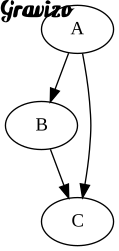
<img src='http://g.gravizo.com/svg?digraph G { A -> B -> C; A -> C; }'>
~~~~~~~~~~~~~~~~~~~~~~~~~~~~~~~~~~~~
<img src='http://g.gravizo.com/svg?digraph G { A -> B -> C; A -> C; }'>
~~~~~~~~~~~~~~~~~~~~~~~~~~~~~~~~~~~~
~~~~~~~~~~~~~~~~~~~~~~~~~~~~~~~~~~~~

Markdeep also allows captions on Gravizo graphs and newlines within
the URL itself:
![Figure [graph]: A more complex graph example](http://g.gravizo.com/svg?
digraph G {
main -> parse -> execute;
main -> init;
main -> cleanup;
execute -> make_string;
execute -> printf
init -> make_string;
main -> printf;
execute -> compare;
})
Including/Inserting Other Documents
===================================================
Markdeep currently contains experimental (i.e., beta, may-not-be-supported-in-the-future)
support for including one document within another. This is convenient for bibliographies,
boilerplate footers and headers, and styling. The syntax is:
<center>`(insert otherdocument.md.html here)`</center>
The inserted document must be a standalone Markdeep document, including the Markdeep line. It
can have any file extension, although `.html` is recommended and there **must** be a period
in the filename to disambiguate it versus arbitrary TODO-style notes.
The included document will be inserted inline, meaning that footnotes, figure numbering, and
other kinds of references will flow correctly. Recursive inclusion is allowed. All paths in an
included document are relative to the original document. That's undesirable, and a future
release may be able to make those paths absolute.
Here is an example of embedding `example.md.html` into `features.md.html`:
(insert example.md.html here)
Differences from Other Markdown
===================================================
Features
---------------------------------------------------
There are many, inconsistent markdown variants. Markdeep intentionally differs from a few of
them in specific ways:
- Code blocks require fences; no indent-only code blocks. I think that allowing indentation to
indicate code blocks was a poor choice in the original markdown specification because code
vs. blockquote is ambiguous in plain text and it makes list detection harder.
- Two trailing whitespace characters do not force a hard newline. Use `<br>` or regular
paragraph breaks if you need a hard newline. The original markdown specification on this
point violates its golden rule that the input look as much as possible like the output,
and that rule also ends up requiring special code editors/syntax highlighting to see
invisible characters, which is bad design.
- No bold/italic/strikethrough inside of words without spaces because they could form an
equation or technical term. Just use HTML tags.
- Setext headers require at least three minus or equals characters to distinguish from
multiline equations
- Whitespace required between `#` and the section name for ATX headers (disambiguates "#1" from
a header; required by CommonMark)
- Markdeep's table reference syntax differs from MultiMarkdown's in order to provide a
consistent formatting syntax across sections, figures, and tables...and one for which the
source text is more readable.
- Blockquotes must be two lines long (use explicit HTML if you really need a single-line
blockquote) or contain quotation marks to disambiguate them from lines where a greater-than
sign just wrapped around.
- Escaped characters such as `\*` and `\_` are not needed, since Markdeep heuristics for
determining when those characters are part of text and not formatting.
Temporary Limitations
---------------------------------------------------
Future releases likely will address these known bugs, limitations, and
"missing features":
- Tables and diagrams in lists create a new list
- Listings have a maximum caption length of three lines
Permanent Limitations
---------------------------------------------------
Due to the special protection from formatting that Markdeep affords `<pre>` and `<code>` tags
that appear in the document, you cannot nest a code tag inside of another code tag, and
likewise for pre tags. Fortunately, it is pretty hard to imagine a case where you would want
nested code tags.